
NVR Meaning: The Ultimate Guide
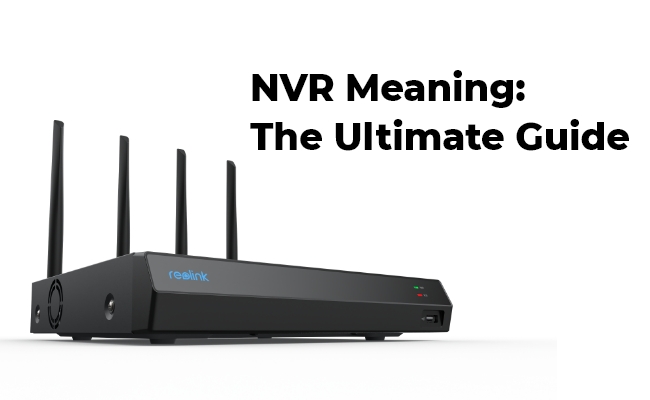
NVR is an acronym that has different meanings across various contexts. At its core, NVR meaning is Network Video Recorder – a device that records video footage from IP cameras onto a storage medium. However, the term has expanded beyond the realm of physical devices and taken on broader meanings, especially on social media and texting.
In this article, we will explore the different facets of “NVR” - from its origins in video surveillance to how it's used in Internet slang.
What's the NVR Meaning?
NVR stands for Network Video Recorder. As the name indicates, it is a device that records video footage from IP-based surveillance cameras onto a storage drive. NVRs differ from analog DVRs in that they work over a network and record digital video.
The advent of IP cameras and wireless networks led to the development of NVRs. They offered greater flexibility, scalability, and remote accessibility over traditional CCTV systems. NVRs are a key component of modern video surveillance and CCTV camera networks.
What is NVR in CCTV?
In the context of CCTV and video surveillance, NVR meaning camera refers to the actual recording device that captures footage from IP-based security cameras. Unlike analog DVRs, NVRs don't have ports to connect cameras directly. Rather, the cameras connect to the NVR over a network, hence the term "Network Video Recorder".
NVR camera meaning refers to IP cameras that transmit digital video that can be recorded by an NVR. The NVR processes the footage from multiple network cameras and stores it on hard drives for monitoring and review. NVRs offer centralized management and more scalable storage than DVRs.
What Is NVR Meaning in Text?
With the rise of texting and messaging apps, NVR has taken on new meanings completely unrelated to surveillance tech. In digital communication, NVR meaning in text translates to "Never".
For example, NVR text meaning could be someone saying "NVR gonna give you up" - translating to "Never gonna give you up". The letters NVR are used as an abbreviated form of Never.
Another example is NVR meaning text could be someone replying "NVR mind" which means "Never mind". So in casual texting or chatting, NVR takes on the informal meaning of Never.
What Is NVR Meaning in Slang?
Expanding beyond just texting, NVR has evolved as Internet slang across various social media platforms and forums. On sites like Reddit, Twitter, or TikTok, people often use NVR meaning slang way to mean "Never".
For instance, NVR meaning Snapchat could be someone writing "NVR leave me" as shorthand for "Never leave me". The casual tone and brevity of social media have promoted these kinds of slang usage.
NVR System Meaning: Definition, Features, and Purpose
Now that we've covered the varied meanings of NVR, let's zoom back into its original technology context. In the realm of CCTV and security, what exactly is an NVR system? What key features and purposes does it serve?
What is NVR System?
An NVR system meaning refers to the complete setup enabling networked digital video recording. At its core is the NVR unit which records footage from multiple IP cameras onto a storage medium. The system also includes the cameras, cabling, and software for transmitting, managing, and accessing the video.
Together, the components of the NVR system enable digital video capture over IP networks, centralized monitoring, motion-based recording, and remote viewing.
Features of NVR Systems
Some key features that make NVR systems advantageous over analog DVR setups:
- Network-based - Cameras connect and transmit data over networks enabling flexibility in placing cameras anywhere there's network coverage.
- Scalability - NVR systems can easily scale up by adding more IP cameras without additional infrastructure. DVRs have limited ports.
- Higher resolution - NVRs support high def, 4K, and higher megapixel footage from the latest IP camera models.
- Remote access - NVR recordings can be accessed and monitored remotely via mobile apps for convenience.
- Centralized management - All cameras can be managed through a single interface rather than individual DVRs.
NVR Components and Functionality
The core components of an NVR system work together to enable smooth digital recording, storage, and management. Let's look closer at the key pieces and internal workings:
Components
These are the must-have elements of a complete NVR system:
- NVR Recorder - The central device that processes and stores footage from connected IP cameras. Has networking ports and runs NVR software.
- Cameras - IP-based security cameras that connect wirelessly or via Ethernet to transmit digital footage.
- Networking - Ethernet cabling, switches, and routers for connecting system components and providing network access.
- Storage - Hard disk drives that store video recordings from cameras based on capacity. Some NVRs have inbuilt storage.
- Monitoring - Screens like PC monitors or wall-mounted TVs that display live or recorded surveillance footage.
- Software - NVR software for configuring cameras, scheduling recordings, and adjusting settings and parameters.
How does NVR Work?
The typical work process of an NVR system consists of:
- IP cameras capture video and send digital data packets over the network to the NVR.
- The NVR receives packets, extracts video information, and assembles footage from the camera feeds.
- Video is compressed, encoded, and stored on the NVR's storage drives on a rolling basis.
- NVR software enables configuring recording schedules, motion detection, camera settings, etc.
- Stored footage can be searched and monitored locally on the NVR or remotely via software apps.
- Most NVRs have PoE ports to transmit power and data over a single Ethernet cable to cameras.
So in essence, NVRs act as central hubs receiving, processing, storing, and managing camera feeds for intelligent surveillance recording and control.
Best NVR Camera Recommendation: Reolink Duo 3 PoE
When shopping for an NVR system, choosing the right cameras is key to building an effective setup. The Reolink Duo 3 PoE stands out as a top-rated outdoor security camera that seamlessly works with Reolink NVRs. This durable and robust IP67 camera is made of solid materials that can withstand different outdoor conditions. The seamless integration of two lenses into one body gives it a distinctive modern look.

Groundbreaking 16MP Dual-Lens PoE Camera
16MP UHD, Dual-Lens, Motion Track, 180° Wide Viewing Angle, Power over Ethernet, Color Night Vision.
Based on the specs, the Duo 3 PoE delivers 16MP resolution, offering a 180-degree ultra-wide view in a single image. It supports motion-triggered, scheduled, and continuous 24/7 recording. Plus, its two-way audio and built-in sirens elevate its surveillance capabilities. With robust weatherproofing, intelligent detection, crystal clear 16MP video, and PoE compliance, the Reolink Duo 3 is an excellent choice to pair with an NVR for comprehensive monitoring coverage.
FAQs
What is NVR used for?
An NVR is used to record and store video from IP security cameras. It manages the footage, provides playback, and lets you view live or recorded video on a monitor or app.
What is better, NVR or DVR?
An NVR is generally better if you want higher video quality, easier installation, and more advanced features, because it works with modern IP cameras. A DVR is better only if you have a tight budget or already use analog cameras.
What is the disadvantage of NVR?
The main disadvantages of an NVR are its higher cost, its reliance on a stable network, and the fact that it only works with IP cameras. If the network is slow or unstable, video quality or recording performance may be affected.
Conclusion
NVR is a versatile tech acronym that has evolved beyond its original meaning in surveillance recording. With roots as a Network Video Recorder, NVR refers to the digital devices used to record IP camera footage. The term also has informal meanings like "Never" in texting and social media speak.
When shopping for NVR surveillance solutions, go for cameras with robust night vision, weatherproofing, and PoE like the Reolink Duo 3. Do you understand the NVR meaning right now? Share your thoughts with us in the comment section below! We'd love to hear from you!
Search
Subscribe for the Latest Updates
Security insights & offers right into your inbox