
Reolink Elite Floodlight WiFi Review (2026): Is It Worth Buying?
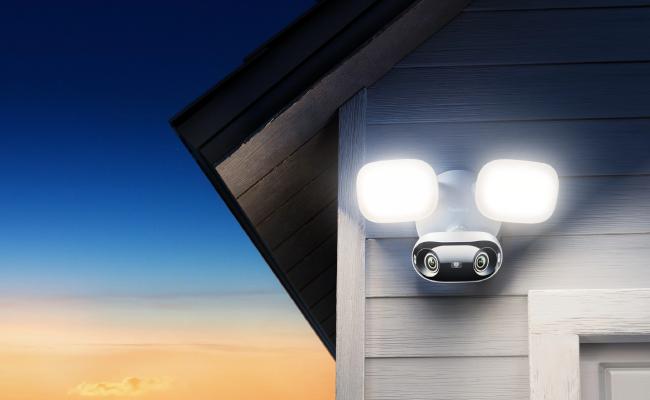
Reolink Elite Floodlight WiFi is a 4K security camera that has been designed to appeal to individuals seeking a wide coverage, bright light, and no monthly charges. This review covers each component of the camera to enable you to make decisions on whether it suits your business or home.
Reolink Elite Floodlight WiFi: Specifications
The camera captures in 4K using a 180-degree lens comprising two stitched pictures. The LED panel has 3000 lumens and allows you to choose 3000K warm light or 6000K cool light.
The LEDs are on and off, respectively, with up to 30 meters of black-and-white or color range of night vision. It has a built-in microphone and speaker, which facilitates two-way talking and a 105dB siren.
The unit stores video on up to 512GB on a microSD card or Reolink NVR. Wi-Fi 6 is available in dual-band 2.4 GHz and 5 GHz, supporting WPA3.
The housing has a rating of IP66 and has a working temperature of -10 °C to 55 °C. Power is supplied via a 100-240 V hardwired connection.
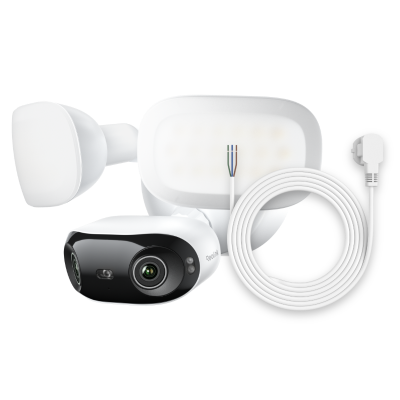
4K 180° Ultra-Wide Wired Floodlight Security Camera
3000-Lumen Dimmable Lighting, Adjustable Color Temperature, Local AI Video Search, Local Storage, Dual-Band Wi-Fi 6.
Installation and Setup
A majority of purchasers will install the camera outside a wall where they already have an old floodlight or junction box. The process box to first live view is illustrated in the following steps.
-
Switch off the breaker supplying the current in the existing junction box or outdoor light.
-
Take out the old connector and ensure that wires are long enough; extend 18 AWG outdoor-grade cable in case they are short.
-
Insert the two screws that are provided into the junction box to attach the metal mounting plate, ensuring that the foam gasket is placed flat.
-
Plug the line, the neutral, and the ground into the colored pigtails of the camera; screw the wire nuts together and wrap with electrical tape.
-
Insert the wires into the box and attach the camera body to the mounting plate; tighten up the two thumb screws.
-
Point the camera head and the light panel; the camera is tilted 90 degrees, and the light panel is tilted 45 degrees.
-
Switch the breaker back; wait 40 seconds until you hear the voice that tells you you are waiting to be connected.
-
Install the Reolink App, then tap the Add Device, then select Bluetooth Setup, and the camera connects within 15 seconds.
-
Select the name of the home Wi-Fi, key in the password, and wait for the sound of a successful connection.
-
Install an update to the firmware when a button in the app indicates this; add a MicroSD card when you do not want an NVR and want to record locally.
Key Features and Performance
When the camera picks up, it turns on the light and begins to capture the moment when it detects movement. The following sections discuss the functionality of each of the major features in a day-to-day setting.
Image quality
The 4K sensor maintains finer details like faces and license plates with the sensor. The 180-degree perspective is given an undulating nature at the edges of straight lines, and the remaining 70 percent remains natural. Digital zoom remains clear on a phone screen.
Brightness
The lumens of the LED panel reach 3000, and this is adequate to illuminate a two-car driveway. The brightness of the app is controllable between 10-100 percent; warm 3000K is yellow like an old halogen bulb, and cool 6000K is white-blue like daylight. To save on energy, the light switches off 10 seconds after stopping the movement.
Recording modes
You may choose continuous, scheduled, or motion-only recording. Motion clips take between 8 seconds to 5 minutes and have a one-second pre-roll in order not to miss the trigger. Every clip has a tag assigned to it by the camera: person, vehicle, or animal. Clips can be downloaded to the phone or stored up to an NVR.
Night vision
The camera becomes black and white when the LEDS are off and infrared lamps are employed. Face visibility is increased as much as 15 meters, and shapes are visible up to 30 meters. The use of the light to auto will ensure that the LEDs are on when a person has been detected, and this will aid in ensuring that the color video is not wasted by the power.
Local storage
A microSD slot hides behind a rubber cover on the bottom. Cards up to 512 GB work; a 128 GB card holds about 16 days of 4K motion-only video. The camera also pairs with any Reolink NVR for longer storage. There is no cloud plan and no monthly fee.
Elite Floodlight WiFi and Reolink App
The same app that runs other Reolink cameras also runs this floodlight camera. After you tap the device tile, five icons appear at the bottom: Live, Playback, Album, Message, and Settings. The next sections cover the tools most people use every day.
Live view and playback
It takes two seconds to launch a live stream on a home Wi-Fi 6 router and about four seconds in 4G. It has pinch-to-zoom, taps to focus, and dragging the timeline to replay what happened to you during the past 24 hours, without switching to the live screen. A Clip button records the previous 30 seconds onto the phone. With an NVR, you can go to any date and time in a calendar.
Push notification
The app sends a banner and a thumbnail within three seconds of motion. You can set quiet hours so the phone does not buzz at night. Each alert shows the tag: person, vehicle, or animal. Tapping the alert opens the live view and starts recording on the phone.
Smart detection
AI detection cuts false alerts from swaying trees by roughly 80 percent compared with standard pixel motion. You can draw three zones and set different sensitivities for each. Line-crossing mode triggers only when a person walks in one direction, useful for sidewalks next to busy streets.
Other AI features
Local AI Video Search is still in beta. You type “red truck” or “man in black shirt” and the app lists clips that match the color or object. The search works on the last seven days of video and needs 30 seconds to finish. Voice control through Google Assistant shows the camera on a Nest Hub if you link the Reolink account in the Google Home app.
Pros and Cons
The sections below list what the camera does well and where it falls short after two weeks of daily testing.
Pros:
- 4K 180-degree view covers a wide yard with one unit
- A 3000-lumen LED panel replaces an old floodlight and saves space
- No monthly fees; video stays on the card or NVR
- Wi-Fi 6 keeps a steady 4K stream on busy networks
- AI tags and search cut the time spent looking for events
- IP66 shell and hardwired power run 24/7 without battery swaps
- Bluetooth setup avoids typing passwords on a tiny screen
Cons:
- No battery backup; power loss stops recording
- No Apple HomeKit support at launch
Verdict: Should You Buy Reolink Elite Floodlight WiFi?
The Reolink Elite Floodlight WiFi gives you a bright light, a sharp 4K picture, and free local storage in one hardwired unit. It fits best on a garage or driveway where you already have a floodlight box and want wide coverage without buying two cameras. The LED panel is strong enough to replace an old 250 W halogen, and the Wi-Fi 6 radio keeps video smooth on crowded networks.
If you refuse to pay cloud fees and you like the idea of typing “red van” to find a clip, this model is a clear winner. Skip it only if you need battery backup, Apple HomeKit, or a narrow view that keeps faces straight at the edges. For most homes and small shops, the Elite Floodlight WiFi is worth the price in 2026.
Search
Subscribe for the Latest Updates
Security insights & offers right into your inbox