
Reolink Duo 3 WiFi Review: Best Choice for Wider Coverage
Key Specifications
Pros
- 16MP resolution (7680×2160) delivers noticeably more detail than a standard 4K camera, especially at a distance
- 180-degree field of view from a single mounting point, replacing what would otherwise take two separate cameras
- No Ethernet run needed after initial setup: just a nearby power outlet and dual-band Wi-Fi 6
- Person, vehicle, and animal detection plus Perimeter Protection (line crossing, zone intrusion, zone loitering) run locally with no monthly subscription
- Auto-switching between black-and-white and color night vision
Cons
- Plug-in power only: works best where an outdoor outlet is already within reach of the mounting point; if not, the battery/solar Argus 4 Pro covers similar ground without one
- The 32:9 ultrawide image is easiest to review on a computer monitor or in full-screen mode on the app, since the default in-app view compresses the frame and makes detail harder to pick out
- Might not be suitable for discreet monitoring purposes due to its design
Best for:
- Homeowners or small property owners who want one camera to cover a wide outdoor area, like a full driveway or side yard
- Anyone that has a power outlet within reach of where they want to mount it
What is the Reolink Duo 3 WiFi

Inspired by the same innovative design of the Reolink Duo 3 PoE, The Duo 3 WiFi is a 16MP dual-Lens outdoor wi-fi security camera. The camera is designed to solve the problem of covering a wide outdoor area without needing to run an Ethernet cable to the mounting point.
Reolink first brought 16MP resolution to its lineup with the Duo 3 PoE, pairing two 4K lenses into a single 180-degree ultra-wide image with greater detail than a standard 2K or 4K camera.
The PoE version's one drawback was the wiring itself. Though it's useful for a stable connection, it can be a real barrier for anyone mounting a camera somewhere without existing network cable. The Duo 3 WiFi, introduced at CES 2025, solves that specific problem while keeping the same sensor and resolution.
Did You Know: The Duo series' dual-lens design, which the Duo 3 WiFi carries forward, has already been recognized industry-wide, winning Gold in Product Design at the 2023 MUSE Design Awards and earning recognition at the 2023 IDA Design Awards.
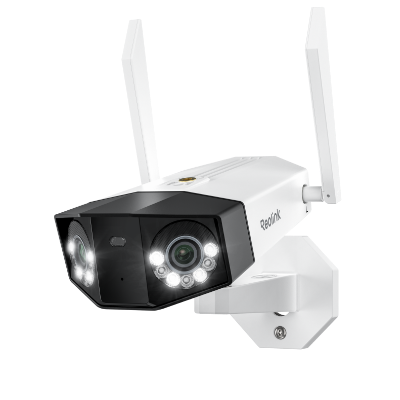
Groundbreaking 16MP Dual-Lens WiFi Camera
16MP UHD, Dual-Lens, Motion Track, 180° Wide Viewing Angle, Plug-In WiFi, Color Night Vision.
What's in the Box?
The entire Reolink Duo 3 WiFi includes a package of the following items:
- Duo 3 Wi-Fi Camera
- Power Adapter
- 1m Ethernet Cable
- Power Extension Cable
- Mounting Plate & Mounting Hole Template
- Operational Instructions
- Surveillance Sign & Pack of Screws
Reolink considers all the potential scenarios in which you might use the camera, and the included accessories reflect that. For instance, if you plan to place the camera far from a power source, the power extension cable will be handy. Similarly, the Ethernet cable is essential if your WiFi connection is unstable.
How Do You Install and Set Up the Duo 3 WiFi?
Installing the new Duo 3 WiFi is straightforward, especially if you have experience with Reolink WiFi cameras. Even if you're new to this, simply follow the operational instructions, and the entire process will be quick and easy. Here's how to install and set up the device:
It's recommended to complete the initial setup before installing the camera. The initial network configuration requires an Ethernet cable.
- Connect the camera to your router using the Ethernet cable and power it on with the adapter.
- Add the camera to the Reolink app.
- If your phone and the camera are connected to the same network, enable the "Add Devices Automatically" option, and the camera will appear directly on the app's interface.
Since it covers a 180-degree field of view, consider placing it facing your driveway or another key entry point. The mounting template included in the product box is very useful and helps you position it quickly.
Key Features of Reolink Duo 3 WiFi
16MP Video Resolution: Is it Really Sharper Than 4K?

The Reolink Duo 3 WiFi's 16MP sensor captures a combined 7680×2160 pixels across both lenses, roughly double the pixel count of a standard 4K camera. That extra resolution matters most at range. With more pixels to work with in the first place, the Duo 3 WiFi can retain more usable detail on a license plate or a face at distances where a lower-resolution camera has already lost it.

Independent testing backs this up: a 3rd party reviewer called the footage "superbly crisp and detailed", crediting the dual 4K sensor pairing and F1.6 aperture for the added clarity. Watch a sample of the footage below:
Reolink Duo 3 WiFi sample footage
180° Field of View: How Useful is it in Reality?

The Duo 3 WiFi uses two 4K lenses to stitch what it captures into one 180-degree image. This is more than enough to cover the range of what would otherwise take two separate single-lens cameras. When positioned facing a driveway or yard, it can capture the full width of the property and the complete path of any vehicle passing through, with no dead zone in the middle where the two lenses meet.

How-To Geek's hands-on testing found the same thing, calling the coverage "terrific" and noting the stitched image held up cleanly across both day and night shots.
Dual-Band WiFi 6 Connection: Is it Reliable?

Unlike the Duo 3 PoE, the Duo 3 WiFi only needs a power outlet while everything else runs over Wi-Fi 6. Reolink's Wi-Fi 6 implementation uses 1024-QAM and OFDMA, which moves roughly 25% more data than Wi-Fi 5 and holds up better when other smart home devices share the same network. This matters most in homes where the router sits a room or two away from the camera.
Black-and-White vs. Color Night Vision: Is it Necessary?

The Duo 3 WiFi switches between infrared black-and-white and color night vision (powered by 8 built-in spotlights), with an auto-switch option between the two. Infrared reaches up to 30 meters (100ft), enough to light the full length of a typical driveway and the sidewalk beyond it. Infrared is the more battery-and-bandwidth-friendly default for most outdoor setups, with spotlights better reserved for motion-triggered events rather than staying on continuously.
Motion Track: What does it do?

Beyond standard human, vehicle, and animal detection, Motion Track compiles a subject's movement over roughly 15 seconds into a single image. This is useful for seeing a car's full path up the driveway without scrubbing through video. It's easy to find once you know where it lives in the app and there's a few of the more advanced settings take some hunting the first time.
Two-Way Audio: Is it Supported?
The Duo 3 WiFi has a built-in microphone and speaker so a live, two-way conversation with whoever's on camera runs directly through the Reolink app. No separate smart speaker or intercom needed. That covers the situations a security camera actually gets used for day to day. This could be giving a delivery courier instructions on where to leave a package or telling someone to step away from a parked car.
Perimeter Protection: How does it Work?

Reolink's Perimeter Protection covers three distinct yet configurable alert types, layered on top of standard motion detection:
- Line Crossing Alert: triggers when a person, vehicle, or animal crosses a line drawn across the camera's field of view, in a chosen direction, useful for flagging anything that crosses onto the property rather than passing by on the street
- Zone Intrusion Alert: triggers as soon as a subject enters a defined zone in the frame, suited to a smaller area like a doorstep or gate
- Zone Loitering Alert: triggers only if a subject enters a zone and stays there past a set time threshold, which cuts down on alerts for someone briefly cutting through versus someone lingering
All three run locally on the camera and can be set up and adjusted from the Reolink app. The best thing is it's subscription-free!
Pro Tip: Because Perimeter Protection zones run locally, you can place a Line Crossing alert at your driveway entrance. This helps filter out alerts from pedestrians on the sidewalk and focuses notifications on people or vehicles entering your property.
Reolink Duo 3 WiFi vs. Duo 2 WiFi and Duo 3 PoE: How It Compares
Reolink Duo 3 WiFi vs. Duo 2 WiFi
Against its predecessor, the jump is mostly about resolution and low-light detail. The Duo 3 WiFi's 16MP sensor is roughly double the pixel count of the Duo 2 WiFi, paired with a larger F1.6 aperture for better night performance.
Reolink Duo 2 WiFi vs Duo 3 WiFi: What's New
For the full breakdown of what changed between the two generations, see Reolink's dedicated Duo 2 WiFi vs. Duo 3 WiFi comparison.
Reolink Duo 3 WiFi vs. Duo 3 PoE
Against its wired sibling, the choice comes down to wiring versus convenience. The Duo 3 PoE uses the same 16MP sensor over a single Ethernet cable for both power and data, while the WiFi version trades that guaranteed wired link for plug-in-anywhere-there's-an-outlet convenience.
See the full Duo 3 WiFi vs. Duo 3 PoE comparison for the complete spec-by-spec breakdown.
Buyer Decision Table
The right camera depends on your installation setup and recording needs. Here's a quick reference to help decide.
Final Verdict: Is the Reolink Duo 3 WiFi Worth It?
The Reolink Duo 3 WiFi earns its place as the easiest way to get 16MP, 180-degree coverage without wiring a camera location for Ethernet. Dual-band Wi-Fi 6 keeps the connection stable enough that the PoE version's main advantage, a guaranteed wired link, stops being a dealbreaker for most driveway and yard installs. The 32:9 image takes a moment to get used to on a phone screen, but that's the tradeoff for replacing two single-lens cameras with one. Check current pricing and availability on the Duo 3 WiFi product page.
Search
Subscribe for the Latest Updates
Security insights & offers right into your inbox