
Are PoE Video Doorbells Worth It: Homeowner's Guide
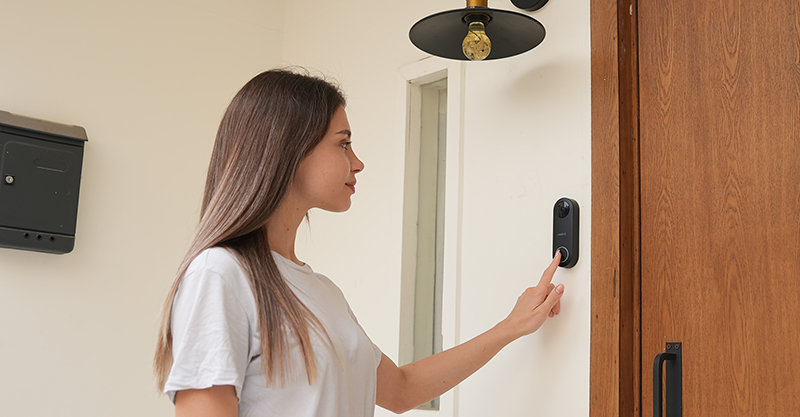
"Are there any PoE video doorbells?" It's a common question, and the honest answer is: fewer than you'd think. But if a wired, always-on connection matters more to you than flexible placement, here's everything worth knowing before you buy one.
- What is a PoE Video Doorbell?
- Advantages of PoE Video Doorbells
- Challenges of PoE Video Doorbells
- PoE vs. WiFi vs. 4G vs. Battery Doorbell Cameras: How They Compare
- Key Features to Look For in a PoE Video Doorbell
- Smart Home Integration & Subscriptions
- Is a PoE Video Doorbell Actually Right for You?
- Best PoE Video Doorbell Recommendations
- How to Install a PoE Video Doorbell (Including Reolink's)
- Alternative to PoE Video Doorbells
- FAQs
- Conclusion
What is a PoE Video Doorbell?

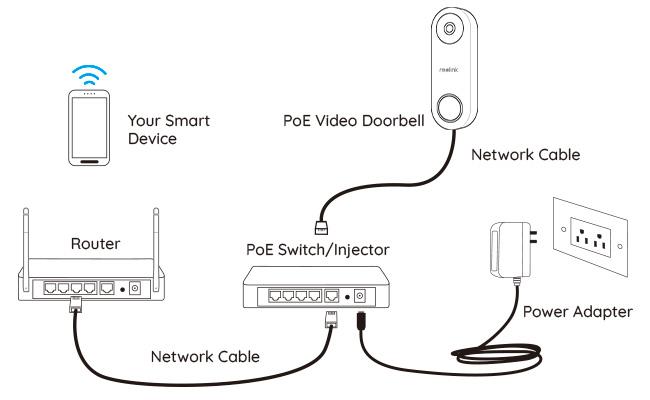
A PoE (Power over Ethernet) video doorbell is a smart security device that combines the functions of a video surveillance camera, intercom, and doorbell into a single unit. Unlike traditional wireless or battery-powered doorbells, it receives both electrical power and data connectivity through a single Ethernet (Cat5e/Cat6) cable connected to a PoE-enabled network switch or PoE injector.
Advantages of PoE Video Doorbells
There is a demand for PoE video doorbells because they solve the two biggest complaints about other doorbell types, which are namely shaky Wi-Fi and dead batteries.
Here are the four advantages that follow from one Ethernet cable doing both jobs.
1. PoE video doorbells enable plug and play
A PoE doorbell needs exactly one cable, and running it handles both power and network connection in a single step. That's the appeal for apartments or commercial properties with no existing doorbell wiring. There’s no separate electrical line to install, and long-term maintenance is simpler because there is only one connection to troubleshoot instead of two.
2. PoE video doorbells transmit data faster
PoE doorbells can work without WiFi and push data over a cable instead of airwaves, which is what keeps the connection steady even when your Wi-Fi is congested.
A Cat5e cable run delivers the full 1 Gbps Ethernet standard over the maximum 100-meter PoE distance. Cat6 supports even higher speeds, reaching up to 10 Gbps on shorter runs and maintaining about 1 Gbps at its full 328-foot length (CDW).
In practice, a doorbell only needs a small fraction of that bandwidth, so the real benefit isn't raw speed, it's that the connection doesn't drop the way Wi-Fi can when a microwave or a neighbor's router interferes. Most PoE doorbell cameras run on the IEEE 802.3at or 802.3af standard (NETGEAR), so any compatible PoE switch, injector, or NVR will power them without extra equipment.
Pro Tip: Cat6 doorbell cables are usually favorable. You can learn more about different types of PoE cables and how to improve PoE performance.
3. Wired PoE video doorbells support stable network connection
With an Ethernet cable plugged in, a wired PoE doorbell camera isn't susceptible to interference or jamming from wireless signals, and walls or other obstacles won't affect it either. A stable wired connection enables strong video and audio signals for consistently high-quality live view and two-way communication.
4. PoE video doorbells enjoy a constant power supply
Battery doorbells eventually go dark often at the worst possible moment, whether during a delivery or in the middle of a package theft. A PoE doorbell skips that risk because power comes continuously through the same cable as the data. There's nothing to recharge or swap out. That constant supply is also what makes true 24/7 continuous recording possible, instead of the motion-triggered clips most battery models rely on to save power.
The PoE doorbell is somewhat a pro product. Arranging Ethernet cables and PoE devices can feel like a bigger project than plugging in a battery doorbell, and the costs can be a real factor too.
Challenges of PoE Video Doorbells
1. PoE video doorbells may require professional cabling work
You won't need traditional doorbell wires, but you'll still need to arrange the PoE cable for your Ethernet doorbell camera. If you're not an experienced DIYer, hiring a technician is worth it.
When installing a doorbell outdoors, the Ethernet cable needs protection from both the weather and potential tampering. Because a cut cable can disable the doorbell entirely, routing it through a wall cavity or conduit is a smarter long-term solution than leaving it exposed on an exterior surface.
2. There is a distance limit for PoE video doorbells
The PoE cable runs from a PoE port on your NVR, router, or PoE injector/switch to the door, and there's a real ceiling on that distance.
The IEEE standard caps it at 100 meters (328 feet), though in practice a long run can under-deliver before it hits that number. Voltage drop means a doorbell drawing close to the standard's power limit may only get a reliable 50 to 60 meters in the real world before performance gets shaky To understand this in greater detail, check out (Reolink's guide on PoE distance limit).
For most single-family homes, that's still more than enough to reach the front door from a garage or basement equipment closet. It becomes a real constraint mainly for larger properties, long driveways, or detached structures.
3. Video doorbells with PoE may challenge your wallet
Among the limited choices of PoE video doorbells, most products sit at a premium compared to WiFi or battery options. Reolink's own PoE doorbell is a clear exception in price (more on that below), so it's worth comparing options individually rather than assuming PoE always costs more.
Setting up a PoE environment will cost more if you haven't got that in your house already. PoE doorbells are usually paired with PoE devices such as an NVR, PoE injector/switch, or a router with PoE ports, but PoE is fairly rare in consumer-grade routers.
PoE vs. WiFi vs. 4G vs. Battery Doorbell Cameras: How They Compare
Since choices of PoE doorbell cameras are much fewer than WiFi or 4G doorbell cameras (battery-powered or DC/AC-powered), it's worth knowing exactly how they differ before ruling any option out.
To help bring clarity to which type actually fits your home, here's a side-by-side comparison of PoE doorbells against WiFi, 4G, and battery-powered alternatives.
Key Features to Look For in a PoE Video Doorbell
Once you know PoE fits your setup, five specs decide whether a specific doorbell is actually good: resolution, field of view, audio quality, motion detection type, and weatherproofing rating.
Video resolution
1080p covers the essentials. You'll see a face at your door, but license plates and small text on packages get blurry. 2K, which most current PoE doorbells use, resolves faces and text clearly enough to matter if there's ever a dispute about a delivery. If your porch gets direct afternoon sun, wide dynamic range matters more than raw megapixels since backlighting is what actually ruins doorbell footage.
Field of view
A narrow field of view misses anyone standing to the side of the door, a common blind spot for package theft. Look for at least 160° horizontal coverage. Some current PoE doorbells offer up to 180°, which is enough to cover a porch corner to corner.
Two-way audio
This is what lets you tell a delivery driver where to leave a package without opening the door. Check specifically for echo cancellation and noise suppression. Cheaper microphone and speaker pairs often cut out or produce feedback as soon as there is wind or traffic noise nearby.
Motion detection and AI alerts
Basic PIR (passive infrared) detection can't tell a person from a passing car or a blowing tree branch, so it floods your phone with notifications until you turn it off. AI-based person and package detection filters most of that noise out.
Weatherproofing rating
Every PoE doorbell sits outside, so an IP65 rating (splash and rain resistant) is the practical minimum. IP66 holds up to direct hosing and is worth the small premium if your entryway is exposed to wind-driven rain.
Smart Home Integration & Subscriptions
A PoE smart doorbell is a genuine plus for a smart home setup, but unexpected costs aren't. Here's what to check on smart home integration and subscriptions before you commit to one.
Smart Home Integration
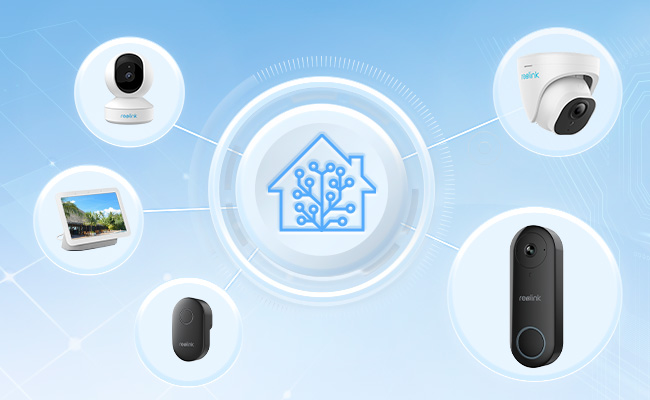
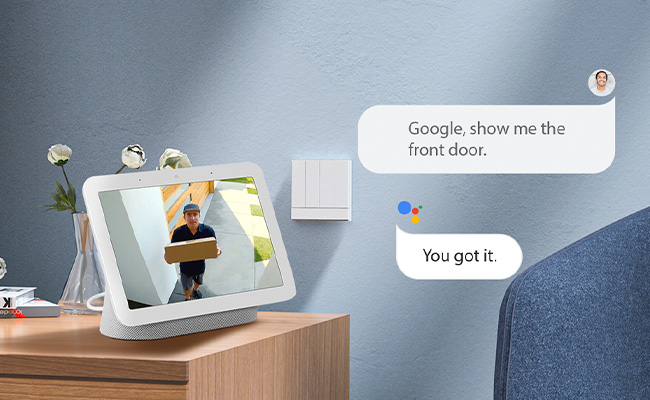
PoE doorbell cameras can work with Alexa, Google Assistant, and Apple HomeKit, though not every model supports all three, and some virtual assistant functions are limited to certain devices.Check the exact PoE video doorbell's compatibility with the assistant or smart home system you already use before buying, rather than assuming broad support.
Subscription
Before settling on a PoE video doorbell, check whether any subscription is required to make it actually work. Features like person detection or extended video history often require a paid plan on other doorbells, meaning recurring monthly fees stacked on top of the hardware cost.
That's worth confirming before you buy, since it changes what a doorbell actually costs you over a year or two, not just on day one.
Important Note: Reolink's PoE doorbell works differently. Person detection and local storage both work without a recurring fee.
Is a PoE Video Doorbell Actually Right for You?
A PoE doorbell is the right call if you already have (or are installing) PoE infrastructure and want zero subscription fees with 24/7 recording. If your home has no Ethernet run to the front door and no PoE gear anywhere else, a battery or WiFi doorbell will get you set up in an afternoon instead of a weekend.
A PoE video doorbell is a good fit if:
-
You already run a PoE NVR or PoE switch for other cameras. Adding the doorbell to the same setup costs nothing extra in new hardware.
-
You want continuous 24/7 recording instead of motion-triggered clips only, and you'd rather pay once for local storage than a recurring cloud fee.
-
Your front door already has a spare Ethernet drop, or you're comfortable running one (or paying an electrician a few hundred dollars to do it).
A battery or WiFi doorbell is the better call if:
-
You're renting, or you don't want to drill into siding or brick to run a cable.
-
Your router sits within strong Wi-Fi range of the front door and motion-triggered recording is enough for you.
-
You want the doorbell running the same day you unbox it, with no cabling step at all.
The trade-off between a PoE doorbell camera versus a battery or WiFi doorbell camera becomes clearer when you consider your existing setup. If you already have PoE cameras connected to an NVR, adding a PoE doorbell typically requires little more than plugging it into the same system. There's no extra subscription, no additional app to manage, and recordings can follow the same 24/7 retention policy as your other cameras. For someone without any PoE infrastructure, however, running Ethernet solely for a doorbell is often difficult to justify.
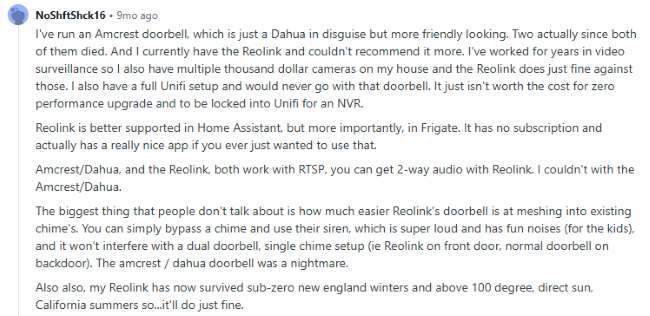
This tracks with what buyers report in community discussions too. In a 2026 Reddit home automation thread comparing PoE doorbell options, the Reolink PoE doorbell came up most often as the budget pick for exactly this setup: simple RTSP streaming, straightforward Home Assistant and Frigate integration, and no monthly fee, without needing to buy into a pricier ecosystem just for one doorbell.
Best PoE Video Doorbell Recommendations
Since Power-over-Ethernet video doorbells have real benefits, it's worth working through the challenges rather than ruling them out. Here's a best PoE doorbell camera with a strong feature set and a friendly price.
Reolink Video Doorbell PoE
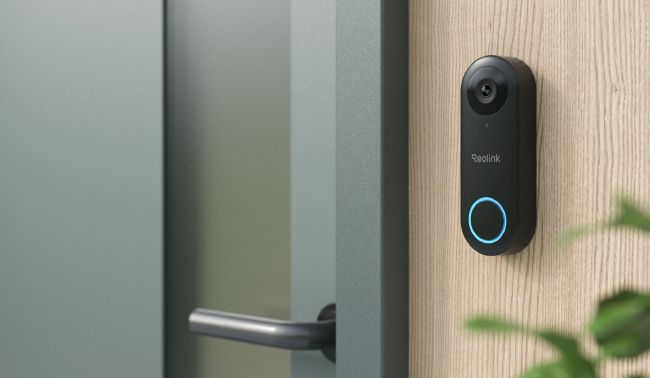
With advanced video quality, audio, and smart features, the Reolink Video Doorbell PoE covers the criteria laid out above well. Check out this video to see what it offers.
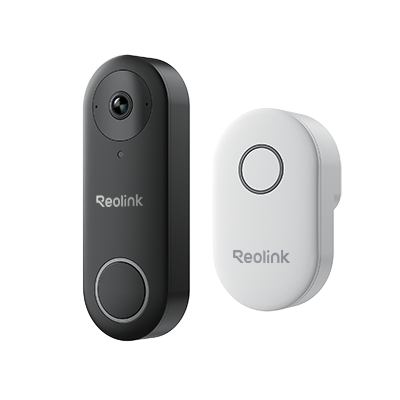
Best PoE video doorbell
- Two-way audio & preset voice messages
- 2K+ 5MP Super HD + 180 FOV (diagonal)
- Customizable person detection & alerts
- Works with smart home
The Reolink Video Doorbell PoE allows you to see your front door clearly in 2K+ Super HD video with a 180° field of view, and know what happened in the recording, including the 6 seconds before motion was detected. Simply plug the chime into any electrical socket to hear it ring from any room in the house, or preset voice messages for visitors if you're not able to answer.
Compatibility with your existing system won't be a problem. This Power-over-Ethernet doorbell supports Reolink NVRs, Google Assistant, Alexa, plus RTSP and ONVIF for third-party integrations.
In case you get confused, here's a video explaining what you'll want to know most about this doorbell, including how the 6-second pre-motion recording and preset voice messages work.
This Ethernet doorbell camera also removes the usual wiring worry. While it's built for plug-and-play PoE installation, you can also connect it to your pre-existing doorbell wires. Even with so many features, it's kind to your wallet too and it includes the chime. Check out the latest pricing on the Reolink Video Doorbell PoE product page.
Best PoE video doorbell
- Two-way audio & preset voice messages
- 2K+ 5MP Super HD + 180 FOV (diagonal)
- Customizable person detection & alerts
- Works with smart home
How to Install a PoE Video Doorbell (Including Reolink's)
Installing a PoE video doorbell usually requires running one Ethernet cable to the door, connecting it to a PoE switch, injector, or NVR, then finishing setup in an app. No separate electrical wiring needed. Budget an afternoon for a straightforward run, or bring in an electrician if the cable needs to go through finished walls.
Step 1: Choose your cable path. If your PoE gear sits within 328 feet (100 meters) of the door, the limit covered above, plan the shortest practical run, ideally through conduit or a wall cavity rather than stapled to an exterior surface.
Step 2: Connect to power. Plug the Ethernet cable into a PoE switch, PoE injector, or the camera port on a PoE NVR. The doorbell draws power and sends video over that same cable. Reolink's own walkthrough for initial PoE doorbell setup covers this step by step, including pairing it in the app.
Step 3: Decide on the chime. A PoE doorbell doesn't need your old mechanical chime to work, but you can keep it. Most PoE doorbells ship with their own plug-in chime and push alerts straight to your phone, so the old chime becomes a backup rather than a requirement. If you'd rather wire into your existing doorbell transformer and chime instead of using the included chime, Reolink's wiring guide covers both the jumper-bypass method and the direct-transformer method.
Step 4: Mount and pair. Mount the doorbell at chest-to-eye height, roughly 48 inches works for most front doors, then finish pairing it in the Reolink app. Budget extra time if you're drilling into brick or stone rather than siding or trim.
Pro tip: If you're not comfortable running Ethernet through an exterior wall yourself, this is the one part of a PoE doorbell installation worth hiring an electrician for. Installation costs vary by region and job complexity, so get a quote before assuming it's out of budget.
Alternative to PoE Video Doorbells
There's a workaround for those who already has a doorbell but still needs to boost security just outside the door. In this case, a PoE security camera can be an ideal alternative to a PoE video doorbell. Here's a PoE IP camera worth considering instead.
Reolink RLC-811A: the best budget alternative to a PoE doorbell intercom
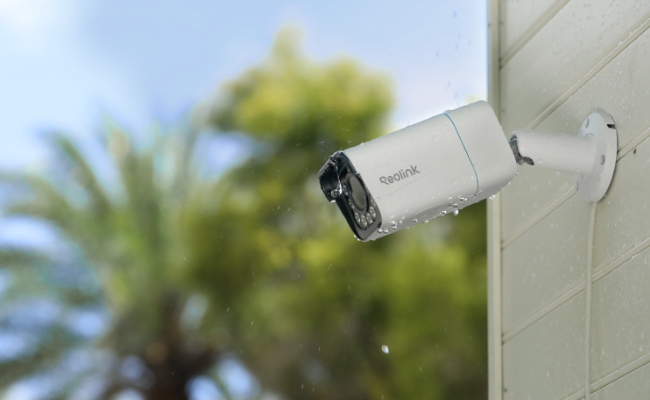
With built-in two-way audio, the RLC-811A lets you hear and speak to visitors, plus preset audio messages. 4K UHD video and color night vision help you see clearly at your front door.
It's also a solid smart home fit, working with the Reolink App and Client, Alexa, and Google Assistant. The camera runs [current price, pull from the reolink.com product page]. You get all of the above without any subscription fees.
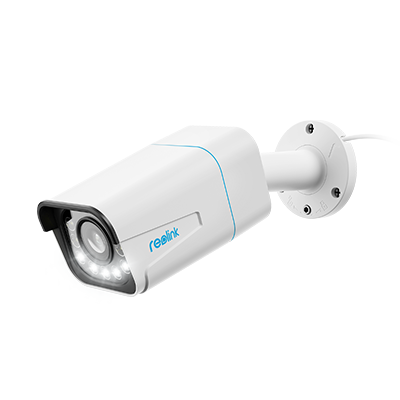
Alternative to PoE intercom doorbell camera
- Two-way audio and preset audio message
- 24/7 live view and continuous recording
- Person/vehicles/motion detection
- Instant alerts and pre-motion recording
- 8MP 4K and 5X optical zoom
- Color night vision
- Storage: Cloud + SD Card
- IP66 weatherproof
Here's a 4K motion video captured by RLC-811A.
If you want to know more about video doorbells, or you're looking for alternatives to battery-powered WiFi doorbells, check out this buyer's guide.
FAQs
Does the PoE video doorbell work with the existing NVR or security system?
If you're looking for a PoE video doorbell for an NVR, or upgrading your PoE camera system with a doorbell, it's usually easier to choose one from the same manufacturer as your NVR or security system. Some security systems only work with same-brand devices, so expanding with a PoE doorbell from that same brand is easier and more budget-saving.
Does the PoE video doorbell support RTSP/ONVIF?
If RTSP is supported, you can use a browser to view your PoE doorbell's feed in real time and stream your IP camera to YouTube or Facebook. If ONVIF is supported, third-party platforms can help automate and integrate the doorbell with other smart devices, for instance, connecting it to Home Assistant to check your front door from a smartwatch. Some features like smart alerts may not carry over to third-party platforms, though.
What's the difference between a WiFi doorbell and a PoE doorbell?
A WiFi doorbell connects wirelessly and usually runs on battery or your existing doorbell wiring, while a PoE doorbell gets both power and network connection through a single Ethernet cable. WiFi doorbells are quicker to install and more flexible about placement, PoE doorbells trade that flexibility for a more stable connection, 24/7 recording, and no battery to recharge. See the comparison table above for the full breakdown by cost, installation, and surveillance coverage.
Is the PoE video doorbell easy to install?
It can be a fun, economical DIY project, or a job worth handing to an expert if the cabling isn't straightforward for you. See the full installation walkthrough above for the exact steps and what it typically costs to hire out.
Conclusion
A PoE video doorbell earns its keep once you have, or are willing to run, the Ethernet infrastructure. The trade-off is a bit more setup work for a connection and power supply that doesn't fail the way Wi-Fi and batteries eventually do.
If a PoE doorbell fits your setup, the Reolink Video Doorbell PoE covers the core case well: 2K+ video, 24/7 recording, and no monthly fees. Still deciding between PoE and another power option? The comparison table and decision checklist above cover the main trade-offs side by side.
Have questions we haven't answered here? Drop them in the comments below, we do read them.
A PoE video doorbell is worth considering if you already have Ethernet cabling in place or don't mind running it. While installation takes a little more effort, you get a more reliable connection and constant power without worrying about Wi-Fi dropouts or battery charging.
If PoE suits your setup, the Reolink Video Doorbell PoE
is a solid choice. It offers 2K+ video, 24/7 recording, and no monthly fees, making it a practical option for homeowners who value reliability.
Still deciding between PoE and other power options? The comparison table and decision checklist above can help you weigh the key pros and cons. If you have any questions, leave them in the comments below. We'd be happy to help.
Search
Subscribe for the Latest Updates
Security insights & offers right into your inbox