
Reolink Argus 3 Ultra Reviews: In-depth Analysis
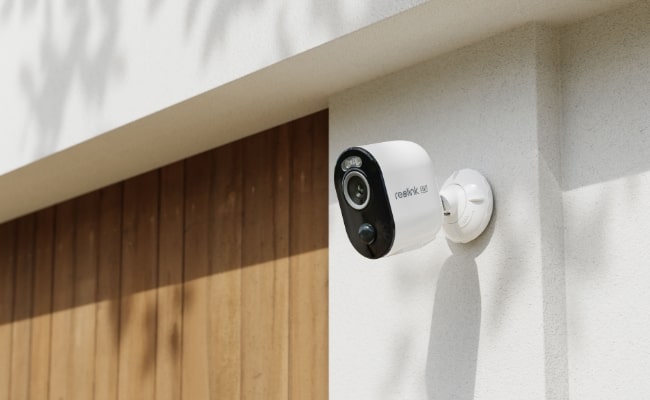
The Reolink Argus 3 Ultra is a 4K battery-powered security camera designed for flexible indoor and outdoor monitoring. It combines 4K 8MP resolution, color night vision, smart detection, and battery/solar power in a compact wire-free design.
In this Reolink Argus 3 Ultra review, we'll take a closer look at its key features, video and night vision performance, battery and solar options, pros and cons, and real-world use cases to see whether it's still a good choice for home security.
What is Reolink Argus 3 Ultra?
The Reolink Argus 3 Ultra follows the compact design of the Argus series, with a standalone body that can be mounted without running power or Ethernet cables. Its flexible mounting design makes it easy to position around entrances, garages, gardens, and other areas where a permanent wired setup may not be practical.
Inside the box, you'll find the Argus 3 Ultra camera, mounting accessories, charging cable, reset needle, surveillance sticker, and quick start guide. A compatible Reolink solar panel can also be added separately for longer-term outdoor installation.
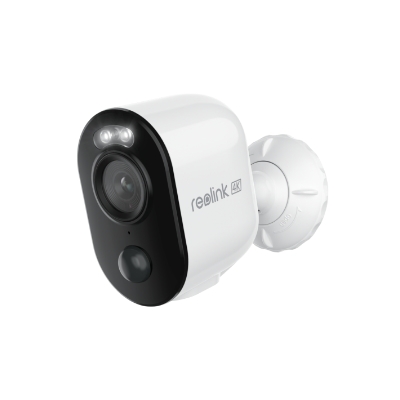
4K 8MP Standalone Wire-Free Camera
4K 8MP; Smart Detection; 5/2.4GHz Dual-Band WiFi; Battery/Solar Powered; Color Night Vision; Alerts Without Subscription.
Pros:
- 4K 8MP resolution captures detailed footage during everyday monitoring.
- Battery-powered, wire-free design allows more flexibility when choosing an installation location.
- Optional solar charging reduces the need to remove and manually recharge the camera.
- Person, vehicle, and animal detection provides more relevant motion alerts.
- Color and infrared night vision provide different options for monitoring after dark.
- Dual-band 2.4/5GHz Wi-Fi provides more connectivity flexibility than 2.4GHz-only battery cameras.
- Local microSD storage allows recording without requiring a mandatory subscription.
Cons:
- As a battery-powered camera, it is not designed for continuous 24/7 recording.
Best for:
- Entrances, garages, gardens, rental homes, and other areas where 4K detail and wire-free installation are priorities and running power cables is inconvenient.
Features and Specifications of Reolink Argus 3 Ultra
In this part, we will explore the Reolink Argus 3 Ultra, which presents a range of innovative features tailored to address diverse contemporary security requirements.
Video quality
The Reolink Argus 3 Ultra astounded us during testing with its remarkable 4K resolution, delivering some of the most stunning video quality in a security camera. Its 4K capability ensures unparalleled clarity, allowing for detailed and crisp footage both during the day and at night.
The camera's field of view stands at horizontal 105°, vertical 55°, and diagonal 125°, sufficient for monitoring an outdoor or indoor space. To maximize the surveillance effectiveness, you need to place the camera strategically to optimize viewing angles.
Night vision capability
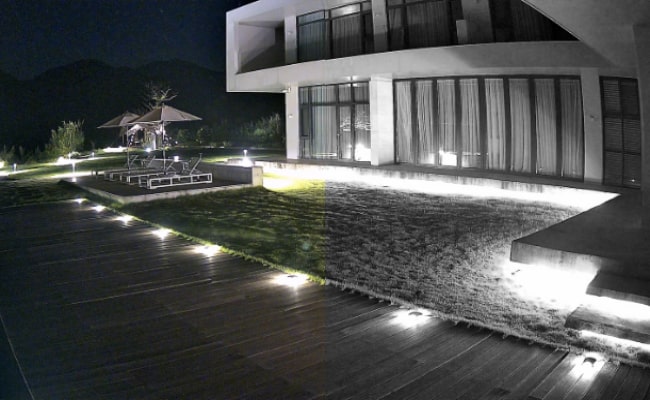
This 4K camera showcased consistent and distortion-free recordings in our assessments across various lighting conditions. The built-in infrared lights and spotlights can be used for different night vision modes in different circumstances. For example, if you prefer the black-and-white night vision and do not want the strong spotlights to disturb others, you can only turn on the IR lights. However, if you want to experience colorful and vivid footage at night, the built-in spotlights can bring color to the footage in low-lit conditions.
Power source
Reolink promises a solid battery life for their camera under regular use (1-4 weeks per charge), even without a solar panel. "Normal use" involves frequent video recordings and live streaming via the Reolink app. The battery of the Argus 3 Ultra is non-removable, and you can recharge it with a USB-C cable.
In addition to the regular battery power, what sets this camera apart is its approach to solar accessories. The new 6W Reolink Solar Panel 2 can supply enough power for everyday use with around 10 minutes of charging. If you want to use the camera in outdoor spaces, you can adjust the panel angle as necessary to maximize sunlight absorption throughout the day.
Network connectivity
This camera showcased consistent and distortion-free recordings when we changed between different modes. Users can choose between 2.4GHz or 5GHz according to their home or business WiFi specifications. You can use 5GHz for faster transmission speed and 2.4GHz for a longer cover range. The dual-band WiFi capability makes the 4K footage more stable and lag-free.
Storage options
The Argus 3 Ultra has two storage options: local and cloud storage. The camera has a built-in SD card slot and supports up to 128GB for local storage and later playback of videos. Reolink also offers cloud storage options. You only need to pay $10 or less monthly for versatile cloud-based services.
Reolink app
The Argus 3 Ultra allows seamless control and remote access via the Reolink app on smartphones and the Reolink Client on PCs or laptops. The app/client can push instant alerts when abnormal activities are detected. The average notification speed is under 8 seconds after the device detects movements within its field of view or the specific motion zones you've configured. You can also talk through the app since the camera has a two-way audio function. If you want to play back old video clips, the app/Client lets you view the footage according to the event type and timeline.
Smart home integration
The Argus 3 Ultra is compatible with Google Assistant, and you can connect it to the Google Home system if needed. For example, this camera can be integrated into the Google Nest Hub. You can use your voice assistant to access a live camera feed, and it is incredibly handy for keeping an eye on the kids outdoors or getting a hands-free view following a Reolink app notification.
Installation
The Reolink Argus 3 Ultra is easy to set up due to clear instructions in the Reolink app. It took less than 5 minutes to finish the initial setup and connect it to WiFi. When installing the camera, we use the security bracket and screws coming inside the product box. We screwed the bracket to the back of the camera and attached it to the wall using the screws (a hanging mount is also available). A loop strap is also included in the product box, and you can use it if you want to install the camera on a tree or pole.
Spec table
How to Install Reolink Argus 3 Ultra?
The Reolink Argus 3 Ultra offers flexible installation for different outdoor locations. You can mount it permanently on a wall or use the loop strap when installing it on a tree.
Mount the Argus 3 Ultra on a Wall
- Rotate the security mount to separate the base.
- Use the mounting template to mark and drill the holes, then screw the base securely to the wall.
- Attach the remaining part of the mount and screw the Argus 3 Ultra onto it.
- Adjust the camera angle until the target area is properly covered.
- Turn the mount clockwise to lock the camera securely in position.
Install the Argus 3 Ultra with a Loop Strap
For locations such as trees where drilling isn't practical, thread the loop strap through the slot on the security bracket, wrap it around the tree, and tighten it firmly to secure the camera.
Tip: If you need to change the viewing angle after installation, loosen the upper part of the mount by turning it counterclockwise, adjust the camera, and secure it again.
Real User Reviews of Reolink Argus 3 Ultra
Better Night Vision with the Spotlight
One Reddit user shared that the Argus 3 Ultra performs well at night, with the built-in spotlight making the image noticeably clearer. The user also liked having the option to use IR night vision when the spotlight isn't needed.
Easy Setup and Great Image Quality
The other one Reddit user was very happy with the Argus 3 Ultra's image quality, noting that details remained clear even around the corners of the image. The user also found the camera quick to set up and reported a stable Wi-Fi connection when using it outdoors.
Reolink Argus 3 Ultra vs. Other Argus Cameras: Which Should You Choose?
The main differences between the Argus 3 Ultra, Argus 3 Pro, and Argus 4 Pro come down to resolution, viewing coverage, and night vision. The Argus 3 Ultra offers traditional 4K UHD with a 125° diagonal view, the Argus 3 Pro is a 5MP option with a similar viewing angle, while the Argus 4 Pro uses dual lenses to deliver a much wider 180° panoramic view with ColorX night vision.
FAQs
Does Reolink Argus 3 Ultra require a subscription?
No. It depends on your specific security needs. This camera has an SD card slot and supports up to 128GB of local storage. It does not require subscription fees if you prefer to store the data on-site. However, if you want to use cloud storage, you may need to pay for a subscription to Reolink Cloud.
Is Reolink Argus 3 Ultra any good?
The Argus 3 Ultra offers several excellent features, such as a wireless battery-powered security camera. It boasts 4K UHD resolution, delivers unparalleled clarity, and captures finer details. It supports local storage up to 128GB and is also a perfect standalone security camera.
How long does the Argus 3 Ultra battery last?
The Reolink Argus 3 Ultra battery lasts about 3 months under typical active usage. When connected to a Reolink Home Hub, battery life can extend to up to 5 months, depending on usage, recording frequency, network conditions, and camera settings.
For longer-term outdoor use, the Argus 3 Ultra also supports a Reolink Solar Panel, which can keep the battery topped up and reduce manual recharging.
Conclusion
The Argus 3 Ultra stands out for its impressive 4K UHD resolution and standalone design. While there are some areas for improvement, its overall performance and special features make it a solid choice for security solution finders. If you are looking for a standalone solar-powered security camera, consider the Reolink Argus 3 Ultra. It is a worthy investment for those seeking an eco-friendly surveillance device.
What do you think about the new Argus 3 Ultra? Do you agree that it is a good investment? Please share your thoughts in the comment section below, and let's discuss them together!
Search
Subscribe for the Latest Updates
Security insights & offers right into your inbox