
Reolink Battery Video Doorbell (2nd Gen) Review: Reolink 2026 New Released
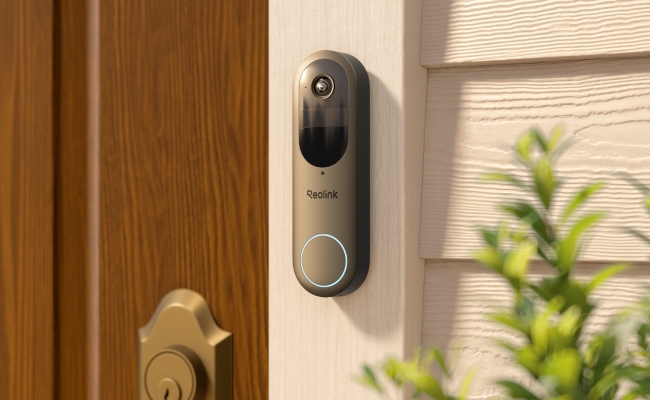
Reolink has recently introduced the Video Doorbell (2nd Gen). It’s packed with incredible features and functionalities that enhance security and privacy.
We will give you a complete review of the Reolink Video Doorbell (2nd Gen). We will discuss the pros & cons, features, installation/setup, and what’s new in it. It will help you decide whether it’s worth upgrading from your old video doorbell to the Reolink Video Doorbell (2nd Gen).
- Pros and Cons of Reolink Battery Video Doorbell (2nd Gen)
- Review of Reolink Battery Video Doorbell (2nd Gen)
- Installation and Setup of Reolink Battery Video Doorbell (2nd Gen)
- What Upgrades Does the New Battery Doorbell (2nd Gen) Offer Compared to the Previous Gen?
- Verdict: Is It Worth to Upgrade Reolink Battery Video Doorbell (2nd Gen)
- FAQs
Pros and Cons of Reolink Battery Video Doorbell (2nd Gen)
Pros
- The video doorbell supports dual-band Wi-Fi, which ensures optimal speed and coverage along with reliable connectivity.
- Because of HDR, it captures exceptional details and reduces overexposure for balanced footage.
- Works with your existing mechanical chimes. It also supports Reolink Chime Plus.
- Allows users to have a video call with the person at the door, and you can chat with him/her from anywhere.
- It’s IP65 rated, so it can work outdoors in harsh weather conditions. It won’t be affected by rain and snow.
- No monthly subscription required. Store recordings locally on a microSD card or Reolink Home Hub for greater privacy and lower long-term costs
Cons
- It requires hard wiring for 24/7 recordings.
Best for
It’s an ideal option for homeowners to keep an eye on the front door when they are away. They can talk to the person at the door from any location. They can video call with the neighbors, delivery guys, or any visitor at the door. Thus, they know who entered the house and when.
It smartly detects persons, vehicles, animals, and packages and sends real-time alerts. Thus, users can ensure the safety of their loved ones and parcels without any subscription fees.
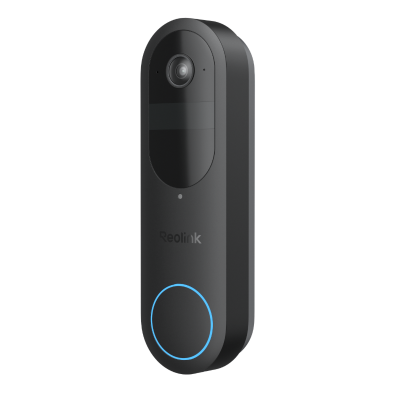
2K Battery Wi-Fi Video Doorbell with Smart Detection
- 2K 4MP Head-to-Toe View
- Person/Vehicle/Animal/Package Detection
- 300-Day Lasting Battery Life
- No Monthly Fees for Local Storage
Review of Reolink Battery Video Doorbell (2nd Gen)
Long-Lasting, Low-Maintenance Battery Protection
The battery doorbell delivers up to 300 days of battery life on a full charge, helping provide reliable doorstep protection with less frequent charging. Built on the Qualcomm® Micro-Power Wi-Fi solution, it is designed for efficient power consumption while maintaining stable wireless performance. Based on 5-minute daily recordings, the long-lasting battery helps reduce maintenance and provides a more convenient security experience.
2K 4MP and 1:1 Aspect Ratio
The video doorbell records videos in 2K (4MP) resolution, which offers incredible detail and clarity. With the 1:1 aspect ratio, it captures the head-to-toe view. Thus, it not only helps in keeping an eye on the visitors but also on the packages.
Supports Local Detection
Powered by local AI detection, the doorbell accurately identifies people, vehicles, animals, and packages to minimize unnecessary alerts. Free push notifications with snapshots provide instant visibility into detected events, enabling faster responses.
No Subscription Required & Privacy Protection
The video doorbell provides essential security features without requiring a monthly subscription. Users can enjoy smart detection alerts and access recordings through flexible storage options, including microSD cards, Reolink NVR, or Home Hub, helping reduce ongoing costs.
With local storage options, users can keep greater control over their recorded footage instead of relying only on cloud storage services. This provides a more privacy-focused security solution while allowing users to choose how their video data is stored and managed.
Pre-recording
The video camera also offers a pre-recording feature. It starts recording before the event starts to capture every important moment and detail. For this, you need to do hard wiring.
Specs
Installation and Setup of Reolink Battery Video Doorbell (2nd Gen)
What's in the Box?
Before installation, check that all accessories are included in the package. The Reolink Battery Video Doorbell (2nd Gen) comes with the following items:
- Reolink Video Doorbell (2nd Gen) ×1 – The main doorbell camera unit.
- Jumper Cables ×1 – Used for wiring connections when needed.
- Extension Cables ×1 – Helps extend cable length during installation.
- Mounting Plate ×1 – Used to securely attach the doorbell to the wall.
- Wedge ×1 – Adjusts the installation angle for a better viewing direction.
- USB-C Cable ×1 – Used for charging the battery doorbell.
- Quick Start Guide ×1 – Provides installation and setup instructions.
Installation
- Choose an appropriate height for the video doorbell to be installed on the front door. You can also use a wedge to give a slight angle.
- Place the mounting template on the wall and drill the required holes. Secure the mounting plate on the wall using screws.
- If you are using the battery-powered mode, you can install the video doorbell directly on the plate. Otherwise, you need to hardwire it. If there is no chime, connect the output terminals of the transformer or power supply to the battery.
- But if there is a chime, you need to connect one terminal of the video doorbell directly to the transformer/power supply. The second terminal from the transformer/power supply goes to the Trans of the mechanical chime. Then the Front of the chime is connected to the doorbell. Both Trans and Front are shorted using a jumper cable.
Note: The chime is not included with the video doorbell. If you want to use an existing mechanical chime, make sure it is properly wired according to the instructions above.
Setting Up the Doorbell
- Once the doorbell is powered, open the Reolink app. Tap the “+” button and scan the QR code at the back of the doorbell.
- Select the Wi-Fi connection on the application and connect the device to it by entering the password.
- Complete the initialization setup. You will have to name the device and enter a password. After that, you will see the doorbell on the app.
What Upgrades Does the New Battery Doorbell (2nd Gen) Offer Compared to the Previous Gen?
Pre-recording
The Reolink Video Doorbell (2nd Gen) supports pre-recording. It’s an exceptional feature that starts recording the video before the event starts. Therefore, it does not miss any important moments. Once you hardwire the video doorbell, you can enable 24/7 recording with pre-recording.
Longer Battery Life
It has a longer battery life, which offers uninterrupted performance. The battery could last up to 10 months on a single charge. If there are 5 minutes of recordings per day, the battery could last up to 10 months without any issues. But if you record 10 minutes per day, the battery life will be 6 months.
Added Animal Detection
The latest generation also supports animal detection. When your pet or wild animal is around the front door, the camera detects it instantly and sends a real-time alert to the connected device. Previously, only person, vehicle, and parcel detection were supported.
Support IFTTT
The best part is that it supports IFTTT, which is incredible for smart home system users. They can connect to supported platforms and devices, such as floodlights, alarm systems, and even social media platforms.
Verdict: Is It Worth to Upgrade Reolink Battery Video Doorbell (2nd Gen)
Yes, it is worth it to upgrade to the Reolink Video Doorbell (2nd Gen). Most importantly, it can record 24/7 with pre-recording, which is exceptional for robust security. However, you can also opt for the battery-powered mode, and it has an extended battery life.
With tamper alert, you can prevent tampering with the doorbell and protect your privacy and security. It also supports animal detection, which is much needed for pet owners, especially if there is frequent wildlife activity. The best part is that IFTTT support, which enables you to connect the doorbell to any platform or device to command it to do anything you want.
FAQs
1. Is a Reolink battery doorbell good?
Yes, the Reolink Battery Doorbell is a wireless option that allows users to keep an eye on their doors. They can video call with the person from anywhere and record every moment.
2. How to recharge a Reolink doorbell battery?
Remove the doorbell from the mounting plate. You will see the USB-C charging port on the back. Plug it into a wall adapter to charge the battery.
3. Does the Reolink battery doorbell record 24/7?
No, you cannot record from the Reolink Video Doorbell (2nd Gen) 24/7 on battery power. However, you can hardwire it and record 24/7 with pre-recording.
Search
Subscribe for the Latest Updates
Security insights & offers right into your inbox