
Best Wireless Camera Systems: 2026 Ultimate Guide
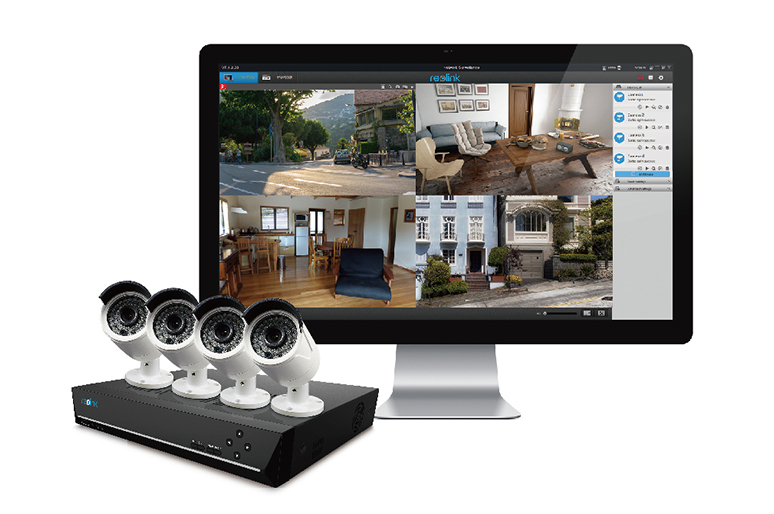
The best wireless security camera systems depends on how many cameras you need, how it's powered, and how strong your Wi-Fi actually is at each mounting spot. Nail those, and you'll get wired-level coverage without tearing into walls to run cable.
No single wireless camera system will work for every property. A two-camera apartment setup and an eight-camera farmhouse system solve very different problems, even though both fall under the same "wireless security camera system" label. This is why we've written this guide to help break down the important details so you can match a system to your property instead of guessing.
- Types of Wireless Security Camera Systems
- Features to Look For in Wireless Security Camera Systems
- Wireless Camera System Price Ranges
- Best Reolink Wireless Security Camera System Recommendations
- Which Wireless Camera System Fits Your Situation
- Wireless vs. Wired Security Camera Systems
- Common Mistakes to Avoid When Buying a Wireless Camera System
- Buyer Decision Table
- FAQs
- Conclusion
Types of Wireless Security Camera Systems

Wireless security camera systems fall into four categories based on how the cameras get power and send footage. The right one depends on whether you have mains power near each camera and how reliable your internet connection is at the mounting spot. These setups are also sometimes called wireless CCTV systems, particularly outside the US, though the underlying technology is identical.
Wi-Fi NVR Systems
These systems consist of multiple cameras connecting wirelessly to a dedicated network video recorder, which handles 24/7 storage and stays plugged into mains power. Nothing needs recharging, and footage saves locally instead of running through a monthly cloud plan.
Battery (wire-free) Systems
For these systems, each camera runs on its own rechargeable battery and talks straight to Wi-Fi with no recorder required. Installation takes minutes since nothing needs wiring, though the trade-off is periodic recharging.
Solar-Assisted Systems
Solar-Assisted Systems are powered by a solar panel, which will help top up the camera's battery through the day. This activity can stretch runtime to months in a sunny spot. However, it only works if the mounting location gets consistent direct sun.
Cellular (4G) Systems
The cameras of these systems usually connect through a mobile data network instead of Wi-Fi, which makes it the only wireless option for a property with no internet at all. These are highly suitable for places such as barns, cabins, or job sites.
A lot of people search for a "wireless DVR camera system," but DVRs are built to decode analog, coax-based cameras. Wireless setups record through an NVR instead, which processes digital footage from IP cameras. If a listing calls itself a wireless DVR system, check the spec sheet. It's almost always an NVR under a different name.
What's Actually Inside the System
A full setup usually includes four parts. The cameras capture the footage and can be indoor, outdoor, pan-tilt-zoom (PTZ), or standalone battery models. The NVR or hub receives the feed and stores it, either on a built-in hard drive or a microSD card. The router provides the Wi-Fi signal every camera depends on, so its placement matters as much as the cameras' placement. A monitor is optional. Most people skip it and check footage through the mobile app instead.
Features to Look For in Wireless Security Camera Systems

Get these six decision points right for your specific property, and the marketing terms on the camera systems box will stop mattering as much.
Video Resolution
The more common resolutions are 1080p, 2K, and 4K. 1080p covers general monitoring, 2K sharpens things up enough to make out faces at the front door, and 4K is worth the extra storage if you need to make out faces or license plates from a distance.
- 1080p: Fine for small rooms, apartments, and short-distance monitoring.
- 2K: Clearer detail for front doors, driveways, or anywhere you need to see faces.
- 4K: Best for larger properties or footage you might need to zoom into later.
Do note that higher resolution has its drawbacks too. It eats more storage. A 4K camera recording 24/7 fills a hard drive faster than the same camera at 1080p. This tend to matter more for Wi-Fi NVR systems running multiple cameras at once than for a single battery camera.
Night Vision
The night vision type determines what you actually see after dark, and it isn't the same across all wireless cameras.
- Infrared (IR): Works in complete darkness but only in black-and-white. The light is invisible to the naked eye, so it won't spook nocturnal wildlife or tip off anyone that they're being filmed.
- Color night vision: Uses a more sensitive image sensor to hold color in low light. Color night vision is getting more popular for most users as the technology is improving over time.
- Spotlight night vision: Triggers a built-in light on motion, which gives the clearest footage but also announces the camera's location to whoever triggered it.
Motion Detection and AI Alerts
Basic motion sensors can send dozens of false alerts a day from tree branches and passing cars. AI-based detection only notifies you when it recognizes an actual person, vehicle, or animal.
- Basic PIR detection: PIR (passive infrared) sensors trigger on body heat and movement, with no filtering for what caused it.
- AI detection: Distinguishes people, vehicles, and animals before sending an alert. This is a standard on most current Reolink battery and Wi-Fi cameras.
For indoor cameras, some AI models also detect when someone enters a specific zone rather than anywhere in frame.
Local Storage vs. Cloud Storage
Cloud storage costs a recurring fee but it's convenient for users to access from anywhere. Local storage is a one-time cost with no ongoing bill, but footage lives on the hardware itself.
- Cloud storage: Hosted online, accessible from any device, usually gated behind a paid plan after a trial period. The downside is you're paying indefinitely, and footage becomes unreachable if your internet drops or the provider has an outage.
- Local storage: Saved to a microSD card, an NVR hard drive, or a NAS device. No subscription, and footage stays on-site. The catch is that if the camera or drive gets stolen or damaged, that footage is gone with it, and older clips get overwritten once the storage fills up.
Important Note: Some wireless systems are built specifically around local recording, using an NVR, microSD card, or home hub instead of the cloud. Reolink's lineup leans in this direction, offering long-term local storage without a required monthly fee.
Power Source
How a camera gets power decides where you can mount it and how much upkeep it needs.
- Wi-Fi NVR cameras: Have to be plugged into mains power, so nothing needs recharging. But, the mounting spot needs to be near an outlet or a low-voltage cable run.
- Battery cameras: Can be mounted almost anywhere, at the cost of a recharge every few weeks to a few months depending on usage and temperature.
- Solar-assisted cameras: Extend battery runtime significantly in direct sun, less so in shade or in northern climates during winter.
- Cellular cameras: Skip Wi-Fi entirely, drawing power from battery or solar and data from a mobile network.
Number of Channels
The channel count on an NVR sets the ceiling on how many cameras the system can run. So, it's wise to plan for the property size, not just what you need on day one.
Consumer NVRs are typically sold in 4, 8, 12, or 16-channel versions. An 8-channel system covers most single-family homes, while a 16-channel system suits larger properties or small businesses monitoring multiple entrances and storage areas.
Signal Reliability: What to Check Before You Buy
A wireless camera is only as reliable as the Wi-Fi signal reaching it and that's worth checking before buying, not after installation.
Reolink's own published range specs put WiFi camera range at roughly 100 to 200 meters (about 330 to 650 feet) in open, unobstructed space, though the exact number depends on the camera type and band:
These figures assume a clear line of sight with no interference. So, you can expect far less through walls, floors, and other Wi-Fi devices competing for the same channel. Dense neighborhoods and busy 2.4GHz networks can also cause occasional dropped frames from interference, since 2.4GHz has far fewer non-overlapping channels than 5GHz.
Dual-band support isn't about one band universally "reaching farther." It's about letting a camera fall back to whichever band actually performs better at its specific mounting spot.
Security-focused communities have noted that mains-powered Wi-Fi NVR systems hold a steadier connection than pure battery cameras, since battery units drop into a low-power standby mode between motion events to save charge.

That standby state can add a short delay before recording starts, which matters most for fast-moving events like a porch theft.
Reolink's approach here is AI-based detection paired with dual-band Wi-Fi 6 on its NVR systems, which cuts down both false triggers and wake-up lag compared to older PIR-only battery cameras.
Cold weather is also worth planning around, since rechargeable batteries lose runtime in freezing temperatures regardless of brand.
None of this rules out a battery system. It just means checking signal strength at the exact mounting spot, and leaning toward a mains-powered Wi-Fi NVR setup for anywhere a missed second or two of coverage actually matters.
Wireless Camera System Price Ranges

A single wire-free camera typically costs $100 to $275, while a full multi-camera Wi-Fi NVR system runs $300 to $1,000 or more depending on channel count and storage.
Reolink's own pricing puts basic systems in the $100 to $200 range and advanced multi-camera setups between $300 and $1,000-plus, based on features like resolution, AI detection, and storage capacity. A few reference points from current listings:
- Standalone battery or solar cameras: roughly $100 to $275, spanning entry-level models up to 4K pan-tilt cameras.
- Wi-Fi 6 NVR systems: around $600 for a 12-channel kit with 2TB of storage, such as the RLK12-800WPT4.
- Cellular (4G) cameras: typically $100 to $290 for the camera itself, before any mobile data plan, since these skip Wi-Fi entirely.
The rule of thumb: Price scales with channel count and storage more than with resolution alone. A 4-camera Wi-Fi NVR kit and a 16-camera version can use the same camera model, with the price difference coming almost entirely from the recorder and hard drive capacity.
Best Reolink Wireless Security Camera System Recommendations
Wi-Fi 6 Wireless Camera System

The RLK12-800WB4 is an all-powerful 4K wireless security camera system that runs on dual-band 2.4/5GHz Wi-Fi 6. It can hold four 4K cameras with less interference than older Wi-Fi standards and it's backed by four high-gain antennas rated for coverage up to roughly 1,000 square meters. That coverage figure is a manufacturer rating taken in open conditions, so it's worth treating as a ceiling and confirming signal strength at your actual mounting spots before committing to camera placement.
The system ships with a 16-channel NVR and a 2TB hard drive, which Reolink rates for roughly 10 days of continuous 24/7 footage from four cameras at that storage capacity. The hard drive is also expandable to 8TB so if there's a need for a bigger storage space, this is an option worth considering. The Person, vehicle, and animal detection functions also help to reduce false alerts, and the cameras are suitable to be mounted outdoors as they carry an IP67 weatherproof rating.
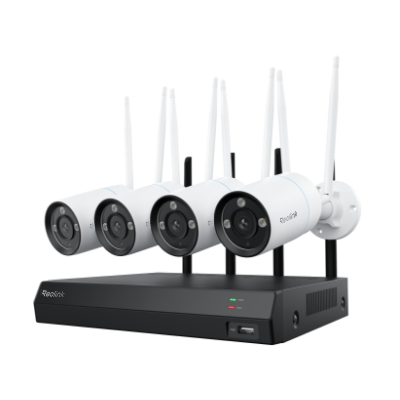
4K Security Kit with Next-Gen WiFi 6
4 pcs 4K Ultra HD Security Cameras; Dual-Band WiFi 6; 2TB HDD 12-Channel NVR for 24/7 Recording; Peron/Vehicle/Animal Detection; IP67 Weatherproof.
Battery-Powered Wireless Camera System

A battery-based setup skips the NVR entirely. Reolink sells this pre-packaged as the Home Hub with Argus PT Ultra kit, featuring a Reolink Home Hub with two or four Argus PT Ultra cameras out of the box. The setup can be expandable to eight cameras total if you ever require more.
Each Argus PT Ultra camera shoots 4K with 355 degrees of pan and 140 degrees of tilt, switches to color night vision through built-in spotlights, and runs on a rechargeable battery topped up by roughly 20 minutes of daily sunlight through its solar panel. Its built-in PIR, and AI detection capability cuts down on false alerts the same way the NVR system above does.
The Home Hub also handles encrypted local recording for the whole setup with no monthly fee. This is a solid starting point for renters or anyone building out coverage over time, since more cameras can be added to the same Home Hub later, without buying a second kit.
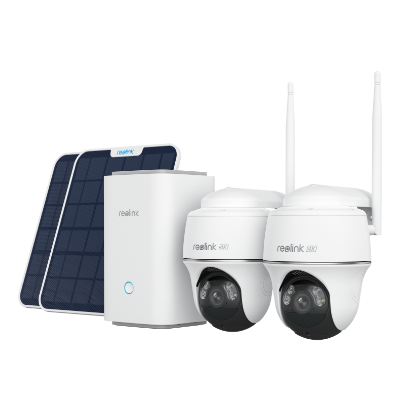
Wireless Security System With 4K PT Standalone Battery/Solar Wi-Fi Cameras
4K Color Footage Day & Night, 1 Year of Local Storage, Exclusive Anti-Theft Algorithms, Expandable System Up to 8 Reolink Cams
Which Wireless Camera System Fits Your Situation

The best wireless camera system for your situation depends on the layout of your property, not any universal rankings. Here's how the main use cases usually break down.
- Apartment or rental, no drilling allowed: A battery-powered indoor or outdoor camera paired with a Home Hub avoids any wiring or property modification, and the whole setup moves with you at lease end.
- Family home with kids or pets: An indoor camera with two-way audio and AI person detection matters more here than raw resolution, since the goal is checking in instead of identifying strangers from far away.
- Large property with multiple blind spots: A Wi-Fi NVR system with 8 to 16 channels and centralized local storage covers more ground than adding standalone battery cameras one at a time.
- Remote property with no internet connection: A 4G cellular camera sidesteps the Wi-Fi requirement entirely. It's a suitable setup for farms, cabins, RVs, and construction sites.
- Retail store or small business: Multiple entrances, a stockroom, and a parking area usually call for an 8-channel or larger NVR system with continuous recording rather than motion-triggered clips alone.
- Privacy-first buyers avoiding subscriptions: Any system with local storage will enable you to skip the monthly fee entirely.
Wireless vs. Wired Security Camera Systems
Wired systems win on long-term reliability and range while wireless systems win on installation speed and flexibility. Neither is universally better. The right choice depends on whether running cable through your walls is realistic.
Neither format is right for every property. A rental that can't be drilled into calls for wireless. A property owner who wants a camera to simply work for years without touching a battery usually lean towards wired, or a mains-powered Wi-Fi NVR system that gets the flexibility of wireless without the recharging.
Common Mistakes to Avoid When Buying a Wireless Camera System
Most wireless camera regrets trace back to five avoidable mistakes made before the first camera is even mounted.
Buying 4K without planning for storage
A 4K camera generates far larger files than 1080p. Check that the NVR's hard drive or microSD card can hold enough footage before committing to the highest resolution available.
Ignoring Wi-Fi signal strength at the mounting spot
A camera placed far from the router, or behind thick walls, can buffer or drop footage entirely. Test the signal at the exact location before drilling any mounts.
Skipping AI detection to save money
Basic PIR-only cameras trigger on tree branches, shadows, and passing cars. The alert fatigue that follows often leads people to mute notifications entirely, which defeats the purpose of the camera. With AI detection, false alerts can be reduced due to a higher accuracy rate made possible with custom triggers.
Overlooking weatherproof ratings for outdoor use
Not every camera marketed as "outdoor-ready" carries the same protection. Per Reolink's own guidance, IP65 covers most outdoor spots, especially with at least some overhead cover like an eave or porch roof and in climates without extensive rainfall. IP66 or higher is the safer call for a camera mounted fully exposed on an open wall or pole with no shelter, or in a region that gets heavy, sustained rain, snow, or storms. Check the exact rating before mounting, and never place an indoor-only camera outside.
Choosing based on camera count alone
Two systems can both ship "4 cameras", but differ completely in channel capacity, storage, and expandability. Check the NVR's maximum channel count before assuming the system can grow with the property later.
Buyer Decision Table
Analysis paralysis is common once every system claims to be the "best." This table maps common situations to the system type that usually fits, so the decision comes down to matching a row instead of comparing every channel and storage spec individually.
FAQs
1. Do wireless camera systems require a subscription?
No. Many wireless systems, including Reolink's, support local storage through a microSD card, Home Hub, or NVR with no mandatory subscription. Cloud storage remains available as an optional add-on for off-site backup.
2. Are wireless cameras suitable for NVR systems?
Yes. Wireless cameras connect to a Wi-Fi NVR the same way wired cameras connect to a traditional recorder, just without the cable run. The recorder still handles storage, motion alerts, and continuous recording across every connected camera.
3. How do wireless camera systems work?
A wireless camera captures video, compresses it, and transmits it over Wi-Fi (or a cellular network, for 4G models) to an NVR, Home Hub, or the cloud. From there, footage can be viewed live or reviewed later through a mobile app.
4. How far can a wireless camera be from the router?
Most wireless cameras hold a stable connection within roughly 330 to 650 feet of the router in open space, depending on the model and band, and far less indoors due to walls and interference from other devices. Cameras mounted farther away or behind obstructions benefit from a mesh network extender, or from a camera model with a stronger antenna rated for longer range.
5. Is a Wi-Fi NVR system more reliable than plug-in Wi-Fi cameras?
Both are mains-powered, so neither deals with the standby lag of battery cameras. The bigger difference is the network each one uses: a Wi-Fi NVR kit's cameras connect to the recorder's own dedicated Wi-Fi network, built with high-gain antennas for that job specifically, while standalone plug-in cameras connect straight to your home router and share bandwidth with every other device on it.
6. Do wireless security cameras work during a power outage?
Battery and solar cameras keep recording during a power outage as long as the router and internet connection stay up, since footage still needs Wi-Fi to reach the app or cloud. Mains-powered Wi-Fi NVR systems stop recording once the power cuts, unless connected to a battery backup.
Conclusion
The right wireless security camera system comes down to matching the setup to your property, not chasing the single "best" option on a list. A renter needs something different from a farm owner with no internet, and a family monitoring a front porch needs something different from a retail store covering three entrances.
For a quick start, refer to the buyer decision table above to narrow down a system type then check the price ranges against what that setup actually costs before comparing individual products. For a deeper dive into matching cameras to a specific property, Reolink's Solution Finder walks through the same decision points with more granularity. Feel free to leave any questions in the comments section below and we'll try to help solve your queries!
Search
Subscribe for the Latest Updates
Security insights & offers right into your inbox