
Baby Monitor vs. Security Camera: Which Is Better for Your Baby 2026?
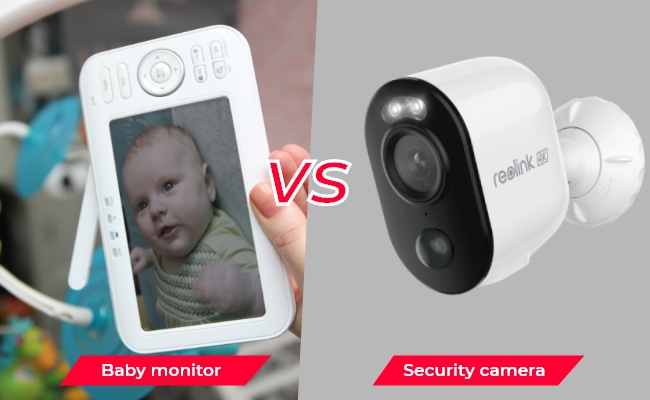
The main difference between a baby monitor and a security camera comes down to dedicated childcare features versus long-term, multi-purpose home monitoring. Baby monitors use dedicated parent units or background audio to track real-time nursery needs like crying and room temperature. Security cameras offer higher video resolution, broader room coverage, and long-term utility across the home.
This guide compares setup, monitoring features, pricing, and long-term value to help you decide which fits your routine best.
- What Is a Baby Monitor?
- What Is a Security Camera?
- Baby Monitor vs. Security Camera: Key Differences
- Security Camera vs. Baby Monitor: Comparison Table
- Pros and Cons
- Baby Monitor vs. Security Camera: Which Should You Choose?
- Can I Use Security Camera as a Baby Monitor?
- Best Smart Baby Monitor Cameras for Different Setups
- Do Parents Prefer Security Cameras or Baby Monitor? Real-World Insights
- FAQs
- Conclusion
What Is a Baby Monitor?
A baby monitor is specifically designed for monitoring babies at home. You can find audio and video baby monitoring devices. However, video devices are preferred and mostly used.
The video baby monitor is an indoor camera equipped with some special features, such as motion detection, two-way audio, instant alerts, etc. It records everything happening in the room or baby crib and helps you ensure the safety of the baby.
They are of two types. One uses a local radio frequency to transmit video and sound from the camera to the parent unit, which is a display. This type is also called a baby monitor without WiFi. The second type of baby monitor is a Wi-Fi baby monitor that offers remote access and live previews through an app.
The main function of a baby monitor is to allow parents to monitor the baby when they are in different parts of the house or doing home chores. It helps in keeping an eye on the baby and taking suitable actions immediately.
What Is a Security Camera?
A security camera, on the other hand, is a general camera used for indoor and outdoor security. It is usually used to monitor properties. It records the videos and offers live previews from remote locations.
It might lack features that professional baby monitors have, but if it is equipped with such features, it can also function as a baby monitor.
Baby Monitor vs. Security Camera: Key Differences
Primary Purpose
A baby monitor is designed specifically to help parents watch and listen to their baby in real time. A security camera is designed for general indoor or outdoor property surveillance, though models equipped with live viewing, two-way audio, motion alerts, and night vision easily adapt to nursery monitoring.
Choose a baby monitor for dedicated childcare monitoring, or select a security camera if you want a single device that serves broader home security needs.
Viewing Method: Dedicated Screen vs. Mobile App
Traditional baby monitors send video directly to a dedicated parent unit, allowing you to check on your baby instantly without unlocking a smartphone or opening an app. Security cameras stream live video through a mobile or desktop app, offering greater convenience for parents who want to check the nursery remotely while away from home.
A dedicated parent unit provides effortless viewing around the house, while an app-based security camera offers superior flexibility for remote access.
Audio Performance: Background Listening vs. Two-Way Audio
Baby monitors are engineered for continuous background listening, ensuring you hear every sound in the nursery as it happens. Security cameras utilize two-way audio to let you speak through the camera, but they generally rely on motion alerts or on-demand listening rather than an unmuted, continuous audio stream.
A baby monitor suits parents who prioritize uninterrupted overnight audio, while a security camera works best for occasional listening and quick two-way check-ins.
Baby-specific Features
Baby monitors come equipped with specialized childcare functions such as crying detection, lullaby playback, room temperature monitoring, and sleep alerts. Security cameras focus on broader smart security features, including motion tracking, person or pet detection, and customizable detection zones, with baby-specific capabilities varying by individual model.
Choose a baby monitor if nursery-specific functions are essential, or opt for a security camera if smart detection and flexible room tracking matter more.
Video Coverage
Baby monitors usually feature a fixed field of view focused strictly on the crib or immediate sleeping area. Security cameras offer higher video resolutions, wider fields of view, and motorized pan-and-tilt capabilities that actively follow movement across the entire room.
A baby monitor excels at focused crib coverage, whereas a security camera is better for monitoring the baby, caregivers, pets, and the surrounding nursery space.
Internet Dependence
Non-Wi-Fi baby monitors use a direct wireless signal to stream video to the parent unit without requiring an internet connection or home network. Security cameras and Wi-Fi baby monitors rely on a stable network connection for app viewing, though loss of internet does not automatically halt local camera recording depending on the device configuration.
A non-Wi-Fi baby monitor is ideal if you require internet-independent operation, while a security camera is the right choice when remote access from anywhere is a top priority.
Privacy Control
Privacy protection depends on connectivity methods and storage locations rather than device labels. Security cameras that support local storage keep video recordings securely inside your home, while cloud-dependent systems send footage to remote servers, requiring parents to evaluate account security and network access carefully.
Prioritize robust account security and a local storage method that aligns with your personal privacy preferences regardless of which camera type you choose.
Security Camera vs. Baby Monitor: Comparison Table
Pros and Cons
Pros and Cons of Baby Monitor
Pros:
- A baby monitor has a built-in speaker and microphone to help you talk with the baby remotely.
- It detects the motion of the baby, persons, and pets in the area and sends instant alerts to your devices.
- It has night vision to capture clear videos at night and monitor the baby 24/7.
- Some cameras even have lullabies and other sounds to keep babies calm and fall asleep.
- It uses infrared LEDs to capture night and low-light videos without disturbing the baby.
- It might have sensors to monitor the temperature and humidity level of the room to help parents provide the most comfortable environment for the baby.
Cons:
- It covers a very limited area around the baby, which might not give complete information on babysitters working in the room and pets roaming around.
Pros and Cons of Security Camera
Pros:
- It covers a wider area and gives more information in a frame.
- There are instant motion alerts on devices to take action quickly.
- Some cameras offer two-way audio to facilitate communication with the baby.
- You can select a specific range for motion monitoring and tracking.
- It can also monitor babies at night through the black & white night vision.
Cons:
- It might have bright LEDs to capture videos at night, which is disturbing for the baby.
- While covering a wider area, it might lower the video quality. So, high resolution is essential.
Baby Monitor vs. Security Camera: Which Should You Choose?
Can I Use Security Camera as a Baby Monitor?
Yes, you can use a security camera as a baby monitor if it includes the right combination of features for nursery tracking.
What Features Should You Look For?
-
High Resolution (4K Preferred): Captures crisp details to help you clearly recognize facial expressions and receive accurate alerts on your phone.
-
Smart Motion Detection: Sends instant notifications when movement occurs and allows you to set custom detection zones around the crib.
-
Lag-Free Remote Viewing: Delivers smooth, real-time video streaming through a mobile app so you can check on your baby from anywhere.
-
Two-Way Audio: Enables clear, real-time audio so you can listen in or speak to soothe your baby remotely.
-
Pan-Tilt-Zoom (PTZ): Rotates and zooms to track movement, cover the whole room, and provide close-up views of your child or caregivers.
-
Infrared Night Vision: Uses invisible IR LEDs to capture clear video in total darkness without disturbing your baby's sleep.
If a security camera includes these capabilities, it serves as an effective, flexible alternative to a traditional indoor baby monitor.
Best Smart Baby Monitor Cameras for Different Setups
The best camera for baby monitoring depends on how and where you plan to use it. A Wi-Fi PTZ camera is better for flexible room coverage and remote viewing, while a PoE camera can be a better fit when you prioritize a stable wired connection and continuous monitoring.
Best for Flexible Nursery Monitoring: Reolink E1 Zoom
The Reolink E1 Zoom is a strong choice for parents who want to monitor both the crib and the surrounding nursery. Its pan-and-tilt design provides 360-degree room coverage, while 3× optical zoom helps you check fine details without physically moving the camera. It also features AI-powered crying sound detection, person and pet detection, two-way audio, infrared night vision, and app-based remote viewing.
With upgraded 4K resolution and dual-band Wi-Fi 6, the E1 Zoom delivers smooth live viewing and flexible camera placement without running Ethernet cables. Local microSD storage and an on-demand privacy mode also give parents direct control over video recordings and monitoring time.
Choose this camera if:
-
You want flexible, wide-area room coverage to pan across the nursery, auto-track a moving toddler, or zoom in on the crib.
-
You rely on smart infant alerts like AI crying sound detection and mobile notifications to know instantly when your baby needs attention.
-
You prefer a quick wireless setup using dual-band Wi-Fi 6 without running network cables through walls.

PTZ Wireless Smart Home Camera
Smart, Powerful and Affordable All-Round Home Protection. 355° Pan and 50° Tilt; 4K Ultra HD, 3X Optical Zoom, Two-Way Audio, 2.4/5 GHz WiFi, with Google Assistant Integration.
Best for a Stable Wired Connection: Reolink RLC-510A
The Reolink RLC-510A is better suited to a fixed monitoring setup where network stability matters more than pan-and-tilt flexibility. Its Power over Ethernet (PoE) connection carries power and data through one Ethernet cable, eliminating dependence on Wi-Fi and preventing signal dropouts during continuous monitoring.
The camera records in 5MP resolution and supports infrared night vision, local microSD storage, and 24/7 scheduled recording. However, it has a fixed viewing angle and a built-in microphone for one-way audio recording rather than two-way communication, making it less interactive than a dedicated baby monitor.
Choose this camera if:
-
You prioritize a rock-solid, hardwired connection that eliminates Wi-Fi latency, buffering, or signal interference.
-
You need 24/7 continuous local recording to track sleep patterns or review footage via an NVR or microSD card without monthly cloud fees.
-
You want a permanent fixture that can easily be repurposed for general indoor or outdoor home security as your child grows.
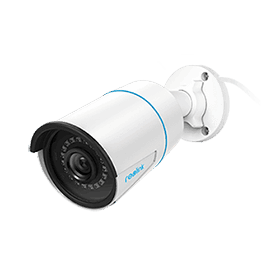
5MP PoE IP Camera with Person/Vehicle Detection
Smart Person/Vehicle Alerts; 100ft Night Vision; Time Lapse; IP66 Certified Weatherproof; Audio Recording.
Do Parents Prefer Security Cameras or Baby Monitor? Real-World Insights
Many parents prefer dedicated baby monitors—especially non-Wi-Fi models—because they offer simple, always-on monitoring without requiring a phone app. A separate parent screen lets them watch and hear their baby continuously while keeping their phone free for other tasks.
Privacy is another major reason some parents choose non-Wi-Fi baby monitors. Several users specifically mention avoiding Wi-Fi-connected devices because they are concerned about unauthorized access or hacking. For these parents, a closed, local connection between the camera and monitor provides greater peace of mind.

However, not every parent needs baby-specific features. Some users simply want a reliable way to see and hear their child and communicate when necessary. For this group, either a baby monitor or a security camera can work well, depending on whether they prefer a dedicated screen, app-based remote viewing, or broader home-monitoring capabilities.

FAQs
1. Do I need a baby monitor?
Yes, baby monitors as a must to take care of the baby. If you do home chores or any other part of the house, you can monitor the baby remotely. Secondly, it helps in monitoring the baby's actions, carrying, and people visiting the room.
2. Are baby monitors better than cameras?
Yes, they are specifically made for monitoring babies. They are equipped with advanced features to ensure the baby's safety and take appropriate measures when required.
3. When should you not use a baby monitor?
When babies get older, about four years or above, it is better not to monitor their every movement and respect their privacy. Secondly, if the baby monitor sends inaccurate alerts or disturbs you for minor issues, it would create a problem. It might disturb your sleep and working hours.
Conclusion
We have discussed baby monitor vs security camera in detail. Baby monitors are specifically designed for monitoring babies. They have incredible features, including two-way talk, night vision, motion detection, and instant alerts. You can also use a security camera instead of a baby monitor. But make sure it has the required features we have discussed. We have also shared some of the best IP cameras you can use for baby monitoring.
Search
Subscribe for the Latest Updates
Security insights & offers right into your inbox