
What Is a P2P Camera & How Does P2P Camera Technology Work?
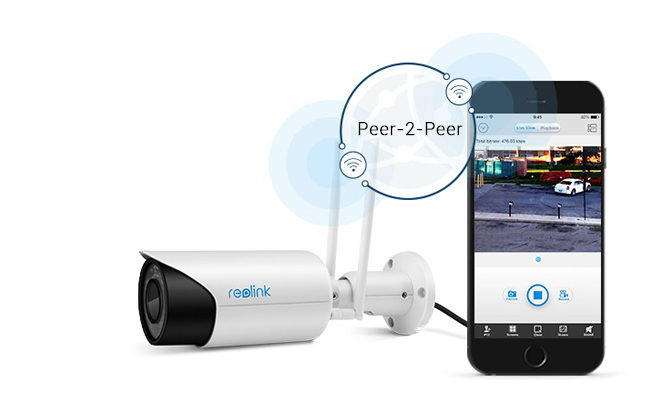
P2P IP cameras make remote access easier by allowing users to connect through an app or desktop client without manually configuring port forwarding or DDNS. For users frustrated by complicated network settings, failed remote connections, or not knowing how to access a camera away from home, P2P can simplify setup with a QR code or camera UID.
So, what is a P2P camera and how does it work? This guide explains how P2P camera technology enables remote viewing, how it differs from traditional IP camera connections, and how to deal with common concerns such as security risks, offline cameras, invalid IDs, connection failures, and bandwidth usage.
Key Takeaways:
- P2P simplifies remote camera access without manually setting up port forwarding.
- A unique device identifier such as a UID helps an authorized app locate and connect to the camera.
- P2P does not mean the camera is automatically insecure; security depends on implementation, encryption, account protection, firmware, and network configuration.
- What Is a P2P IP Camera?
- How Does P2P Camera Technology Work?
- Are P2P Security Cameras Safe?
- P2P Camera vs. Cloud Camera vs. Port Forwarding
- What Are the Benefits of P2P Security Cameras?
- 3 Key Features to Look for in the Best P2P IP Security Camera
- Best Reolink P2P Cameras for Different Use Cases
- How to Connect a P2P Camera?
- How to Fix Common P2P Camera Connection Problems
- Common Questions about P2P IP Cameras
- Conclusion
What Is a P2P IP Camera?
A P2P security camera is an IP camera that uses peer-to-peer networking to simplify remote access. Instead of manually configuring port forwarding or DDNS, the camera can use a unique device ID, such as a UID, to establish a connection with an authorized mobile app or desktop client over the internet.
What Does P2P Mean on a Security Camera?
On a security camera, P2P (Peer-to-Peer) refers to a network technology that establishes a direct connection between the camera and your viewing device (such as a smartphone or PC).
It allows you to view live video feeds remotely over the internet without needing complex network setups like port forwarding or static IP addresses. The P2P server only facilitates the initial connection setup, while the actual video stream travels directly between the camera and your app.
What Is a Camera UID?
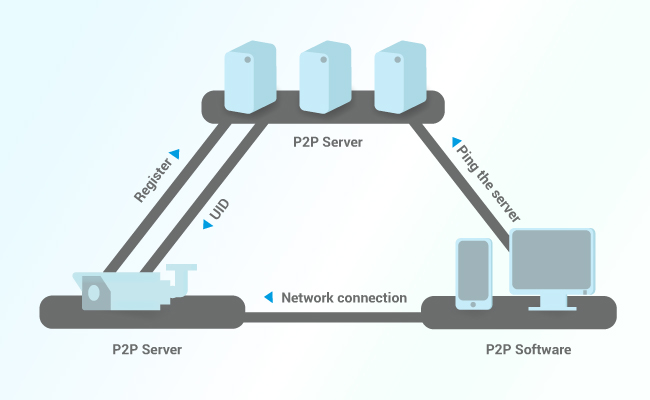
A camera UID (Unique Identification number) is a specific alphanumeric code assigned and registered to a security camera or NVR at the developer level. It serves as the camera's unique digital address. When you enter or scan the UID in a P2P app, the software uses it to identify and ping the correct device on the network, initiating the secure direct stream to your app.
How Does P2P Camera Technology Work?
-
Developer-Level UID Registration: Every camera or Network Video Recorder (NVR) is assigned a unique UID during manufacturing.
-
Server Handshake: When you launch the app, it pings a central P2P server to locate the camera's IP address. The server acts solely as a matchmaker to establish the link, not as a proxy streaming your media.
-
Direct Real-Time Streaming: Once connected, the app streams encrypted live video directly from the camera across local networks or remote internet connections.
How Does P2P Enable Remote Viewing?
P2P enables remote viewing by using a central server to introduce your smartphone or PC app to your security camera using its Unique Identification number (UID).
Once this initial handshake locates the camera's current network address, a direct communication channel opens between the viewing app and the camera. This allows live video to stream directly across the internet to your phone in real time without passing through third-party video cloud servers.
Does P2P Require Port Forwarding?
No, P2P does not require port forwarding. Traditional remote access required manually opening ports on your router firewall to expose the camera to the internet, creating potential security vulnerabilities and complex setups.
P2P eliminates this step entirely because the camera automatically initiates an outbound connection to the P2P server to register its location, allowing the viewing app to connect through standard internet traffic rules without changing router settings.
Are P2P Security Cameras Safe?
P2P security cameras are safe when properly configured and sourced from reputable manufacturers. Their inherent design offers distinct security advantages, though protection ultimately relies on strong basic security practices.
Why P2P Cameras Are Secure?
-
No Open Router Ports: Unlike traditional IP cameras, P2P technology eliminates the need for manual port forwarding or static IPs, closing off open inbound router ports that hackers frequently scan for vulnerabilities.
-
Encrypted Connections: Legitimate manufacturers apply strong end-to-end encryption to both the initial server handshake and the video stream, preventing unauthorized interception across public networks.
-
Direct Data Transfer: The central P2P server only acts as a matchmaker to establish the connection using the device's Unique Identification number (UID); your actual video feed streams directly to your app rather than passing through third-party video storage servers.
Key Safety Steps for Users
-
Change Default Passwords: Replace default credentials with a strong, unique administrator password immediately upon setup.
-
Update Firmware: Keep camera and NVR firmware up to date to ensure the latest security patches are active.
-
Use Official Software: Only connect to cameras using official developer-backed apps or PC client software.
P2P Camera vs. Cloud Camera vs. Port Forwarding
What Are the Benefits of P2P Security Cameras?
Easier Remote Setup
P2P network technology tackles problems that have long plagued many non-P2P IP cameras head-on.
For example, users used to labor his wits on DDNS setup or port forwarding to view IP camera video outside the home network or remotely on a mobile phone, laptop or PC.
Nowadays, there is no such complicated setup because these security cameras/NVRs are pre-configured in production.
Remote Live Viewing and Playback
Thanks to the simple connection between P2P cameras and your smartphone/PC/Mac, it facilitates remote viewing and resolves common problems like “Can I access my surveillance camera on the internet while I am out of home network?” “Can I view my camera while at work or outside my country?”.
In virtue of the P2P device app (iOS & Android) & software, you can view and stream live videos from P2P cameras more smoothly in real-time.
Note that you can’t view P2P cameras on web browsers remotely without port forwarding, because most web browsers are not built-in with P2P technology infrastructure.
What’s more, you can even record videos remotely and save the P2P cam footage to the SD card or NVR remotely through the IP camera P2P viewers and software.
Even you’re not physically there, you can playback historic videos of the P2P WiFi cameras to ensure you miss no single details.
Multi-Device Access
P2P technology also allows you to watch live viewing on multiple devices, like your smartphone, laptop or mac at the same time.
And that means, not only you but also your family members can access your P2P home IP camera simultaneously to steam the live feed.
Flexible Local Storage
P2P security cameras excel at offering flexible local storage because the P2P connection handles remote viewing without relying on paid cloud services. You can store footage locally on a microSD card, Network Video Recorder (NVR), or NAS drive, allowing you to access recorded clips from anywhere in the world without incurring recurring subscription fees.
3 Key Features to Look for in the Best P2P IP Security Camera
1. Secure and Reliable P2P Remote Access
-
UID-Based Connection: A quality P2P camera relies on a unique identification code (UID) to negotiate the handshake between your phone/PC app and the camera. This removes the need for unsafe port forwarding or fixed static IPs, closing off open inbound firewall ports.
-
End-to-End Encryption: Ensure the P2P connection uses industry-standard encryption (such as AES-128/256 or WPA3 on Wi-Fi models) for both authentication and video streaming to keep unauthorized viewers out.
-
Dual-Stream Optimization: Look for cameras and software that feature dual-streaming. This allows you to view a fast, low-bandwidth "Fluent" stream when using mobile cellular data while storing full high-resolution "Clear" video locally.
2. Flexible Recording and Local Storage Options
-
Decentralized Local Storage: To avoid forced cloud subscriptions, select a P2P camera that supports high-capacity local storage options, such as onboard microSD cards (up to 512GB), a Network Video Recorder (NVR), or a Home Hub.
-
Third-Party & Protocol Support: Having NAS or FTP backup options—or ONVIF/RTSP protocol support—ensures you can easily back up P2P recordings off-site or integrate them into broader network video setups without per-camera monthly fees.
-
Remote Playback: The companion P2P app should let you search, filter, and review clips saved directly to local storage from anywhere without needing cloud intervention.
3. High Resolution and AI-Driven Smart Detection
-
Actionable Image Quality: Higher resolutions (2K, 4K, or 16MP panoramic) and strong night vision ensure critical details like faces, clothing, or license plates are legible from afar.
-
On-Board AI Detection: Edge-AI processing accurately distinguishes people, vehicles, and animals from random motion like wind, shadows, or rain. This eliminates notification fatigue and ensures remote alerts are actionable.
-
Perimeter Protection & Zones: Features like customizable motion zones, line-crossing alerts, and zone-intrusion boundaries let you tailor exactly what triggers a P2P push notification.
Best Reolink P2P Cameras for Different Use Cases
Every Reolink P2P camera features a pre-registered UID code that bypasses complex port forwarding setup, letting you establish a direct, secure connection to your app in seconds.
Best for Wide Wire-Free Coverage — Reolink Argus 4 Pro
Simply scan the QR code on the camera's body to link its UID directly to the mobile app. The P2P network allows instant live streaming from remote locations and quick playback of clips saved to a local SD card without subscription fees.
Features:
- Person/vehicle detection
- Wireless & rechargeable battery-powered
- Motion alerts & siren
- Remote access & live stream on Smartphone (iOS & Android)
- 2-way communication with built-in mic & speaker
- 180 degree wide viewing angle
- ColorX night vision
Besides, you can stream live videos remotely or playback pre-saved motion recordings stored on your SD card with a few taps on the Reolink app.

4k 180° Wire-free Color Night Vision Camera
4K UHD 180° Blindspot-free View; Color Vision Day and Night; 30% More Battery Life; Dual-band Wi-Fi 6; Smart detection.
Best for Wired 24/7 Recording — Reolink RLC-810A
Built for reliable 24/7 continuous local recording via a single Power-over-Ethernet (PoE) cable. The embedded P2P architecture connects the RLC-810A camera instantly to the desktop software or mobile app using its UID, providing low-latency 4K remote viewing across outside networks.
Features:
- Person/vehicle detection
- Plug-and-play, simple setup
- 4K 8MP ultra HD video quality
- Motion alerts via email or app
- Remote viewing on Smartphone, Mac, Windows PC or Web browsers
- Could record audio & sounds
Better yet, this P2P IP camera price is pretty budget-friendly, a best-valued quality security option for home and business.
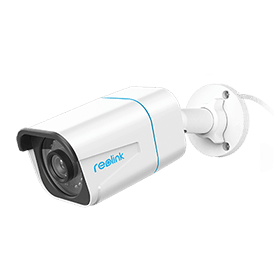
4K PoE IP Camera with Person/Vehicle Detection
Smart Person/Vehicle Alerts; 4K UHD Day; Night; 100ft Night Vision; Time Lapse; IP66 Certified Weatherproof; Audio Recording.
Best for Battery PT Monitoring — Reolink Altas PT Ultra
Reolink Altas PT Ultra camera can be set up easily by scanning QR code or entering UID. This dual-band WiFi P2P IP camera (2.4/5 GHz) can ensure stable video streaming locally & remotely, and it helps cut down bandwidth pressure on home broadband as 5 GHz is less crowded than 2.4 GHz which is widely used by other home appliances.
Features:
- Battery-powered, simple setup
- 4K 8MP Super HD video quality
- Motion alerts via email or app
- Remote viewing on Smartphone, Mac, Windows PC or Web browsers
- SD card (not included) for motion-based recording
Viewing live video feeds and accessing footage saved on SD card is easy and painless on Reolink P2P IP camera app & desktop software (PC/Mac).
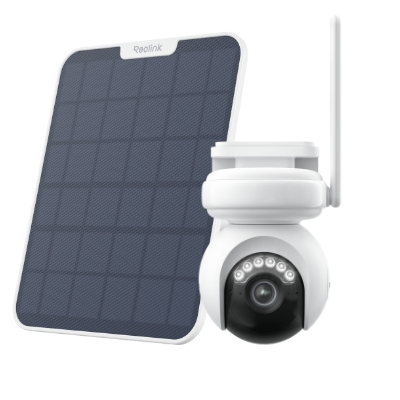
4K Battery-Powered PTZ Camera with Continuous Recording
👍 4K UHD video with continuous recording
👍 ColorX night vision in low light
👍 Pan, tilt, and automatic person tracking
👍 Local storage without monthly fees
How to Connect a P2P Camera?
- Power On and Connect to Network: Connect the camera to power via its power adapter, PoE cable, or battery, and attach it to your Wi-Fi or router if using a wired network setup.
- Download the Official App: Install the manufacturer's official mobile app or desktop software (such as the Reolink app) on your device.
- Add Device via UID/QR Code: Open the app, select "Add Device," and scan the QR code printed on the camera—this automatically imports its unique UID. Alternatively, enter the alphanumeric UID code manually.
- Set Up Credentials: Create a strong admin password and name your camera to complete the initial handshake.
- Start Viewing: Once paired, you can immediately stream live video and view local recordings from anywhere inside or outside your local network.
How to Fix Common P2P Camera Connection Problems
Why Is My P2P Camera Offline?
There could be many reasons when users couldn’t access the P2P cameras remotely on their mobile phones, like network issues, wrong password, WiFi connection failure, etc.
Follow the useful troubleshooting tips below if you can’t connect to your P2P wireless cameras remotely using the P2P IP camera App.
- Make sure your P2P IP camera is connected to the internet.
- Check to see if your mobile device is connected to the Internet.
- Verify the P2P feature of your camera is enabled.
- Make sure you have entered the right username and password of your P2P client IP cameras.
- Update your P2P network camera and the P2P IP camera software to the latest versions
Why Does My Camera Show Invalid UID?
P2P network cameras are normally registered with a P2P server and can be accessed by the camera viewers or apps (mostly proprietary).
During setup, if you encounter a problem like “invalid ID” or “offline”, try to delete the device and try a couple of times later.
Besides, many so-called P2P cameras sold by resellers are prone to “Invalid ID” or connection problem.
What’s more, running P2P devices on third-party apps or software, you are likely to bump into “invalid ID” due to compatibility issues.
Why Does P2P Remote Access Fail?
P2P remote access can fail when the camera or viewing device has no internet connection, the UID or login credentials are incorrect, or network settings block the connection. Firewalls, router restrictions, outdated firmware, or an outdated camera app/client can also cause connection failures. Check the network and UID settings first, then update the camera and software if needed.
Common Questions about P2P Network IP Security Cameras
What does P2P mean for cameras?
P2P stands for peer-to-peer. For security cameras, it refers to a connection method that helps users access a camera remotely through an app or desktop client without manually configuring port forwarding or DDNS. The camera is typically identified by a unique ID, such as a UID, to simplify remote connection.
What is a P2P device?
A P2P device is a network-connected device that uses peer-to-peer technology to communicate with another device or client. In security systems, a P2P device can be an IP camera, NVR, or similar device that supports remote access through a compatible app or software.
What are some good apps for P2P IP cameras?
The best app is usually the official app provided by the camera manufacturer, because it offers the best compatibility, security, and access to device-specific features.
For Reolink cameras, the Reolink App and Reolink Client support remote live viewing, playback, alerts, and device management. Some cameras may also work with third-party software through standards such as RTSP or ONVIF, but compatibility varies by model.
Does a P2P WiFi camera consume a lot of bandwidth?
P2P WiFi cameras won’t constantly use bandwidth because it will eat the data only when you are viewing the cameras on P2P software or viewer (iPhone, Android, Mac or Window) and the cameras send you alerts upon motion detection.
Conclusion
P2P security cameras offer a secure, affordable, and flexible solution for modern home and business surveillance. By pairing unique device identification numbers (UIDs) with direct peer-to-peer data transfers, these systems eliminate complex network configurations, avoid costly subscription fees, and deliver instant remote access from anywhere.
What features do you value most in a P2P security setup—is it local storage flexibility, sharp 4K resolution, or hassle-free remote access? Leave a comment below with your thoughts or questions, and let's get the conversation started!
Search
Subscribe for the Latest Updates
Security insights & offers right into your inbox