
How to Tell If a Security Camera Is Real or Fake: 7 Signs 2026
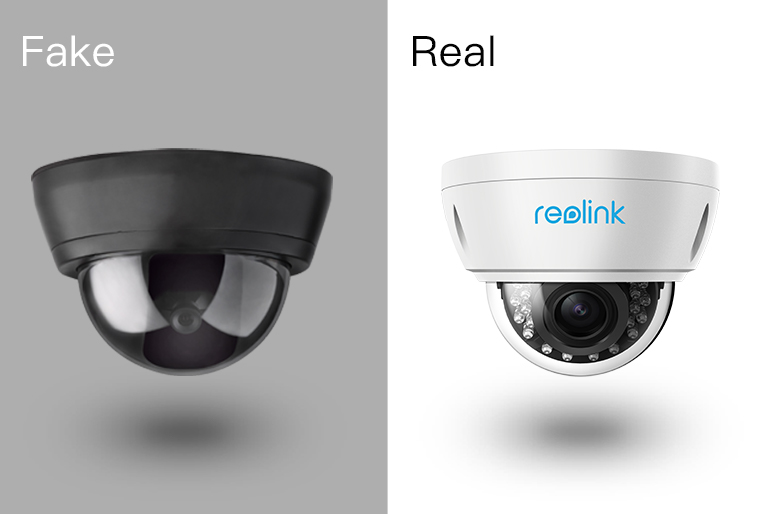
A fake security camera does not actually capture, transmit, or store video. Common warning signs include unrealistic blinking LEDs, cheap housing, fake or poorly routed cables, unverified branding, and repetitive mechanical movement. However, no single visual sign can confirm that a camera is fake, so several indicators should be checked together.
Here we list 7 ways to help you spot a fake camera, and offer the best security camera solution to save money.
- What Is a Fake Security Camera?
- How to Tell If a Security Camera Is Fake?
- Key Differences Between Fake and Real Security Cameras
- What to Do If Spot Fake Security Cameras?
- Can You Tell If a Security Camera Is Real Just by Looking at It?
- How to Verify Whether a Security Camera Is Actually Working?
- Real vs. Fake Security Cameras: Which Should You Use?
- Best Real Security Cameras Recommendation
- FAQs
- Conclusion
What Is a Fake Security Camera?
A fake security camera, also called a dummy or decoy camera, is designed to resemble a working surveillance camera but does not record, transmit, or store video.
Fake cameras are mainly used as visual deterrents. Some include blinking LEDs, fake cables, or simple motion mechanisms to appear functional, but they provide no actual surveillance footage.
How to Tell If a Security Camera Is Fake?
Real security cameras record and transmit video, while fake ones are just for show. Fake cameras are often made of cheap plastic, have thin or fake cables, and may flash a red light—something real cameras usually don’t do.
You can tell a real camera by LED lights, covers, installation place, wires, camera types, brands and motion tracking. Fake cameras lack these features and don’t actually work, making them easy to spot with a closer look. Let's see how to spot a fake security camera:
1. Check the LEDs
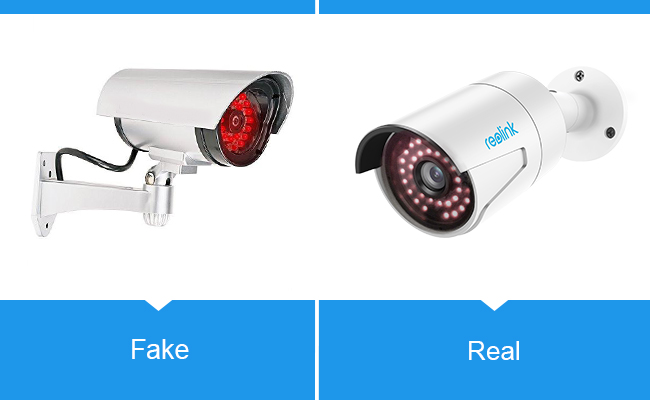
A constantly blinking red LED can be a warning sign because many dummy cameras use flashing lights to appear active. However, LED behavior alone cannot prove whether a camera is real or fake.
Real cameras may use infrared LEDs, status lights, spotlights, or no visible LEDs at all. Night-vision IR LEDs may produce a faint glow in darkness, while some models use invisible infrared light or full-color night vision.
In my opinion, it’s better to turn off the light than send out the obvious signal that the camera is fake. But there are still ways to know whether a CCTV camera is on or not even if it has no light.
Quick Tip:
- The Fake Camera: Many dummy cameras feature a bright, constantly blinking red LED light to "prove" they are recording.
- The Real Model: Modern night-vision cameras use infrared (IR) LEDs that emit a faint, steady reddish glow only in low-light conditions. They do not blink, and they remain completely off during the day.
2. Check Security Camera Covers
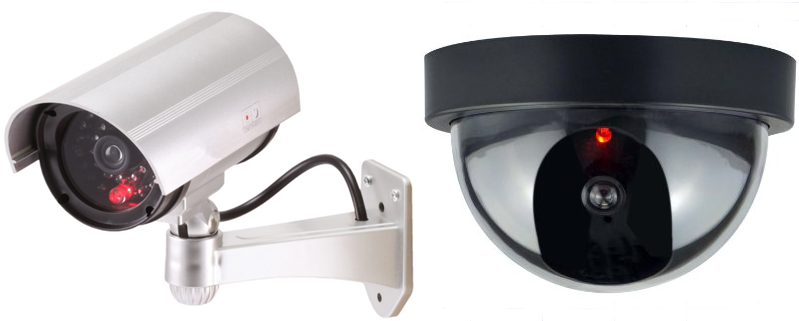
Construction quality can provide clues, but housing material alone is not reliable. Look instead for proper weather sealing, secure mounting hardware, manufacturer markings, cable routing, and a verifiable model number.
Quick Tip:
- Fake: Primarily made of cheap, lightweight plastic. They often look weathered, faded, or warped after brief exposure to the sun.
- Real: Built from high-grade, weather-resistant aluminum or heavy-duty polycarbonate designed to withstand tampering and harsh environments.
3. Check the Installation Quality
How a security camera is installed can provide clues about whether it is real or fake. A working camera typically needs secure mounting and, depending on the model, access to power, a network connection, or properly protected cables.
Look for signs of a functional installation, such as a sturdy mounting bracket, cables routed into a wall or conduit, sealed outdoor connectors, or nearby power and network infrastructure. Real outdoor cameras are also usually positioned to capture useful areas such as entrances, driveways, or walkways.
However, installation alone cannot confirm whether a camera is real. Battery-powered and WiFi cameras may have few or no visible wires, while well-made dummy cameras can also be mounted realistically.
Quick Tip:
-
Fake: Because they lack true weatherproofing, fake outdoor cameras are almost always tucked safely under deep eaves or ceilings.
-
Real: True outdoor cameras carry solid IP ratings (like IP65 or higher rating). They can be mounted directly on exposed walls, poles, or roofs, completely unprotected from wind and rain.
4. Check the Wiring and Connections
The wire is not an effective indicator of fake security cameras as it was. More dummy IP cameras today have visible fake wires, making the difference between real and fake security cameras much more confusing.
But remember those bullet cameras that miss this small detail are obviously fake ones. (The real dome security cameras and the wire-free cameras don’t have wires in plain sight)
Quick Tip:
-
Fake: Bullet-style dummy cameras often feature visibly thin, cheap wires that seem to lead nowhere or are awkwardly glued to the surface.
-
Real: Bullet cameras route wires securely through the mounting bracket directly into the wall.
Note: Wire-free battery cameras and dome cameras normally show no wires at all, so a lack of wires doesn't automatically mean it's fake.
5. Check Whether the Camera Has Functional Components
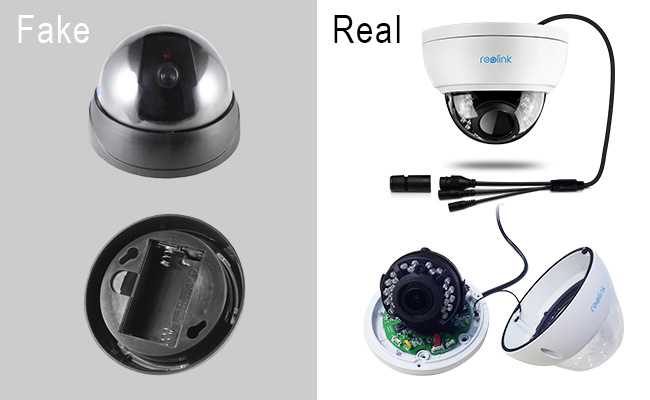
Another way to identify a real security camera is to look for components needed for actual monitoring. Depending on the camera type, these may include a real lens assembly, infrared LEDs or a spotlight, microphone and speaker openings, a PIR sensor, antennas, or power and Ethernet connections.
You may also find a reset button, microSD card slot, QR code, UID, serial number, or model label. These components support functions such as recording, night vision, two-way audio, network connectivity, and local storage.
Fake cameras may imitate some of these details, so the presence of a single component does not prove that a camera works. Checking several functional features together—and verifying the model when possible—is more reliable.
Quick Tip:
-
Fake: Almost all dummy cameras copy basic, generic bullet or dome shapes because they are cheap to manufacture.
-
Real: True security setups feature a massive variety of distinct designs, including complex PTZ (Pan-Tilt-Zoom) systems and compact, wire-free battery pods.
6. Verify the Brand and Model
Look for a manufacturer name, model number, QR code, serial number, or regulatory label. Search the model on the manufacturer's official website.
A recognizable brand does not automatically prove that a camera is functional, but a verifiable model number makes identification much easier.
Quick Tip:
- Fake: Usually generic, completely unbranded, or printed with a fake, unsearchable name.
- Real: Clearly displays reputable industry brands (e.g., Reolink, Nest, Ring, Arlo). A 5-second phone search will immediately verify if the manufacturer actually exists.
7. Observe How the Camera Moves
Movement alone does not indicate whether a camera is real. Some dummy cameras use simple motors that repeatedly sweep from side to side or react mechanically whenever motion is detected. Real PTZ security cameras can also physically pan and tilt, but their movement is typically controlled by software, presets, manual commands, or intelligent auto-tracking.
Quick Tip:
-
Fake: Some old-school dummy cameras use cheap motion sensors that cause the entire camera body to physically swivel or rock back and forth whenever anyone walks by.
-
Real: While modern smart cameras do feature advanced digital motion tracking (and PTZ cameras can smoothly pan), they track targets silently and precisely. They do not clumsily swing back and forth on a mechanical loop just to show they are "working."
8. Check Whether It Connects to a Network or Recorder
A real security camera typically connects to a monitoring or recording system. Depending on the camera type, this may be a WiFi or Ethernet network, NVR, security camera app, or local storage device.
If you have authorized access to the camera, check whether it provides a live video feed, appears in the manufacturer's app or NVR, or can save recorded footage. These are much stronger signs of a working camera than appearance alone.
A fake security camera cannot transmit live video or send footage to an NVR or app. However, you usually cannot confirm network connectivity simply by looking at a camera from the outside.
Key Differences Between Fake and Real Security Cameras
What to Do If Spot Fake Security Cameras?
1. If You Spot Them at Your Workplace
Discovering dummy cameras at your job can be a major safety and liability concern, especially if you rely on them for protection during late shifts.
-
Report the Blind Spot: Discreetly talk to your manager, HR, or facilities team. Express your concern professionally: "I noticed the camera in the back parking lot appears to be a dummy unit. I often leave late, and I'm concerned about the lack of real security coverage there."
-
Request Real Alternatives: If budgeting is the issue, suggest low-cost, real alternatives like smart floodlight cameras, or ask for enhanced physical security like better lighting or security escorts at night.
-
Document Your Concerns: Keep a written record (like an email) of your request. If an incident occurs later, having proof that management was notified of a security gap can be important.
2. If You Spot Them in a Rental Property (Airbnb or Apartment)
Property owners sometimes use dummy cameras to deter vandals, but they can create a dangerous "illusion of security" for tenants and guests.
-
Review Your Agreement: Check your lease or the short-term rental policy. Landlords and hosts are generally required to provide a safe environment. If they advertised a "secure building with video surveillance" and gave you fake cameras, this may constitute fraud or a breach of contract.
-
Contact the Host or Landlord: Send a polite but firm message. “I noticed that the cameras monitoring the main entrance are dummy models. Because I chose this property based on its security features, I’d like to know what active safety measures are in place.”
-
Take Personal Precautions: Never assume you are being protected. Secure your own windows, use portable door locks, and consider a budget-friendly indoor smart camera for your personal living space.
3. If You Spot Them at a Business (Retail, Parking Lots, etc.)
If you realize a store or parking garage you use relies on fake cameras, your personal safety is in your own hands.
-
Adjust Your Behavior: Treat the area as if it has zero security. Do not leave valuables in your car, park as close to a well-lit entrance as possible, and stay hyper-aware of your surroundings.
-
Notify Management (Optional): If you are a regular customer, let the manager know that savvy criminals can spot those fakes instantly, which actually makes the business more of a target.
4. If You Spot Them at a Neighbor’s House
If your neighbor has put up dummy cameras, it’s usually best to tread lightly.
-
Mind Your Own Security: Do not rely on their cameras to catch someone breaking into your car or stealing packages from your porch. Upgrade your own home defense with a real video doorbell or spotlight camera.
-
Have a Casual Conversation (If Close): If you have a good relationship with them, you can mention it casually: "Hey, I noticed you put up some cameras! Just a heads up, a lot of people know that the ones with the 24/7 blinking red lights are fakes. I just upgraded to a real reolink camera, and it wasn't too expensive if you ever want to swap them out."
Can You Tell If a Security Camera Is Real Just by Looking at It?
Not always. Modern fake security cameras can closely imitate real ones, while real WiFi and battery-powered cameras may have no visible wires, blinking lights, or other obvious signs.
Visual clues such as LED behavior, wiring, build quality, branding, and movement can help, but no single feature can confirm whether a camera is real. A more reliable approach is to check several signs together and, when possible, verify the model and whether the camera can provide live video or recorded footage.
How to Verify Whether a Security Camera Is Actually Working?
The most reliable way to verify a security camera is working is to check whether it can capture and deliver video. If you own or are authorized to access the camera, you can:
- Check the live view: Open the camera app, NVR, or monitoring software and confirm that live video is available.
- Review recorded footage: Trigger an event or wait for a recording, then check whether the footage has been saved.
- Check the connection: Confirm that the camera is connected to its WiFi/Ethernet network, NVR, or other supported recording system.
- Test detection and alerts: Walk through the monitored area and see whether motion detection or push notifications work as configured.
- Verify the model: Check the model number, serial number, QR code, or other identifying information against the manufacturer's documentation.
Real vs. Fake Security Cameras: Which Should You Use?
Fake cameras may provide a visual deterrent, but they cannot record incidents, send alerts, or provide evidence. Real security cameras can detect activity, record footage, enable remote monitoring, and support local or cloud storage.
For areas where actual surveillance is needed, a working security camera provides substantially more functionality than a dummy camera.
Best Real Security Cameras Recommendation
Best for Fixed PoE Installation & 24/7 Local Recording: Reolink RLC-810A
If you want a reliable wired connection with maximum clarity, the RLC-810A delivers top-tier performance over a single Power over Ethernet cable.
-
4K 8MP Ultra HD Resolution: Delivers crisp details and sharp video output.
-
Power over Ethernet (PoE): Simplifies setup by handling power and data transmission through a single cable.
-
IP66 Weatherproof: Built to withstand harsh outdoor weather conditions.
-
Built-In Audio: Features an integrated microphone to record audio alongside video.
-
100ft Night Vision: Clear long-range infrared surveillance in total darkness.
-
Smart Alerts: Instant email and push notifications triggered by smart motion detection.
-
24/7 NVR Recording: Supports continuous local recording when paired with a Reolink NVR or microSD card.
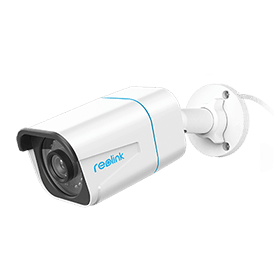
4K PoE IP Camera with Person/Vehicle Detection
Smart Person/Vehicle Alerts; 4K UHD Day; Night; 100ft Night Vision; Time Lapse; IP66 Certified Weatherproof; Audio Recording.
Here is a video captured by Reolink RLC-810A posted by a Reolink user:
Best 100% Wire-Free Home & Driveway Camera: Reolink Argus 4 Pro
Easy installation is no longer an excuse to buy a dummy camera. Wire-free options offer seamless setup without drilling through walls or running power cables.
-
100% Wire-Free Setup: Flexible installation anywhere with simple mounting brackets included.
-
180° Panoramic 4K View: Dual-lens technology provides wide, blindspot-free coverage.
-
Rechargeable Battery & Solar Power: Powered by a long-lasting rechargeable battery, with optional solar panel connection for continuous power.
-
ColorX Night Vision: Captures full-color night footage without needing harsh, visible spotlights.
-
Two-Way Audio: Built-in mic and speaker allow real-time communication via the app.

4k 180° Wire-free Color Night Vision Camera
4K UHD 180° Blindspot-free View; Color Vision Day and Night; 30% More Battery Life; Dual-band Wi-Fi 6; Smart detection.
Best for Off-Grid, Remote, or No-WiFi Locations: Reolink Go Plus
Poor Wi-Fi or lack of electricity shouldn't compromise property security. 4G LTE cameras keep construction sites, cabins, and remote lands protected.
-
4G LTE Network Connectivity: Operates entirely without Wi-Fi using cellular data.
-
100% Wire-Free & Portable: Powered by a rechargeable battery with solar panel support for remote locations.
-
2K 4MP Super HD Resolution: Delivers detailed, high-definition video.
-
33ft Infrared Night Vision: Built-in IR LEDs provide clear surveillance in low-light environments.
-
Smart Detection & Alerts: Features person and vehicle detection to minimize false alarms.
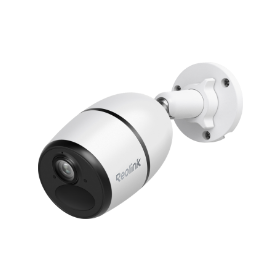
Smart Wireless 4G Battery Camera
Rechargeable Battery/Solar Powered, Person/Vehicle Detection, 2K 4MP Super HD, Two-Way Audio, High-Quality Night Vision, Live View Anytime.
You can learn more about Reolink Go Plus from this video:
FAQs
How can you tell if a security camera is real?
Check several signs rather than relying on appearance alone. A real security camera typically has a functional lens, verifiable brand or model information, proper power or network connections, and the ability to provide live or recorded video. LEDs, wires, housing, and movement can provide clues, but none can confirm authenticity on their own.
Do real security cameras have blinking red lights?
Some do, but many do not. Real cameras may have status LEDs or infrared (IR) LEDs that produce a faint red glow at night. However, LED behavior varies by model, and some cameras allow status lights to be disabled. A bright red light that constantly blinks can be a sign of a dummy camera, but it is not definitive proof.
Can a real security camera have no visible wires?
Yes. Battery-powered security cameras can operate without visible power or Ethernet cables, while WiFi cameras may only require a power cable that is hidden during installation. Even wired PoE cameras can have their cables routed through the mounting bracket and wall, leaving no wiring visible.
Do fake security cameras move?
Some do. Dummy cameras may use basic motion sensors or motors to swivel when someone passes or continuously move from side to side. Real PTZ cameras can also pan, tilt, and automatically track detected people or vehicles, so movement alone cannot tell you whether a camera is real.
Can dummy security cameras record?
No. A true dummy security camera does not have the imaging and recording hardware needed to capture or store video. Some models may have blinking lights or movement mechanisms to imitate a working camera, but these features do not enable video recording.
Can you tell if a security camera is recording?
Not reliably just by looking at it. Status lights, infrared LEDs, or camera movement may indicate that a camera is powered on, but they do not necessarily mean it is recording. If you own or are authorized to manage the camera, check its app, NVR, live view, recording schedule, or stored footage to confirm recording.
Are fake security cameras legal?
Fake security cameras are generally legal to own and use in the United States, but where and how they are installed can raise privacy, employment, rental, or other legal issues. Laws vary by state and situation, and placing even a dummy camera where people reasonably expect privacy can create problems. Check applicable state and local laws before installing one in a sensitive location.
[ga-seo-faq-end]
Conclusion
While the line between real and fake security cameras is becoming increasingly blurred, knowing what to look for can help you protect your property effectively. Always consider above seven factors to distinguish between real and fake security cameras.
Investing in a quality security system is crucial, and by being informed about the differences, you can ensure that you’re not inadvertently relying on a decoy to protect your home or business. Remember, when it comes to security, it's often better to be safe than sorry.
Search
Subscribe for the Latest Updates
Security insights & offers right into your inbox