
Ultimate Guide to Reolink Home Hub Compatibility: What Cameras Work?
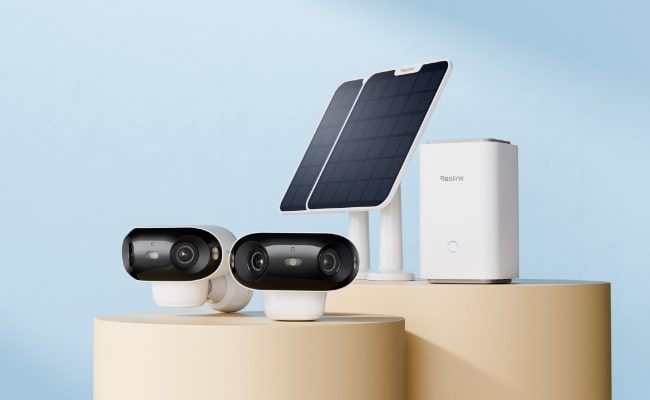
Not sure whether your Reolink camera works with Reolink Home Hub or Home Hub Pro? Compatibility varies by camera type and model. Reolink PoE and Wi-Fi plug-in cameras are widely supported, while many newer battery-powered cameras are also compatible, sometimes with a firmware update.
This guide covers Reolink Home Hub compatibility, including supported camera types, compatibility requirements, setup, and Home Hub kit options, so you can quickly determine whether your cameras can work with the hub.
What's the Reolink Home Hub Compatibility?
Reolink Home Hub and Home Hub Pro work with a broad range of Reolink cameras, but compatibility can vary by camera type, UID, hardware version, and firmware. Newer models are generally easier to integrate, while some older battery-powered cameras may require a firmware update or may not be supported.
Here's a quick overview of Reolink Home Hub compatibility:
Want to check a specific camera? See the official Reolink Home Hub Compatibility List for detailed compatibility by camera model, hardware version, and firmware requirements.
What is Reolink Home Hub?
Reolink Home Hub acts as the control system. It’s a wireless control center that connects multiple cameras to one platform. It stores the data of all cameras with incredible security. It is equipped with advanced anti-theft algorithms and encryption technology. It offers offline recording and works like a reliable alarm center. It provides a weekly summary of all your activities on the app.
Home Hub comes with a 64GB microSD card, and you can expand up to two 512GB microSD cards. It can connect up to eight security cameras.
Home Hub Pro is the advanced version. It’s a Wi-Fi 6 wireless security center with built-in 2TB storage. You can increase the storage up to 16TB and connect up to 24 security cameras.
Home Hub vs. Home Hub Mini vs. Home Hub Pro: What's the Difference?
Reolink Home Hub Mini, Home Hub, and Home Hub Pro all provide centralized camera management and encrypted local storage, but they differ significantly in supported resolution, storage capacity, camera capacity, Wi-Fi, and expansion options.
How to Set Up Reolink Home Hub with Cameras?
- Connect the Home Hub to power using the given adapter. Turn it on and connect it to the Wi-Fi router using an Ethernet cable.
- Install the Reolink app and open it. Follow the instructions on the screen to connect Home Hub to the app.
- You can now add security cameras. Tap the “+” button on the app. Scan the QR code at the back of the camera. Select the option “Use with Home Hub” to integrate the camera.
- Add all security cameras the same way. Once all are added, you can control them with Home Hub and see the live preview and other details on the app.
Best Reolink Home Hub Kit Recommendation
Home Hub with Argus PT Ultra — Best for 360° Wire-Free Home Security
The Home Hub with Argus PT Ultra combines two 4K battery-powered cameras with centralized local storage and management. Each Argus PT Ultra offers pan-and-tilt coverage for a 360° view, smart detection, and both color and infrared night vision, making it suitable for monitoring yards, driveways, and other large outdoor areas.
The rechargeable cameras support optional solar charging, while Home Hub brings recordings, live views, alerts, and camera management together in one place. This combination is a good fit for users who want wider outdoor coverage without running power or network cables to each camera.
Best for: Homes that need flexible 360° outdoor coverage with centralized local storage.
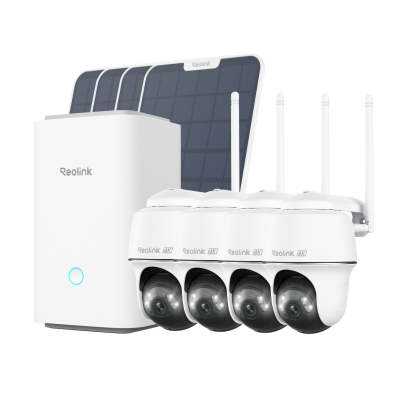
Wireless Security System With 4K PT Standalone Battery/Solar Wi-Fi Cameras
4K Color Footage Day & Night, 1 Year of Local Storage, Exclusive Anti-Theft Algorithms, 360° All-Around Coverage, Expandable System Up to 8 Reolink Cams.
Home Hub Pro with Lumus Pro - Best for 24/7 Multi-Camera Security
The Home Hub Pro with Lumus Pro combines four 4K 8MP cameras with a high-capacity hub, making it better suited for continuous monitoring across multiple areas. Lumus Pro features an F1.6 aperture for improved low-light imaging and can be installed indoors or outdoors to cover entrances, driveways, yards, and other key areas.
Home Hub Pro provides 2TB of built-in storage, Wi-Fi 6 connectivity, encrypted local recording, and storage expansion for longer-term surveillance. Combined with plug-in cameras designed for 24/7 recording, the kit is a stronger option for users who prioritize continuous multi-camera coverage over a fully wire-free setup.
Best for: Larger homes and properties that need 24/7 recording, multiple cameras, and high-capacity local storage.
Home Hub Mini with Argus 3 Pro — Best for Small Home Security Setups
The Home Hub Mini with Argus 3 Pro is a compact wire-free security kit for homeowners who want centralized monitoring without building a large system. The two Argus 3 Pro cameras capture 5MP video with smart person, vehicle, and animal detection, while dual-band 2.4/5GHz Wi-Fi provides flexible wireless connectivity.
Home Hub Mini brings live viewing, playback, and camera management together in one place, with support for up to 8 cameras and up to 1TB microSD storage. It also provides encrypted local recording without mandatory subscription fees, leaving room to expand the system later. :contentReference.
Best for: Small homes, apartments, and users looking for an affordable wire-free multi-camera setup.
FAQs
1. What is Reolink compatible with?
Reolink Home Hub is compatible with all PoE and Wi-Fi plug-in security cameras. It is also compatible with some recent battery-powered cameras. You can connect up to 8 cameras to Home Hub, and it supports Google Assistant for hands-free operation.
2. What is the range of the Reolink Home Hub?
Reolink Home Hub can cover an area of up to 450 square feet. You can connect multiple cameras without any hassle and cover a large area.
3. What is the purpose of the Reolink Home Hub?
The purpose of Reolink Home Hub is to provide a control center to connect multiple cameras and control them without any hassle. Secondly, it offers a secured local storage with encryption and advanced algorithms to ensure privacy. It is meant to provide the summary of all connected devices and be used as an alarm center.
Conclusion
Reolink Home Hub controls all your security cameras and stores their data in a secured local storage. That’s why people love to have it to control and operate their cameras without any issues. It is compatible with a wide range of Reolink cameras we have discussed. It is also compatible with Google Assistant and Alexa.
Search
Subscribe for the Latest Updates
Security insights & offers right into your inbox