
Reolink Home Hub with Argus 4 Pro Review: Security with 180-Degree Coverage
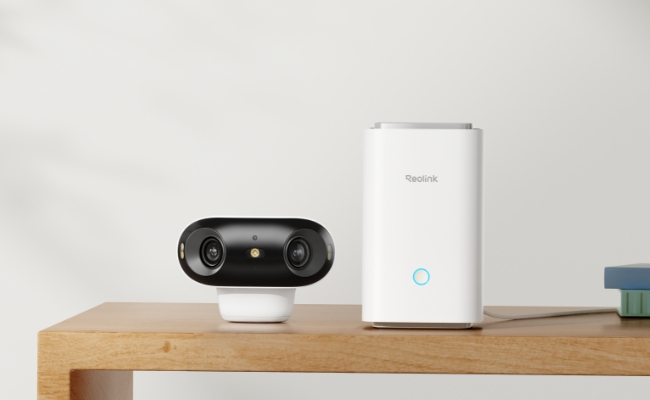
Reolink offers several wireless security camera systems built around the Home Hub, with different camera combinations for different security needs. One of these options pairs the Reolink Home Hub with two Argus 4 Pro cameras and solar panels.
In this review, we tested the Reolink Home Hub with Argus 4 Pro to see how the system performs in real-world use. We will cover its setup, central management, local storage, video quality, night vision, and key pros and cons.
Key Takeaways:
- Best for: Monitoring two outdoor areas, such as a driveway and backyard.
- Centralized system: Manage cameras, recordings, and alerts through the Home Hub.
- Flexible installation: Battery power, solar charging, and 180° views suit wide outdoor spaces.
- No subscription: Local storage requires no monthly fee, and the system can expand to eight cameras.
Product Overview
This camera kit includes a Reolink Home Hub, two Argus 4 Pro cameras, and two solar panels. The Home Hub provides centralized management and local storage, while the two battery-powered cameras provide 4K 180° coverage without requiring power or video cables at each camera location.
The camera bundle also comes in a 4-camera version. You can choose the kit based on your specific needs.
Reolink Home Hub: Key Features
The Reolink Home Hub serves as the central management and storage device for compatible Reolink cameras. Connected cameras can be managed through a single interface in the Reolink app, with recordings stored locally on the Hub.
- Local storage with two microSD card slots, supporting up to 1TB each (2TB total)
- Storage encryption and privacy protection
- No subscription required for local storage
- Supports up to 8 compatible Reolink cameras
- Built-in alarm for real-time alerts
Reolink Argus 4 Pro: Key Features
The Argus 4 Pro is a battery-powered dual-lens security camera that combines 4K resolution, a 180° panoramic view, and ColorX technology. It also supports solar charging, making it suitable for outdoor areas where running power cables is inconvenient.
- 4K UHD resolution with a 180° panoramic view
- Dual-band Wi-Fi 6 connectivity
- ColorX full-color night vision
- Rechargeable battery with solar charging support
- Smart person, vehicle, and animal detection
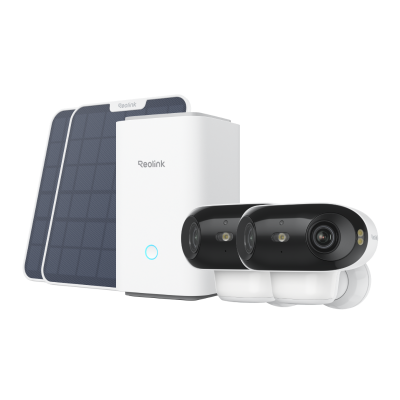
4K UHD Wi-Fi 6 Security System with 180° Blindspot-Free View
ColorX Night Vision, 1 Year of Local Storage, Exclusive Anti-Theft Algorithms, 180° Blindspot-Free Coverage, Expandable System Up to 8 Reolink Cams.
Reolink Home Hub with Argus 4 Pro: Pros and Cons
Pros:
- Complete wireless camera system with two 4K cameras, a Home Hub, and solar panels.
- 180° coverage from each camera is suitable for wide areas such as driveways and backyards.
- Centralized camera management and local storage through the Home Hub.
- No subscription required for local recording and supported smart detection features.
- Battery and solar power make outdoor camera placement more flexible.
- The system can be expanded with additional compatible Reolink cameras.
Cons:
- The Home Hub requires wired power and a connection to the router.
- Battery performance can vary depending on recording frequency, detection activity, and spotlight use.
- Two cameras may not provide enough coverage for larger properties.
Installation and Setup
Setting up the system involves two main parts: setting up the Home Hub and then adding the two Argus 4 Pro cameras. I completed the process through the Reolink app.
How to Set Up Reolink Home Hub?
- Power on the Home Hub: Connect the Home Hub to power and use an Ethernet cable to connect it to your router.
- Add the Hub to the Reolink app: Open the Reolink app and scan the QR code on the Home Hub to add the device.
- Complete the initial setup: Create the login credentials and assign a name to the Home Hub.
The process was straightforward, and the Home Hub was ready for camera pairing once the initial setup was complete.
How to Connect Reolink Argus 4 Pro to Home Hub?
- Open the Home Hub interface: Select the Home Hub in the Reolink app and tap the "+" button to add a device.
- Add the first Argus 4 Pro: Scan the camera's QR code and follow the in-app instructions to connect it to the Hub.
- Add the second camera: Repeat the same process for the second Argus 4 Pro.
- Check the connection: Once added, both cameras will appear under the Home Hub for centralized management and recording.
For more detailed instructions, see how to add Reolink cameras to the Home Hub.
Reolink Home Hub with Argus 4 Pro: Performance
After setting up the complete system, I tested it in several everyday monitoring scenarios. Instead of looking at individual specifications, I focused on how the two cameras and Home Hub worked together and how well the cameras handled wide outdoor areas during the day and at night.
Overall System Experience
The biggest difference from using two standalone cameras was the way the system worked as a whole. I could check both camera feeds and recordings from the Home Hub interface, while Scene Mode made it easier to change the system's behavior when I was home or away.
During daily use, alerts from the outdoor cameras could also trigger notifications on my phone and an audible alarm from the Home Hub indoors. This made the setup feel more like a complete home security system rather than two independent cameras.
Outdoor Monitoring Performance
I tested the cameras in wider outdoor areas, where the 180° view proved particularly useful. A single Argus 4 Pro could capture a broad scene without requiring me to switch between different camera angles, making it practical for locations such as driveways and backyards.
Daytime footage provided enough detail to review people and vehicles across the scene. The panoramic view was especially useful when the goal was to understand what was happening across a larger area rather than monitor one narrow point.
Nighttime Performance
The cameras also performed well after dark. In areas with some ambient lighting, ColorX maintained a color image without immediately relying on the spotlights, which helped preserve details such as clothing and vehicle colors.
In darker areas, the built-in spotlights provided additional illumination when needed. However, because the Argus 4 Pro is battery-powered, frequent nighttime activations and spotlight use can increase power consumption.
Where Does It Work Fast?
Based on the two-camera setup, wide viewing angle, and wireless installation, this system is particularly practical for homes with two separate outdoor areas to monitor.
-
Front Driveway + Backyard: Place one Argus 4 Pro facing the driveway and the other in the backyard. The wide view works well for covering open areas, while both cameras can be managed and recorded through the same Home Hub.
-
Front Yard + Side Entrance: For homes with more than one access point, one camera can monitor visitors and vehicles at the front while the second covers a side gate or walkway. Solar charging is useful where outdoor power outlets are not conveniently located.
-
House + Detached Garage: One camera can stay around the main house while the other monitors a detached garage or shed. This setup works best when both installation points have a stable wireless connection to the system.
FAQs
Does the Reolink Home Hub with 2x Argus 4 Pro require a subscription?
No. The system supports local recording and smart detection without requiring a monthly subscription. Recordings from the cameras can be stored locally through the Home Hub.
Can I add more cameras to the Reolink Home Hub with 2x Argus 4 Pro?
Yes. The two-camera kit can be expanded with additional compatible Reolink cameras. The Home Hub supports up to eight cameras, so you can start with two Argus 4 Pro cameras and add more cameras as your monitoring needs grow
Does the Reolink Home Hub with Argus 4 Pro work with smart home?
Yes. The Home Hub with Argus 4 Pro works with Google Home, allowing you to use Google Assistant voice commands to display the camera's live view on compatible smart displays, such as Google Nest Hub. This is useful for quickly checking areas such as the front yard or driveway without opening the Reolink app.
Verdict
Overall, the Reolink Home Hub with Argus 4 Pro is an excellent wireless security system. It can promptly monitor your property and also serves as an alarm system to alert you to any danger. The system is suitable for both homes and small-scale businesses. It is also future-proof, as the Home Hub is expandable up to 8 cameras, making it a good option for future needs. However, keep in mind that the Home Hub itself requires a wired connection for power supply, so it's important to plan some space for this kit.
Search
Subscribe for the Latest Updates
Security insights & offers right into your inbox