
12V Security Camera Guide 2026: Power Supply, Adapter & Installation
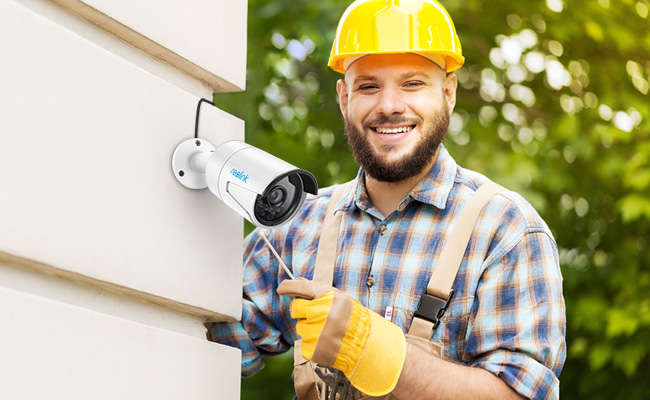
A 12V security camera runs on 12V DC power, so choosing the right power adapter, cable length, and installation setup is essential for stable performance. Long cable runs can introduce voltage drop, while an incompatible power supply can cause connection issues, image problems, or even hardware damage.
This guide explains how to choose a 12V security camera power supply, how far you can run power safely, what to check in a compatible adapter, and which features matter most when choosing the right 12V camera for your home or business.
- What Is a 12V Security Camera?
- What Power Supply Does a 12V Security Camera Need?
- 5 Key Features to Consider When Choosing the Best 12V Security Camera
- Which Reolink Cameras Support 12V Power?
- Best 12 Voltage Security Camera Recommendations
- How Far Can You Run a 12V Security Camera?
- 12V Security Camera vs. PoE Camera
- How to Install a 12V Outdoor Security Camera
- FAQs
- Conclusion
What Is a 12V Security Camera?
A 12V security camera is a surveillance camera powered by a 12-volt direct current ($12\text{V DC}$) power supply. It plugs directly into a standard electrical outlet using a 12V power adapter or connects to a centralized 12V power supply box for multi-camera setups.
Key Features:
-
Power Delivery: Runs on standard 12V DC current, requiring a nearby power outlet or dedicated low-voltage wiring.
-
Connection Types: Commonly used in plug-in Wi-Fi cameras or traditional analog/CCTV systems using BNC cables.
-
Best Used For: Permanent home or business setups where continuous power is preferred without relying on Power over Ethernet (PoE) or battery recharges.
Unlike PoE models that carry power and data over a single Ethernet cable, a 12V Wi-Fi camera requires two separate considerations: proximity to a wall outlet for power and a strong Wi-Fi signal for video transmission.
What Power Supply Does a 12V Security Camera Need?
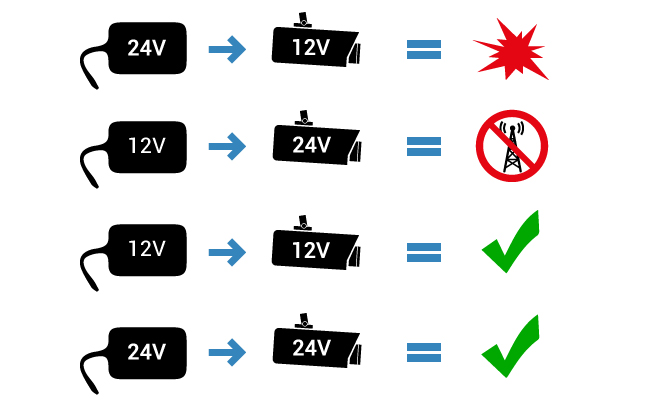
A 12V security camera requires a regulated 12V DC power supply that strictly matches its voltage, current, polarity, and connector dimensions.
-
Voltage (12V DC): Must match the camera's rated input exactly. Excess voltage damages internal components, while insufficient voltage causes reboot loops and failed IR night vision.
-
Amperage (1A or higher): The power supply must match or exceed the camera’s required current draw (e.g., a 12V 2A adapter works safely with a 12V 1A camera, as the device only draws what it needs).
-
Polarity (Center-Positive vs. Center-Negative): The plug orientation must match the camera's intake port. Reversing polarity risks permanently frying the motherboard.
-
Connector Size: The DC barrel jack must match the camera's port dimensions—typically 2.1mmx5.5mm—to ensure a snug connection and prevent intermittent power loss.
5 Key Features to Consider When Choosing the Best 12V Security Camera
Power Requirements and Adapter Compatibility
Match voltage exactly, ensure amperage meets or exceeds requirements, and verify physical connector dimensions to prevent hardware damage. Rated input (12V DC), current draw (e.g., 1A or 2A), center-positive vs. center-negative polarity, and barrel jack dimensions (commonly 2.1mm x 5.5mm.
Undervoltage leads to reboot loops and failed IR night vision, while incorrect polarity can permanently fry the device's motherboard.
Wired or WiFi Connectivity
Choose Wi-Fi for quick, flexible placement or Ethernet/PoE for uninterrupted, high-bandwidth 24/7 recording.
Wi-Fi Models require only a local 12V outlet for power, making them ideal for residential setups where running network lines is difficult.
Wired/PoE Models eliminate wireless signal interference and buffering, offering a stable data connection for high-resolution security feeds.
Recording and Storage Options
Look for subscription-free storage options like microSD cards, NVRs, or FTP servers to retain full control of your footage.
Event-Based MicroSD carding recording is best for motion-triggered clips with low ongoing storage demands.
Continuous 24/7 NVR and NAS recording is essential for multi-camera business or home systems requiring long-term video retention without monthly cloud fees.
Installation Distance and Voltage Drop
Account for electrical resistance on long cable runs to ensure your camera receives steady power at night.
Most 12V cameras run smoothly up to 100–130 feet, but high power draw from IR spotlights or heavy-gauge extension cables can extend this up to 300 feet.
Measure distance from the power outlet before mounting, and use thicker wire gauges (like 18 AWG) for extended outdoor runs.
Brand Support and Compatibility
Choose a manufacturer that provides clear spec sheets, active firmware updates, and direct accessory compatibility. Clear documentation ensures you can easily source replacement 12V power adapters, extend cable lengths safely, and resolve setup issues down the road.
Which Reolink Cameras Support 12V Power?
Many Reolink 12V cameras support DC 12V input, especially outdoor WiFi cameras and many PoE models. The exact current requirement varies by model, so always check the product specifications before choosing a replacement adapter.
Reolink WiFi Cameras
Most Reolink WiFi cameras use a 12V DC power adapter. Common exceptions include the E Indoor series and Lumus series, which typically use 5V power, as well as certain hardwired floodlight models that use AC power instead.
Reolink PoE Cameras
Many Reolink PoE cameras also support 12V DC input as an alternative power method, even though they are usually powered through Ethernet. Depending on the model, the required adapter is typically 12V 1A or 12V 2A.
Best 12 Voltage Security Camera Recommendations
The ideal 12V security camera depends on your power access, network setup, and monitoring needs. Plug-in Wi-Fi models are best when an outlet is nearby but running network cables is difficult, whereas PoE cameras excel in permanent setups requiring rock-solid wired connection stability and uninterrupted 24/7 recording.
Best Plug-In 12V WiFi Security Camera — Reolink OMVI 3i WiFi
You need continuous monitoring for a home, detached garage, or storefront that has an accessible electrical outlet nearby, but running an Ethernet cable back to your router isn't feasible.
The Reolink OMVI 3i WiFi uses a 12V plug-in power source for nonstop operation, relying on Wi-Fi for video transmission and instant mobile alerts. This eliminates battery recharging cycles while avoiding complex network wiring.
Best For: Indoor rooms, attached garages, retail shops, and sheltered entryways with reliable Wi-Fi coverage and a nearby wall outlet.
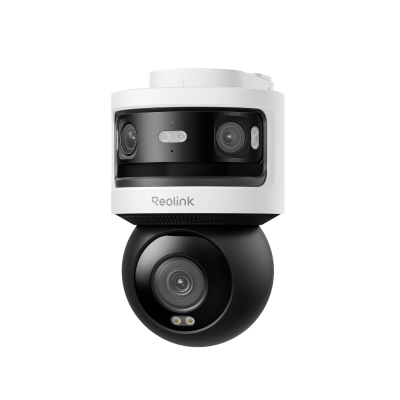
10MP+8MP Triple-Lens 360° Panoramic Pan-Tilt Camera
- 10MP Dual-Lens 180° View & 4K 360° Full Coverage
- Dual-Band WiFi 6 Connectivity & Local Storage
Best Outdoor PoE Camera with 12V Power Option — Reolink Duo 3 PoE
You need wide-angle coverage for a large outdoor property where extreme weather, long distances, or Wi-Fi interference demand a permanent, heavy-duty surveillance setup.
The Reolink Duo 3 PoE features a dual-lens design to capture ultra-wide panoramic footage across large spaces. It delivers single-cable Power over Ethernet (PoE) deployment, while including a backup 12V DC input port for maximum flexibility if you prefer running a dedicated power supply.
Best For: Driveways, large yards, building perimeters, and commercial entrances needing wired stability and maximum coverage with a single camera.

Groundbreaking 16MP Dual-Lens PoE Camera
16MP UHD, Dual-Lens, Motion Track, 180° Wide Viewing Angle, Power over Ethernet, Color Night Vision.
How Far Can You Run a 12V Security Camera?
There is no single maximum distance for every 12V security camera. The safe cable length depends on the camera’s current draw, wire gauge, connector resistance, and how much voltage drop the device can tolerate. Longer runs require more careful power planning.
Why Voltage Drop Happens
Voltage drop occurs when electrical resistance in a cable reduces the voltage that reaches the camera. The longer and thinner the cable, and the more current the camera draws, the greater the drop.
If too little voltage reaches the camera, you may see unstable operation, unexpected restarts, weak infrared night vision, or intermittent recording.
How Cable Gauge and Camera Load Affect Distance
Thicker wire has lower electrical resistance, so it can carry 12V power farther with less voltage loss. Camera load also matters: models with infrared LEDs, spotlights, heaters, or motorized pan-and-tilt functions may draw more current than basic fixed cameras.
For long cable runs, check both the wire gauge and the camera’s maximum power consumption rather than relying on a fixed distance such as 300 feet.
How to Extend 12V Camera Power Safely
-
Use Thicker Extension Cables: Choose heavy-gauge, outdoor-rated 12V extension cables designed to minimize line resistance over long distances.
-
Move the Power Source: Install an outdoor-rated junction box or relocated AC outlet closer to the camera so the DC cable run remains short.
-
Switch to Power over Ethernet (PoE): For runs exceeding 100–150 feet, switching to a PoE setup carries both power and data reliably up to 328 feet (100 meters) over a single Ethernet cable.
-
Avoid Over-Volting: Never connect a higher-voltage adapter (e.g., 18V or 24V) to compensate for voltage drop unless the camera explicitly supports variable input; doing so risks permanently frying the circuit board.
12V Security Camera vs. PoE Camera
A 12V security camera** and a PoE camera can both provide reliable wired surveillance, but they handle power and networking differently.
Choose a 12V camera when you already have a suitable DC power source or want to use WiFi for data transmission. Choose PoE when you prefer a single-cable installation and a stable wired connection for continuous surveillance.
How to Install a 12V Outdoor Security Camera
Installing a 12V outdoor camera requires proper protection against moisture, weather, and physical stress to ensure continuous operation.
1. Protect Outdoor Power Connections**
Seal exposed DC plugs and extension joints to prevent moisture intrusion, corrosion, and power failure. Keep connections sheltered from direct rain, and apply weather-resistant covers or silicone sealing tape over outdoor plug joints.
2. Use a Waterproof Junction Box
Mount a weatherproof junction box behind or beside the camera to safely enclose bulky power plugs and Ethernet connectors. Prevents direct surface moisture contact, relieves cable strain, and leaves a cleaner installation footprint.
3. Verify IP Weather Rating and Shelter
Match the camera's IP rating (such as IP65 or IP66) to your environment's exposure level before mounting. Mount the camera under an eave, soffit, or porch overhang whenever possible to provide extra shelter for the camera body, lens, and cable entry points.
FAQs
Do they make 12 volt security cameras?
Yes. Many security cameras are designed to run on 12V DC power, including WiFi, wired, and some PoE-capable models. These cameras are commonly used for home, business, and outdoor surveillance.
Can a CCTV camera run on 12V DC?
Yes, if the camera is rated for 12V DC input. Always check the camera specifications before connecting a power adapter, since using the wrong voltage, polarity, or connector can cause unstable operation or damage.
Is 12V the same as 12V DC?
Not exactly. 12V only describes the voltage level, while 12V DC means 12 volts of direct current. Most 12V security cameras require 12V DC, not 12V AC, so the power type must match the camera’s specifications.
Conclusion
A 12V security camera can be a practical choice for home, business, and outdoor surveillance, but reliable performance depends on matching the camera with the correct power supply and installation setup. Check the required voltage, amperage, polarity, and connector size before using a replacement adapter, and plan longer cable runs carefully to reduce voltage drop.
Search
Subscribe for the Latest Updates
Security insights & offers right into your inbox