
Best Self-Monitoring Security Systems 2026:Top Picks & What to Look For
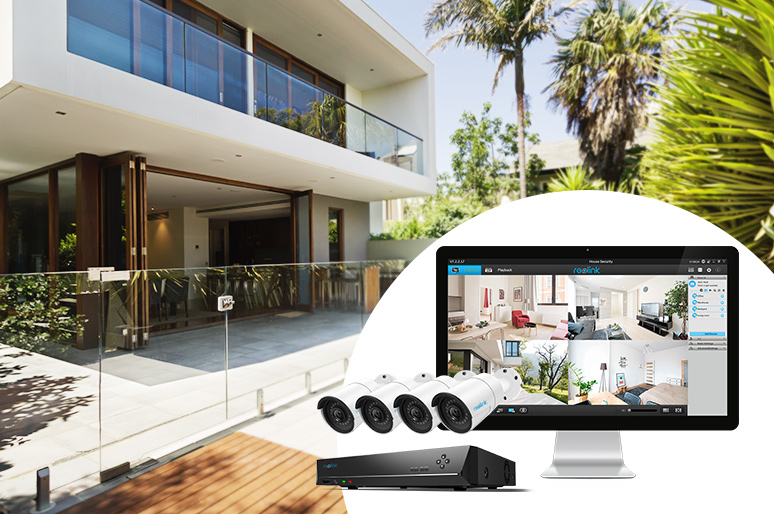
Choosing the right self-monitoring security system comes down to three factors: finding high-resolution hardware, avoiding monthly subscription fees, and picking a setup that fits your property's wiring.
With dozens of brands competing for your attention, sorting through camera specs, local storage options, and app features can feel overwhelming. To save you time, this guide breaks down the core benefits of self-monitoring, highlights our top-tested picks for every property type, and reveals the key features you need to evaluate before buying.
- What Is a Self Monitoring Security System?
- Why Choose a Self-Monitoring Home Security System?
- 5 Key Features to Look for in the Best Self-Monitoring Security System
- 3 Best Self-Monitoring Security Systems for Different Setups
- Self Monitoring vs Monitored Security System: Key Differences
- How to Convert an Existing Security System to Self-Monitoring
- Real-World User Opinions on Self-Monitoring Security Systems
- FAQs
- Conclusion
What Is a Self Monitoring Security System?
A self-monitoring security system is a setup where property owners handle their own security alerts directly via a mobile app—eliminating the need for paid call centers or monthly subscriptions.
When motion sensors, cameras, or door alarms trigger, real-time push notifications or video clips are sent straight to your smartphone. This gives you immediate, full control to check live video feeds, speak through two-way audio, or notify emergency services yourself.
Why Choose a Self-Monitoring Home Security System?
A self-monitoring security system gives you complete, independent control over your home's protection without locked-in contracts or ongoing fees.*
Key benefits include:
-
Zero Monthly Subscriptions: Pay only for your initial equipment. Avoid compulsory service contracts and recurring monthly fees.
-
Full Equipment Ownership: You own 100% of your hardware from day one, giving you freedom to expand, change, or reconfigure your setup anytime.
-
Real-Time Verification: Instant app notifications let you inspect live video feeds, confirm false alarms, or act immediately when a real threat occurs.
-
100% Rent-Friendly & Portable: Simple DIY installation means no wall drilling or pro installation appointments. Unplug and reinstall effortlessly if you move.
5 Key Features to Look for in the Best Self-Monitoring Security System
When choosing a self-monitored security setup, prioritize features that simplify daily management and eliminate false alarms without requiring paid tech support. Look for these five core capabilities:
1. Simple DIY Installation
Look for plug-and-play hardware that requires zero professional installation costs, allowing you to mount or move cameras in minutes.
-
Wire-Free Options: Battery or solar-powered wireless cameras require no wall drilling or running cables—ideal for renters or temporary setups.
-
Pre-Paired Systems: Integrated NVR or hub kits automatically connect to cameras out of the box, drastically cutting setup time.
-
Self-Contained Mounts: Magnetic bases or adjustable bracket mounts make repositioning simple if your monitoring needs change.
2. Flexible Network Connection Types
Match your system's connectivity (Wi-Fi, PoE Ethernet, or 4G Cellular) to your property's internet stability and power infrastructure.
-
Wi-Fi Systems: Best for standard residential setups with strong router coverage; easy to position anywhere within range.
-
PoE (Power over Ethernet): Delivers video data and camera power over a single cable; offers maximum stability and zero wireless signal dropouts.
-
4G LTE Cellular: Ideal for off-grid properties, vacation cabins, or construction sites with no Wi-Fi or mains power available.
3. AI Motion Detection & Instant Alerts
Modern self-monitoring relies on AI person, vehicle, and package detection to filter out false alarms and notify you only when real action is needed.
-
Smart AI Detection: Distinguishes human shapes and vehicles from blowing leaves or small animals, reducing false push notifications by up to 90%.
-
Multi-Channel Warnings: Generates real-time smartphone app notifications, email alerts with photo snapshots, and custom on-site audio sirens to scare off intruders.
-
Custom Motion Zones: Draw specific alert zones on screen—like your driveway—to ignore busy public streets or background tree motion.
4. Intuitive Remote Control & App Scheduling
A clean, zero-subscription mobile app allows you to arm system modes, check live video streams, and communicate via two-way audio from anywhere.
-
One-Tap Arming Modes: Easily toggle between "Home," "Away," and "Disarmed" modes via smartphone or scheduled timers.
-
Two-Way Audio: Speak directly to visitors, package couriers, or potential trespassers through your phone's microphone.
-
Multi-Device Support: Monitor live views and play back local recordings effortlessly on iOS, Android, macOS, or PC client software.
5. Future Expansion & Scalability
Choose a flexible brand ecosystem that lets you add extra cameras, sensors, or storage capacity over time without replacing your core equipment.
-
Expandable Channel Capacity: Selecting a 4, 8, or 16-channel NVR lets you start with 2 cameras and add more as your coverage needs grow.
-
Cross-Device Compatibility: Ensure outdoor spotlight cameras, doorbell cameras, and indoor pan-tilt units can seamlessly coexist on the same app platform.
-
Storage Upgradeability: Look for NVRs or local hubs with open SATA hard drive bays or expandable microSD slots to increase local footage retention.
3 Best Self-Monitoring Security Systems for Different Setups
No single security system fits every property. The right setup depends on whether you are securing a suburban house, an apartment rental, or a multi-zone commercial property. Here are our top scenario-based picks:
1. Best for Standard Homes needing 24/7 Continuous Coverage: Reolink RLK8-800B4
A plug-and-play PoE kit ideal for homeowners who want round-the-clock continuous recording across main entryways without battery charging or Wi-Fi dropouts.
You own a single-family home and need total peace of mind around high-traffic areas (front door, driveway, backyard, side entrance). You want continuous 24/7 footage saved locally so you never miss a moment, even if your internet goes down.
Power over Ethernet (PoE) delivers steady power and video data over a single network cable. The centralized NVR records constantly to a built-in 2TB hard drive with zero subscription fees.
Key Features:
-
Ultra HD 4K 8MP Resolution: Crisp clarity day and night to capture essential fine details.
-
Smart AI Detection: Distinguishes people and vehicles to prevent false motion alerts.
-
24/7 Local Recording: Comes with a pre-installed 2TB HDD for non-stop footage retention.
-
IP67 Weatherproof: High durability against harsh outdoor rain, snow, and heat.
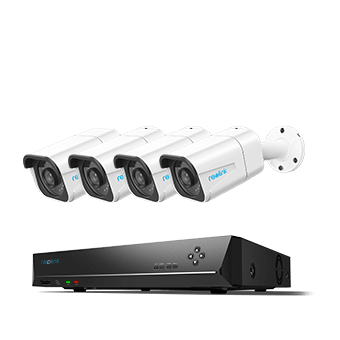
4K 8-Channel PoE Security System
4 pcs 4K Ultra HD Security Cameras; 2TB HDD 8-Channel NVR for 24/7 Recording; Person/Vehicle Detection; Plug & Play; 2 Network Solutions.
2. Best Wire-Free Setup for Renters & Easy DIY: Reolink Argus PT Ultra Kit with Home Hub
A completely wire-free, pan-and-tilt battery camera kit designed for renters or homeowners who want wide 360° coverage without drilling walls or running cables.
You live in an apartment or rental property where running permanent cables isn't allowed, or you want a flexible setup that moves with you when you relocate. You need flexible placement and the ability to rotate the camera remotely to inspect wide areas like a large patio or living area.
The wire-free design requires no installation wiring, while the centralized Home Hub provides encrypted local storage and sound deterrents without requiring paid cloud plans.
Key Features:
-
360° All-Around Protection: 4K video resolution paired with 355° pan and 140° tilt control.
-
Encrypted Local Storage: Home Hub stores footage locally with bank-grade encryption—no monthly fees.
-
Anti-Theft Security: Built-in hub alerts notify you immediately if a camera is tampered with or moved.
-
System Scalability: Expandable up to 8 Reolink Wi-Fi cameras as your space grows.
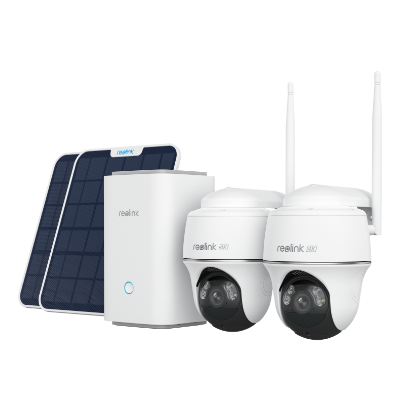
Wireless Security System With 4K PT Standalone Battery/Solar Wi-Fi Cameras
4K Color Footage Day & Night, 1 Year of Local Storage, Exclusive Anti-Theft Algorithms, Expandable System Up to 8 Reolink Cams
3. Best Subscription-Free System for Large Properties & Business: Reolink RLK16-1200D8-A
A high-capacity 12MP system engineered for large estates, retail shops, or farms requiring multi-angle coverage and maximum digital zoom precision.
You manage a large property, ranch, store, or warehouse with multiple blind spots across expansive spaces. You need ultra-high resolution to read license plates or identify faces at distance, plus room to expand your camera count over time.
Featuring 12MP Ultra HD detail (4512×2512) and a 16-channel NVR, this kit gives you enterprise-grade surveillance capabilities with complete local privacy and $0$ recurring costs.
Key Features:
-
12MP Ultra HD Precision: Industry-leading clarity allowing deep digital zooming on critical details.
-
16-Channel NVR Hub: Comes with 8 dome cameras and supports up to 16 cameras for future expansion.
-
Built-in 4TB Storage: Large pre-installed hard drive capacity to store weeks of continuous multi-camera video.
-
Discreet Vandal-Resistant Design: Sleek dome form factor blends seamlessly into residential or commercial structures.
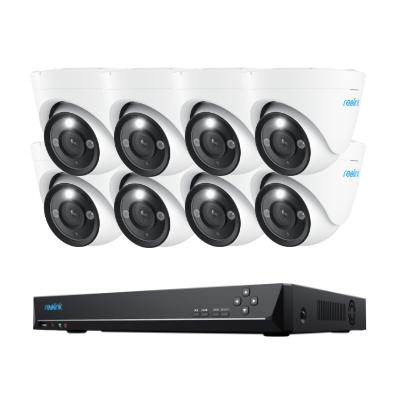
12MP PoE Security System with Color Night Vision
12MP Ultra HD, Person/Vehicle Detection, Power over Ethernet, 16-Channel NVR.
Self Monitoring vs Monitored Security System: Key Differences
The primary difference between a self-monitored system and a professionally monitored system comes down to cost and control: self-monitored systems require zero monthly fees and give you direct ownership, while professionally monitored systems charge ongoing service subscriptions to have a 24/7 call center manage your alerts.
Below is a direct feature comparison to help you choose the right model for your property:
How to Convert an Existing Security System to Self-Monitoring
Converting your current security system to self-monitoring lets you eliminate expensive monthly fees while maintaining direct control over your home's protection via your smartphone. Follow these four steps to make the transition:
Step 1: Audit Your System & Compatibility
Determine whether your current setup can be updated via software settings or if it requires a retrofitting hardware module.
-
Smart/Wireless Systems: Modern wireless systems often include built-in Wi-Fi or cellular chips. Check if the manufacturer's mobile app allows self-monitoring features (like push notifications and live view) without an active paid plan.
-
Legacy/Wired Systems: Older hardwired systems (e.g., traditional Honeywell or DSC panels) can be repurposed. You can connect retrofit conversion panels (such as Konnected or Envisalink) directly to your existing door/window sensors, allowing them to send alerts to platforms like SmartThings, Home Assistant, or Apple Home.
Step 2: Cancel Professional Monitoring & Verify Ownership
Formally cancel your current monitoring contract to avoid service overlap and ensure you own all on-site hardware outright.
-
Check Your Contract Terms: Review your agreement for early termination fees or required written notice windows.
-
Confirm Hardware Ownership: Ensure you fully own the panel, keypads, and sensors so the provider cannot remotely lock or brick the devices once service ends.
-
Request Master/Installer Codes: Ask the vendor for the system's master installer code. Having this code allows you to reprogram panel settings or reset the system without vendor intervention.
Step 3: Install a Compatible App or Smart Integration
Connect your hardware to a smartphone application or home automation platform to enable zero-fee monitoring.
-
Download Manufacturer App: Re-link your system's main hub or IP cameras to the official mobile app using your local Wi-Fi or network connection.
-
Integrate with Smart Hubs: If retrofitting a legacy system, pair your new Wi-Fi bridge or conversion board with your preferred smart home app (e.g., Alexa, SmartThings, or Google Home).
Step 4: Configure Push Alerts & Emergency Routines
Customize motion sensitivity, alert types, and emergency shortcuts to handle alerts directly.
-
Set Real-Time Push Alerts: Turn on instant app notifications and email snapshots for motion detection, door contact triggers, or water leaks.
-
Filter False Alarms: Adjust motion sensor sensitivity zones or enable AI human/vehicle detection settings so you only get alerted for actual security events.
-
Create Emergency Shortcuts: Program one-tap speed-dial shortcuts on your phone for local emergency dispatch, ensuring you can quickly call for assistance if a real threat is visually verified.
Real-World User Opinions on Self-Monitoring Security Systems
Many Reddit users prefer self-monitored security systems because they want more control, avoid monthly fees, and manage their own security footage. Across discussions, users commonly look for reliable alerts, local storage, and flexible DIY installation.
What Users Value Most in Self-Monitored Security Systems
- No subscription fees: Users prefer systems that provide mobile alerts and access to recordings without mandatory monthly plans.
- Local storage and privacy: Many homeowners favor microSD cards, NVRs, or local hubs to keep their footage under their control.
- Smart and accurate alerts: Person detection and customizable notifications help reduce false alarms.
- Easy DIY setup: Users want systems that are simple to install and can be expanded with more cameras or devices.
Common Concerns
Users also mention that self-monitoring requires homeowners to respond to alerts themselves. Reliable internet, proper camera placement, and reducing unnecessary notifications are important for effective protection.
Overall, Reddit users lean toward subscription-free security systems with local recording, remote viewing, and smart detection for a more independent home security setup. Reolink cameras support this approach with AI detection, remote access, and local storage options through microSD cards, NVRs, and Home Hub devices.
FAQs
What is the best self-monitored security system?
The best self-monitored security system depends on your security needs, but an ideal system should offer reliable alerts, smart detection, remote viewing, and local storage without mandatory subscription fees. A system with AI-powered person detection, flexible installation options, and support for microSD cards or NVR recording can provide greater control and privacy.
Can I monitor my own security system?
Yes. A self-monitored security system allows you to receive real-time alerts, view live footage, and check recordings directly through a mobile app. Many modern security cameras support remote access and smart notifications, allowing homeowners to monitor their property without professional monitoring services.
What security system do burglars hate?
Burglars typically avoid security systems that increase the risk of being detected, such as visible cameras, motion-activated lights, loud alarms, and smart alerts. A security camera system with high-resolution video, night vision, and AI detection can help deter intruders and provide clear evidence if suspicious activity occurs.
Conclusion
Self-monitoring security systems are better choices than monitored ones in terms of their price and performance. They give you full control of your home security and you can monitor everything that happens around your property. Let us know if you have any further questions in the comments below and we would love to answer!
Search
Subscribe for the Latest Updates
Security insights & offers right into your inbox