
PIR Cameras: Ultimate Guide to Get Quality Buy
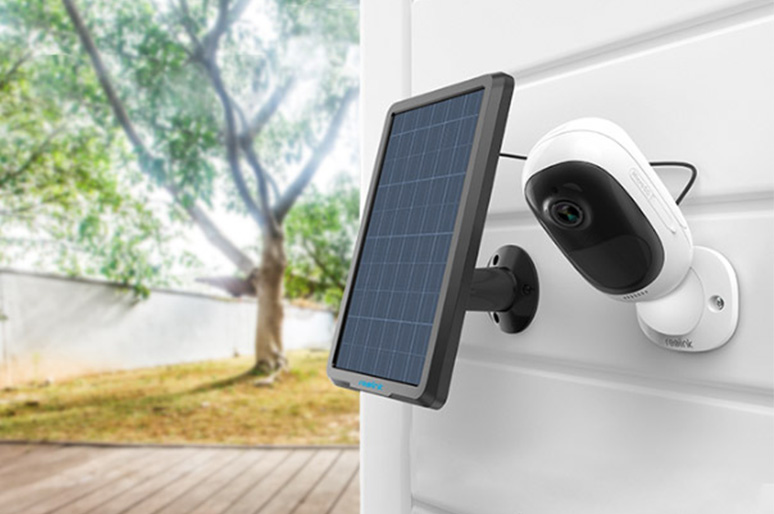
Not all security cameras detect motion in the same way. Some analyse changes in video images, while others use PIR sensors to detect movement based on infrared radiation. These differences can affect motion detection accuracy, false alerts, and overall camera performance.
This guide explores how PIR security cameras work, how they compare with other motion detection technologies, and what to look for when choosing the right camera for your security needs.
Key Takeaways:
- PIR cameras detect motion through infrared changes. They sense changes in heat patterns caused by moving people, animals, or other objects, triggering recording and alerts.
- PIR detection helps reduce false alerts. Unlike conventional video-based motion detection, PIR sensors are less affected by moving shadows and lighting changes.
- Detection range and placement matter. Many PIR cameras detect motion up to 10m (33ft). Positioning the camera across a walking path can improve detection reliability.
- PIR cameras suit specific monitoring areas. Front entrances, driveways, garden gates, and remote properties are practical locations, especially when motion-triggered recording is preferred.
What Is a PIR Security Camera? How Does It Work?
What Is a PIR Security Camera?
A PIR (Passive Infrared) security camera uses a built-in sensor to detect motion by sensing changes in infrared radiation within its detection area. Unlike cameras that detect movement by comparing video frames, PIR cameras respond to changes in heat patterns, such as when a person or animal moves across the monitored area.
Many Reolink security cameras feature built-in PIR sensors that detect motion and trigger recording or alerts when activity is detected.
How Does a PIR Security Camera Work?
A PIR sensor monitors changes in infrared radiation within its detection range. When a person or animal moves across the area, the change in infrared radiation can trigger the camera's motion detection system.
Here's how the process typically works:
- Detect Motion: The PIR sensor detects changes in infrared radiation caused by movement within its detection area.
- Trigger Recording: The camera starts recording according to its settings when motion is detected.
- Analyse the Event: On cameras with AI detection, the video may be analysed to distinguish people, vehicles, or animals.
- Send an Alert: The camera can send a push notification to your phone so you can check the detected activity.
Benefits of PIR Security Cameras
Fewer False Alerts: PIR sensors are less likely to be triggered by moving shadows or sudden lighting changes, helping reduce unnecessary notifications.
Low Power Consumption: PIR sensors use little power and can activate motion-triggered recording without continuous video analysis.
Reliable Detection in Darkness: PIR sensors detect changes in infrared radiation without relying on visible light, making them useful for monitoring entrances and driveways at night.
PIR vs. Pixel-Based Motion Detection:
PIR Security IP Cameras: Right Choices to Make Before Purchasing
When choosing a PIR security camera, consider where it will be installed, how far it needs to detect motion, and how you want to store and access recordings. The following factors can help you compare different models.
1. Indoor vs. Outdoor Use
For outdoor locations such as driveways, gardens, and entrances, choose a camera with an IP65 rating or higher. IP65 protects against dust and water jets, while IP66 offers stronger protection against powerful water jets.
Also check the operating temperature range. For example, a camera rated for -10°C to 55°C (14°F to 131°F) may be suitable for many outdoor environments, but areas with freezing winters may require a model rated for lower temperatures.
For indoor use, weather resistance is less important. Instead, focus on the camera's size, mounting options, and whether its detection area covers the intended room or entrance.
2. PIR Detection Range and Adjustable Sensitivity
Many PIR security cameras offer a detection distance of up to 10m (33ft), with horizontal detection angles commonly around 90°–120°, depending on the model.
For example, the Reolink Argus 3 Ultra has a 100° horizontal PIR detection angle and a maximum PIR detection distance of 10m (33ft). These specifications can help you assess whether the sensor covers a front entrance or a section of your driveway.
Camera placement also matters. PIR sensors generally detect movement across their field of view more reliably than movement directly towards the camera.
Look for adjustable PIR sensitivity to fine-tune detection. Lower sensitivity may help reduce alerts from distant movement, while higher sensitivity can be useful when monitoring a larger area. Available settings and their effects vary by model.
3. Video Resolution and Night Vision
Choose at least 1080p (1920 × 1080) for basic monitoring. For driveways, gardens, and other larger areas, 2K or 4K resolution can provide more detail when reviewing recordings.
For example, the Reolink Argus PT Ultra offers 4K (3840 × 2160) resolution, infrared night vision up to 10m (33ft), and spotlight-assisted colour night vision. These features can help capture clearer footage of people or vehicles around a property.
However, PIR detection range and night vision range are different specifications. A camera may detect movement at 10m without capturing enough detail to identify a person's face at that distance.
4. Local Storage vs. Cloud Storage
Check whether the camera supports microSD cards and its maximum storage capacity. Common options include 128GB, 256GB, and 512GB, although compatibility varies by model.
For reference, the following table estimates how much video different card capacities can store at a constant 4Mbps bitrate.
These are theoretical estimates based on continuous recording at 4Mbps. Actual storage duration depends on video bitrate, compression, formatting overhead, and recording settings. Motion-triggered recording may cover a longer period.
A PIR security camera with an SD card slot can store footage locally without requiring a monthly cloud subscription. Cloud storage offers the additional benefit of off-site access to recordings, but fees and availability vary.
5. Two-Way Audio and Remote Access
For monitoring front doors or entrances, look for a PIR camera with a built-in microphone and speaker. Two-way audio allows you to speak with visitors or delivery drivers directly through a smartphone.
Remote access is useful when monitoring a property while away. Check whether the camera supports live viewing, motion-triggered push notifications, and playback through a mobile app.
For example, the Reolink Argus 4 Pro combines PIR motion sensing with AI person, vehicle, and animal detection. This allows the camera to distinguish supported object types after motion triggers an event, helping users focus on relevant alerts.
For areas with frequent movement, such as driveways facing public roads, AI detection and configurable notification settings can be particularly useful.
Top-Rated PIR Camera Recommendations
Reolink Go PT Ultra – Best for Remote Properties
The Reolink Go PT Ultra is a 4K battery-powered PIR security camera with 4G LTE connectivity and pan-and-tilt functionality. Its PIR sensor triggers motion recording, while AI person, vehicle, and animal detection helps filter alerts. With optional solar charging, it can monitor locations without Wi-Fi or wired electricity.
Best for: Remote cabins, farms, and properties without Wi-Fi access.
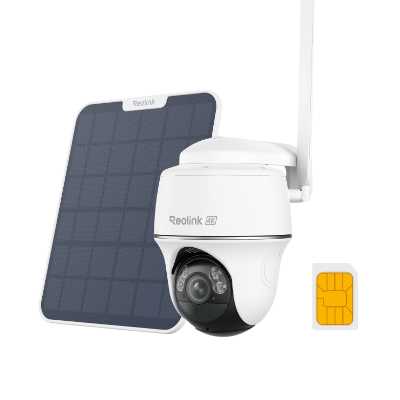
4K 8MP Wire-Free 4G LTE PT Battery Camera
4K 8MP; Smart Detection; 355° Pan & 140° Tilt; Battery/Solar Powered; Color Night Vision; Smart Real-Time Alert.
Reolink TrackMix Battery – Best for Driveways
The Reolink TrackMix Battery combines PIR motion detection with dual-lens viewing and automatic tracking. When motion triggers the camera, it can follow supported moving subjects while capturing both an overview and closer details.
Best for: Driveways and gates where PIR detection and automatic tracking help monitor approaching people and vehicles.
Where to Use PIR Security Cameras?
Where to Use PIR Security Cameras?
PIR security cameras are useful for monitoring areas where people or animals pass through a defined detection zone. For reliable motion detection, position the camera according to the expected movement path, detection distance, and surrounding environment.
1. Front Doors and Porches
Mount the camera about 2–3m (6.5–10ft) above the ground, angled towards the path leading to your entrance. Position it so visitors cross the PIR detection area rather than walk directly towards the sensor.
For porches facing busy streets, adjust the PIR sensitivity to avoid triggering alerts from pedestrians passing outside your property.
2. Driveways and Garages
For a PIR camera with a maximum detection distance of 10m (33ft), focus on the garage entrance or the area around parked vehicles rather than attempting to cover a long driveway.
Position the camera diagonally across the driveway to detect people approaching cars or walking towards the garage. Keep in mind that PIR sensors respond to changes in infrared radiation, so vehicle detection may vary with engine temperature and environmental conditions.
3. Side Passages and Garden Gates
Install the camera where people must pass through a narrow entrance, such as a side gate or passage between two buildings. This creates a defined detection zone and reduces unnecessary monitoring of surrounding areas.
For a passage approximately 1–2m wide, angle the PIR sensor across the walking route. Avoid pointing it towards nearby roads, moving vegetation, or direct sunlight, which may contribute to unwanted alerts.
4. Farms and Remote Buildings
Position PIR cameras near farm gates, equipment sheds, or storage entrances rather than attempting to monitor an entire field with one sensor.
For example, a camera with a 10m detection range can monitor movement near a shed entrance but cannot reliably detect someone crossing a field 30m away. Where Wi-Fi and mains power are unavailable, consider a 4G PIR camera with solar charging.
5. Wildlife Trails and Garden Feeding Areas
Place PIR cameras along established animal trails or near feeding areas where animals regularly pass. Mount the camera relatively low and angle it across the expected movement path.
For smaller animals, position the camera closer to the target area because PIR detection distance varies with body size, temperature contrast, and movement speed. Avoid placing the camera behind glass, as standard window glass blocks the long-wave infrared radiation used by PIR sensors.
FAQs
Which is better, PIR or motion detection?
Neither is universally better. PIR is a type of motion detection, and the right choice depends on your monitoring environment, power requirements, and what you want to detect.
Will a PIR detect a car?
Yes, a PIR sensor can detect a moving car if its temperature differs sufficiently from the surroundings. A warm engine or tyres may make detection easier, but results depend on the vehicle's temperature, distance, movement direction, and ambient conditions.
Bottom Line
Well! That's it for the lowdown on PIR security cameras. By the time you get these knowledge base and tear down the confusions towards PIR cameras, you should be ready to pick the best PIR security camera in different price ranges.
Feel free to leave a comment below if you have any questions concerning PIR cameras.
Search
Subscribe for the Latest Updates
Security insights & offers right into your inbox