
4K vs 1440p vs 1080p vs 720p: How to Choose
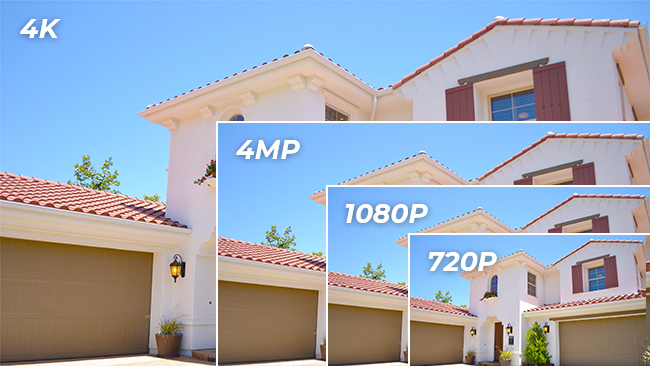
4K, 1440p, 1080p, and 720p describe how many pixels a screen or camera captures. More pixels generally means sharper, more detailed images, but the right choice depends on your screen size, use case, and hardware budget.
This guide compares all four resolutions across image quality, storage, cost, and real-world performance, including what each resolution means specifically for security cameras, TVs, and gaming. For most home security setups, 1440p (2K) or 4K delivers the best value today. 1080p remains solid for budget builds. 720p is no longer worth purchasing.
What Are 4K, 1440p, 1080p, and 720p Resolutions?
What Is 4K?
4K (Ultra HD) captures 3840 x 2160 pixels (8 megapixels), roughly four times the pixel count of 1080p. At that density, you can digitally zoom into recorded footage and still identify faces or license plates that would be unreadable at lower resolutions. It is also referred to as 8MP or 2160p.
From vivid colors to precise detail at distance, 4K is the benchmark for high-quality surveillance and large-screen display. Gaming, professional creative work, and high-end streaming all benefit significantly from 4K. For security cameras specifically, 4K truly shines when you need to cover large outdoor areas without sacrificing the ability to zoom in on specific zones.
What Is 1440p?
1440p, also called 2K, QHD, or 4MP, captures 2560 x 1440 pixels, nearly 1.8x the pixel count of 1080p. For security cameras, it sits in a strong practical position. It has enough resolution to identify faces and plates at typical driveway distances, without the storage overhead of 4K.
For gamers, 1440p offers a significant visual step up from 1080p without the demanding hardware requirements of 4K. For everyday display use, it delivers sharp images without straining your system.
What Is 1080p?
Also referred to as Full HD (FHD), 1080p captures 1920 x 1080 pixels. It remains the baseline resolution for most display devices and streaming services, and it still performs well for standard surveillance, general computing, and gaming on mid-range hardware.
While it offers fewer pixels than 4K and 1440p, 1080p is more than adequate for monitoring indoor spaces or smaller properties where subjects are relatively close to the camera. The 4K vs 1080p comparison goes beyond pixel count. 4K cameras often come with wider lenses that cover more area in a single frame.
What Is 720p?
720p (HD Ready) captures 1280 x 720 pixels. Once a legitimate entry point into high-definition video, it now sits at the bottom of the usable resolution range. It still appears in live streaming and broadcasting contexts where bandwidth is constrained, and on older or budget mobile devices. For security camera applications, 720p is effectively obsolete.
Pro Tip: One of the most commonly compared resolutions are 1080p vs 720p. If you are keen to understand in greater detail, See our guide on FHD vs HD for a direct quality comparison.
How Do 4K, 1440p, 1080p, and 720p Actually Compare?
The table below compares 4K, 1440p, 1080p, and 720p across the dimensions that matter most for real-world use, from pixel counts and hardware needs to the surveillance applications each resolution is best suited for.
Go Deeper: 4K Resolution Comparisons Explained
When it comes to choosing the right resolution for your display or camera, the 4K tier has more nuance than the name suggests. The articles below each address a specific 4K comparison. Use the one-liner to find the article that matches your situation.
- 4K vs. 8K. Wondering whether 8K cameras or screens are worth it yet? Start here.
- 4K vs. 2K. A focused head-to-head between 4K (8MP) and 2K (4MP) for security cameras and displays.
- 4K vs. 5K. Relevant if you use Apple Pro Display XDR or work in professional creative environments.
- 4K vs. 5MP. Comparing 5MP security cameras against 4K/8MP models, useful for mixed-spec system planning.
- 4K vs. 2160p. Explains why "4K" and "2160p" appear on different products but don't always mean the same thing.
- 4K vs. Blu-ray. Read this if you're deciding whether upgrading your home theater to 4K makes a visible difference.
- 4K Resolution Explained. A full breakdown of 4K pixel counts, naming conventions, and what "8MP" means in practice.
- 4K vs. QHD. Helps you choose between a 4K monitor and a QHD (1440p / 2560x1440) display.
How Does Resolution Affect Security Camera Performance?

For security cameras, resolution affects more than image sharpness. It determines how wide an area a single camera can cover, how much storage your system consumes, and whether you can digitally zoom into recorded footage and still identify a face or license plate. 4K delivers the most detail and coverage. 1440p (2K) is the practical choice for most home builds. 1080p handles standard surveillance needs. 720p is no longer competitive and should not be considered for new purchases.
Which Resolution Gives the Best Image Quality?
Higher resolution produces sharper footage with more recoverable detail. 4K and 1440p cameras can identify license plates and faces at distances where 1080p footage becomes ambiguous, particularly when you need to zoom into a specific area of a wider frame.
A 4K camera capturing a standard driveway scene, for example, gives you enough pixel density to crop into a 1080p-equivalent view of the license plate zone while still retaining the full wide-angle frame for context. A 1080p camera covering the same scene forces a trade-off. Frame it tight enough to read the plate and you lose the peripheral area. Frame it wide and the plate becomes unreadable.
For 1080p Full HD security cameras, plate recognition depends heavily on camera quality and distance. For 720p cameras, the chances are slim under most real-world conditions.
Pro Tip: Resolution alone doesn't determine image quality. Sensor size, aperture, and night vision technology all contribute. A high-quality 1080p security camera with a large sensor and a fast aperture can outperform a budget 4K camera in low-light conditions.
Does a Higher Resolution Mean a Wider Field of View?
Not automatically, but in practice, yes. Higher-megapixel cameras are typically paired with wide-angle lenses because they have enough pixel density to maintain usable detail across a broader frame.
A single 4K camera can cover approximately the same area as two to three 1080p cameras placed side by side, with no blind spots between them. For a property owner monitoring a large backyard or parking area, this translates directly into lower hardware cost and simpler cable routing.
How Much Bandwidth and Storage Does Each Resolution Use?
4K cameras do consume more bandwidth and storage than 1440p, 1080p, or 720p cameras when using the same codec. However, most modern 4K security cameras use H.265 compression, which reduces file sizes by roughly 50% compared to H.264 at the same quality level.
In practice, a 4K camera recording continuously in H.265 uses approximately the same daily storage as a 1080p camera recording in H.264, typically in the range of 40 to 60GB per camera per day depending on motion activity and scene complexity.
Pro Tip: If your NVR or router does not support H.265 decoding, a 4K camera will fall back to H.264 compression, roughly doubling storage consumption. Check your recorder's codec support before upgrading to 4K.
Which Resolutions Are Compatible with My Existing Setup?
1440p, 1080p, and 720p cameras all display correctly on a 4MP or higher monitor without issue. A 4K camera connected to a 1080p monitor will display at 1080p. You won't see the full 4K detail on-screen, though recorded footage still retains the full resolution.
The practical question for most buyers is monitor compatibility. 4K monitors have become widely available and are priced competitively with 1080p screens. If you are purchasing a 4K camera system, pairing it with a 4K monitor gives you the full benefit of the resolution, for both live monitoring and recorded footage review.
How Much More Do Higher-Resolution Cameras Cost?
Higher-resolution cameras carry a premium at purchase, but the total system cost calculation is not straightforward. A single 4K camera covering a large area can replace two or three 1080p cameras, reducing the number of units, cables, and installation points needed. For larger properties, the per-coverage-area cost of 4K may be lower than 1080p.
1440p and 1080p cameras offer lower upfront costs and are well-suited to scenarios where coverage area per camera is small, such as indoor spaces, garage interiors, or corridors.
Which Resolution Is the Best Long-Term Investment?
4K is the current ceiling for mainstream consumer security cameras and is unlikely to become obsolete within a standard hardware refresh cycle of 5 to 7 years. 1440p and 1080p will remain fully functional but may fall short as higher-resolution displays and AI-based video analytics become the norm.
720p cameras are already functionally obsolete. The cost of replacing them before your typical hardware refresh window is a real risk.
Which Security Camera Resolution Should You Choose?

The right resolution depends on what you're monitoring, how far away subjects typically are from the camera, and your budget for hardware and storage. The framework below maps common setups to the resolution that fits best.
When to Choose 4K Surveillance Cameras:
- You have a significant budget.
- You require the highest-resolution surveillance and the cost is justified by your use case.
- You need to monitor a large area with a single camera.
- You have recently upgraded or plan to upgrade your monitor to 4K.
- You need a future-proof surveillance setup.
Typical Scenarios: Small businesses (shops, bars, restaurants, hotels), warehouses, parking lots, driveways, multi-tenant buildings.
Watch the high-resolution video of a rollover accident captured by the 4K security camera Reolink RLC-810A:
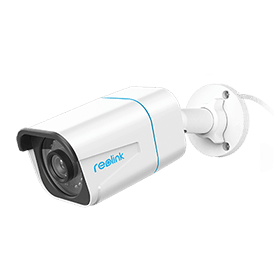
4K PoE IP Camera with Person/Vehicle Detection
Smart Person/Vehicle Alerts; 4K UHD Day; Night; 100ft Night Vision; Time Lapse; IP66 Certified Weatherproof; Audio Recording.
When to Choose 2K Security Cameras:
- You want high-quality images with clear detail at a distance (including plate recognition at close range).
- 2K resolution covers your application.
- You want a balance of quality and cost.
Typical Scenarios: Home entrances, garage, driveways, construction sites, small businesses.
For example, the Reolink Altas is a popular 2K 4MP battery WiFi camera. Place it anywhere for flexible, smart surveillance.
2K Pre-recording Bullet Camera with a Long Lasting Battery
2K 10s Pre-recording ; ColorX Night Vision; 20,000mAh Battery; Dual-band Wi-Fi 6.
When to Choose 1080p Security Cameras:
- You are on a tight budget.
- You need general-purpose surveillance for a smaller or lower-risk space.
- You need an entry-level security camera.
Typical Scenarios: Barns and farms, vacation homes, RVs, boats and marinas.
Note: High-quality 1080p Full HD cameras can still deliver clear, detailed footage for most home surveillance needs. The Reolink Argus 2E is a strong example, a rechargeable 1080p battery camera that performs well above its resolution class.
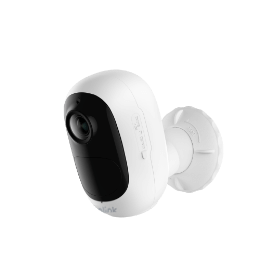
Wire-Free, Battery or Solar Powered IP Camera
Rechargeable Battery & Solar Powered; 1080 Full HD; Stunning Night Vision; Built-In Siren; 120° Wide Viewing Angle; Two-Way Audio.
When to Choose 720p Security Cameras:
The simple answer is: NEVER.
720p cameras deliver blurry footage that makes face and plate recognition unreliable, and they no longer hold a price advantage over 1080p or 1440p cameras. You can find capable 1080p or 1440p security cameras for under $100, making 720p a poor value at any budget.
Note: If you already own 720p cameras, they will continue to function. But for any new purchase, even on a tight budget, 1080p cameras are available at the same or lower price points. There is no scenario in which buying new 720p hardware is the right call by today's modern standards.
FAQs
Is 1080p Good for Security Cameras?
Yes. 1080p delivers clear, high-definition footage that covers most home surveillance needs. At typical indoor and short-range outdoor distances, a quality 1080p camera can identify facial features and license plates. For larger properties or areas where you need to zoom into footage post-capture, 1440p or 4K gives you more flexibility.
Is There a Big Difference Between 720p and 4K?
Yes, the gap is substantial. 4K offers 16 times the pixel count of 720p and four times that of 1080p. On a large screen or when zooming into footage, the difference is immediately visible. To see the full benefit of 4K, you need a screen or display large enough and close enough for the additional detail to be perceptible. On a small screen viewed from across a room, the difference is less noticeable.
Is a Higher Resolution Always Better?
Not necessarily. Higher resolution delivers more detail, but its value depends on screen size, viewing distance, and hardware capability. On a small screen or at a typical living-room viewing distance, the human eye may not perceive the difference between 1080p and 4K. Higher resolutions also require more processing power and storage. The best resolution is the one that matches your display, your hardware, and your use case, not simply the highest number available.
Is 12MP Better Than 4K for Security Cameras?
12MP captures approximately 4000 x 3000 pixels, more total pixels than standard 4K (3840 x 2160), but in a 4:3 aspect ratio rather than the widescreen 16:9 of 4K. 12MP cameras are better suited for close-range detail work such as entrances, facial recognition, or areas where vertical coverage matters. 4K cameras in 16:9 are better for wide-area coverage, including driveways, parking lots, and large outdoor spaces. Neither is universally superior; the right choice depends on the shape and distance of what you're monitoring.
Conclusion
4K delivers the most detail and coverage, which is worth it for large-area monitoring or anywhere license plate-level clarity matters. 1440p (2K) is the practical choice for most home security builds today. 1080p still performs well for standard indoor or budget setups. 720p has been priced out of relevance and should be skipped.
For security cameras specifically, the decision comes down to coverage area and storage budget. A single 4K camera covering a wide driveway does the work of two or three 1080p units. If storage is a concern, confirm your recorder supports H.265 before upgrading. That one step closes most of the gap.
If you have questions or want to share how you've set up your system, leave a comment below.
Search
Subscribe for the Latest Updates
Security insights & offers right into your inbox