
Cat5 and Cat6 Security Cameras: Ethernet Cable & PoE Wiring Guide
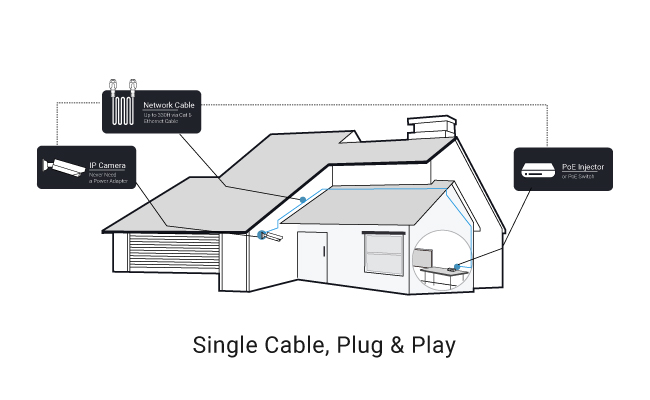
Cat 5 and Cat 6 security cameras usually refer to IP cameras that connect through Ethernet cables for network transmission, and in many cases, PoE power. Cat 5e and Cat 6 are both commonly used for security camera installations, while Cat 6 is generally the better choice for new setups because it offers greater bandwidth and better resistance to crosstalk.
In this guide, we’ll explain what Cat 5/Cat 6 security cameras and camera systems are, whether Cat 6 is good for security cameras, how far Ethernet cables can run, how to wire PoE cameras, and how Cat 5/Cat 6 cables can also be used with analog CCTV systems.
Key Takeaways
- What Is a Cat 5 or Cat 6 Security Camera?
- What Are Common Types of Cat 5 and Cat 6 Cameras?
- Is Cat 6 Ethernet Good for Security Cameras?
- How to Choose Cat 5/Cat 6 Ethernet Cable for Security Cameras? 4 Key Features to Consider
- 3 Best Cat 5/Cat 6 Security Cameras and Systems for Different Setups
- Cat 5 vs. Cat 5e vs. Cat 6 for Security Cameras
- How to Wire Cat 5/Cat 6 PoE Security Cameras?
- FAQs About Cat 5/Cat 6 Security Cameras
- Conclusion
What Is a Cat 5 or Cat 6 Security Camera?
A Cat 5 or Cat 6 security camera—commonly called a PoE (Power over Ethernet) camera—uses a single standard Ethernet cable to transmit both high-speed data and electrical power simultaneously. By eliminating the need for a separate power outlet near the installation spot, these wired IP cameras simplify long-distance outdoor and indoor setups using Cat 5e or Cat 6 network cabling.
To power a PoE system, the camera plugs into a PoE switch, a PoE injector, or directly into a Network Video Recorder (NVR) with built-in PoE ports, which connects to your home network router for live viewing.

How Does a Cat 5/Cat 6 PoE Camera Work?
PoE security cameras work by utilizing standard IEEE 802.3af or 802.3at networking protocols, which safely inject 48V DC power onto unused copper pairs inside a standard twisted-pair Ethernet cable alongside video data.
Because power and video feed through one line, a PoE camera can run up to 330 feet (100 meters) from its switch or NVR without experiencing power drop-off or signal degradation.
Does a Cat 6 Camera Need a Separate Power Cable?
No, a Cat 6 security camera does not need a separate power cable as long as it is connected to a PoE-enabled NVR, PoE switch, or PoE injector.
The Cat 6 cable carries both electrical power and data on a single line. A separate DC power adapter is only required if you plug the camera directly into a non-PoE network router or standard switch that lacks powered ports.
What Are Common Types of Cat 5 and Cat 6 Cameras?
PoE security cameras that run on Cat 5 or Cat 6 cables are primarily grouped by how they are installed and whether they operate as individual units or as part of a centralized recording system.
Cat 6 Security Camera
A standalone Cat 6 security camera is an individual PoE IP camera that connects to your local network via a single Cat 6 Ethernet cable for power and data transmission.
Best used for: Single-location monitoring, such as watching a front porch, driveway, or side gate.
- Storage options: Saves footage locally via an onboard microSD card (typically supporting up to 256GB/512GB for motion-activated clips) or streams directly to a mobile app without requiring a dedicated recording box.
Using Cat 6 over Cat 5e for a standalone camera provides higher bandwidth (up to 10 Gbps at 250 MHz), ensuring uncompressed 4K or 16MP video streams smoothly across your network with zero latency or frame drops.
Cat 6 Security Camera System
A Cat 6 security camera system is a complete, multi-channel surveillance setup that links multiple Cat 6 PoE cameras directly to a centralized Network Video Recorder (NVR).
Best used for: Large properties, businesses, or homes needing continuous 24/7 coverage across 4, 8, 16, or 32 blind spots simultaneously.
Each camera plugs directly into the built-in PoE ports on the back of the NVR. The NVR supplies power to all cameras, centralizes management, and broadcasts a live feed to your monitor or app.
- Storage options: Stores hundreds of hours of continuous high-resolution footage on dedicated surveillance-grade hard drives (typically 2TB to 16TB+) with zero monthly subscription fees
Is Cat 6 Ethernet Good for Security Cameras?
Yes, Cat 6 is an excellent choice for modern PoE (Power over Ethernet) security camera setups. It handles both high-speed data transmission and electrical power over a single cable, providing plenty of network headroom for high-bitrate video feeds like 4K or 16MP ultra-HD streams.
While an individual IP camera won't use the full 10 Gbps capacity of a Cat 6 cable, using Cat 6 prevents network bottlenecks when multiple high-resolution cameras feed into a single switch or NVR simultaneously.
Note: Upgrading your cabling to Cat 6 improves network stability and transmission capacity, but it will not artificially boost a camera’s native video resolution or sensor quality.
Is Cat 6 Better Than Cat 5 for Security Cameras?
Cat 6 is superior to standard Cat 5 and Cat 5e in shielding, crosstalk reduction, and maximum bandwidth. It operates at frequencies up to 250 MHz (compared to Cat 5e’s 100 MHz), which ensures cleaner signal integrity over longer distances near electrical wiring.
Is Cat 5 Good Enough for Security Cameras?
Cat 5e (the modern revision of legacy Cat 5) is fully capable of running standard PoE IP cameras. It carries 100 Mbps to 1 Gbps data speeds alongside standard IEEE 802.3af/at power, making it fully functional for 1080p, 2K, and most 4K single-camera setups.
However, original Cat 5 (unlettered) is obsolete and limited to 100 Mbps with minimal internal wire twisting, making it prone to signal interference (crosstalk). While you can safely re-use existing Cat 5e cable runs, any brand-new wiring job should default to Cat 6 to ensure long-term reliability and headroom.
How to Choose Cat 5/Cat 6 Ethernet Cable for Security Cameras? 4 Key Features to Consider
Choosing the right Ethernet cable for a PoE security camera setup determines your system's long-term power delivery, video clarity, and resistance to interference. While most standalone PoE IP cameras—such as the 4K Reolink RLC-810A—include a short 1-meter Cat 5e patch cable for setup, permanent outdoor or multi-room installations require choosing longer cables based on four core criteria.
1. Category Rating: Cat 5e vs. Cat 6
-
Cat 5e: Sufficient for individual 1080p, 2K, and single 4K cameras running up to 1 Gbps. It handles video data and IEEE 802.3af/at PoE power reliably over standard distances.
-
Cat 6: Ideal for multi-camera feeds or high-bitrate 4K and 16MP systems. Its internal spline separates wire pairs to reduce crosstalk and support higher bandwidth (up to 250 MHz).
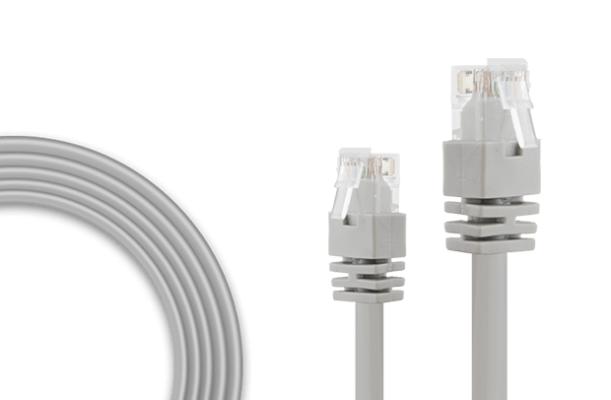
2. Maximum Cable Distance Limits
-
Standard IEEE 802.3 PoE specification allows cable runs up to 328 feet (100 meters) from a PoE switch or NVR before signal degradation or power drop-off occurs.
-
For longer runs up to 262 feet (80 meters) without signal loss, pre-made extension lines (such as 18-meter or 30-meter Cat 5e cables) offer plug-and-play simplicity. Runs exceeding 300 feet typically require a PoE extender or inline powered switch.
3. Cable Shielding: UTP vs. STP
-
Unshielded Twisted Pair (UTP): Flexible, budget-friendly, and easy to bend around interior walls or drop ceilings. UTP handles 90% of standard residential and office camera installations without issue.
-
Shielded Twisted Pair (STP): Features foil wrapping around internal copper pairs to block electromagnetic interference (EMI). Choose STP if running cables alongside high-voltage electrical lines, near heavy machinery, or outside across metal conduit.
4. Wire Conductor Quality: Pure Copper vs. CCA
-
Solid Copper (Pure Bare Copper): Essential for PoE cameras. Copper delivers low electrical resistance, minimal heat generation, and consistent power transmission over long distances.
-
Copper-Clad Aluminum (CCA): Avoid for PoE cameras. CCA cables use an aluminum core coated with copper, leading to higher electrical resistance, voltage drops over long runs, and a higher risk of overheating under continuous PoE loads.
3 Best Cat 5/Cat 6 Security Cameras and Systems for Different Setups
1. Reolink RLC-810A – Best for Entryways, Driveways & Specific Coverage Zones
You need high-definition monitoring at a single high-priority area—like a front porch or driveway—without paying for a full NVR system or monthly cloud fees.
The Reolink RLC-810A is a standalone 4K 8MP smart PoE bullet camera that runs power and data through a single Cat 5e or Cat 6 Ethernet cable. It features built-in AI detection that accurately distinguishes between people and vehicles, virtually eliminating false motion alerts.
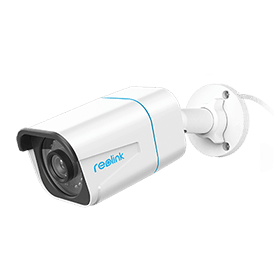
4K PoE IP Camera with Person/Vehicle Detection
Smart Person/Vehicle Alerts; 4K UHD Day; Night; 100ft Night Vision; Time Lapse; IP66 Certified Weatherproof; Audio Recording.
Supports onboard recording via an internal microSD card (up to 256GB) for motion-triggered clips, or plugs directly into a PoE switch/NVR for 24/7 continuous recording.
Operating at 25 fps with H.265 compression, the RLC-810A streams uncompressed 3840x2160 video while taking up roughly half the network bandwidth of older H.264 cameras—ensuring smooth playback over standard Cat 5e cabling.
2. Reolink RLC-823S2 – Best for Wide-Open Spaces, Yards & Large Properties
Broad outdoor areas—like large backyards, farms, or parking lots—often require multiple static cameras to avoid blind spots.
The Reolink RLC-823S2 is an 8MP 4K PTZ (Pan-Tilt-Zoom) PoE camera capable of 360° endless horizontal panning, 90° vertical tilting, and 16X optical zoom. It dynamically tracks moving people or vehicles across expansive environments, giving you complete coverage with a single device.
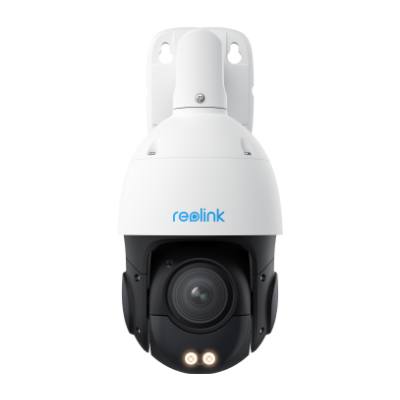
Smart 4K PTZ PoE Security Camera with 16X Optical Zoom
16X Optical Zoom, 360° Coverage in 4K UHD, Auto Tracking, Color Night Vision.
Built-in spotlights provide color night vision, while two-way audio and a custom siren allow you to warn off intruders in real time.
3. Reolink RLK8-800B4 – Best for Complete 24/7 Property-Wide Protection
Monitoring an entire home or business requires multi-angle coverage, continuous 24/7 recording, and centralized video management with zero recurring costs.
The Reolink RLK8-800B4 is a complete 8-channel 4K PoE security system that includes four 8MP bullet cameras, an 8-port PoE NVR with a pre-installed 2TB hard drive, and a spool of 18-meter Cat 5e Ethernet cabling per camera.
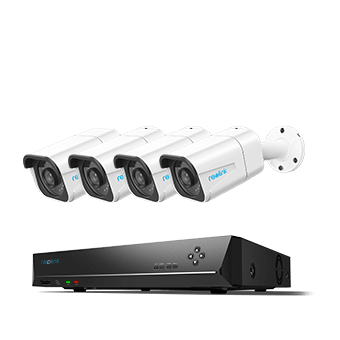
4K 8-Channel PoE Security System
4 pcs 4K Ultra HD Security Cameras; 2TB HDD 8-Channel NVR for 24/7 Recording; Person/Vehicle Detection; Plug & Play; 2 Network Solutions.
Plug-and-play design allows each camera to draw power and transmit video directly through the NVR's built-in PoE ports, saving continuous footage locally without needing a router connection or subscription.
Cat 5 vs. Cat 5e vs. Cat 6 for Security Cameras
Choosing the right cable category comes down to balancing required bandwidth, interference protection, and overall distance. While legacy Cat 5 is obsolete, both Cat 5e and Cat 6 reliably deliver data and Power over Ethernet (PoE) to modern security cameras.
Comparison Table
When Should You Use Cat 5e?
You should use Cat 5e if you are on a tight budget or utilizing pre-installed cabling in an existing home.
-
Existing Installations: If your walls are already wired with Cat 5e, there is no need to tear them open. Cat 5e easily handles 1 Gbps throughput, which is more than enough for streaming 2K and 4K IP cameras (which typically use only 4 Mbps to 12 Mbps per stream).
-
Short, Low-Density Runs: Perfect for straightforward indoor patch cords or short runs to single cameras where wire flexibility makes routing around tight corners easy.
When Should You Use Cat 6?
You should use Cat 6 for all new camera installations, multi-camera NVR setups, and long outdoor runs.
-
New Cabling Infrastructure: The price difference between Cat 5e and Cat 6 is negligible, making Cat 6 the smarter choice for future-proofing your home or office network.
-
High-Power PoE & High Density: Cat 6 uses thicker 23 AWG copper conductors that dissipate heat better. This makes it safer and more reliable when bundling multiple cables together or powering heavy-duty PTZ cameras with built-in spotlights and heaters via higher-wattage PoE+ / PoE++.
-
High Interference Environments: Built with an internal plastic spline, Cat 6 isolates wire pairs to prevent crosstalk and signal loss when run near high-voltage electrical lines or fluorescent lighting.
How to Wire Cat 5/Cat 6 PoE Security Cameras?
Wiring a Cat 5 or Cat 6 PoE security camera involves running a single Ethernet cable from your Network Video Recorder (NVR) or PoE switch directly to the camera's mounting point. This single line delivers both 48V electrical power and high-speed video transmission, eliminating the need for electrical outlets near your mounting spots.
1. Observe the 328-Foot (100-Meter) Distance Limit
The IEEE 802.3 PoE standard caps Ethernet cable runs at 328 feet (100 meters). Exceeding this distance without active hardware causes power drop-off and video signal degradation.
-
For runs under 328 ft: Connect the Cat 5e or Cat 6 cable directly from your NVR/PoE switch to the camera.
-
For runs over 328 ft: Insert a PoE switch or inline PoE extender halfway down the line to act as a powered repeater, or switch to a fiber-optic cable run for extreme distances.
2. Protect Outdoor Cable Runs
When routing Ethernet cabling outdoors, unshielded wires exposed to weather, UV light, or physical stress will degrade over time.
-
Buried lines: Encase your Cat 5e or Cat 6 cables inside schedule 40 PVC or rigid metal conduit when burying them underground. Alternatively, use outdoor-rated Direct Burial cable with a water-blocking jacket.
-
Wall penetration: Drill holes at a slight upward angle from the outside to prevent rainwater from traveling down the cable into your exterior walls. Seal all wall entry points with waterproof silicone sealant.
3. Terminate Wires with the T-568B Standard
If you are terminating custom lengths of bulk cable with RJ45 connectors, use the industry-standard T-568B pinout pattern on both ends. Maintaining a uniform wiring order ensures proper power delivery across the copper pairs and prevents network handshake failures.
Note: A standard 4K PoE camera requires roughly 12W of continuous power and 8 to 12 Mbps of network bandwidth. Using solid bare copper Cat 6 cabling terminated with T-568B connectors ensures minimal voltage drop over a full 300-foot run.
FAQs About Cat 5/Cat 6 Security Cameras
Can a Cat6 Cable Be Used for a Camera?
Yes. Cat6 cable can be used with IP and PoE security cameras that have an Ethernet connection. When connected to a compatible PoE NVR, PoE switch, or injector, a single Cat6 cable can transmit camera data and supply power, reducing the need for separate power wiring.
How Far Can You Run Cat6 for Cameras?
For a standard Ethernet connection, Cat6 can generally run up to 100 meters (328 feet), including patch cables. If a security camera needs to be installed farther away, you may need a compatible PoE extender, additional network equipment, or fiber. Always check the camera and PoE equipment specifications for their supported transmission distance.
Which Is Better for Security Cameras, Cat5 or Cat6?
Cat6 is generally the better choice for new security camera installations. Original Cat5 is an older Ethernet standard, while Cat5e remains sufficient for many PoE cameras. Cat6 offers greater bandwidth and improved crosstalk performance, making it a better long-term option. However, if you already have properly installed Cat5e that meets your camera's requirements, upgrading solely to Cat6 is usually unnecessary.
Conclusion
Cat 5e and Cat 6 can both provide reliable Ethernet connections for IP and PoE security cameras. While Cat 5e is sufficient for many existing camera systems, Cat 6 is generally the better choice for new security camera installations thanks to its greater bandwidth, improved crosstalk performance, and room for future network upgrades.
Whichever cable you choose, consider the camera's PoE requirements, Ethernet distance limits, and installation environment. For standard copper Ethernet runs, keep the total channel length within 100 meters (328 feet) or use appropriate network equipment or fiber for longer distances.
For analog CCTV systems, Cat 5e or Cat 6 can also be used with compatible video baluns. If you prefer a simpler installation without running Ethernet cables, a wire-free battery-powered security camera may be a more suitable alternative.
Search
Subscribe for the Latest Updates
Security insights & offers right into your inbox