
Do Security Cameras Have Audio? Can CCTV Record Sound Legally?
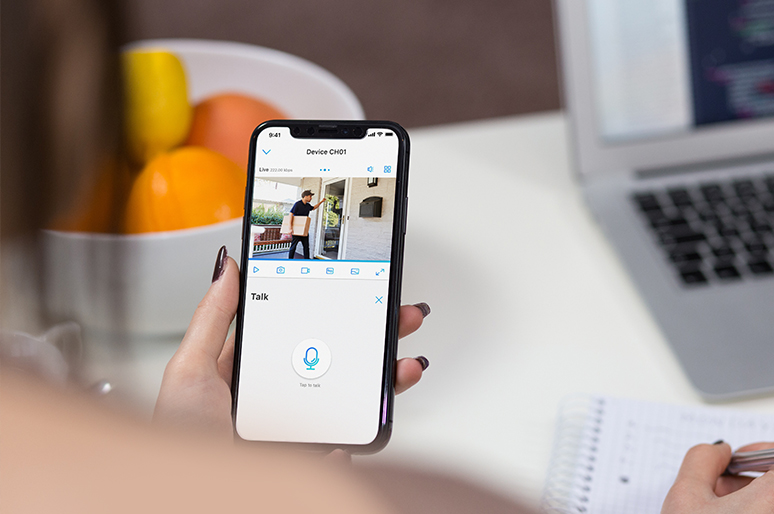
You probably pass multiple security cameras every single day. While video surveillance is common, unexpected audio recording is where privacy concerns really step in. So, do security cameras record sound? How far can they capture audio, and how can you tell if a camera is listening? Here is everything you need to know about security camera audio capabilities and your privacy rights.
Key Takeaways:
-
Not all security cameras record audio. A camera needs a built-in or connected microphone to capture sound.
-
One-way and two-way audio are different. One-way audio captures sound, while two-way audio adds a speaker so you can listen and talk through the camera.
-
Audio recording laws vary by location. In the U.S., consent requirements and expectations of privacy can affect whether recording a conversation is legal.
-
Wi-Fi is not always required. Cameras with local storage can record video and audio without an internet connection.
-
Audio can usually be turned off separately. Disabling sound recording typically does not stop the camera from recording video.
-
Choose audio features based on the scenario. Two-way audio is useful for front doors and remote communication, while one-way audio can add context to recorded security footage.
- Do All Security Cameras Have Audio?
- Which Security Cameras Can Record Audio?
- Is It Legal for Security Cameras to Record Audio?
- How to Tell If a Security Camera Has Audio?
- How Far Can Security Cameras Pick Up Audio?
- How to Turn Off Security Camera Audio Recording
- Security Camera Audio vs. Two-Way Audio
- Best Security Cameras with Audio Recording
- FAQs
- Conclusion
Do All Security Cameras Have Audio?
No. Not every security camera records audio. Some cameras only record video, some have a microphone for one-way audio, and others include both a microphone and speaker for two-way talk. Even when a camera supports audio, users may be able to disable audio recording in its settings.
Which Security Cameras Can Record Audio?
Audio capabilities in modern security cameras depend largely on their design, network architecture, and power constraints. Knowing how these features function helps you select the right system for your specific monitoring needs.
Two-Way Audio
Two-Way Audio uses an integrated microphone and speaker to allow real-time, bi-directional communication between the user and anyone near the camera.
The camera stream transmits live audio to a smartphone app, enabling you to speak through the built-in speaker.
Frequently found in battery-powered doorbell cameras, indoor desktop cameras, and smart Wi-Fi spotlight cameras.
Best Used For: Interacting with delivery drivers at the front door, speaking to family members, or deterring unwanted visitors.
One-Way Audio
One-Way Audio captures environmental sound around the camera to provide extra context during video recording without offering a return speaker.
An onboard microphone records ambient audio directly onto the video feed, capturing conversations, footsteps, or background events.
Frequently used in most IP cameras, Power over Ethernet (PoE) outdoor cameras, and standalone smart security cameras.
Best Used For: Evidence collection and monitoring high-risk entry points like driveways or side yards.
Audio Event Detection
Audio Event Detection utilizes software algorithms to analyze incoming sound frequencies and trigger immediate security alerts.
Rather than recording continuously, the onboard sound sensor identifies distinct audio patterns—such as breaking glass, loud bangs, or car alarms—and sends an immediate notification to your device.
High-end indoor plug-in cameras, smart home hubs, and commercial-grade IP surveillance systems usually have such features.
Best Used For: Capturing off-camera incidents and minimizing unnecessary motion alerts.
Traditional and Analog Systems
Traditional/Analog Systems process video feeds through coaxial cables and usually lack built-in microphones.
Older coaxial security systems require a separate external microphone wired directly into an audio-in port on the Digital Video Recorder (DVR) to record sound alongside video feeds.
Analog CCTV cameras, bullet cameras connected to legacy DVRs, and hardwired commercial systems need physical wiring for audio recording.
Best Used For: Legacy commercial installations or retrofitted closed-circuit systems.
Is It Legal for Security Cameras to Record Audio?
Security cameras can legally record audio in some situations, but the rules depend on where you live, where the camera is installed, and whether the people being recorded have given the required consent. In the U.S., audio surveillance is generally more restricted than video surveillance because recording a private conversation may be subject to federal and state wiretapping or eavesdropping laws.
Audio Recording Laws in the U.S.
U.S. audio recording laws are governed by both federal and state rules. Federal law generally allows a conversation to be recorded when at least one party to the communication consents, but individual states may impose stricter requirements.
The legality can also depend on whether the people being recorded have a reasonable expectation of privacy. Recording a private conversation inside a home, office, or other private setting may therefore be treated differently from capturing general sounds in an outdoor public area.
Before enabling audio on a security camera, check the applicable federal, state, and local laws, especially when the camera may capture other people's conversations.
One-Party vs. All-Party Consent
Audio recording laws in the U.S. are commonly described as one-party consent or all-party consent laws.
-
One-party consent: Generally, at least one participant in the conversation must consent to its recording.
-
All-party consent: All participants covered by the applicable law generally must consent before a private or confidential conversation can be recorded.
The exact rules and exceptions vary by state, so these categories should be treated as general guidance rather than a complete legal test. Simply owning the property or installing a warning sign does not necessarily make every audio recording legal.
Where You Should Not Record Audio?
Avoid using security cameras to record conversations in places where people have a strong expectation of privacy. Examples can include bathrooms, bedrooms, changing rooms, locker rooms, and other private areas.
You should also be cautious when a camera can capture private conversations from neighboring properties or other spaces outside the area you intend to monitor.
If audio is not necessary for your security purpose, disabling audio recording can reduce privacy concerns while allowing the camera to continue recording video.
Home vs. Business Audio Surveillance
For home security, cameras with audio are commonly used around entrances, driveways, yards, and other areas for purposes such as communicating with visitors or monitoring activity. However, homeowners should still consider consent and privacy laws when their cameras capture conversations involving guests, neighbors, workers, or other people.
For business security, additional considerations may apply when cameras capture employees, customers, or private workplace conversations. Businesses should clearly disclose surveillance where appropriate and check applicable federal, state, and local requirements before enabling audio recording.
A security camera having a microphone does not automatically mean that recording every conversation is legal. The location, expectation of privacy, type of conversation, consent requirements, and applicable jurisdiction all matter.
This information is for general informational purposes and is not legal advice. Audio surveillance laws vary by jurisdiction and may change over time.
How to Tell If a Security Camera Has Audio?
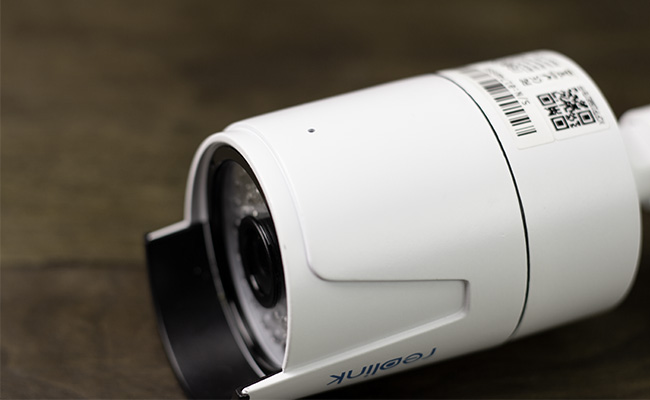
It is often difficult to judge whether a security camera is recording audio based on appearance alone. Microphones are typically small, discreet, and hard to spot from a distance.
If you are inspecting a camera in a public area, the most reliable approach is to look for posted privacy notices or ask the camera owner directly. However, for a camera you own or manage, you can confirm audio capabilities through the following methods:
-
Check the product specifications: Review the user manual or product page for features such as "built-in microphone," "audio recording," "one-way audio," or "two-way audio."
-
Inspect the camera app or software: Audio-supported models generally feature options to toggle audio recording, adjust microphone sensitivity, or enable two-way talk.
-
Review recorded footage: Play back or download a saved video clip to verify if sound is captured on the file.
-
Look for a microphone hole or grille: Check the camera housing for a small pinhole or speaker grille designed for sound pickup (though physical design alone is not a guarantee).
-
Contact the manufacturer: Reach out to technical support with your exact camera model number to confirm its hardware capabilities.
Because physical features can be deceiving or hidden, checking official specifications or software settings remains the most accurate way to verify audio recording.
How Far Can Security Cameras Pick Up Audio?
There is no universal distance for security camera audio pickup. How far a camera can capture clear sound depends on microphone sensitivity, camera placement, background noise, wind, and the volume of the sound source.
Under quiet indoor conditions, a typical built-in camera microphone can capture clear conversation up to 15 to 25 feet away. However, environmental factors dramatically alter this range:
-
Indoor vs. Outdoor Environments: Outdoor background noise—such as traffic, wind, or HVAC units—can drown out subtle sounds, reducing effective audio pickup to under 10 feet.
-
Mounting Height: A camera installed high on a soffit or ceiling will capture far less intelligible speech than one mounted at eye level closer to the monitored area.
-
Microphone Quality: Standard built-in mics are designed for close-range sound, whereas commercial-grade security cameras with high-sensitivity or directional microphones can extend audio capture further.
Because distance varies so significantly by environment, checking the manufacturer’s technical specifications or reviewing sample recordings offers the most accurate estimate for a specific camera model.
How to Turn Off Security Camera Audio Recording
If you want to disable sound capture for privacy compliance or to save bandwidth, most audio-enabled security cameras allow you to turn off microphone features through their companion app, desktop client, or web portal.
-
Open the software: Launch your security camera app or desktop client.
-
Select the device: Choose the specific camera you wish to adjust.
-
Navigate to Audio Settings: Go to Settings > Device Settings > Video/Audio (or Recording).
-
Disable sound recording: Toggle off options like Record Audio, Microphone, or Audio Capture, then save your changes.
Note: Disabling audio recording stops the camera from saving sound on video clips, but video recording will continue uninterrupted. Some systems allow you to toggle live two-way talk, audio alerts, and recorded audio independently, so consult your device's manual if settings appear separated.
Security Camera Audio vs. Two-Way Audio
Security camera audio and two-way audio are related but not the same feature.
Security camera audio usually refers to a built-in microphone that captures sound around the camera. Depending on the model and settings, that sound may be heard live, recorded together with video, or both.
Two-way audio requires both a microphone and a speaker. It allows the person viewing the camera remotely to listen to what is happening and speak through the camera using an app or other compatible software.
For example, a camera with one-way audio may let you hear a visitor but not talk back. A camera with two-way audio can support a conversation, making it useful for front doors, indoor monitoring, pets, and other situations where remote communication is helpful.
In short, all two-way audio cameras have audio capability, but not every camera that records audio supports two-way communication.
Best Security Cameras with Audio Recording
Choosing a security camera with audio capabilities adds critical situational awareness to your surveillance system. While clear video shows what is happening, synchronized audio provides the context—capturing conversations, off-camera sounds, or unexpected disturbances.
What to Look For in Audio-Enabled Security Cameras
When evaluating security cameras with audio recording, prioritize these core features to ensure reliable coverage:
-
Built-in Microphone and Speaker: Models equipped with both components enable Two-Way Audio, allowing you to speak directly to visitors or deter intruders in real time through a companion app.
-
Audio Event Detection: High-end models feature sound sensors configured to trigger immediate mobile alerts upon detecting distinct noises like breaking glass, car alarms, or crying.
-
Flexible Storage: Ensure the device supports your preferred recording setup—whether local storage via a microSD card/NVR (no monthly fees) or encrypted cloud plans for remote backups.
-
Customizable Audio Toggles: Look for systems that allow you to independently adjust microphone volume, enable/disable audio recording, or manage live two-way talk to maintain privacy compliance.
Featured Model: Reolink Argus 4 Pro
For broad outdoor coverage combined with complete audio and visual surveillance, the Reolink Argus 4 Pro delivers a high-performance, wire-free solution.
-
Two-Way Audio: Features an integrated microphone and speaker, enabling clear bi-directional communication with visitors or delivery drivers.
-
180° Panoramic 4K UHD: Uses dual-lens technology to deliver a seamless 180-degree ultra-wide field of view in 4K resolution, eliminating outdoor blind spots.
-
ColorX Night Vision: Captures full-color video in low-light environments without relying on bright, intrusive spotlights.
-
Wire-Free & Solar-Powered: Operates on a 5000mAh rechargeable battery compatible with the Reolink Solar Panel 2 for continuous outdoor power.
-
Local Storage & Smart Alerts: Supports microSD cards up to 512GB alongside onboard AI detection for people, vehicles, and animals—no subscription required.
Note: Audio recording features are often disabled by default out of the box. Be sure to access the device's audio settings within the mobile app or software client during setup to enable microphone capture and adjust volume thresholds.

4k 180° Wire-free Color Night Vision Camera
4K UHD 180° Blindspot-free View; Color Vision Day and Night; 30% More Battery Life; Dual-band Wi-Fi 6; Smart detection.
FAQs
Does CCTV Record Audio All the Time?
Not always. CCTV records audio only if the camera has a microphone and audio recording is enabled. Sound may be recorded continuously, on a schedule, or only during events.
Can Security Cameras Record Audio Without Wi-Fi?
Yes. Cameras with local storage can record video and audio without Wi-Fi. Wi-Fi is mainly needed for remote viewing, alerts, cloud storage, and two-way talk.
Can Neighbors' Security Cameras Record My Conversations?
They may capture nearby sounds if they have a microphone, but legality depends on local privacy and consent laws, especially when private conversations are involved.
Can Workplace CCTV Record Audio?
Yes, technically, but workplace audio recording may be subject to stricter consent, notice, and privacy requirements.
Does a Security Camera Still Record Video If Audio Is Turned Off?
Yes. In most cases, disabling audio does not stop video recording. Live audio, recorded audio, and two-way talk may also have separate settings.
Conclusion
So, do security cameras have audio? Some do, but not all. Modern security cameras may offer one-way audio, two-way talk, or other sound-related features depending on their hardware and settings.
Audio can provide valuable context beyond video alone, whether you want to communicate with visitors, monitor activity, or review an incident. However, because recording conversations can raise privacy and legal concerns, always check applicable laws and configure audio settings appropriately.
When choosing a security camera with audio, look for a built-in microphone, two-way talk if needed, flexible audio controls, and reliable recording options that fit your monitoring scenario.
Search
Subscribe for the Latest Updates
Security insights & offers right into your inbox