
Unhackable Security Camera: Ultimate Protection for Your Home

The main purpose of installing security cameras is monitoring so that your safety and privacy are ensured. However, not all users get the unhackable security cameras, and they end up getting privacy concerns. So, if you want to install a security camera system at home, here is all you need to know about home security systems that can’t be hacked.
Can Home Security Cameras be Hacked? Why?
Yes, home security cameras can be hacked, but no security camera is 100% hack-proof. Most security breaches occur because of weak passwords, outdated firmware, poor network security, or other preventable vulnerabilities rather than flaws in the camera itself.
Hackers may exploit these weaknesses to gain unauthorized access to live video feeds or camera settings, putting your privacy and security at risk. However, choosing a camera with strong encryption, regular firmware updates, secure authentication, local storage, and wired or protected network connections can make it significantly more difficult for attackers to compromise your system.
How to Choose a Security Camera That's Hard to Hack?
When choosing unhackable security cameras, you only need to check a few additional things apart from the basic checks of buying a security camera. Here we have listed and explained the most important things to consider for choosing a hackproof security camera:
Choose a Trusted Brand
A camera's security depends not only on its hardware but also on how well the manufacturer maintains it after release. Choose brands that regularly publish firmware updates, respond quickly to newly discovered security vulnerabilities, and provide long-term software support. Companies that actively maintain their products are more likely to keep your camera protected against emerging cyber threats.
Look for Strong Encryption
Encryption protects your data while it is transmitted and stored. For Wi-Fi cameras, look for support for WPA3 wireless encryption, which offers stronger protection than older WPA2 networks. Remote access should use HTTPS to encrypt communication between your camera and your phone or computer. If recordings are stored on the device or in the cloud, AES-128 or AES-256 encryption helps prevent unauthorized users from accessing your footage.
Check the Manufacturer's Security Practices
Choose manufacturers that take cybersecurity seriously. Look for companies that perform independent security testing, publish security advisories, or have a vulnerability disclosure program that allows security researchers to report issues responsibly. These practices show that the manufacturer continuously monitors and improves product security instead of only releasing updates when major problems occur.
Prefer Cameras with Local Storage
Choose cameras that support microSD cards or NVRs for local recording. Local storage keeps your footage on devices that you own, reducing dependence on cloud services. It also gives you continued access to recordings even if your internet connection is unavailable or you choose not to subscribe to cloud storage.
Enable Two-Factor Authentication
If a camera supports two-factor authentication (2FA), enable it during setup. With 2FA enabled, entering the correct password alone is not enough to access your account. A second verification step, such as a code sent to your phone or generated by an authentication app, is required, making unauthorized access much more difficult.
Check for Regular Firmware Updates
Firmware updates are one of the most important security features of any smart device. They fix newly discovered vulnerabilities, improve system stability, and strengthen protection against evolving cyber threats. Before buying a camera, check whether the manufacturer has a history of releasing regular firmware updates for its products rather than only providing updates immediately after launch.
Secure the Camera's Network Connection
A secure network is essential for protecting any internet-connected camera. If you choose a Wi-Fi model, connect it to a WPA3-protected wireless network and use a strong, unique Wi-Fi password. Keep your router's firmware updated and avoid exposing your camera directly to the internet through unnecessary port forwarding. If possible, a PoE (Power over Ethernet) camera provides an additional layer of security because it communicates over a wired network instead of relying on Wi-Fi, reducing exposure to wireless attacks.
Are Wired Cameras More Secure Than Wi-Fi Cameras?
Choose a wired PoE camera if security and reliability are your highest priorities, especially for permanent installations. Choose a Wi-Fi camera if you need flexible installation and ensure it supports modern security features such as WPA3 encryption, HTTPS communication, two-factor authentication, and regular firmware updates to minimize cybersecurity risks.
Best Unhackable Security Camera Recommendation
Here are our top 3 picks for unhackable security cameras that you can install anywhere:
Secure Wireless Security Camera: Reolink Argus 4 Pro
We recommend the brand new Reolink Argus 4 Pro as the first unhackable security camera. This camera utilizes advanced Wi-Fi 6 technology with WPA3 encryption, adding an extra layer of protection to your data security. Additionally, it supports local storage with a MicroSD card and Home Hub. Users can enjoy full-color night vision footage without visible spotlights and a 180-degree field of view, ensuring no blind spots.

4k 180° Wire-free Color Night Vision Camera
4K UHD 180° Blindspot-free View; Color Vision Day and Night; 30% More Battery Life; Dual-band Wi-Fi 6; Smart detection.
Secure 4G Cellular Security Camera: Reolink Go PT Ultra
Reolink Go PT Ultra reduces Wi-Fi-related attack risks because it connects through a 4G LTE network instead of a traditional home Wi-Fi network. It is unhackable because it does not connect to the network via Wi-Fi, which solves a major part of the problem. This camera uses 4G LTE connectivity and brings features like smart detection, pan and tilt, color night vision, etc. It also has 4K 8MP video quality for the clearest surveillance.
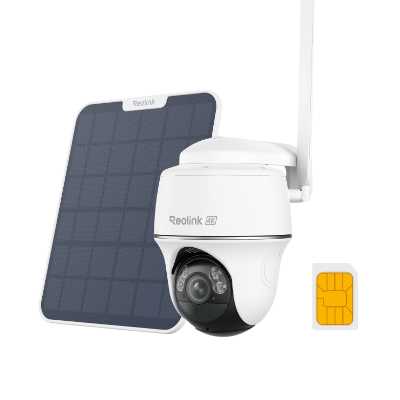
4K 8MP Wire-Free 4G LTE PT Battery Camera
4K 8MP; Smart Detection; 355° Pan & 140° Tilt; Battery/Solar Powered; Color Night Vision; Smart Real-Time Alert.
Secure PoE Security Camera: Reolink Duo 3 PoE
The wired PoE connection reduces the attack surface compared with Wi-Fi cameras while encrypted communication and local storage further improve security. It takes power and connectivity from a single ethernet connection making it unhackable for any unauthorized person. Moreover, the app comes with secure encryption from Reolink. In terms of security features, it has 16MP resolution, motion tracking, color night vision, etc.

Groundbreaking 16MP Dual-Lens PoE Camera
16MP UHD, Dual-Lens, Motion Track, 180° Wide Viewing Angle, Power over Ethernet, Color Night Vision.
Secure WiFi Security Camera: Reolink Duo 3 WiFi
The Reolink Duo 3 Wi-Fi is a dual-lens, 16MP resolution security camera. It features a wide viewing angle and clear image quality, allowing you to monitor large areas with ease. This camera also supports Wi-Fi connectivity for hassle-free installation, making it an excellent choice for anyone seeking high-resolution surveillance with a wide coverage area.
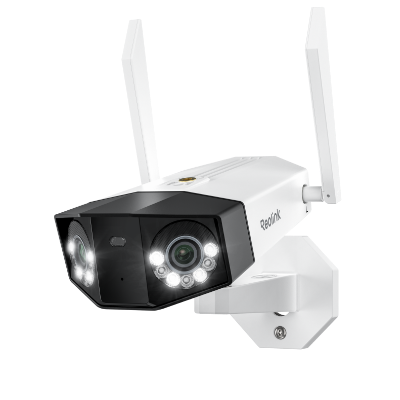
Groundbreaking 16MP Dual-Lens WiFi Camera
16MP UHD, Dual-Lens, Motion Track, 180° Wide Viewing Angle, Plug-In WiFi, Color Night Vision.
Best Home Security Systems that can't Be Hacked
Are you looking for complete home security systems that can’t be hacked? Well, here we have our top 2 picks that you can choose from.
Secure PoE Security Camera System: RLK8-1200B4-A
This surveillance kit is based on PoE technology which means that the whole security system will be connected via wires. It prevents hackers from accessing and hacking your Wi-Fi network to steal your video footage. It has smart person, animal, and vehicle detection and notifies you in case of abnormal activity. Moreover, it supports connecting with Wi-Fi cameras as well.
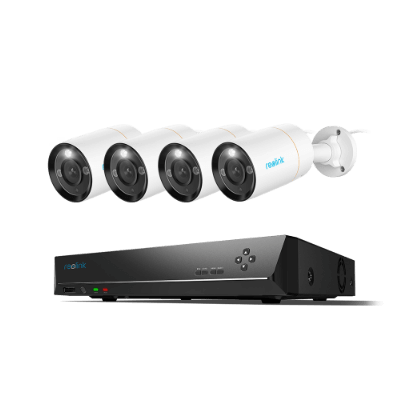
12MP 8-Channel PoE Surveillance Kit with Spotlights
4 pcs 12MP Ultra HD Security Cameras; 2TB HDD 8-Channel NVR for 24/7 Recording; Person/Vehicle Detection; Color Night Vision.
Secure WiFi Security Camera System: RLK12-800WB4
The second option here is the Next-Gen security kit from Reolink that provides 4K video capturing capabilities. It is based on Wi-Fi 6 technology with both 2.4 and 5 GHz connections.
What makes it unhackable is the fact that it comes with a built-in 2TB HDD so that all the recording is saved offline. Moreover, it comes with smart detection which will notify you in case of any tampering with the camera.
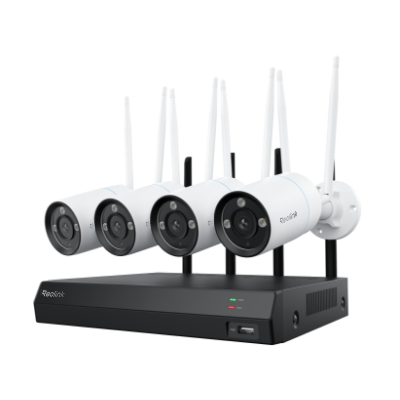
4K Security Kit with Next-Gen WiFi 6
4 pcs 4K Ultra HD Security Cameras; Dual-Band WiFi 6; 2TB HDD 12-Channel NVR for 24/7 Recording; Peron/Vehicle/Animal Detection; IP67 Weatherproof.
How to Protect Your Security Camera from Hackers?
It is always a better idea to get some additional protection for your security camera. Even the best brands can be hacked. That is why manufacturers provide frequent firmware updates. It helps prevent hackers from using the vulnerabilities against you. However, here are some tips that you can follow for additional protection:
Use a high-quality security camera
Buy reliable, high-class brand security cameras with the latest security features like encryption and motion detection. These cameras are less prone to hacking and usually come with better customer support for security issues.
Use Strong Passwords
Formulate complicated and unique passwords for your camera and its app. Do not use the common passwords and think of the combination of:
- Letters
- Numbers
- Special characters
This helps to increase the security level.
Secure Wi-Fi Network
Secure your Wi-Fi network by using strong encryption such as WPA3. Changing the default router settings and hiding your network name (SSID) from public view. This minimizes the chances of hackers getting into your connected devices.
Enable Two-Factor Authentication
Turn on 2FA as it will serve as an extra layer of security. This implies a second form of verification like a text message code to access your camera software. Hence, making unauthorized access much more difficult.
Keep Firmware and Software Updated
Frequently check your camera's firmware and the apps that are connected to it. Manufacturers usually come up with security patches through these updates to fix the vulnerabilities and to make the system more functional and secure.
Set Up Push Login Notifications
Set up your security system to instantly send you a notification on your phone or email if someone logs into the camera. This quick alert will enable you to react quickly to any unauthorized access attempts.
FAQs
1. Are there any security cameras that can't be hacked?
No security camera is completely hackproof, but a combination of the efforts from both the manufacturer and the owner can greatly improve security. Manufacturers should have strong encryption and regular updates, while owners should use strong passwords and secure networks. Wired cameras with local storage can be almost unhackable without physical access.
2. How can you tell if your security camera has been hacked?
Evidence that your security camera has been hacked includes:
- Unusual camera movements
- Unexpected changes in settings
- Unfamiliar voices or sounds
- Spikes in data usage.
Moreover, your system may be unsafe if you get notified of unrecognized login attempts.
3. Which security camera is least likely to be hacked?
The most reliable security cameras are those from well-known manufacturers. Such products provide end-to-end encryption, regular software updates, and strong user authentication features. However, apart from the wireless cameras, wired options with local storage and no internet connectivity whatsoever are the most secure.
It is essential to have physical access to the system for hacking such cameras.
Conclusion
Installing an unhackable home security system with hack-proof security cameras will double your peace of mind for you. It is because you will know that the cameras are doing their job, and nobody can hack into the system to cause any privacy issues for you. Moreover, after installing such a security system, you can follow our tips above to ensure nobody can hack into your system.
Search
Subscribe for the Latest Updates
Security insights & offers right into your inbox