
4K Video Doorbell: Ultimate Guide 2026

True 4K video doorbells exists and they are great at footage quality. But, there's a catch: Price.
The first 4K battery-powered doorbell reached the market in March 2026, priced around $250, about $70 more than the 2K version in the same lineup. Real-time motion alerts and live viewing are free, at least for now. But recording, saving, and replaying missed events all require a paid subscription. So does accessing up to 180 days of video history or searching clips. That ongoing cost pushes the total price well past the initial purchase.
For those that aren't ready to spend that much, a no-subscription video doorbell camera is still largely the smarter buy, even though they provide up to 2K+ (5MP) resolution.
That resolution ceiling isn't unique to doorbells, either. Security camera manufacturers like Reolink already offer resolutions from 4MP to 12MP outdoors, well beyond what any doorbell, 2K or 4K, offers today.
If you want the best video doorbell camera for your front entry without paying a 4K premium, or you'd rather go straight for a 4K security camera at the door instead, We have alternatives in this guide you can consider but first, let's understand what a 4K video doorbell is.
- What is a 4K Video Doorbell?
- What to Look for in 4K Video Doorbell Cameras?
- Why Do 4K Doorbell Cameras Cost So Much?
- Which Reolink Video Doorbells Are Worth Looking At Instead of a 4K Video Doorbell?
- Best Reolink 4K Security Cameras to Complement Your Doorbell
- Common Mistakes When Shopping for a 4K Doorbell
- Buyer Decision Table: Which Camera Actually Fits Your Door?
- FAQs
- Conclusion
What is a 4K Video Doorbell?
A 4K video doorbell provides a resolution of 3840 x 2160 pixels. That's four times the detail of standard 1080p. In practical use, that means sharper faces, clearer license plates on cars in the driveway, and package labels you can actually zoom in without the image turning to mush.
Beyond resolution, a 4K video doorbell works the same as any other smart doorbell, along with some extra features that we'll talk about below. The resolution is the only thing that changes, not the feature set.
What to Look for in 4K Video Doorbell Cameras?
Aside from 4K resolution, today's 4K video doorbell cameras comes with more features that help establish greater security at doorsteps. Here are the key specifications to check out:
Night Vision
Night vision quality varies even within the 4K category, since resolution and low-light performance are two separate specs. A built-in infrared fill light that switches to black-and-white mode after dark is the baseline. Some 4K doorbells go further with color night vision, using an integrated spotlight or a more sensitive sensor to keep color visible when there isn't much ambient light left.
Field of View (FOV)
Field of view is how much ground your doorbell camera actually sees, measured in degrees. Most doorbell cameras cover 160 to 180 degrees diagonally, wide enough to catch someone approaching from either side of your porch, not just standing directly in front of the lens.
A 16:9 aspect ratio, the same shape as a TV or laptop screen, is standard on higher-resolution doorbell cameras. It shows the full frame without cropping the sides, which matters most when the camera is mounted higher up and angled down to cover the walkway below, not just the doorstep.
Pro tip: mount at 4 to 5 feet high and angle the camera down slightly. Any higher and the wide lens starts capturing more sky than sidewalk.
AI Detection & Smart Alerts
As doorbell cameras add AI, they can now tell the difference between a person, a delivery, and a passing car instead of just flagging generic motion. That distinction is what separates a handful of useful alerts a day from dozens of false ones triggered by wind or shadows.
Smart Home Compatibility
Doorbell cameras depend on smart home compatibility more than most other camera types, since you'll often want to answer the door hands-free. Compatibility with Alexa or Google Home lets you use voice commands to check who's there or talk to a visitor.
Chime Trigger
The chime is the part of a doorbell camera located inside your house. Every time the doorbell button is pressed, the chime makes a sound so you know someone's at the door. Most video doorbells can use your existing doorbell wiring to power both the camera and the chime. If a product doesn't support your existing wiring, check the store page to see if a chime is included in the box, or plan to rely on phone alerts instead.
Storage
4K footage takes up more space than 1080p or 2K, so how you store it matters more at this resolution. Footage can be stored locally on an SD card, NVR, or in the cloud. Local storage avoids monthly fees and keeps the footage on-site. Cloud storage costs more over time but means your footage survives even if the camera itself is stolen or damaged.
Power Source
4K video doorbells follow the same two power paths as any other doorbell camera.
-
Wired models use your existing doorbell wiring for continuous power.
-
Battery-powered models skip the wiring but need recharging every few weeks to months depending on activity.
-
PoE (Power over Ethernet) versions run both power and data through a single cable.
Wireless, battery, or WiFi-only versions trade that constant power for flexible placement.
Why Do 4K Doorbell Cameras Cost So Much?
4K doorbell cameras give you higher resolution, but the tradeoffs that kept it rare for years are exactly why it still carries a real premium.
The Camera Itself Costs More to Build
A 4K sensor captures four times the pixels of a 1080p sensor, and bigger, higher-resolution image sensors cost more to manufacture than smaller ones.
That extra resolution goes to waste, though, unless the lens in front of the sensor is sharp enough to actually resolve that much detail. Camera makers call this matching the lens to the sensor. Pair a high-resolution sensor with a cheap lens and you get a hi-res image full of the lens’s flaws, not the sharp picture you paid for, a tradeoff
Kintronics breaks down for IP camera systems. A 4K doorbell needs a better sensor and a better lens working together, which is part of why it costs more before storage or bandwidth even enter the picture.
Power Supply
Processing that much more pixel data also takes more power. A 4K sensor feeds the chip inside the camera four times the raw pixel data of a 1080p sensor every second, before any compression happens, which calls for a more powerful, and more power-hungry, processing chip.
Battery-powered 4K doorbells now exist, but that extra load is part of why they cost more and lean on features like quick-swap battery packs to stay usable day to day.
Storage Space
Higher resolution also means more storage per hour of footage. Real-world comparisons under matching settings, a storage chart Montavue built across 2MP to 8MP IP security cameras, put 4K (8MP) footage at roughly four times the storage of 1080p for the same length of video, which adds up fast across a household running several cameras.
Internet Bandwidth
Streaming 4K footage does take more bandwidth than lower resolutions, though less than most people assume. Bandwidth is just how much data your camera has to push through your internet connection every second to keep the video flowing smoothly, and a sharper picture means more data to send.
According to Reolink's guide to calculating IP camera bandwidth, a single 4K (8MP) camera uses around 8 Mbps with standard H.264 compression, roughly double the 4 Mbps a 1080p camera needs. Cameras using the newer H.265 compression squeeze the same footage into even less data, similar to how a more efficient zip file shrinks a folder without losing anything inside it.
For most households, that's still well within what a typical home internet connection can handle, even with a few cameras streaming at once. Most home internet plans today comfortably clear that, so bandwidth is rarely the deciding factor unless your connection is already stretched thin by other devices.
If interference or network security is still a concern, a video doorbell that operates without WiFi sidesteps both, since a wired connection resists signal interference better and doesn't expose your home WiFi network the way a wireless device does.
Subscription Costs
If a doorbell camera doesn't ship with an SD card or local storage option, you'll likely need a paid cloud subscription to save footage for more than a day or two, and even the first 4K doorbells to reach market keep anything beyond a few days of history, and the ability to search back through it, behind a paid plan.
Combined with the higher price of the camera itself, that stacks two ongoing costs on top of each other. Doorbell cameras with local storage and no subscription requirement are worth considering instead.
Which Reolink Video Doorbells Are Worth Looking At Instead of a 4K Video Doorbell?
4K doorbells are real but they're not the only way to get a sharper picture at your front door. For many households, it's overkill on both specs and price. Here are some alternatives to consider:
Reolink Video Doorbell PoE
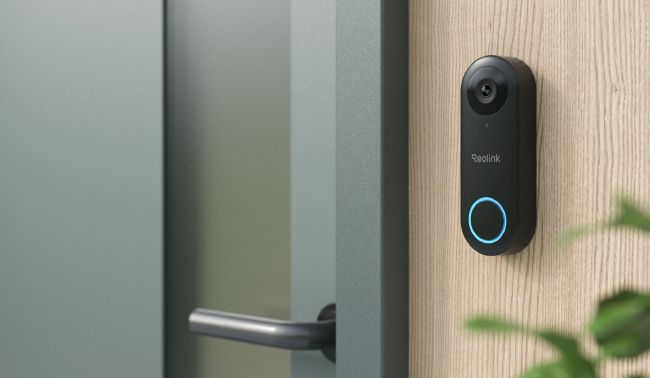
Best video doorbell with the most stable connection at the door
The Reolink Video Doorbell PoE runs power and data through a single Ethernet cable, so it isn't affected by a weak WiFi signal, thick walls, or a crowded router.
It offers 2K+ (5MP) resolution with a 180° diagonal viewing angle, person detection with instant push notifications, and built-in two-way audio to talk to whoever's outside. That stability comes at the cost of convenience, though, since getting an Ethernet line to the door usually means a PoE injector or a nearby switch, so it's worth confirming that's realistic before committing.
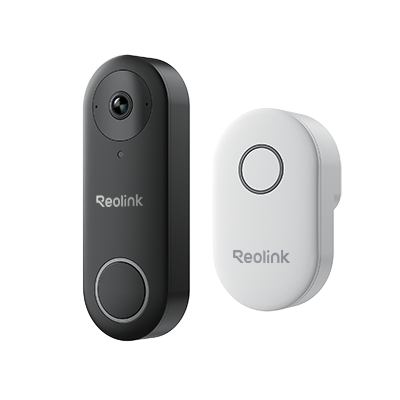
Smart 5MP Video Doorbell with Chime
5MP Super HD, Person Detection, Power over Ethernet, 180° Diagonal Viewing Angle, Two-Way Audio, High-Quality Night Vision.
Reolink Video Doorbell WiFi
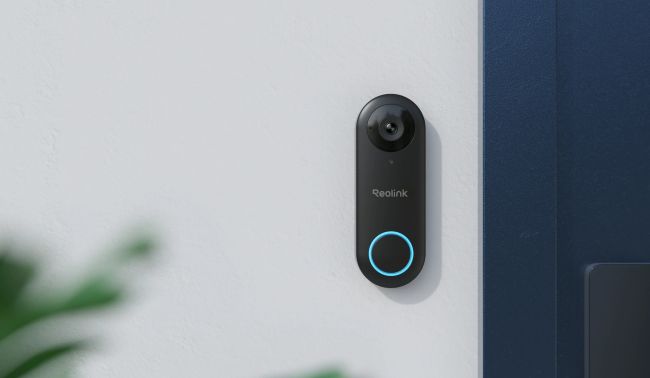
Best video doorbell for situations when a cable to your door isn't practical
The Reolink Video Doorbell WiFi taps into your existing doorbell wiring for continuous power and connects over your home WiFi instead, so there's no new cable to run.
It matches the PoE version on the specs that matter, 2K+ (5MP) resolution, a 180° diagonal viewing angle, person detection with push notifications, and two-way audio, making it the easier install of the two.
The tradeoff is that video quality depends on your WiFi signal at the door, which can dip if the router is far away or walls get in the way.
Smart 5MP Video Doorbell with Chime
5MP Super HD Day & Night, Person Detection, 2.4/5 GHz Dual-Band WiFi, 180° Diagonal Viewing Angle, Two-Way Audio, Rich Notification.
Reolink Battery Video Doorbell (2nd Gen)
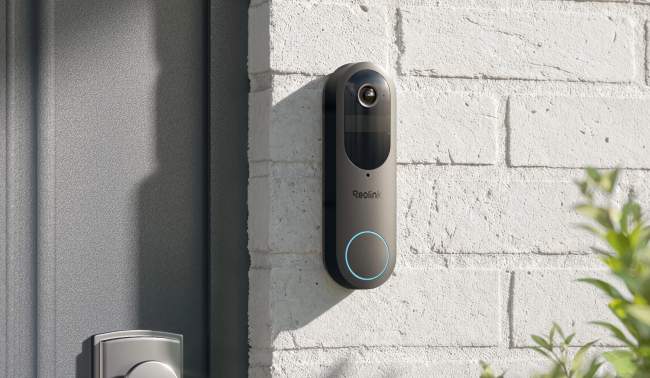
Best video doorbell for totally wire-free scenarios
The Reolink Battery Video Doorbell (2nd Gen) runs on battery power for up to 300 days per charge, so there's no wiring to deal with at all, though it can also hardwire into 8-24V AC or 24V DC power if you'd rather have 24/7 recording and pre-recording built in.
Its 1:1 aspect ratio frames a visitor head to toe instead of just their face, and detection goes beyond people to include vehicles, animals, packages, and a zone loitering alert for anyone lingering too long at the door. It stores locally on a microSD card, NVR, or Reolink Home Hub with no monthly fees, and dual-band WiFi (2.4/5GHz) keeps the connection steady.
The one limitation is resolution, as it steps down to 2K (4MP) from the 2K+ (5MP) on the PoE and WiFi versions.
Reolink Battery Doorbell (2nd Gen) Explained
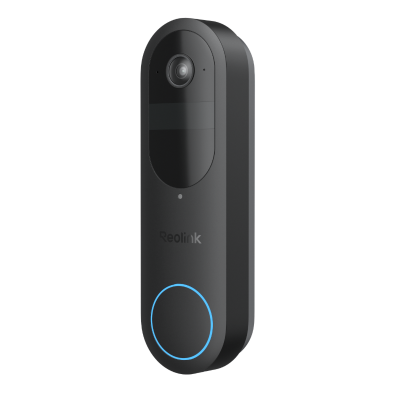
2K Battery Wi-Fi Video Doorbell with Smart Detection
- 2K 4MP Head-to-Toe View
- Person/Vehicle/Animal/Package Detection
- 300-Day Lasting Battery Life
- No Monthly Fees for Local Storage
Best Reolink 4K Security Cameras to Complement Your Doorbell
If you already have a doorbell of your own, here are more practical options that can save you unnecessary costs and provide you the 4K quality footage you want.
Reolink RLC-810WA
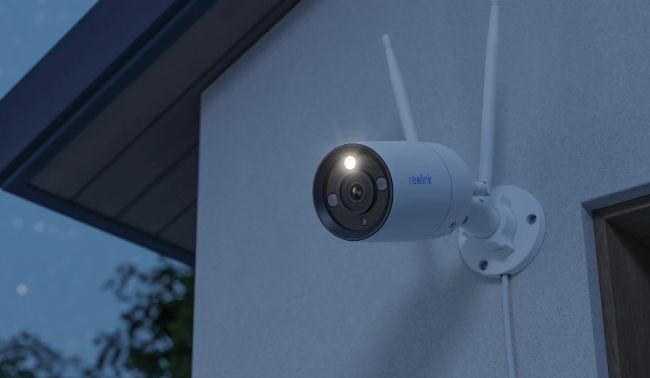
Best 4K security camera to be installed outside your door
If 4K is a must and you already have a doorbell installed, the Reolink RLC-810WA is one of the most popular alternatives for this scenario.
It is a 4K (8MP) fixed-angle camera with two-way audio, WiFi 6, and person/vehicle detection, built to watch one spot well rather than swivel to follow activity.
Its color night vision also means it picks up actual color after dark, not just black and white, which matters if you need to describe a visitor's clothing or a delivery van rather than just confirm someone was there.
Just make sure the placement is right the first time, since the angle is fixed once it's mounted, unlike the pan-tilt camera below.
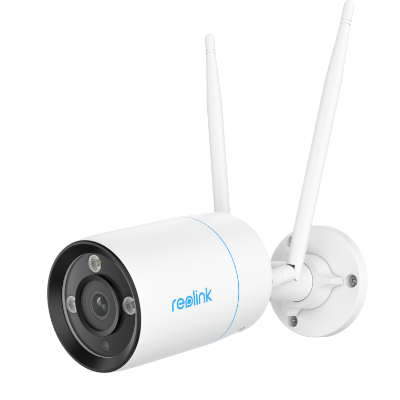
4K WiFi 6 Surveillance Camera
4K 8MP Ultra HD, Dual-Band WiFi 6, Color Night Vision, IP67 Waterproof, Smart Detection, Two-Way Audio, Built-in Siren.
Reolink E1 Outdoor Pro
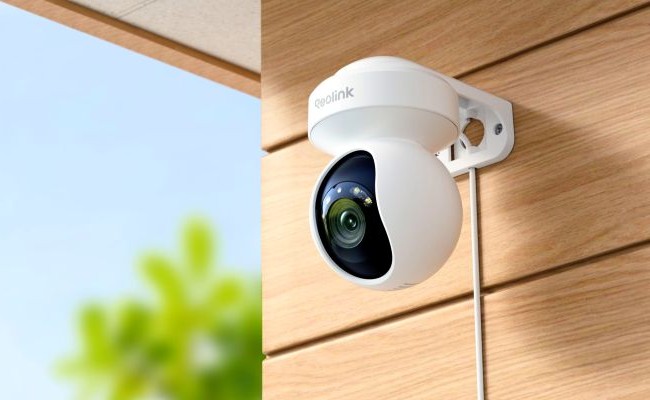
Best 4K security camera for wider outdoor spaces
If you have a wide space outside your door that needs wider 4K coverage, the E1 Outdoor Pro does a better job. It is a 4K (8MP) pan-tilt camera with dual-band WiFi 6 and 3x optical zoom, which makes it more capable for wide-area outdoor coverage rather than a fixed doorway view.
When mounted near the entrance with 355° pan and 50° tilt, it can cover the walkway, driveway, and front door in one setup. That's something a fixed-angle doorbell camera can't do.
The tradeoff is that it has to be mounted on a wall or ceiling, not in place of your existing doorbell button.
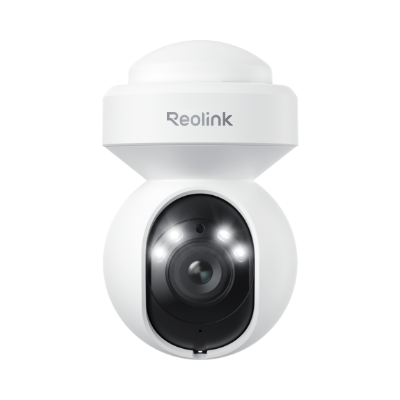
4K WiFi PTZ Camera with Auto-Tracking
4K 8MP Super HD, Smart Person/Vehicle Alerts, 355° Pan & 50° Tilt & 3X Optical Zoom, Auto Tracking, Color Night Vision.
Common Mistakes When Shopping for a 4K Doorbell
Assuming a 4K Doorbell Is the Affordable, No-Subscription Option
It's usually the opposite. The first 4K doorbells to reach market cost more than their 2K counterparts, and while basic recording works without a subscription, keeping more than a few days of footage or searching back through it usually doesn't. Check the price and the fine print on subscriptions before assuming 4K is a straightforward upgrade.
Buying a 4K Security Camera Without Checking the Mounting Angle
A security camera can get you 4K resolution near your door, but only if it can actually be mounted and angled to cover the entryway the way a doorbell does. Confirm the pan/tilt range and mounting height before buying one as a doorbell substitute.
Ignoring the Storage Math Until After Buying
4K footage takes roughly four times the storage of 1080p for the same length of video. Work that out before you buy, not after your NVR fills up.
Not Checking Wiring Compatibility First
Wired doorbell cameras need your home's existing doorbell wiring to work. Check what your home already has before ordering a wired model.
Buyer Decision Table: Which Camera Actually Fits Your Door?
To help cut through the resolution confusion, here's a quick way to match your situation to the right product.
FAQs
What is the best doorbell camera?
There's no single best doorbell camera, it depends on what you're optimizing for. A 2K+ (5MP) model with local storage covers sharp detail and reliable detection without an ongoing subscription, which is enough for most doors. A 4K doorbell earns its price if reading faces, plates, or labels at a distance matters more to you than avoiding a subscription, and a 4K security camera at the entryway can out-resolve either one if you don't need the doorbell form factor.
How do doorbell cameras work?
A doorbell camera combines a video camera, a motion sensor, and a chime trigger in place of a traditional doorbell button. When a visitor presses the button, or the built-in PIR sensor detects a person, animal, or vehicle nearby, the camera starts recording, sends a push notification to your phone, and triggers the chime inside your home. Two-way audio lets you talk to whoever's there in real time, and footage saves locally to an SD card, NVR, or Home Hub, or to the cloud if you're on a subscription.
How much is a doorbell camera?
Doorbell cameras generally cost between $100 and $250, depending on resolution and features. The first 4K battery-powered doorbells reached the market in March 2026 priced around $250, about $70 more than the 2K version in the same lineup. 2K+ (5MP) doorbells with local storage and no required subscription, like the Reolink Video Doorbell WiFi or PoE, typically cost less upfront and skip the ongoing fees that 4K models still charge for extended recording and video history.
How far can a doorbell camera see?
Most doorbell cameras detect motion within 15 to 30 feet, using a PIR (passive infrared) sensor that picks up heat radiation from people, animals, or vehicles. For how much of the scene the camera actually frames, field of view matters more than detection range: most doorbell cameras cover 160 to 180 degrees diagonally, wide enough to catch the walkway and porch, not just whoever's standing directly in front of the lens.
What doorbell works with Google Home?
All three current Reolink video doorbells, the Video Doorbell PoE, Video Doorbell WiFi, and Battery Video Doorbell (2nd Gen), work with Google Home through Google Assistant. You can say "Hey Google, show me the front door" to pull up the live feed on a Nest Hub or Chromecast-enabled TV, or set up routines like turning on porch lights when the doorbell rings. Video doesn't appear automatically. Google Home sends a chime and notification first, and you request the live view from there.
Which doorbell camera is best without a subscription?
A doorbell camera with local storage support is the best choice if you want to avoid a subscription entirely. The Reolink Video Doorbell PoE, WiFi, and Battery (2nd Gen) all save footage to a microSD card, NVR, or Reolink Home Hub with no monthly fee required. That's the opposite of most 4K doorbells on the market today, which keep extended video history and clip search behind a paid cloud plan even when basic recording is free.
Conclusion
4K at the door sounds like the obvious upgrade until you price it out. Between the markup and a subscription that still gates anything past a few days of footage, the resolution jump costs more than it changes in day-to-day use. For most homes, a 2K+ doorbell with local storage already covers the resolution, field of view, and detection that matter at the door, without an ongoing fee attached.
If more resolution than that is genuinely the priority, a dedicated security camera aimed at your entryway gets you there today, just without a doorbell button built in. Either way, the smarter buy isn't whichever camera has the biggest number on the box. It's whichever setup matches how you'll actually use it, and what you're willing to keep paying for afterward.
Search
Subscribe for the Latest Updates
Security insights & offers right into your inbox