
The Ultimate Guide to Doorbells That Work with Google Home
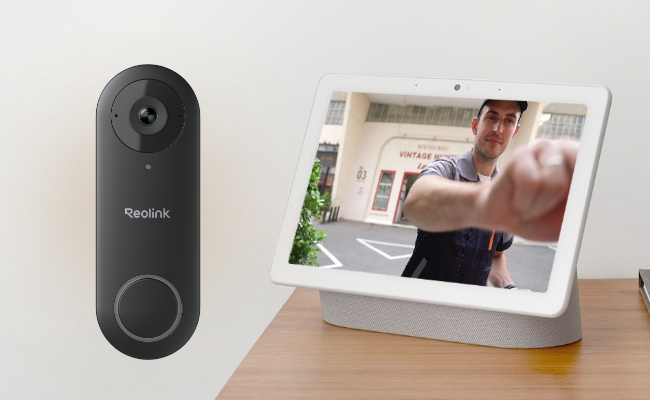
If you’re already using Google Home, a doorbell camera can be one of those upgrades that quietly makes life easier. From seeing who’s at the door without getting up to keeping an eye on deliveries, it pulls everything into the same smart home experience.
Of course, not every doorbell is the right fit. Your setup, Wi‑Fi coverage, and how you want recordings handled all play a part. In this article, we’ll walk through what to consider, share a few Reolink options that work well with Google Home, and show you how to get everything connected.
- Why Choose Video Doorbell Cameras that Work with Google Home?
- Which Reolink Doorbells Work with Google Home?
- Real Owner Case Study: Switching From a Subscription Doorbell to Reolink
- How to Choose Doorbells Compatible with Google Home?
- Common Mistakes to Avoid When Buying a Google Home Doorbell
- Which Reolink Doorbell Fits Your Situation?
- How to Connect Your Doorbell to Google Home?
- FAQs
- Conclusion
Why Choose Video Doorbell Cameras that Work with Google Home?
Choosing a doorbell that works with Google Home offers some exceptional benefits. You'll be able to control the doorbell entirely hands-free. Just use your voice to check who’s at the door, pull up a live view, or manage it without ever opening the app.
That hands-free control comes with another perk and that's alerts that go further than a phone ping. Ring the doorbell, and depending on your setup, you might get an announcement through a Nest speaker, a pop-up on a Nest Hub display, or a routine that turns on the porch light and pulls up a live view automatically. It's less about adding another device to control and more about the doorbell slotting into the Google Home habits you already have.
Which Reolink Doorbells Work with Google Home?
Reolink Video Doorbell PoE

The Reolink Video Doorbell PoE works with Google Home through Google Assistant, so you can ask to pull up the live feed hands-free. It records videos in 2K+ (5MP) resolution, which offers exceptional clarity and intricate details. It is also equipped with infrared LEDs to capture clear footage at night.
It can automatically detect if there is any person on the door and send real-time alerts. You can customize the motion zone for accurate alerts. Its 180-degree diagonal view offers a complete picture of the person and surroundings. It's a plug-and-play device and offers flexible storage options.
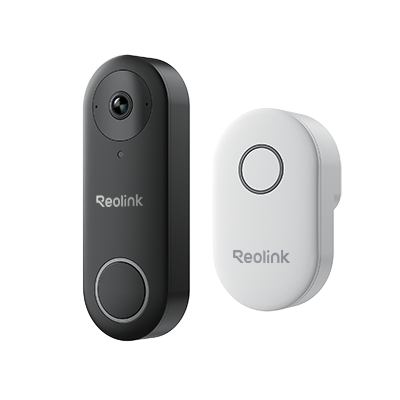
Smart 5MP Video Doorbell with Chime
5MP Super HD, Person Detection, Power over Ethernet, 180° Diagonal Viewing Angle, Two-Way Audio, High-Quality Night Vision.
Reolink Video Doorbell Wi-Fi

The Reolink Video Doorbell Wi-Fi also works on your home Wi-Fi network and works with Google Home through Google Assistant. Its dual-band Wi-Fi capabilitiy helps to ensure a stable and fast connection.
It comes in two color options with different fields of view. The black version offers a 4:3 wide horizontal view suited to open landscapes, while the white version offers a 3:4 view built for narrow porches and head-to-toe visitor and package shots. Its 2K+ resolution ensures exceptional clarity. At night, it records videos through brilliant night vision.
The doorbell detects persons and packages in the customized detection zone. It offers real-time alerts on your devices without any monthly subscription. You can also answer the door instantly through quick replies and communicate with the person at the door.
Important Note: See what "no monthly fee" actually covers if you're weighing cloud backup later.
Smart 5MP Video Doorbell with Chime
5MP Super HD Day & Night, Person Detection, 2.4/5 GHz Dual-Band WiFi, 180° Diagonal Viewing Angle, Two-Way Audio, Rich Notification.
Reolink Video Doorbell Battery (2nd Gen)

The Reolink Video Doorbell Battery (2nd Gen) is a completely wireless doorbell with a built-in 7,000mAh battery that lasts up to 5 months under typical use. You can answer your door hands-free through Google Home as it works with Google Assistant. Unlike some Wi-Fi doorbells in this lineup, it also wires into an existing mechanical chime in addition to Reolink Chime, Reolink Home Hub, Alexa Echo Show, and Google Assistant-enabled routing, plus two-way audio for easy communication.
With its AI detection capabilities, it can accurately detect persons, vehicles, and parcels and send quick alerts to your device. You can also set up quick replies to answer the door in no time. It has a 2K security camera with night vision and its HDR technology ensures true colors in all conditions.
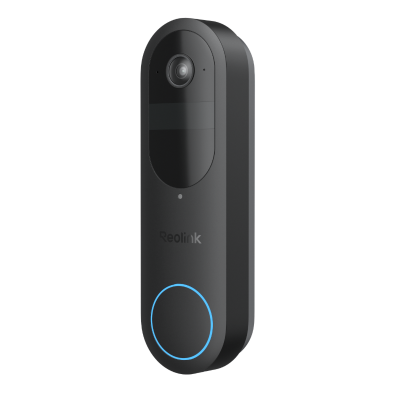
2K Battery Wi-Fi Video Doorbell with Smart Detection
- 2K 4MP Head-to-Toe View
- Person/Vehicle/Animal/Package Detection
- 300-Day Lasting Battery Life
- No Monthly Fees for Local Storage
Real Owner Case Study: Switching From a Subscription Doorbell to Reolink

One owner's review of the Reolink Video Doorbell WiFi
after switching from a subscription-based doorbell has been generally positive.
According to the owner, daytime video came through sharp at 2K, with person alerts arriving within seconds. Two-way audio held up well too, with under a 1-second delay and enough speaker volume to cut through street noise.
On the ecosystem side, the doorbell connected cleanly to both Home Assistant and Google Home. Pulling the stream into third-party NVR software like Blue Iris requires switching the protocol from RTSP to RTMP to stop dropped frames. It's an extra step worth knowing if you're running a multi-camera NVR setup alongside the doorbell.
However, do note that this Wi-Fi model doesn't ring an existing mechanical chime on its own, only the included digital chime or a smart-home routine. If your home already has an analog chime and you're looking at the Wi-Fi doorbell, plan on replacing it or bridging the alert through Google Home instead. Only the Reolink Battery doorbell supports a mechanical chime.
How to Choose Doorbells Compatible with Google Home?
Here are a few things you can consider while choosing a doorbell compatible with Google Home.
Check Compatibility
First, ensure whether the doorbell is compatible with Google Home or Google Assistant. Some doorbells are compatible with multiple smart home systems or hubs.
Power Options
You can go with a PoE, DC-powered, or Battery-powered doorbell. These are the three common options. For PoE, you need to have proper Ethernet wiring, but it is a reliable option. DC-powered doorbells are Wi-Fi doorbells that require power through a DC adapter connected to a nearby AC outlet. The last one is the battery-powered doorbell, which relies on the battery power, and you have to recharge it once in a while.
Video and Audio Quality
The video quality of the doorbell should be optimal. Aim for at least a 2K resolution for rich details and clear videos. It should also have a brilliant night vision to capture clear videos at night. Also, check the audio quality of the camera. It should facilitate clear and smooth communication.
Smart Features
The most important feature is smart detection. The camera should detect movement instantly and be able to distinguish between a person, vehicle, and parcel. It should work on voice commands and offer hand-free control. You should be able to see the live preview from any location. Last but not least is the smart playback. It allows you to filter out the footage you need.
Build Quality
The doorbell camera should be durable enough. Firstly, it should withstand all weather conditions and offer reliable performance whether it is rain or snow.
Common Mistakes to Avoid When Buying a Google Home Doorbell
Assuming every "Google Home compatible" doorbell shows video automatically
Some buyers expect a Google Home-compatible doorbell to pop up video the instant someone rings, the same way a phone call would. In practice, most doorbells in this category, Reolink included, send a chime or notification first, and you pull up the live feed with a quick voice command or a tap in the app.
Skipping the subscription math
A "no monthly fee" claim usually covers local recording, not every feature. Check what happens if you later want off-site cloud backup or a longer video history; see Reolink's subscription cost breakdown before assuming a plan will never apply to you.
Forgetting that local storage lives on the device
Local storage means no monthly fee and full control over your footage, but if the doorbell itself is stolen or damaged, that footage typically goes with it since there's no off-site copy. Weigh that against a cloud plan if theft of the unit itself is a real concern for your location.
Not checking for a Google smart display or Chromecast first
Without a Google Nest Hub, a Chromecast-enabled TV, or a similar device, Google Home can't display live video at all, no matter which doorbell you buy. Confirm you have one of these before counting on video-on-demand as a feature.
Which Reolink Doorbell Fits Your Situation?
To help bring further clarity to what's best for you, here's a Buyer Decision Table to make it easier to compare choices with confidence.
How to Connect Your Doorbell to Google Home?
Before linking to Google Home, make sure the doorbell itself is already connected to your home Wi-Fi network through the Reolink app's normal setup flow; Google Home pairing comes after that, not instead of it.
- In the Google Home app, tap Home > Add device > Link apps or services, search Reolink, tap Reolink Smart Home, and log in with the same account your doorbell uses. Tap Allow.
- In the Reolink app, make sure the doorbell is already added, then go to Me > Smart Home > Google Home and toggle the device on.
- Back in the Google Home app, the doorbell will now appear under Devices. Tap it, assign it to a home, and finish setup.
For the full walkthrough with screenshots, see Reolink's official Google Home setup guide.
FAQs
1. Do any doorbells work with Google Home?
Reolink doorbells work with Google Home. You can select any kind of Reolink doorbell and use it hands-free after connecting it to your Google Home.
2. What is the best smart doorbell for Google?
Reolink Battery Doorbell is an excellent doorbell you can use with Google Home. It is easy to install, and the doorbell itself keeps running on battery during a power outage, though live view and Google Home alerts still need your Wi-Fi and internet to stay up. It offers smart features like motion detection, real-time alerts, smart playback, etc.
3. Will my Google Home doorbell show video the instant someone rings it?
Not automatically for most doorbells, including Reolink's. You'll get a chime and a notification through Google Home right away, and pulling up the live feed takes one quick voice command ("Hey Google, show the front door") or a tap in the app.
Conclusion
A doorbell that works with Google Home means fewer steps between a knock at the door and knowing who's there; just remember that "works with" usually means a chime alert, not always an automatic video pop-up. Match the factors above to your home's wiring and Wi-Fi, then check the full Reolink video doorbell lineup to compare the PoE, Wi-Fi, and Battery models side by side.
Search
Subscribe for the Latest Updates
Security insights & offers right into your inbox