
Wi-Fi 6 Compatible Devices: 2026 Full Guide
Wi-Fi 6 is the latest and fastest version and has been making its way into top wireless devices since 2019. Now, many cool options are available if you're thinking of getting one. In this article, we'll explore the Wi-Fi 6 compatible devices that have become increasingly prevalent. Just keep reading!

🎉 Limited-Time Security Camera Prime Deals
- Explore Special Offers on Individual Cameras and Security Systems.
- Protect Your Home for Less with Bundles & Multi-Packs.
What is Wi-Fi 6?
Wi-Fi 6 is a new wireless technology released in 2019. In optimal conditions, Wi-Fi 6 can reach a theoretical maximum bandwidth of 9.6 Gbps, utilizing both the 5 GHz and 2.4 GHz frequency ranges. This high-speed technology elevates performance in the 5 GHz band and enhances speeds in the 2.4 GHz band, providing a Wi-Fi network with superior range and faster speeds compared to previous versions.
Wi-Fi 6 is specifically designed to handle numerous devices simultaneously on the network. With support for multiple frequency bands, expanded multi-user capabilities, improved multiplexing, and various other technologies, it excels in managing a larger number of devices. This makes Wi-Fi 6 particularly effective in crowded networks found in environments like office buildings, public spaces, and smart homes.
Wi-Fi 6 Compatible Devices
It's crucial to understand which devices support this advanced technology. Let's delve into the realm of Wi-Fi 6-capable devices, including Wi-Fi 6 laptops, tablets, phones, and other gadgets.
Wi-Fi 6 supported phones
Unsurprisingly, smartphones were quick to embrace Wi-Fi 6, following in the footsteps of routers. Samsung led the pack with the Galaxy S10, and soon after, Apple, Huawei, Xiaomi, and other major players joined the trend. Today, Wi-Fi 6 (and its newer Wi-Fi 6E / Wi-Fi 7 standards) is a default feature across all modern mid-range and flagship smartphones. Here is an updated list of major phone series supporting Wi-Fi 6 and above:
- Apple: iPhone 11 series through iPhone 15, 16, and 17 series (iPhone 15 Pro, 16, and 17 series also support Wi-Fi 6E/7)
- Samsung: Galaxy S20 through S24, S25, and S26 series; Galaxy Z Fold 2/3/4/5/6/7 & Z Flip 3/4/5/6/7 series; Galaxy A35/A55/A56 series
- HUAWEI: HUAWEI P40 through P60 & Pura 70 series; HUAWEI Mate 40 through Mate 60 & Mate 70 series; Pocket 2 / Mate X5 series
- XIAOMI: Xiaomi 10 through 14, 15, and 16 series; Redmi Note 12 Pro / 13 Pro / 14 Pro / 15 series and K60 / K70 / K80 series
- Google: Pixel 6 through Pixel 8, 9, and 10 series
- OnePlus: OnePlus 8 through 12, 13, and 15 series; OnePlus Ace 2 / 3 / 5 series
Note: If you want to know more details, you can go to the official website.
Wi-Fi 6 capable laptops
Following the rapid adoption in smartphones, Wi-Fi 6 (802.11ax) has become a standard baseline feature across modern laptops. Today, virtually all mainstream and flagship laptops come equipped with Wi-Fi 6, Wi-Fi 6E, or the latest Wi-Fi 7 wireless cards (which are fully backward-compatible with Wi-Fi 6 networks).
Here is an updated list of major laptop series and models that support Wi-Fi 6 and above:
- Apple: MacBook Air (M2, M3, M4, and newer) and MacBook Pro (2023 M2 series through M3, M4, and M5 series); iMac, Mac Studio, and Mac mini lineup
- Dell: XPS 13 / 14 / 16 series; Inspiron 14 / 15 / 16 series; Latitude 5000 / 7000 / 9000 business series; Alienware m16 / m18 and x-series gaming laptops
- HP: Spectre x360 & OmniBook series; ENVY 14 / 16 & Pavilion lineup; OMEN 16 / 17 & Victus gaming series; EliteBook and ProBook business lineup
- Lenovo: ThinkPad X1 Carbon, T-series, and P-series workstations; Yoga 7 / 9 & Slim series; Legion Pro / Slim & LOQ gaming series; IdeaPad 3 / 5 series
- ASUS & ROG: ROG Zephyrus G14 / G16 & Strix series; TUF Gaming lineup; Zenbook 14 / 15 / S series; Vivobook series
- Microsoft: Surface Laptop 5 / 6 / 7 / 8 and Surface Pro 9 / 10 / 11 / 12 series
Wi-Fi 6 capable tablets
Here is a list of tablets that support Wi-Fi 6:
Apple iPad Lineup:
- iPad (10th gen and newer)
- iPad mini (6th gen, A17 Pro / 7th gen, and newer)
- iPad Air (5th gen M1, M2 series, and newer)
- iPad Pro 11-inch & 13-inch (4th gen, M2, M3, M4 series, and newer)
Samsung Galaxy Tab Series:
- Galaxy Tab S8 / S9 / S10 / S11 series (S8 Ultra through current flagship lines)
- Galaxy Tab S9 FE / S10 FE series
- Galaxy Tab Active4 Pro / Active5 rugged tablets
Microsoft Surface Series:
- Surface Pro 8, 9, 10, 11, and 12 series
- Surface Go 3, 4, and newer
- Surface Laptop Studio 1 & 2
Xiaomi & Redmi:
- Xiaomi Pad 5 Pro, Pad 6 / 6 Pro / 6 Max, Pad 7 series
- Redmi Pad Pro / K-series tablets
Lenovo:
- Tab P11 Pro (Gen 2 and newer) & Tab P12 / P12 Pro
- Legion Tab / Y700 gaming series
- Yoga Tab 11 / 13 and Pro lineup
HUAWEI:
- MatePad Pro 11 / 12.2 / 13.2 series
- MatePad Air & MatePad 11.5 / 11.5" S series
Wi-Fi 6 capable streaming devices
Here is a short list of streaming devices that support Wi-Fi 6:
Apple TV:
- Apple TV 4K (2nd generation, 2021)
- Apple TV 4K (3rd generation, 2022) & newer iterations
Amazon Fire TV Series:
- Fire TV Stick 4K (2nd Gen) & Fire TV Stick 4K Max (1st and 2nd Gen)
- Fire TV Cube (3rd Gen)
Roku:
- Roku Ultra (2024 model and newer)
- Roku Streaming Stick 4K / 4K+
Google & Android TV:
- Google TV Streamer 4K
- Chromecast with Google TV (select newer hardware revisions)
- NVIDIA SHIELD TV / Pro (via Wi-Fi 6 USB adapter expansions or newer hardware revisions)
Smart TVs (Built-in Streaming):
- Samsung Neo QLED, OLED, and 8K Smart TVs
- LG OLED (C-series, G-series, and M-series) & QNED Smart TVs
- Sony BRAVIA XR (A80/A90/A95 and X90/X95 series and newer)
- TCL & Hisense flagship 4K / 8K Mini-LED Smart TVs
Wi-Fi 6 capable security cameras
The integration of Wi-Fi 6 capabilities into security cameras marks a significant stride in enhancing the efficiency and performance of these surveillance devices. Let's see the list of Wi-Fi 6 security cameras.
Reolink Argus 4 Pro – Best Wi-Fi 6 Camera for Wide Outdoor Coverage
The new Reolink Argus 4 Pro is an advanced 4K battery-powered surveillance camera embedded with Wi-Fi 6 technology. This dual-lens camera delivers exceptional speed and stability for an unparalleled security experience. Boasting a 4K 8MP Ultra HD resolution and 180-degree field of view, the Argus 4 Pro ensures crystal-clear footage for detailed surveillance.
Most importantly, Argus 4 Pro uses advanced ColorX technology. It allows for full color night vision without replying on visible spotlights. The wire-free design also ensures flexible installation in different scenarios.

4k 180° Wire-free Color Night Vision Camera
4K UHD 180° Blindspot-free View; Color Vision Day and Night; 30% More Battery Life; Dual-band Wi-Fi 6; Smart detection.
For consumers that require full-color night vision without apparent spotlights, the Reolink Argus 4 Pro is an excellent choice. Alternatively, if you're looking for a camera with longer battery life, check out the new Altas PT Ultra. It also offers full-color night vision and runs on WiFi 6 for enhanced performance.
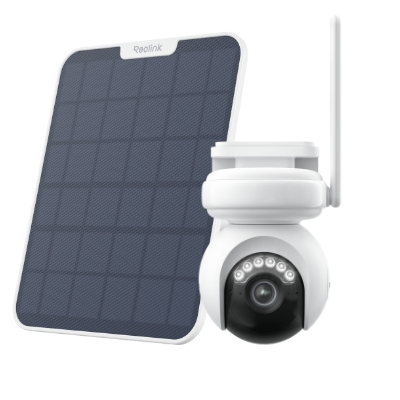
4K Battery-Powered PTZ Camera with Continuous Recording
👍 4K UHD video with continuous recording
👍 ColorX night vision in low light
👍 Pan, tilt, and automatic person tracking
👍 Local storage without monthly fees
Reolink TrackMix WiFi – Best Wi-Fi 6 Camera for Tracking Moving Objects
Reolink TrackMix WiFi is a cutting-edge 4K 8MP Smart PTZ Wi-Fi Camera with Auto Tracking, designed to elevate your surveillance experience. This camera's impressive features ensures top-notch security for your outdoor spaces.
Equipped with Dual-Band Wi-Fi 6, the E1 Outdoor Pro sets a new standard for connectivity, providing faster and more reliable data transmission. Its 6X hybrid zoom capability allows for enhanced focus and clarity, while the 355° Pan and 90° Tilt ensure comprehensive coverage of your surroundings.
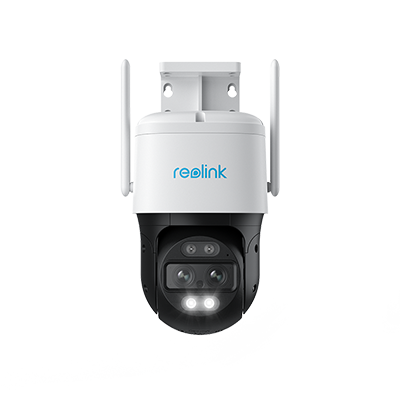
4K Dual-Lens PTZ Camera with Motion Tracking
4K 8MP UHD, Wide-Angle & Telephoto Lenses, Pan-Tilt-Zoom, Auto-Tracking, Person/Vehicle Detection, 2.4/5 GHz Dual-Band WiFi, Two-Way Audio.
RLK12-800WB4 – Best Wi-Fi 6 Camera System for Whole-Property Monitoring
RLK12-800WB4 is a 4K security kit revolutionizing your surveillance experience with Wi-Fi 6 capabilities. Thanks to the 4K 8MP Ultra HD resolution, capture every detail with stunning precision. RLK12-800WB4 goes beyond conventional surveillance by incorporating advanced features such as Person/Vehicle/Animal Detection, providing intelligent and targeted monitoring.
With a 12-channel NVR accompanied by a spacious 2TB HDD, this security kit ensures ample storage for your footage, ensuring you never miss a moment.
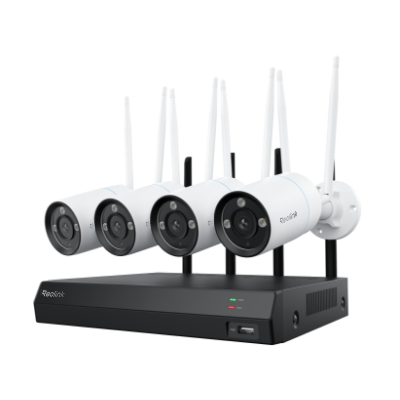
4K Security Kit with Next-Gen WiFi 6
4 pcs 4K Ultra HD Security Cameras; Dual-Band WiFi 6; 2TB HDD 12-Channel NVR for 24/7 Recording; Peron/Vehicle/Animal Detection; IP67 Weatherproof.
Note: Some of these devices not only support Wi-Fi 6, but also Wi-Fi 6e.
Wi-Fi 6 Devices Using Cases
Let's explore a range of Wi-Fi 6 use cases that highlight its significant value to various scenarios.
Wi-Fi 6 phones
Leading smartphones come equipped with built-in Wi-Fi 6 support, optimizing performance on congested networks through key technologies like OFDMA and MU-MIMO.
- High-Density Venues: In packed sports stadiums, concert arenas, and convention centers, Wi-Fi 6 handles massive concurrent client loads as thousands of fans stream 4K video, make HD calls, and upload content simultaneously. When cellular coverage fluctuates, switching seamlessly to a Wi-Fi 6 network provides reliable alternative connectivity.
- Dense Residential Buildings: Large apartment complexes and dormitories benefit from Target Wake Time (TWT) and BSS Coloring, reducing channel interference between neighboring Wi-Fi networks and preserving smartphone battery life.
- Transit Hubs: High-traffic subway stations and international airports equipped with Wi-Fi 6 offer passengers fast, secure, and low-latency connectivity for mobile boarding passes, navigation, and entertainment while on the go.
Wi-Fi 6 laptops
Wi-Fi 6 laptops are essential for professionals and hybrid workers seeking desktop-class wireless reliability, especially where multi-gigabit data sharing and cloud collaboration are critical.
- Enterprise & Hybrid Workspaces: Businesses deploy Wi-Fi 6 and Wi-Fi 6E/7 access points alongside modern laptops to deliver secure, ultra-low-latency wireless access. This ensures seamless 4K/8K video conferencing, cloud desktop virtualization, and instant large file transfers across crowded open offices.
- Industrial & Outdoor Operations: Ruggedized laptops and field devices equipped with Wi-Fi 6 thrive in challenging settings like automated warehouses, ports, and manufacturing floors, where maintaining stable connections near heavy machinery is vital.
- Content Creation & Local NAS Access: Media creators and engineers working on laptops can stream, edit, and back up raw video footage directly to network-attached storage (NAS) at speeds rivaling wired Ethernet connections.
Other Wi-Fi 6 devices
Beyond personal electronics, Wi-Fi 6 powers a broad ecosystem of enterprise, industrial, and smart home hardware:
- Interactive Education & Immersive Tech: Educational institutions deploy Wi-Fi 6 to stream high-bandwidth augmented reality (AR) and virtual reality (VR) learning modules across entire classrooms without lag or motion blur.
- Hospitality & Smart TVs: Hotels and resorts utilize Wi-Fi 6 streaming players and integrated smart TVs to provide guests with high-bitrate 4K/8K media streaming, low-latency cloud gaming, and automated room controls.
- Public Safety & Surveillance: High-resolution wireless security cameras and first responders' body-worn cameras leverage Wi-Fi 6 to offload encrypted video footage rapidly upon entering coverage zones, accelerating response times.
- Retail & Smart Logistics: Retail stores and distribution centers use Wi-Fi 6 to extend the battery life of mobile barcode scanners via Target Wake Time (TWT), while prioritizing real-time point-of-sale (POS) terminal traffic to eliminate checkout delays.
- Smart Home Automation & IoT: Modern Wi-Fi 6 routers handle dozens to hundreds of connected IoT devices simultaneously—from video doorbells and smart hubs to security sensors—ensuring uninterrupted home network stability.
Consideration: Does Wi-Fi 6 Benefit Older Devices?
A Wi-Fi 6 router will still work with older devices, you just won’t enjoy its benefits. In some cases, the Wi-Fi 6 is definitely worth it. The first is speed. With data rates reaching up to 9.6 Gbps, the caveat lies in the capability of your connected device. If it falls short, the effective speeds will be lower than the maximum potential.
As for security, Wi-Fi 6 uses this fancy encryption called WPA3, which is like a super strong lock for your internet. But, if your device is old, it might not know how to use this new lock, so it uses a slightly less secure one called WPA2.
The last is battery time. Wi-Fi 6 is smart about saving battery. It lets devices take naps between sending stuff, which is great for battery life. But, if your device doesn't know how to nap (use something called target wake time), it won't save as much battery.
FAQs
1. Can a Wi-Fi 6 device connect to a Wi-Fi 5 router?
Absolutely! A Wi-Fi 6 device can connect to a Wi-Fi 5 router without any issue. Wi-Fi standards are designed to be backward compatible, meaning that newer devices can connect to older routers. While the Wi-Fi 6 device won't experience the full range of benefits that a Wi-Fi 6 network provides, it can still establish a connection and function well on a Wi-Fi 5 network
2. How many devices can Wi-Fi 6 support?
Thanks to MU-MIMO technology, routers can now chat with multiple devices at the same time. In the Wi-Fi 5 era, MU-MIMO allowed routers to talk to a maximum of four devices at once. But with the Wi-Fi 6 upgrade, this superhero power doubles, and routers can now juggle up to eight devices simultaneously.
3. How do I know if my device supports Wi-Fi 6?
To check if your device supports Wi-Fi 6, follow these steps:
- Review device specifications on the manufacturer's website or user manual.
- For PCs, inspect network adapter details in the Device Manager.
- On smartphones/tablets, check network settings for Wi-Fi version information.
4. Is there a downside to Wi-Fi 6?
While Wi-Fi 6 brings several improvements over its predecessors, there are still some potential downsides to consider:high cost of routers and limited compatibility with older devices.
5. Is Wi-Fi 6 becoming obsolete?
No. Wi-Fi 6 is not obsolete and remains widely used in routers, security cameras, and other smart home devices. Although newer standards such as Wi-Fi 6E and Wi-Fi 7 are available, Wi-Fi 6 still offers fast speeds, lower latency, and better performance when many devices share the same network, making it well suited for security camera systems.
6. What is the difference between WiFi 5 and 6?
Wi-Fi 6 is a newer and more efficient wireless standard than Wi-Fi 5, offering faster speeds, lower latency, better performance in crowded networks, and improved support for multiple connected devices. While Wi-Fi 5 mainly operates on the 5 GHz band, Wi-Fi 6 can operate on both 2.4 GHz and 5 GHz.
Conclusion
Wi-Fi 6 promises faster speeds, increased capacity, and enhanced performance across a spectrum of devices. From laptops to smartphones, smart home devices, and beyond, the Wi-Fi 6 revolution is transforming the way we stay connected.
If you like this article and find it helpful, share it with your friends. Do you have something to say about Wi-Fi 6 devices? Make sure you leave a comment below!
Search
Subscribe for the Latest Updates
Security insights & offers right into your inbox