
Shed Camera: How to Choose the Right One for Your Shed
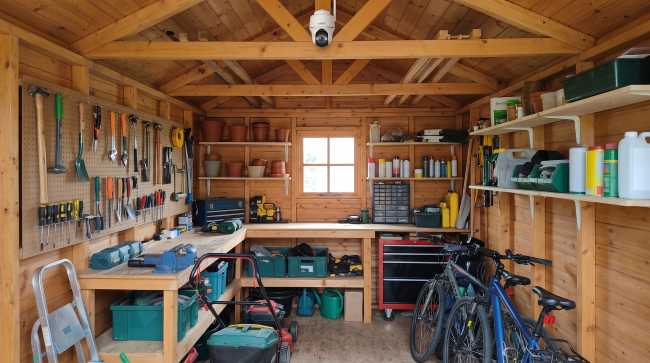
Got a shed to monitor but not sure what's the right shed camera for you? Picking the right shed camera is actually less complicated than you think. The most important factors comes down to two things your shed either has or doesn't, and that's WiFi and power. Price, brand, and resolution become easy second-order decisions after that.
This guide walks through three realistic setups in depth, then ends with specific Reolink models mapped to whichever one matches your shed, not a generic "top five shed cameras" list. Along the way, it also covers two things most shed camera guides skip entirely: what an insurer actually requires for a theft claim to hold up, and which SIM card works if your shed has no WiFi at all.
A Shed Camera Isn't One Product, It's Three Different Setups
A shed camera covers three genuinely different setups, and buying the wrong one for your situation is the single most common way this purchase goes wrong. Which one applies to you comes down to whether WiFi reaches your shed, and can you get power to it?
The one-line test: stand right next to the shed with your phone and check the WiFi bars there, not at the back door. A phone showing one bar at the door often means zero usable signal ten feet further into the garden. Run that test, then jump to the scenario below that matches what you experienced.
Scenario 1: Your Shed has WiFi
Your shed sits close enough to the house that your phone shows full or near-full WiFi signal standing right next to it. This is the easiest scenario. Simply buy a standard battery or mains-powered camera and move on, no special setup required. That being said, here are a few tips that can help you consider which one's better for you.
Battery vs. mains power: battery cameras need zero wiring, but you'll recharge them every couple of months. Mains-powered cameras run 24/7 with no charging needed, but you'll need an outdoor-rated socket nearby, or an electrician to add one.
Pro Tip: Want 24/7 continuous recording? Go mains-powered. A battery camera doing that needs recharging every few days instead of every few months, unless you add a solar panel to offset the drain.
Range: most home routers reliably cover 10 to 15 metres through interior walls. Outdoor walls, fences, and metal shed cladding cut that down further. That's why the phone signal test above beats any range figure printed on a router's box.
Note: See Reolink's wireless outdoor security cameras built for this scenario.
Scenario 2: Weak or No WiFi, But Some Power Is Possible
Your shed sits further back behind a fence, wall, or hedge. WiFi is patchy or drops out entirely by the time it reaches it. You might still get power out there occasionally, even just an extension lead during a gardening session.
This is the scenario people get wrong most often. They either fight a weak signal for years, or jump straight to a cellular camera they don't actually need.
Try this first: If you have a mesh point or a basic range extender, put it halfway between the house and the shed. That alone often turns a one-bar, unusable signal into something perfectly workable, and it costs far less than going cellular.
If extending isn't practical, because there's no power for the extender either or the distance is just too far, stop fighting the signal and a 4G security camera is the next better option (See Scenario 3 below).
You don't need constant mains power to make a WiFi camera work here, either. If you can plug something in once a month, or recharge a battery camera indoors occasionally, that's enough to keep it running even on a borderline signal.
Note: See our guide to security cameras that work without WiFi for more on this option.
Scenario 3: No WiFi, No Power at All
There's no WiFi anywhere near your shed and no mains power either. This could be places such as an allotment, a paddock building, or a shed at the far end of a large garden. This is a genuinely different category from Scenario 1 and it's the scenario most homeowners have little to no idea handling it. The WiFi cameras from Scenario 1 and 2 are out, since there's no signal for them to connect to. You'll need a camera with its own SIM card and data plan instead.
Option A: a 4G security camera with a solar panel. It records to a microSD card in the camera and can send alerts over the mobile network. A small solar panel keeps the battery topped up, so nobody has to unplug it to recharge.
Option B: a trail camera. Basic, no-frills trail cameras are built for exactly this situation: no power, no WiFi, long stretches unattended, and they're usually cheaper than 4G security cameras. On those bare-bones models the trade-off is real: no real-time alerts, no two-way audio, no app. Everything sits on the SD card until you physically walk out and check it, sometimes days later. Connected trail cameras skip that trade-off, though. Reolink's own Keen Ranger PT, for example, runs on 4G and works with the Reolink app, so you still get real-time push alerts. The Go PT Ultra covers the same no-WiFi, no-power scenario too, just in a pan-tilt security camera body rather than a trail-camera one.
Here's the decisive part: if you need to know the moment someone opens your shed door, a bare-bones trail camera can't tell you that, but a connected option like the Keen Ranger or Go PT Ultra can, since both are really 4G security cameras built for this kind of off-grid coverage. If you're fine checking your shed every week or two anyway, which is how most people actually use one through spring and summer, a basic trail camera isn't a downgrade. It's lower cost, simpler tech, and it does exactly what you need.
The UK SIM card gap: this is where most guides, including US-focused ones, fall short. It's the one part of this article aimed squarely at UK buyers. Reolink's own community forum confirms that the SIM it used to bundle with cameras in the US, called V-Sim, doesn't work in the UK and has since been discontinued. A UK buyer needs their own data-only SIM instead, from a network that supports the camera's required LTE bands. As of the time of writing this article, a Reolink moderator on Reolink's community forum names three networks that work: O2, EE, and Three. The same moderator recommends an IoT-type SIM over a standard M2M one, since M2M SIMs often restrict the external network access a security camera needs. Take that as informed forum guidance rather than an official spec page, and double-check your specific camera model supports those bands before buying a SIM.
If you are concerned about how much data does 4G cellular security cameras actually use? It's honestly not much. Reolink's own support documentation recommends roughly 2GB a month for its current 4G cameras to cover motion alerts and occasional live viewing. Recording to the camera's own microSD card uses no mobile data at all. Only live viewing or downloading a clip over the mobile network counts against your plan.
Note: For solar sizing, see our solar security camera guide. For full SIM setup steps, see the Reolink SIM card guide.
Why a Shed Camera Also Matters for Insurance
A shed camera earns its keep before anything happens, simply by being visible. What's less obvious is that it can matter after a break-in too, when you're the one trying to prove what was taken.
In the UK, insurer Aviva put real numbers on how common this problem is. Research it commissioned from Censuswide, surveying 2,000 UK adults (1,266 of them shed or outbuilding owners) in March 2026, found that 27 percent of shed and outbuilding owners have experienced a break-in or attempt. Basic locks are common, 44 percent have them, but precautions drop off fast after that: only 22 percent have an outdoor camera, 20 percent motion-activated lighting, and 14 percent a burglar alarm, leaving roughly 4.4 million sheds and outbuildings exposed. The average theft claim has climbed too, up 9 percent year-on-year to £4,567, according to Aviva's July 2026 newsroom release.
Here's the detail most guides skip entirely, and the single most useful insurance fact in this whole section: Aviva's own guidance states that a shed generally needs to have been locked for a related theft claim to be valid. A camera doesn't replace that requirement. It sits alongside it.
That's exactly the gap a shed camera closes. Timestamped footage is precisely the kind of evidence an insurer wants to see, alongside receipts and photos, once a claim is filed.
What to Actually Check Before You Buy
Once you're clear on which setup suits you best, there are four specs that become more important than brand or video quality.
IP Rating
Check the weatherproofing rating first. An outdoor camera should carry an IP65 rating at minimum, and IP66 or IP67 for a shed that catches direct rain or sits somewhere exposed. Pan-tilt models sometimes rate a notch lower, around IP64, because of their moving parts. That still holds up fine tucked under an eave or overhang. Check the exact rating on the product page. Don't assume "outdoor" alone means it meets a specific standard.
Local Storage
A microSD card slot matters whichever scenario you're in. It means footage still gets captured if WiFi drops or a mobile signal briefly cuts out. This matters most in Scenarios 2 and 3, but it's worth having regardless.
False-Trigger Tolerance
Sheds sit near trees, hedges, and wildlife. Look for person, vehicle, and ideally animal detection rather than plain motion detection alone. That alone cuts down dramatically on notifications for a stray cat or a hedge blowing in the wind.
Battery or Solar Expectations
Advertised battery life assumes light, occasional motion. A windy hedge or a busy footpath triggers recordings constantly and drains a battery faster than the spec sheet suggests. Solar panels only help if they get genuine direct sunlight. Wattage doesn't matter if the panel sits in permanent shade.
Which Reolink Camera Fits Which Shed
Each of these two picks maps directly to one of the scenarios above, not a generic "top picks" list. If you already know your scenario from the sections above, you already know which row applies to you.
Argus 4 Pro: Best Camera for a Shed With WiFi
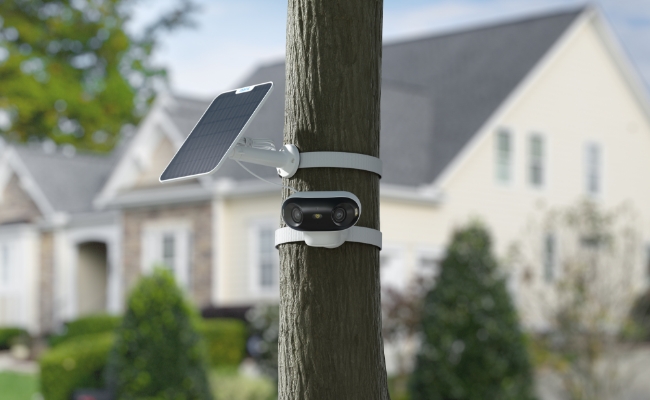
The Argus 4 Pro is our pick for Scenario 1. It records 5120×1440 (8MP) video across a 180-degree horizontal by 50-degree vertical field of view, wide enough to cover most shed approaches from a single mount. A 5,000mAh battery delivers ColorX colour night vision from five 2W spotlights instead of the usual black-and-white infrared, and it's extendable with the optional Solar Panel 2 (6W). It's IP66-rated and supports PIR-based person, vehicle, and animal detection. It also works with Google Assistant and Alexa. Listed at £169.99 on Reolink's UK store. Confirm current pricing before you buy, since Reolink's lineup and prices shift.
If your camera for the shed needs to double as a general garden camera too, the 180-degree field of view does a lot of that work on its own.

4k 180° Wire-free Color Night Vision Camera
4K UHD 180° Blindspot-free View; Color Vision Day and Night; 30% More Battery Life; Dual-band Wi-Fi 6; Smart detection.
Go PT Ultra: Best Camera for a Genuinely Off-Grid Shed
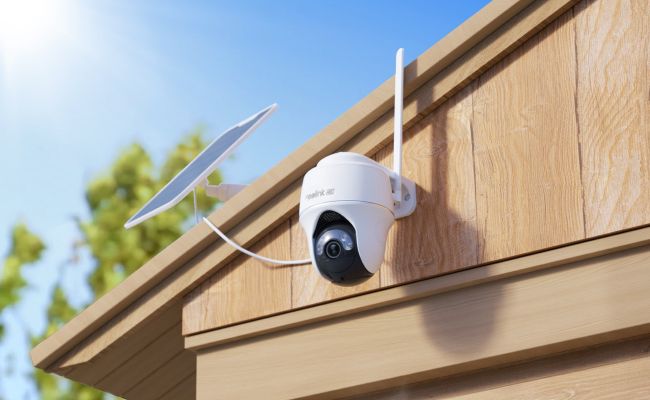
The Go PT Ultra is the fuller-featured pick for Scenario 3: 4K (8MP) video at 15fps over 4G LTE, a 355-degree pan and 140-degree tilt range, and colour night vision. Its 21.6Wh rechargeable battery works with the Solar Panel 2 (6W). It carries an IP64 rating, a notch below the IP65 minimum noted above, which is typical for pan-tilt models and still holds up fine under a shed eave or similar cover. Listed at £169.99 on Reolink's UK store. Confirm current pricing before you buy.
Want to skip the SIM card entirely and don't need real-time alerts? A trail camera, covered in Scenario 3 above, remains a legitimate and simpler alternative to the pick here. Not every off-grid shed needs a connected camera.
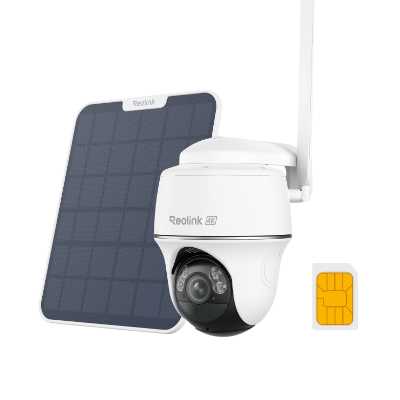
4K 8MP Wire-Free 4G LTE PT Battery Camera
4K 8MP; Smart Detection; 355° Pan & 140° Tilt; Battery/Solar Powered; Color Night Vision; Smart Real-Time Alert.
Note: Browse Reolink's full range of solar security cameras or the Go series lineup to discover a wider selection of cameras suitable for monitoring sheds.
FAQs
Do I need WiFi for a shed camera?
No. A shed camera can run on a mobile 4G connection instead of WiFi, recording to a microSD card locally and optionally sending mobile alerts. It just needs its own SIM card, and in the UK, a check that your chosen camera supports that SIM's network bands. See the Scenario 3 section above for the full setup detail.
Can a security camera work in a shed with no electricity at all?
Yes. A battery-powered camera with a solar panel add-on can run for years without mains power, as long as the panel gets genuine direct sunlight each day. A trail camera is a lower-cost, simpler option if you only check your shed occasionally and don't need real-time phone alerts.
What SIM card works with a Reolink 4G camera in the UK?
Reolink used to bundle a UK-specific SIM called V-Sim with camera purchases, but that SIM has since been discontinued. UK customers now need to source their own data-only SIM from a mobile network confirmed to support the camera's required LTE bands. O2, EE, and Three are named as working options on Reolink's own community forum. An IoT-type SIM is recommended there over a more limited standard M2M SIM.
How much mobile data does a shed camera use per month?
According to Reolink's own support documentation, a single-lens Go-series camera typically uses only 1 to 2GB a month, enough for motion-triggered notifications and some live viewing. Recording footage to the microSD card itself uses no mobile data at all. Only viewing live or downloading clips over your mobile network uses any data.
How much does a shed camera typically cost?
It depends more on your scenario than on brand. A WiFi camera built for Scenario 1, like the Argus 4 Pro, is a one-off cost with no ongoing fees. An off-grid 4G setup for Scenario 3, like the Go PT Ultra, costs about the same upfront but adds a solar panel and a low-cost monthly SIM plan on top. A trail camera is usually the cheapest way into Scenario 3, since you're trading away real-time alerts for a simpler, cheaper device.
Does having a shed camera affect a home insurance claim?
Camera footage can support a claim, but it won't override your insurer's basic policy requirements. UK insurer Aviva states plainly that a shed generally needs to have been locked for a related claim to be considered valid. A camera provides useful evidence but doesn't negate that requirement.
Conclusion
Brand or price never really came into this decision. It really just depends on which of these three categories your shed falls into.
Go outside and stand next to your shed. Take a look at your phone signal. That's step 1, way before checking out camera models. If it gets WiFi, yours is in the Argus 4 Pro camp. Colour night vision included. No power or phone signal? Then your shed lives the remote life and the Go PT Ultra will reach it without laying 1 cable.
Search
Subscribe for the Latest Updates
Security insights & offers right into your inbox