
Reolink SIM Card Guide 2026: Compatible Cameras, Plans & Setup
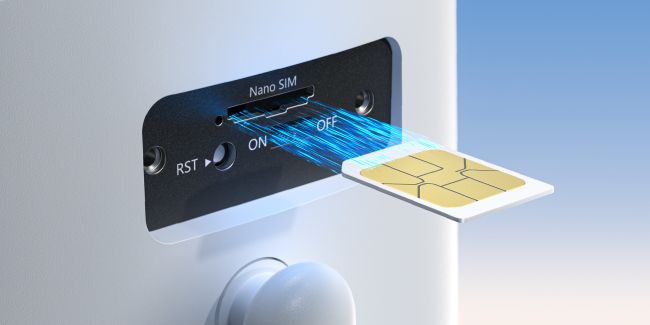
A Reolink SIM card allows compatible 4G LTE cameras to connect to the internet without WiFi, making them suitable for farms, job sites, gates, and remote properties. If you are unsure which SIM works, how much data you need, or whether your camera requires a subscription, this guide covers compatibility, plans, activation, installation, and troubleshooting.
Key Takeaways:
- Reolink 4G LTE cameras require a nano SIM card and an active cellular data plan for remote access.
- WiFi and PoE Reolink cameras do not need SIM cards because they use different network connections.
- You can use either a Reolink SIM card or a compatible third-party carrier SIM depending on your location and camera model.
- Data usage depends mainly on live viewing frequency, video quality, playback, and camera settings.
- What Is a Reolink SIM Card and How Does It Work?
- What Is a Reolink SIM Card Camera?
- How to Choose the Best SIM Card for a Reolink Camera?
- Reolink SIM Card vs. Third-Party SIM Card
- Where to Buy a SIM Card for Reolink Camera
- Reolink SIM Card Plans: What Should You Choose?
- Best Reolink 4G Cameras for Different Scenarios
- How to Activate SIM Card for Reolink Camera?
- How to Install a SIM Card in Reolink Cameras?
- What to Do If Your Reolink SIM Card Is Not Working
- FAQs
- Conclusion
What Is a Reolink SIM Card and How Does It Work?
A Reolink SIM card connects compatible 4G LTE cameras to a cellular network instead of relying on WiFi or wired internet. The SIM card provides mobile data access for features such as live viewing, push notifications, remote playback, and camera management through the Reolink App.
A Reolink cellular camera setup requires:
- A compatible Reolink 4G LTE camera
- A nano SIM card
- An active cellular data plan
- Supported cellular bands in your region
Does a Reolink Camera Need a SIM Card?
Reolink 4G or LTE cameras need SIM cards for normal cellular network access. Regular Wi-Fi cameras use Wi-Fi, while PoE cameras normally connect through Ethernet cables. Each Reolink 4G camera needs its own SIM card for cellular network service.
What Is a Reolink SIM Card Camera?
A Reolink SIM card camera is a 4G/LTE security camera that connects to a cellular network through a SIM card instead of relying on home Wi-Fi. It suits farms, gates, job sites, and other places without fixed internet service.
Which Cameras Work With a Reolink SIM Card?
Reolink SIM support depends on the camera model and its exact hardware version. Buyers should compare both details with Reolink's current model-and-hardware compatibility list before purchase.
Reolink Cameras Compatible With Reolink SIM Cards
Reolink currently lists these camera models and hardware families as supported options.
Some models use exact hardware codes, so check Reolink's current support table first.
The Go PT S Lite camera comes with a built-in, non-removable SIM card.
How to Choose the Best SIM Card for a Reolink Camera?
The best SIM card for a Reolink camera is one that supports the camera's required cellular bands, has strong 4G coverage at the installation location, and offers enough data for your viewing and recording habits. It should also match your camera, country, carrier, and exact installation location requirements.
-
Nano SIM Form Factor: Ensure you select a standard Nano SIM card, as Reolink cellular cameras strictly require this physical size.
-
Compatible Network Bands: Verify that the SIM card's carrier uses the specific 4G LTE frequency bands supported by your camera's hardware version.
-
Local Carrier Signal: Test mobile coverage at the installation spot with a smartphone using the same carrier network to ensure a stable connection.
-
Data-Only Plan Selection: Opt for a dedicated data-only SIM plan (IoT or tablet plan) rather than a voice/SMS phone plan, which carriers often block on security devices.
-
Sufficient Data Allowance: Plan for 2GB to 5GB of data per month for basic motion-triggered alerts and light viewing, or 10GB+ for frequent high-resolution live streaming.
-
Correct APN Settings: Keep your carrier's Access Point Name (APN) details handy in case manual network configuration is needed during the setup process.
Reolink SIM Card vs. Third-Party SIM Card
Reolink SIM Card
The official Reolink SIM works when your camera, hardware, and country support it. It simplifies setup and lets Reolink manage data purchases and account plan details. Users also avoid separate carrier research where official Reolink SIM service remains available.
Third-Party Carrier SIM Cards
Third-party SIM support differs by country, so check Reolink's local carrier guidance first. In the United States, Reolink recommends T-Mobile prepaid data-only SIMs where 4G coverage is strong. Reolink also lists Mint and FreedomPop as tested options for compatible camera setups.
- Choose a Reolink SIM if you prefer easier setup and centralized account management.
- Choose a third-party SIM if you want more carrier choices or already have a suitable cellular data plan.
Where to Buy a SIM Card for Reolink Camera
You can buy an official Reolink SIM or choose a compatible carrier SIM. Your better option depends on package contents, regional support, coverage, and available plans.
Buy a Reolink SIM Card
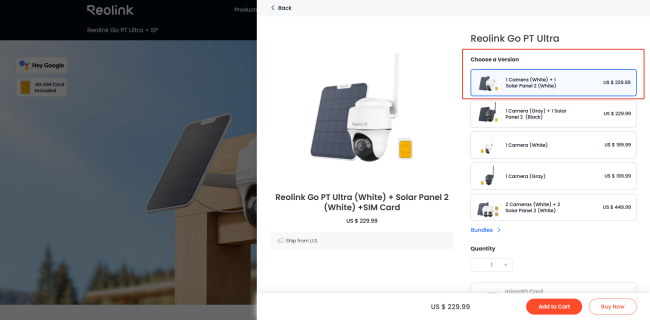
Some Reolink 4G camera packages include a SIM, depending on country and product. Check package versions before buying from Reolink's website or its official Amazon store. For users shopping on Reolink’s website, select your preferred cellular camera, click Add to Cart, and check the available versions to find models that include a SIM card.
Buy a SIM Card From a Mobile Carrier
You can buy a compatible nano SIM directly from a local mobile carrier. Check Reolink's country-specific carrier guidance before choosing any third-party mobile service in your area. When possible, test the SIM with your camera before depending on that setup.
Reolink SIM Card Plans: What Should You Choose?
Choosing the physical SIM matters, but selecting enough cellular data matters as well. Reolink's Cellular Data Service lets supported users manage plans through their Reolink accounts.
How Reolink SIM Card Plans Work
Users link their official Reolink SIM card directly to their existing Reolink account. They then buy cellular data through Reolink's Cellular Data Service for supported regions. Reolink also offers add-on data when the main allowance runs out before renewal.
How Much Data Does a Reolink Camera Use?
Camera data use changes with viewing habits, stream quality, and remote access activity. Frequent live viewing uses more cellular data than occasional remote camera checks. Higher resolution and bitrate settings can also increase the amount of data used.
Playback, uploads, push-related activity, and remote access can all increase overall cellular data use. Actual usage depends on bitrate, viewing patterns, network conditions, and camera working conditions.
Which Reolink SIM Card Plan Is Right for You?
Your data plan should match how often you view and manage cameras remotely.
Best Reolink 4G Cameras for Different Scenarios
Reolink 4G cellular cameras combine battery or solar power with SIM card connectivity, delivering subscription-free local storage and remote P2P viewing in off-grid locations without Wi-Fi or electricity.
Best for Remote Properties: Reolink Go PT Ultra
Ideal for farms, mountain cabins, and off-grid acreage where there is no Wi-Fi network and a single fixed view leaves too many blind spots.
-
Cellular Setup: Operates over 4G LTE with an included Nano SIM card. Enter its unique UID into the Reolink app for instant remote viewing and SD card clip playback from anywhere.
-
Key Features: 4K 8MP Ultra HD resolution, 355° pan and 140° tilt coverage, battery/solar power options, smart person/vehicle detection, and onboard local storage.
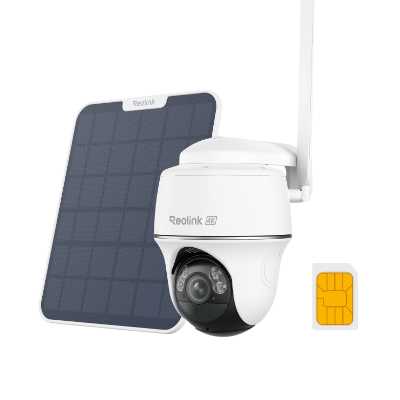
4K 8MP Wire-Free 4G LTE PT Battery Camera
4K 8MP; Smart Detection; 355° Pan & 140° Tilt; Battery/Solar Powered; Color Night Vision; Smart Real-Time Alert.
Best for Wide Outdoor Coverage: Reolink TrackMix LTE
Excellent for long driveways, main gate entryways, and wide open fields that require both a broad overview and auto-tracking close-ups.
-
Cellular Setup: Uses a SIM card to establish a direct P2P streaming channel straight to your phone app without needing a base station or local internet line.
-
Key Features: Dual-lens camera technology, 4K auto-tracking zoom, full pan-tilt motion, smart motion alerts, two-way audio, and solar panel support.
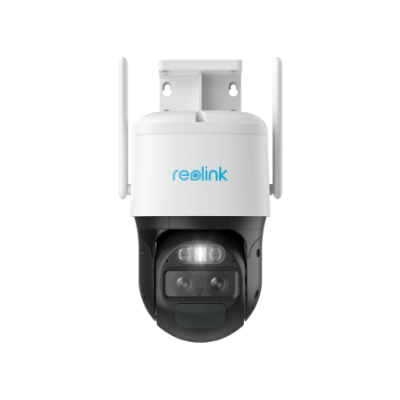
2K Dual-Lens PTZ Camera with Motion Tracking
4K 8MP UHD, Wide-Angle & Telephoto Lenses, Pan-Tilt-Zoom, Auto-Tracking, Person/Vehicle Detection, 4G LTE Network, Two-Way Audio, Time-Lapse.
Best for Job Sites & Temporary Work: Reolink Go Ranger PT
Designed for temporary construction sites, remote build locations, or wildlife monitoring where quick, tool-free installation is necessary.
-
Cellular Setup: Features a wire-free, portable design powered by battery or solar energy. Scan its QR code to pair the camera's UID directly with your app for real-time site monitoring.
-
Key Features: 4K resolution, pan-tilt capability, discrete camouflaged design options, smart detection, and onboard microSD recording
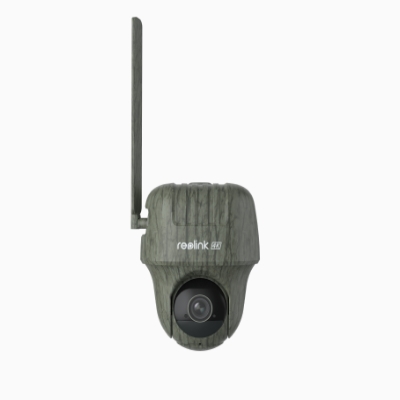
4K 4G LTE Wildlife Camera with 360° All-Around View
4G LTE Network, 4K 8MP Ultra HD, No-Glow IR LEDs, Person Detection, Animal Detection, Two-Way Audio, Battery/Solar Powered.
How to Activate SIM Card for Reolink Camera?
Activation differs between official Reolink SIM cards and third-party carrier SIM card options. Complete activation before setup so the camera can connect after you power it on.
How to Activate a Reolink SIM Card?
Follow these steps to link, fund, and activate an official Reolink SIM card.
-
Sign in to the Reolink App using your existing Reolink account login details.
-
Tap the plus icon and scan the SIM or activation card QR code.
-
You can also open SIM Service and add the SIM card from there.
-
Enter the card ID or upload a clear image of the QR code.
-
Choose the service location, then select a suitable cellular data plan for your camera.
-
Complete checkout and confirm the selected Reolink SIM subscription now appears as active.
-
Insert the activated SIM, power on the camera, and await network connection confirmation.
How to Activate a Third-Party SIM Card for Reolink Camera?
Third-party SIM cards normally require activation through the mobile carrier, not through Reolink. Carrier activation steps vary, so follow the instructions included with your chosen SIM. Confirm the carrier plan includes usable mobile data before inserting the activated card.
How to Install a SIM Card in Reolink Cameras?
Correct installation helps the camera detect the SIM and register with cellular service. The exact slot design and card direction can differ between Reolink camera models.
-
Confirm the nano SIM is compatible, activated, and still has available cellular data.
-
Locate the SIM slot carefully, and avoid confusing it with microSD storage slots.
-
Open the protective slot cover if your Reolink camera model includes one for access.
-
Place the SIM in the correct direction for your specific Reolink camera model.
-
Some models require the SIM card's gold contacts to face downward during insertion.
-
Push the tray or card fully inside, then close the protective cover firmly.
-
Power on the camera, or install its battery if your model requires one.
-
Wait for the camera to register and connect with the available cellular network.
-
Add the camera in the Reolink App or Client, then finish the initial setup.
Always check your model's Reolink instructions because SIM slot designs can vary widely.
What to Do If Your Reolink SIM Card Is Not Working
Connection problems can come from compatibility, activation, data, signal, APN, or firmware issues. Check each area in order because one simple problem can block cellular service.
Check SIM Card Compatibility
Confirm your exact camera model, hardware version, region, carrier, and required SIM type. A supported model can still use hardware that Reolink does not support officially.
Check Whether the SIM Is Activated
Confirm official SIM account linking or complete the required third-party carrier activation process. An inactive SIM cannot register correctly for cellular data service inside the camera.
Check Your Data Plan
Make sure your cellular plan remains active and still has usable data available. Reolink add-on data can help when the main data allowance runs out early.
Check Cellular Signal Strength
Weak 4G coverage can stop network registration or cause unstable remote camera access. Test carrier signal strength near the planned or current camera installation location first.
Check APN Settings
Some third-party carrier SIM cards require correct APN settings before cellular data works. APN information tells the camera how to reach the carrier's mobile data network. If data calls fail, verify carrier APN details and follow Reolink's setup instructions.
Restart the Camera
Restart the camera after checking the SIM, plan, signal, and network settings carefully. Then allow enough time for the camera to register with cellular service again.
Update Camera Firmware
Use current firmware made for your exact Reolink camera model and hardware version. Older or incorrect firmware can sometimes affect compatibility, stability, and cellular camera performance.
FAQs
Does Reolink Camera Come With a SIM Card?
Some Reolink 4G packages include SIM cards, but contents vary by product and country. Check the product listing and package details before assuming any SIM is included.
Does a Reolink SIM Card Require a Monthly Plan?
A Reolink SIM requires an active cellular data plan for normal network service. Review current Reolink Cellular Data Service terms before choosing or renewing your subscription.
Can Reolink 4G Cameras Work Without a SIM Card?
They need SIM cards for normal cellular internet access and remote camera viewing. However, some models can still record video locally to an installed microSD card.
Does Reolink SIM Card Support 5G?
No, current Reolink documentation says its 4G cameras do not support 5G connectivity. Choose compatible 4G cellular service instead when setting up these Reolink camera models.
Can One SIM Card Be Used in Multiple Reolink Cameras?
No, each Reolink 4G camera requires its own SIM card for cellular connectivity. Therefore, several 4G cameras require separate compatible SIM cards and separate cellular connections.
Conclusion
A reliable Reolink SIM setup starts with exact camera and hardware compatibility checks. Choose a nano SIM supporting required 4G bands and strong local carrier coverage. The Reolink SIM simplifies account management, while third-party SIMs offer more carrier choices.
Activate the SIM first, select enough data, and install the card correctly afterward. If problems appear, check compatibility, activation, data, signal, APN settings, and current firmware.
Search
Subscribe for the Latest Updates
Security insights & offers right into your inbox