
Security Camera Resolution Comparison: Which Is Best for You?
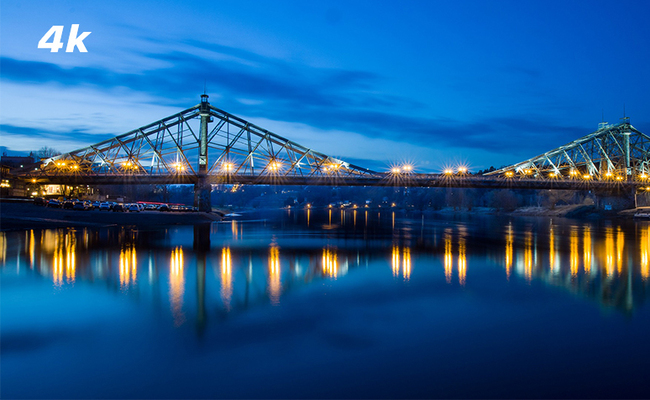
The main differences between 1080p, 4MP, 5MP, and 4K security camera resolutions are image clarity, digital zoom capability, and storage consumption. Higher resolutions provide sharper details like license plates at longer distances but require more bandwidth. This guide compares image quality, storage impact, and setup cost to help you choose the right resolution for your property.
If you want crisp, long-distance details and maximum coverage for a large yard, a 4K (8MP) security camera is the best choice. If you need simple, budget-friendly video coverage for small rooms, a porch, or indoor monitoring, a 4MP or 5MP camera offers the ideal balance of clarity and storage efficiency.
- Security Camera Resolution Breakdown
- Security Camera Resolution Comparison Table
- What Technical Factors Affect Security Camera Resolution?
- 1080p vs 4MP vs 5MP vs 4K, Which Camera Resolution to Choose?
- What Users Really Care About Security Camera Resolution?
- 4K, 5MP, or 4MP: Final Decision Tips
- Technical Details to Verify Before Buying
- FAQs
- Conclusion
Security Camera Resolution Breakdown
Security camera resolution measures how much visual detail a camera can capture. It is calculated by the total number of pixels in an image, expressed as its width and height. In general, the more pixels a camera records, the clearer and more detailed the footage will appear, especially when zooming in on subjects.
What Is 1080p (2MP) Resolution?
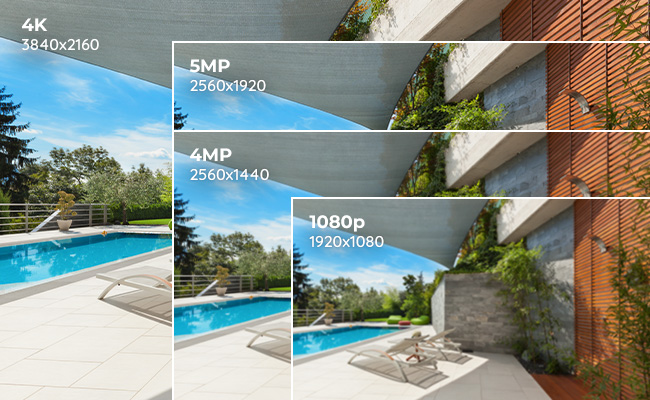
1080p resolution, also known as Full HD or 2 Megapixels (2MP), produces images measuring 1920 pixels wide by 1080 pixels high. It serves as the standard entry-level baseline for modern home surveillance, providing reliable video quality for close-range monitoring.
-
Best Use Case: Ideal for small indoor rooms, narrow hallways, or monitoring immediate entry points like a front porch where subjects are close to the lens.
-
Storage Impact: Low bandwidth consumption; standard compression allows months of footage to sit on minimal storage space.
-
Detection Distance: Reliably identifies distinct human features or large text within 10 to 15 feet; digital zooming beyond this range results in heavy pixelation.
What Is 4MP (2K) Resolution?
4MP resolution, often branded as 2K or Super HD, delivers an image pixel count of 2560 by 1440. With twice the total pixel density of standard 1080p, it significantly enhances details when zooming in on distant objects without immediately blurring the image.
-
Best Use Case: Perfect for monitoring two-car garages, medium-sized backyards, or business storefronts where a wider field of view is needed.
-
Storage Impact: Moderate; requires slightly more network bandwidth than 1080p, but handles efficiently on modern home networks.
-
Detection Distance: Extends clear identification capabilities out to roughly 20 to 30 feet, making it much easier to read large text or clothing details.
What Is 5MP Resolution?
5MP resolution delivers a pixel matrix of 2560 by 1920, offering a distinct 4:3 aspect ratio that provides more vertical viewing space than traditional widescreen formats. This extra vertical coverage ensures fewer blind spots directly underneath the camera mounting point.
-
Best Use Case: Excellent for high-ceiling commercial spaces, front yards with long driveways, or side-yards where vertical depth is critical.
-
Storage Impact: Balanced; delivers near-4K clarity while saving substantial hard drive space compared to true Ultra HD files.
-
Detection Distance: Captures crisp, actionable facial features and defining characteristics up to 35 or 40 feet away.
What Is 4K (8MP) Resolution?
4K Ultra HD resolution, or 8 Megapixels (8MP), boasts a massive pixel layout of 3840 by 2160. It offers four times the detail of 1080p, allowing users to digitally zoom deep into a captured frame to isolate small, critical pieces of evidence like license plates or distinct facial marks.
-
Best Use Case: Essential for wide open properties, large parking lots, perimeter fencing, or high-risk areas where maximum forensic detail is required.
-
Storage Impact: High; uses substantial bandwidth, making advanced H.265 video compression highly recommended to keep network traffic fluid.
-
Detection Distance: Offers superior low-light performance and maintains crisp digital zoom clarity well beyond 50 feet.
Security Camera Resolution Comparison Table
What Technical Factors Affect Security Camera Resolution?
A high megapixel count on paper does not guarantee clear evidence. True image quality is determined by how resolution interacts with four critical hardware and environmental factors.
How Does Focal Length Impact Resolution Detail?
Focal length determines your camera’s viewing angle and how densely its resolution is applied across a space. Shorter focal lengths (e.g., 2.8mm) spread pixels wide to cover massive areas, while longer focal lengths (e.g., 8mm or higher) narrow the field of view to concentrate pixels on distant targets.
If you try to monitor a distant gate with a wide-angle 2.8mm lens, even a 4K resolution will fail to capture a readable license plate because the pixels are spread too thin across the horizon. For long-distance clarity, a optical zpom camera like the Reolink TrackMix PoE is ideal. Its dual-lens system pairs a wide-angle lens with a telephoto lens, delivering a zoomed-in, high-resolution crop without losing situational awareness.

4K Dual-Lens PTZ Camera with Dual Tracking
4K 8MP Ultra HD, Wide & Telephoto Lenses, Pan & Tilt, Auto-Tracking, Person/Vehicle Detection, Power over Ethernet, Two-Way Audio.
Why Does Sensor Size Matter More Than Megapixels?
Image sensor size dictates how much light a camera can capture. A larger physical sensor (like 1/1.8") allows individual pixels to absorb more light, preventing the digital noise and motion blur that plagues smaller 1/3" sensors in low-light conditions.
When manufacturers pack high resolutions (like 4K) onto a cheap, small sensor, individual pixels become microscopic. At night, these tiny pixels starve for light, forcing the camera's software to compensate. This results in severe "ghosting" where a moving person turns into a blurry smear. For true security at night, look for high resolution paired with a larger sensor size, such as the Reolink ColorX series.
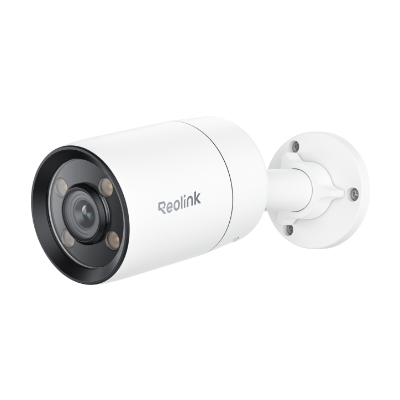
2K PoE ColorX Night Vision Camera
👍 2K 4MP video with image sensor
👍 ColorX night vision with F1.0 aperture
👍 Adjustable warm light
👍 PoE connection for reliable performance
How Does Frame Rate Prevent Motion Blur?
Frame rate, measured in Frames Per Second (FPS), determines video smoothness. A higher frame rate (25 to 30 FPS) captures more rapidly changing images per second, eliminating motion blur when freezing frames to identify fast-moving subjects like cars or running intruders.
Running a 4K camera at a low frame rate (like 15 FPS) will save storage space, but it results in choppy video. If an intruder moves quickly past the lens, a low FPS camera may completely miss the exact fraction of a second where their face is perfectly angled toward the camera. Aim for a baseline of 20 to 30 FPS for high-traffic security zones.
Where Should You Install Cameras to Protect Resolution Quality?
Blindly placing a high-resolution camera facing direct sunlight or behind glass panes will completely destroy image clarity. Glare, backlighting, and infrared (IR) light reflections cause overexposure, erasing high-resolution details into a white blur.
-
Sun Trap: Pointing a camera directly at a bright horizon triggers silhouette effects, making faces completely dark. Position cameras downward or utilize Reolink’s advanced Wide Dynamic Range (WDR) settings to balance harsh lighting.
-
Window-Facing: Never install an infrared camera behind a glass window. At night, the IR LEDs will bounce straight off the glass reflection and blind the lens, turning your high-resolution footage into an unreadable white fog. Mount cameras completely outdoors for exterior surveillance.
1080p vs 4MP vs 5MP vs 4K, Which Camera Resolution to Choose?
Which Resolution Offers the Best Image Quality?
4K (8MP) and 5MP security cameras deliver the highest image quality, offering significantly sharper details at a distance than 4MP or 1080p models. Higher resolution provides the forensic pixel density required to digitally zoom into a recorded frame without the image immediately blurring.
While a 1080p camera provides basic situational awareness, it often pixelates when you attempt to crop in on a critical event. A 4MP (2K) camera doubles the clarity of 1080p, while a 5MP camera uses a specialized 4:3 aspect ratio to add vertical pixel depth. This extra pixel density is what allows a 5MP or 4K camera to capture distinct facial features or readable text at distances where a 1080p camera only shows blurry shapes.
Verdict: 4K is the undisputed winner for long-range target identification, while 5MP offers the best native balance for mid-range vertical tracking.
How Does Resolution Affect Live Streaming?
Higher-resolution security cameras offer backward-compatible live streaming, allowing you to scale down the video feed resolution based on your network performance. A 5MP or 4K camera can stream at its native resolution, 4MP, or 1080p, whereas a native 1080p camera cannot scale upward.
This multi-stream flexibility is crucial when you are viewing your cameras remotely on a mobile device. If you are checking your security feed on a weak cellular connection, you can switch your 4K or 5MP camera's live stream to a lower bandwidth sub-stream (like 1080p or 720p) to ensure smooth playback without losing the original, full-resolution recording saved on your local hard drive.
Verdict: 4K and 5MP cameras offer the greatest viewing flexibility because they give you multiple stream quality options depending on your location.
Which Resolution Captures a Wider Field of View?
High-resolution cameras (4K and 5MP) cover a wider field of view without sacrificing image details, allowing a single camera to secure a large area. Lower-resolution cameras must use a narrower viewing angle to keep images from becoming pixelated.
When a low-resolution camera is paired with a wide-angle lens, its limited pixels are stretched thin across the horizon, creating a distorted "fisheye" effect where background details vanish. Because 5MP and 4K sensors pack four to eight million individual pixels into the frame, they can handle massive wide-angle lenses. This means you can monitor an entire three-car driveway with a single high-resolution camera instead of buying and mounting multiple 1080p units.
Verdict: 4K and 5MP cameras provide the widest, most practical coverage area per device.
Which Resolution Uses the Most Bandwidth and Storage?
4K and 5MP cameras consume the most storage and network bandwidth under identical compression settings. However, Reolink mitigates this impact by using highly efficient H.265 video encoding to compress higher-resolution files to half the size of older H.264 formats.
If you run multiple high-resolution cameras on an older network using standard H.264 compression, your local storage drive will fill up rapidly.
Specific usage scenario matters here: for a system running four cameras 24/7, upgrading to H.265 compression means your local hard drive will last twice as long before rewriting over old footage. This advanced compression allows you to enjoy pristine 4K or 5MP recordings without suffering from slow network speeds or lagging video feeds.
Verdict: 1080p uses the least raw storage, but 4K and 5MP cameras paired with H.265 encoding offer the best overall efficiency for modern systems.
What Users Really Care About Security Camera Resolution?
An analysis of real-world user discussions across r/reolinkcam, r/SecurityCamera, and r/homesecurity reveals that experienced users and professional installers view resolution from an entirely different point of view.
1. Megapixels Mean Nothing Without Sensor Size
A major complaint among security camera owners is that high-megapixel cameras often look stunning in static conditions, but completely fall apart when things move at night. In r/SecurityCamera, industry super users point out that small image sensors packed with too many pixels cannot capture enough light.
When motion occurs in low light, this layout results in "ghosts, blurry smears, and blocky bs" right when you are trying to get a usable freeze-frame of a suspect's face. For superior night clarity, users recommend prioritizing larger physical sensor sizes (like 1/1.8" or 1/1.2") alongside high resolution.
2. "Pixel-Per-Foot" vs. Marketing Bluster
In the r/reolinkcam community, users openly note that raw 4K, 2K, or high megapixel numbers are frequently used as "marketing bluster". What actually matters for capturing actionable evidence is the concept of Pixels-Per-Foot (PPF)—the density of pixels landing directly on the target.
As community members point out, zooming in on a distant detail to ensure positive identification is the ultimate goal of high resolution. However, if a 4K camera is paired with a poor lens or too low a bitrate, it will still yield an unreadable image when cropped.
3. Network and Storage Challenge
Professional installers warn that the biggest mistake residential users make is over-specifying their resolution without upgrading their supporting infrastructure. While 2MP (1080p) streams are light and 4MP/5MP options offer a balanced compromise, true 4K video acts as a massive "storage hog" that may cause severe "network stress".
When users blindly deploy multiple 4K cameras across standard, undersized home networks, the entire system frequently lags or drops frames. Experienced users advise calculating your storage capacity beforehand to prevent cameras from rewriting over critical footage within just a few days
4K, 5MP, or 4MP: Final Decision Tips
The right choice depends on your property layout, network stability, and exact storage goals. High resolution is more affordable than ever, meaning you can secure pristine coverage without breaking the bank. Use the scenario-based framework below to self-identify your needs and match them with the ideal Reolink system.
Quick Resolution Decision Table
Choose a Standalone 4K Camera If: You Need Long-Range Forensic Evidence
If your primary goal is capturing finer details—such as a specific license plate identification across the street at a distance—a true 4K (8MP) camera is essential. Because 4K boasts four times the pixel density of standard 1080p, you can digitally zoom deep into saved clips without the footage instantly pixelating into a blurry smear.
For high-performance standalone tracking, the battery-powered Altas PT Ultra deliver uncompromised Ultra HD detailing alongside smart person/vehicle detection.
- Key Features: Native 4K 8MP resolution, intelligent AI person/vehicle filtering, sharp color night vision up to 100 feet, and instant mobile alerts.
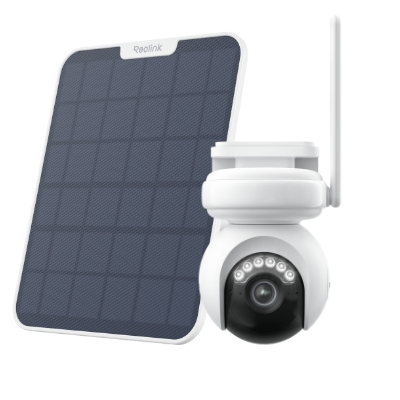
4K Battery-Powered PTZ Camera with Continuous Recording
👍 4K UHD video with continuous recording
👍 ColorX night vision in low light
👍 Pan, tilt, and automatic person tracking
👍 Local storage without monthly fees
Choose a Multi-Camera 4K System If: You Need to Secure a Large Property
A single fixed-lens camera cannot cover every blind spot, no matter how high its resolution is. Spreading a single camera's pixels thin across a vast space will cause distant details to vanish. If you need to monitor multiple outdoor zones like a driveway, back patio, and front business entrance simultaneously, using an multi-camera system is the most cost-effective path.
The Reolink RLK16-800B8 kit provides a cohesive network of four Ultra HD cameras linked to a dedicated Power-over-Ethernet (PoE) ecosystem, ensuring seamless local recording without congesting your home's main Wi-Fi network.
- Key Features: Continuous 24/7 local recording, plug-and-play PoE configuration, high-capacity centralized NVR storage, and advanced smart detection engines.
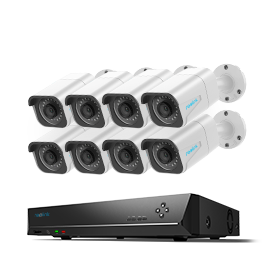
24/7 Surveillance in 4K Ultra HD
Power over Ethernet; 24/7 Continuous Recording; 16-Channel NVR; 4TB HDD Built-In; Audio Recording; 100ft Night Vision.
Technical Details to Verify Before Buying
To make certain you get the full benefits out of your chosen security resolution, run through this quick pre-purchase checklist based on real user testing notes:
1. Test Your Network Bandwidth and Stability
High-resolution IP cameras require a stable connection to transmit pristine live feeds. If your network lacks the necessary bandwidth, your camera app may scale down your real-time stream to a lower resolution to maintain fluid playback. Ensure your routers or PoE switches are positioned correctly to handle steady data loads.
2. Match Resolution with Advanced H.265 Storage Compression
Higher security resolution creates larger file sizes, which will consume your local storage capacity quickly if left unmanaged. To run multiple 4K or 5MP cameras smoothly without buying a massive hard drive array, check that your hardware utilizes advanced H.265 compression video encoding to cut file sizes in half while preserving original image details.
- Pro Tip: For a complete breakdown of managing high-capacity surveillance setups locally, see our expert guide on how to set up a local storage system with an NVR.
3. Check Real-World Resolution Examples and Reviews
Do not buy based on marketing numbers alone. Before finalizing your setup, check real user reviews and unedited sample footage across tech forums. Observing how a 5MP or 4K camera functions under actual environmental variables—like a heavy rainstorm or low-light headlight glare—will ensure you choose the exact hardware built for your climate.
FAQs
What is the best resolution for a security camera?
The best security camera resolution depends on your monitoring needs and installation location. For most homes, a 2K (4MP or 5MP) camera provides an excellent balance of image clarity, storage efficiency, and bandwidth usage.
If you need to identify details, or monitor large areas such as driveways and parking lots, a 4K (8MP) camera is often the better choice because it captures significantly more detail. Higher resolutions beyond 4K can offer additional clarity but typically require more storage space and network bandwidth.
What's better, a 2K or 1080p security camera?
A 2K security camera is generally better than a 1080p camera because it captures more pixels and finer details. While 1080p resolution (1920 × 1080) is sufficient for basic monitoring, 2K resolution (typically 2560 × 1440) provides a sharper image.
Which is better 4K or 12MP security camera?
A 12MP security camera typically captures more image detail than a standard 4K camera because it uses a higher pixel count.
Conclusion
The resolution you choose for your security camera directly affects how well you can monitor your property. What are the other things on security camera resolution that you concern the most? Do I miss anything important? Leave anything you can think of in the comment section and we will add them to the post as well!
Search
Subscribe for the Latest Updates
Security insights & offers right into your inbox