
Reolink Duo 2 WiFi vs. Duo 3 WiFi: Which Reolink Camera Should You Choose?
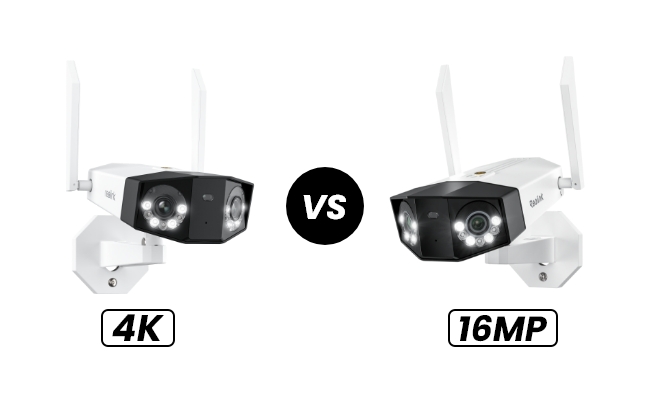
The Reolink Duo 2 WiFi and Duo 3 WiFi are both dual-lens security cameras that provide a 180° panoramic view over Wi-Fi. The biggest difference is image resolution: the Duo 2 WiFi records in 4K 8MP, while the Duo 3 WiFi doubles the resolution to 16MP for more image detail.
But resolution isn't the only difference. This comparison covers their image quality, field of view, storage, smart features, night vision, and other key specifications to help you decide which model is right for you.
Key Takeaways:
- The biggest difference is resolution: Duo 2 WiFi offers 8MP, while Duo 3 WiFi increases this to 16MP for more image detail.
- Both provide 180° panoramic coverage, Wi-Fi 6, smart detection, color night vision, and up to 512GB microSD storage.
- Duo 2 WiFi is better for everyday home monitoring, while Duo 3 WiFi is better for larger areas where you may need to inspect smaller or more distant details.
Duo 2 WiFi vs. Duo 3 WiFi: What's the Difference?
Beyond the jump from 8MP to 16MP, the Duo 2 WiFi and Duo 3 WiFi also differ in lens aperture, vertical field of view, and smart features.
Resolution: 4K vs. 16MP
Reolink security cameras are renowned for their combination of high resolution and advanced smart features. Most Reolink cameras have been upgraded to 4K resolution. The Duo 2 WiFi features a 4K resolution with a total of 4608x1728 pixels. The new Duo 3 WiFi boasts a UHD 16MP resolution, with a total of 7680x2160 pixels. This means that the picture captured by the Duo 3 WiFi has twice as many pixels as that of the Duo 2 WiFi. Consequently, the Duo 3 WiFi undoubtedly delivers more detail and better clarity than the Duo 2 WiFi.
Lens Aperture: F/2.0 vs. F/1.6
Another significant difference between these two cameras is their lens aperture. The Duo 3 WiFi has a larger lens aperture compared to the Duo 2 WiFi. With an aperture of F1.6, the Duo 3 WiFi's lens sensor allows more light to enter, resulting in superior night vision quality and excellent brightness in daylight footage. The Duo 2 WiFi's F2.0 aperture also ensures the camera captures the necessary details both day and night.
Vertical Field of View: 60° vs. 55°
You will also notice a slight difference between these cameras when checking their vertical field of view. The Duo 2 WiFi has a vertical field of view of 60°, while the Duo 3 WiFi only has 55°. One noticeable drawback of dual-lens cameras is that they have to compromise on their vertical angles to achieve the ultra-wide horizontal field of view. Although this difference may not be very noticeable, it's important to keep in mind if you are concerned about the blind spot directly below the camera.
Smart Feature: Motion Track
Another important upgrade of the Duo 3 WiFi is its motion track feature. Users can access this feature directly on the Reolink app. When the motion track is enabled, the movements of an object over a certain period can be compiled into one snapshot, and the snapshot of the entire movement will be emailed to the user with essential timestamps. Thanks to this feature, users won't have to download long videos that take up much storage space.
Comparison Table Between Reolink Duo 3 WiFi and Duo 2 WiFi
Check out the quick comparison between Reolink Duo 2 and Duo 3 WiFi in the table below.
Duo 3 WiFi vs. Duo 2 WiFi: What's the Same?
Apart from all the differences mentioned above, the Duo 2 WiFi and Duo 3 WiFi also share some imporant features in common.
180-degree Field of View
Both of these cameras combine two lenses into one device, creating a 180-degree field of view. They provide ultra-wide footage without any image distortion. This design addresses the functional issues highlighted by users, specifically their difficulties with the feedback that 'one camera can't cover enough, and two are too cumbersome to install.'
Dual-band WiFi 6
They also operate on dual-band WiFi 6, which is crucial for WiFi security cameras to maintain a stable internet connection. Dual-band WiFi 6 connectivity allows users to switch between 2.4GHz and 5GHz WiFi based on their needs. At the same time, WiFi 6 provides a more stable network connection with fewer lags and buffering issues.
Color Night Vision
Both cameras use spotlights for color night vision. Users can switch between infrared black-and-white night vision and color night vision. The built-in spotlight can also be set to smart mode, where it will automatically light up when it detects motion events at night.
Local Storage
Both the Reolink Duo 2 WiFi and Duo 3 WiFi support a microSD card of up to 512GB for local recording. They can also work with Reolink NVRs and Home Hubs for additional storage options.
Reolink Duo 2 WiFi or Duo 3 WiFi: Which One to Choose?
Reolink Duo 2 WiFi Review: Best for Everyday Outdoor Monitoring
The Reolink Duo 2 WiFi is a practical choice for monitoring driveways, backyards, entrances, and other outdoor areas. Its 8MP resolution provides enough detail for checking everyday activity, while the dual-lens design covers a 180° view with a single camera.
Choose the Duo 2 WiFi if you want 180° coverage for everyday home monitoring and don't need to pay extra for 16MP resolution.
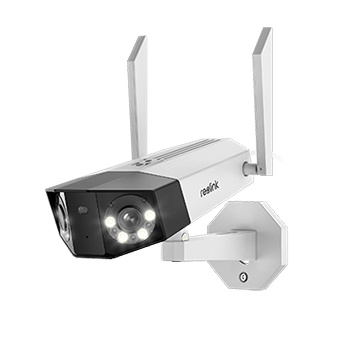
Smart 4K Dual-Lens WiFi Camera
4K 8MP Super HD, Dual-Lens, Person/Vehicle Detection, 180° Wide Viewing Angle, 5GHz/2.4GHz WiFi, Color & Infrared Night Vision.
Reolink Duo 3 WiFi Review: Best for Large Areas and More Image Detail
The Duo 3 WiFi is better suited to larger areas where details can appear farther from the camera. Its 16MP resolution captures twice the pixel count of the Duo 2 WiFi, giving you more detail when reviewing or zooming into footage.
Choose the Duo 3 WiFi for large driveways, yards, or other open areas where you may need to zoom in and examine people, vehicles, or objects at a distance.
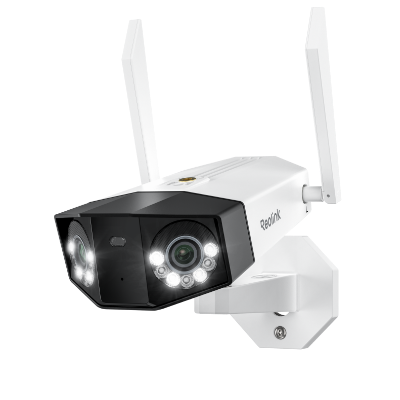
Groundbreaking 16MP Dual-Lens WiFi Camera
16MP UHD, Dual-Lens, Motion Track, 180° Wide Viewing Angle, Plug-In WiFi, Color Night Vision.
FAQs
Is it worth upgrading from Duo 2 WiFi to Duo 3 WiFi?
Upgrading to the Duo 3 WiFi is worthwhile if you need more image detail. Its 16MP resolution provides twice the pixel count of the Duo 2 WiFi's 8MP resolution, which is useful when zooming into footage or monitoring distant objects. If you're satisfied with the Duo 2 WiFi's 8MP image quality, the upgrade may not be necessary.
Is Reolink duo 2 WiFi PoE?
No. The Reolink Duo 2 WiFi is not a PoE camera. It uses a DC power adapter for power and connects to your network over 2.4GHz or 5GHz Wi-Fi. If you want a PoE version, Reolink offers the Duo 2 PoE, which uses an Ethernet cable for both power and network connectivity.
Verdict
After the full comparison, we found that the most significant difference between the Reolink Duo 2 WiFi and Duo 3 WiFi is their resolution: the Duo 2 boasts a 4K resolution, while the Duo 3 features a 16MP resolution. Choose the Duo 2 WiFi if you only require basic surveillance features and a more budget-friendly option. Opt for the Duo 3 WiFi if you want to capture more details in your footage, making it more suitable for your driveway or the outside of your property.
Search
Subscribe for the Latest Updates
Security insights & offers right into your inbox