
Complete Guide to PoE Devices: Types, Setup, and Key Benefits
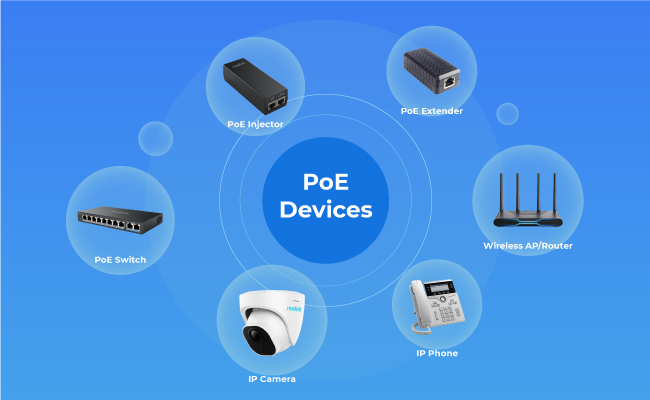
Despite the ubiquity of Wi-Fi in homes, Power over Ethernet (PoE) is revolutionizing home security by making it smarter, safer, and more connected. Rather than utilizing a wireless network that can be hacked through any number of online devices, PoE transmits data via one cable that cannot be attacked unless there is a direct, wired connection. PoE also simplifies security device installations and reduces the number of cables that need to be managed, improving your organization and efficiency.
In this ultimate guide, we will explore several PoE devices as well as their applications and benefits. By the end of the guide, you will have a thorough understanding of these devices. You will be able to make an informed decision about whether you should implement them in your home and about which devices are best suited to your needs.
- What Is Power over Ethernet (PoE)?
- How Do PoE-Powered Devices Work?
- What Are Common Types of PoE Devices?
- What Are Common Types of PoE Devices for Security Systems?
- How to Choose the Best PoE Devices for Home?
- PoE Gadgets & Devices Comparison
- Essential Tips for Deploying PoE-Powered Device
- FAQs About PoE Devices
- Conclusion
What Is Power over Ethernet (PoE)?
Power over Ethernet (PoE) is a technology that enables the transmission of both data and electrical power over a single Ethernet cable.
Understanding the basics of Power over Ethernet and how it works is the first step to deciding whether PoE is a good security solution for you.
PoE technology emerged in the early 2000s, and because it only requires one cable for data and power, its installation is often very easy. This also minimizes the need for significant infrastructure investments (and electricians to install or wire your devices). The installation process is also flexible. Since the cable provides power, there is no need for outlets outside the home, and your device can be placed anywhere. However, before placing the PoE cables you need to terminate them well.
How Do PoE-Powered Devices Work?
PoE-powered devices use a single Ethernet cable to transmit both power and data between the network equipment and the connected device. A Power Sourcing Equipment (PSE), such as a PoE switch or injector, supplies power through the Ethernet cable, while the Powered Device (PD), such as a PoE security camera, receives the power and network connection through the same cable.
This setup simplifies installation by reducing the need for separate power cables and nearby electrical outlets. For security systems, PoE provides a stable wired connection, faster data transmission, and reliable power delivery, making it ideal for continuous video monitoring.
PoE devices are also easy to expand. As your security needs grow, you can add more PoE cameras or other devices to your network without major rewiring. With reliable performance, flexible installation, and centralized power management, PoE technology has become a popular choice for modern home and business security systems.
What Are Common Types of PoE Devices?
Once you know how much power and what essential components your system will have, you can begin building your home security system based on your needs. There are several different types of devices that could be useful to you.
PoE Switches
PoE switches are network switches that provide both data and power to connected devices through Ethernet cables.
Each switch is responsible for one destination device type, so more devices will require more switches in your environment. The advantages are improved, faster connectivity and access. Switches are compatible with various PoE standards (802.3af, 802.3at, or 802.3bt) and can power a wide range of PoE-enabled devices, such as IP cameras, wireless access points, and VoIP phones.
Depending on your security needs, you can get either a managed or an unmanaged switch. An unmanaged PoE switch is quick and easy to install, requires no configurations, and automatically detects and supplies power to devices. This type of switch works best for small networks with only a few devices.
In contrast, a managed PoE switch offers more advanced features including network management, VLANs, and QoS configuration. This allows you to have greater control over the network and security protocols.
PoE Injectors
PoE injectors are devices that add power to an Ethernet cable, enabling non-PoE switches to support PoE devices. So, if you already have switches designed for a wireless network, acquiring a PoE injector will make those pre-existing switches compatible with your new PoE security system. Injectors are also compatible with multiple PoE standards and can power a wide range of devices.
This is a cost-effective solution for small-scale deployments or individual device installations. However, if you are planning a very large new system, it’s likely better to overhaul your switches as PoE injectors provide power to a single device.
PoE Extenders
PoE extenders are used to increase the range of Ethernet cables beyond the standard 100-meter (328-foot) limit. They enable power and data transmission over longer distances, allowing network administrators to deploy PoE devices in hard-to-reach or remote locations.
PoE Splitters
PoE splitters are devices that separate power and data from a PoE-enabled Ethernet cable, allowing non-PoE devices to be powered through the PoE network. They are useful for integrating legacy or non-PoE equipment into a PoE-enabled network infrastructure without the need for additional power adapters.
PoE Adapters/Converters
PoE adapters or converters are devices that enable compatibility between different PoE standards or adapt non-PoE equipment to work with PoE networks. These adapters ensure seamless integration of devices with varying power requirements or connection types, making it easier to expand or upgrade a network while maintaining existing infrastructure.
What Are Common Types of PoE Devices for Security Systems?
PoE IP Security Cameras
PoE IP cameras rely on PoE technology to receive power and transmit video data over the network. PoE simplifies the installation process, making it easier to deploy cameras in various locations without worrying about nearby power outlets.
Wireless Access Points
PoE-powered wireless access points (WAPs) enable seamless connectivity throughout your home. With PoE, WAPs can be installed in optimal locations to ensure strong Wi-Fi coverage without requiring separate power sources. Because the source of the Internet connection is Ethernet, your connection is stronger and more reliable than a conventional Wi-Fi setup.
Smart Doorbells
PoE smart doorbells provide security and convenience by allowing homeowners to see and communicate with visitors remotely. PoE simplifies the installation and reduces cable clutter around entryways. You also have more flexibility in your doorbell placement as you do not need to rely on external outlets.
Network Video Recorders (NVRs)
NVRs are used to store and manage video footage from IP cameras. PoE NVRs can receive power and data through a single Ethernet cable, making installation and management more straightforward. They are also effective alternatives to cloud storage if you prefer to store your data locally.
VoIP Phones
Voice over IP (VoIP) phones use PoE to receive power and transmit voice data over the network. PoE eliminates the need for separate power adapters and allows for more flexible phone placement.
Smart Home Hubs
PoE-powered smart home hubs act as central control points for various smart devices, such as lights, thermostats, and sensors. PoE simplifies the installation process and allows the hub to be placed in a centralized location for optimal connectivity.
Access Control Systems
PoE can power door access controllers, card readers, or biometric scanners, making it easier to install and manage these security components without requiring additional power sources.
How to Choose the Best PoE Devices for Home?
Choosing the right PoE devices requires matching your power-sourcing equipment (PSE) with your powered devices (PDs) in standard type, total wattage budget, and port count. Mis-matching these specs causes underpowered devices, connection drops, or outright hardware failure.
Before purchasing PoE equipment for your home security or networking setup, evaluate these four critical factors:
1. IEEE Standard & Device Compatibility
Verify that your power source (PoE switch or injector) meets or exceeds the IEEE standard required by your connected devices.
-
Define Jargon: In PoE networking, a PSE (Power Sourcing Equipment) supplies power (like a PoE switch), while a PD (Powered Device) consumes power (like an IP camera, access point, or NVR).
-
Match the Standards:
-
PoE (IEEE 802.3af): Supplies up to 15.4W per port. Best for standard fixed IP cameras and basic VoIP phones.
-
PoE+ (IEEE 802.3at): Supplies up to 30W per port. Required for pan-tilt-zoom (PTZ) cameras, dual-lens security cameras, and outdoor units with built-in heaters.
-
PoE++ (IEEE 802.3bt): Supplies up to 60W–90W per port. Used for high-draw devices like multi-sensor 4K cameras and smart building controllers.
-
-
Backward Compatibility: Higher-standard PSEs (like a PoE+ switch) can power lower-standard PDs (like a 802.3af camera), but a standard PoE switch cannot power a high-draw PoE+ device.
2. Total Power Budget vs. Device Requirements
A switch's total power budget determines how many devices it can run simultaneously, regardless of how many physical ports it has.
-
Calculate Total Load: Add up the maximum wattage of all connected devices. For example, running four 12W 4K security cameras requires at least 48W of continuous power.
-
Account for Peak Draws: Infrared (IR) night vision, spotlights, and PTZ motors increase power consumption after dark. Choose a PoE switch with a total power budget at least 20% higher than your calculated total to handle peak nighttime spikes without system shut-offs.
3. Port Density and Network Scalability
Buy a PoE switch with extra ports and bandwidth capacity to avoid replacing hardware when you add new cameras or access points down the road.
-
Port Count Allocation: If you plan to install 4 outdoor cameras today, opt for an 8-port PoE switch. This leaves open ports for future expansion like video doorbells or Wi-Fi access points without needing additional wiring.
-
Unmanaged vs. Managed Switches: Unmanaged PoE switches offer plug-and-play simplicity for home setups. Managed switches add VLAN support and remote port rebooting—ideal for managing multi-camera networks securely.
4. Total Cost
BLUF: While PoE switches cost slightly more upfront than standard unmanaged switches, they eliminate the high cost of hiring an electrician to run dedicated power outlets.
-
Lower Installation Costs: Running a single Ethernet cable (Cat5e or Cat6) for both power and data saves significantly on cabling, conduit, and labor costs.
-
Reduced Maintenance Downtime: Centralizing power into a single PoE switch allows you to back up your entire security system with one Uninterruptible Power Supply (UPS). Your cameras will stay operational even during a household power outage.
PoE Gadgets & Devices Comparison
Many PoE devices have similar functions and often make beginners puzzled. But not all PoE devices are created equal, and choosing the right one for your network can greatly impact its performance and efficiency.
PoE Switches vs. PoE Injectors
Both PoE switches and PoE injectors deliver power and data over a single Ethernet cable, simplifying installation and reducing cable clutter. Also, they are compatible with various PoE standards (802.3af, 802.3at, or 802.3bt) and can power a wide range of PoE-enabled devices, such as IP cameras, wireless access points, and VoIP phones.
However, there are some major differences between them:
-
Number of Devices: PoE switches support multiple PoE ports, allowing multiple devices to be powered simultaneously, while PoE injectors provide power to a single device.
-
Network Management: PoE switches can be managed or unmanaged, with managed switches offering advanced features such as network monitoring, VLANs, and QoS. PoE injectors do not offer network management capabilities.
-
Scalability: PoE switches are better suited for larger networks with multiple PoE devices, whereas PoE injectors are more appropriate for small networks or when only a few devices require PoE support.
-
Cost: PoE switches tend to be more expensive due to their multiple ports and advanced features, while PoE injectors are more cost-effective for small-scale deployments.
PoE Extenders vs. PoE Splitters
Both PoE extenders and PoE splitters help simplify network installations by reducing the need for additional power supplies and cables. They enhance the flexibility of network installations by allowing devices to be placed in optimal locations without being constrained by power source availability or cable length limitations.
Their differences mainly lie in the following aspects:
-
Functionality: PoE extenders increase the range of Ethernet cables beyond the standard 100-meter (328-foot) limit, enabling power and data transmission over longer distances. PoE splitters, on the other hand, separate power and data from a PoE-enabled Ethernet cable, allowing non-PoE devices to be powered through the PoE network.
-
Device Compatibility: PoE extenders are used with PoE devices that need to be deployed beyond the standard cable length limit, while PoE splitters are designed for integrating non-PoE devices into a PoE-enabled network.
-
Use Case: PoE extenders are ideal for installations where PoE devices are located in remote or hard-to-reach areas. PoE splitters are more suited for situations where non-PoE devices need to be connected to a PoE network without requiring additional power adapters.
Essential Tips for Deploying PoE-Powered Device
If you’re thinking that a PoE security system sounds like the way to go for your home, here are some best practices to consider during installation.
1. Proper Cable Management
Good cable management is crucial for maintaining a reliable and organized PoE network. Properly route and secure cables to avoid tangling, minimize interference, and ensure that cables are not damaged. Use cable organizers, such as cable ties, Velcro straps, or cable trays, to keep cables neat and tidy. Additionally, label cables to simplify troubleshooting and maintenance.
2. Ensure Adequate Power and Cooling
Ensure that your PoE devices have sufficient power and are installed in areas with proper cooling and ventilation. Overloading PoE devices or operating them in high-temperature environments can lead to reduced performance or device failure. Make sure to provide adequate airflow around the devices and consider using active cooling solutions, such as fans or air conditioning, in high-density installations.
3. Regular Monitoring and Maintenance
Regularly monitor the performance and status of your PoE devices to proactively identify and resolve potential issues. Use network management tools, especially with managed PoE switches, to track power usage, device status, and network performance. Perform routine maintenance and promptly address any issues to ensure optimal network performance and minimize downtime.
4. Plan for Future Network Expansion
When deploying PoE devices, plan for future network growth and expansion. Choose devices that offer scalability, such as modular PoE switches with additional expansion slots or PoE devices that support multiple power standards. Consider the long-term needs of your network and select PoE devices that can accommodate new devices, increased power requirements, or additional functionality as your network evolves.
Top PoE Security Camera Recommendation: Reolink Duo 3 PoE
The Reolink Duo 3 PoE is a dual-lens panoramic security camera delivering 16MP Ultra HD resolution (7680 x 2160) across a seamless 180-degree field of view. Designed to monitor expansive outdoor boundaries using a single Ethernet connection, it replaces multi-camera setups across large yards, driveways, or commercial loading docks.
Key Capabilities & Features
-
Groundbreaking 16MP Dual-Lens Coverage: Combines two 4K image sensors to capture a wide horizontal panorama without the edge distortion common in single-lens fisheye cameras.
-
Single-Cable PoE Setup: Utilizes a single Cat5e/Cat6 cable (IEEE 802.3af) for power and data transmission, simplifying cable runs and fitting directly into PoE NVRs or switches.
-
On-Device Motion Track & AI Detection: Filters false alerts by accurately identifying people, vehicles, and pets, displaying motion trajectories across the entire $180^\circ$ field of view.
-
Dual Night Vision Modes: Features standard 850nm infrared LEDs for low-profile night vision up to 100 feet, alongside motion-activated spotlights for full-color video in total darkness.
-
Flexible 24/7 Storage Options: Supports local continuous 24/7 recording directly to a microSD card (up to 512GB), a Reolink NVR, or an FTP server without mandatory subscription fees.

Groundbreaking 16MP Dual-Lens PoE Camera
16MP UHD, Dual-Lens, Motion Track, 180° Wide Viewing Angle, Power over Ethernet, Color Night Vision.
FAQs About PoE Devices
What Are Examples of PoE Devices?
PoE devices include PoE security cameras, PoE switches, PoE NVRs, wireless access points, VoIP phones, and smart home devices.
Do PoE Cameras Need Wi-Fi?
No. PoE cameras use Ethernet cables for power and data transmission, providing a stable wired connection without requiring Wi-Fi.
Is PoE Better Than Wi-Fi for Security Cameras?
PoE cameras usually provide a more stable connection and continuous power, making them a good choice for users who need reliable 24/7 monitoring.
Can PoE Devices Work Without a PoE Switch?
Yes. A PoE injector or PoE NVR can provide power to compatible PoE devices without using a PoE switch.
Conclusion
Overall, Power over Ethernet (PoE) technology has transformed how home security and networking devices are installed and managed. PoE devices are increasingly popular, especially among families with the smart home system.
With proper planning and maintenance, PoE devices can provide efficient, scalable, and robust solutions for your home security and networking needs. If you want to share your experiences, questions, or thoughts, feel free to leave them in the comments section below.
Search
Subscribe for the Latest Updates
Security insights & offers right into your inbox