
Best Indoor Security Camera Buying Guide 2026
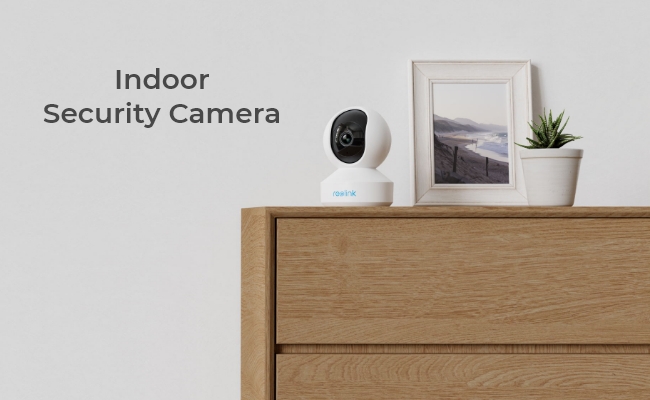
Buying an indoor security camera used to be simple, but many users now find key features locked behind monthly subscriptions. Recorded clips can expire quickly, person-and-pet detection may be limited, and even basic storage often requires ongoing fees.
That’s why expectations have changed. Users now want reliable indoor monitoring that works out of the box without recurring cloud costs.
Fortunately, many modern cameras still offer local storage, AI detection, clear night vision, and stable recording without subscriptions. These local-first systems can match or outperform cloud-based alternatives.
A good indoor camera should deliver clear viewing, instant alerts, and secure local recording—even during internet outages. This is now the standard, not a premium feature.
Next, we’ll cover the 7 key features to consider when choosing the best indoor security camera.
- What Are the Common Types of Indoor Security Cameras?
- 7 Features to Look For in the Best Indoor Security Camera
- Best Indoor Camera Selection Matrix: Which Setup Fits Your Home?
- 4 Common Mistakes Buyers Make When Choosing an Indoor Camera for Home
- 3 Best Indoor Security Cameras for Different Scenarios
- Setup and Placement Tips for Home Indoor Security Cameras
- FAQs
- Conclusion
What Are the Common Types of Indoor Security Cameras?
Different indoor models are designed to match specific interior architectural layouts and household routines. Rather than classifying cameras purely by brand, they are best categorized by their mounting style, power delivery infrastructure, and mechanical movement capabilities.
Understanding these core subcategories ensures you choose a hardware footprint that aligns with your daily monitoring objectives.
1. Desktop / Plug-In Cameras
Desktop or plug-in cameras are compact, fixed-lens units that sit directly on flat surfaces and draw continuous power from a wall outlet via a USB cable. They are the most dependable choice for continuous, localized room monitoring where a constant power source is readily available.
Because these cameras plug directly into your home’s electrical grid, they support uninterrupted 24/7 recording loops without the risk of a battery dying. You can put these devices on living room bookshelves, kitchen counters, or entryway media consoles. They can also easily blend to existing home decor.
2. Pan-Tilt (PT) Cameras
Pan-Tilt (PT) cameras feature motorized internal bases that allow users to remotely rotate the lens horizontally and vertically via a smartphone app. They are specifically engineered to eliminate blind spots in expansive or open-concept living spaces.
Many modern PT indoor cameras utilize localized algorithms to automatically follow moving subjects—such as a walking toddler or a running pet—ensuring the action stays in the center of the frame.
Advanced pan-tilt unit can sweep an entire 360-degree area, so you only need one camera to cover the entire space.
3. Battery-Powered Indoor Cams
Battery-powered indoor cameras operate on internal, rechargeable cells and communicate completely wirelessly over Wi-Fi. They offer tool-free, damage-free installation. Some of such devices are even portable and uniquely optimized for short-term rental spaces.
Free from both data and power cables, you can place these wire-free models in remote corners, high cabinets, or temporary locations where running a power cord is difficult.
For temporary renters, these are optimal choices. They require no nearby outlets and can be mounted using simple temporary adhesive strips or magnetic bases. For homeowners, these devices leave zero wall damage behind when the renter moves out.
7 Features to Look For in the Best Indoor Security Camera
1. Video Resolution (1080p vs. 2K vs. 4K)
Higher video resolution translates directly into finer digital detail. While 1080p is the baseline for general room monitoring, 2K or 4K resolutions are necessary for identifying specific or distant details.
-
1080p (Full HD): The absolute minimum for a modern indoor camera; best suited for small spaces or basic overview monitoring.
-
2K (4MP/5MP): Provides much sharper clarity, allowing you to check on specific entry points or distant corners without severe pixelation.
-
4K (8MP): Offers the best precision. 4K can capture fine text, clothing textures, and facial features across expansive rooms or large open-plan living spaces.
2. Audio Functionality (1-Way vs. 2-Way Communication)
One-way audio only lets you listen to room sounds, while two-way audio enables real-time, bi-directional conversations through the camera's built-in microphone and speaker.
-
1-Way Audio: Acts as a simple microphone feed. You can only hear ambient noise, cries, or glass breaking, but gives you no way to respond.
-
2-Way Audio: Transforms the camera into an intercom. Two-way audio allows you to check in on family members, soothe a anxious pet while at work, or actively command an unauthorized intruder to leave your property.
3. Local Storage vs. Cloud Subscription
Cloud storage requires a recurring monthly fee, while local storage saves video footage directly on-site with zero subscription costs.
-
Cloud Storage: Automatically uploads files online, so your footage is easier to access anywhere, but it permanently ties you to a paid plan.
-
Local Storage: Saves files onto a microSD card, a Network Video Recorder (NVR), or a FTP server. These on-site devices offer complete privacy and a one-time cost.
Consider if you prioritize data security and budget. Local storage is highly recommended for such cases. Certain systems from Reolink are engineered specifically around local recording without onging monthly fees. However, if you prefer cloud storage, remember cloud services require a strong internet connection.
4. Recording Modes and Flexibility
For reliable monitoring, indoor cameras should support multiple recording profiles—including motion-triggered clips, scheduled intervals, and continuous 24/7 recording.
-
Motion-Triggered Recording: Saves storage space and battery life by only filming when the camera detects activity.
-
Continuous 24/7 Recording: Captures every single second of activity, so you never miss context leading up to an incident.
To ensure your data remains accessible, check if your indoor camera supports at least three recording paths, such as a local microSD card, a centralized NVR hardware unit, or an FTP server.
5. Night Vision Technology
Night vision capability is essential for indoor models, especially if you want to check on your babies or loved ones at night. Infrared (IR) night vision works in total darkness to produce black-and-white images, whereas color night vision relies on ambient light or built-in spotlights to deliver colored footage.
-
Infrared (IR) Night Vision: Uses discrete LED lights to illuminate dark rooms invisibly. It works perfectly in 0.0 lux conditions but lacks color data.
-
Full Color Night Vision: Utilizes high-sensitivity or large starlight sensors to generate colored video in low-light environments, typically down to 0.001 lux. Reolink's ColorX series cameras adpot this technology to deliver exceptional full-color nighttime performance.
-
Spotlight-Assisted Color Night Vision: Activates a bright, visible white light upon motion detection. The built-in spotlights help capture maximum detail while acting as a visual deterrent.
6. Motion Detection and Smart AI Alerts
Choose AI-powered detection filters alerts for your indoor cameras. These AI-powered alerts greatly reduce false alarms and only notify you of real events.
-
Basic PIR Sensors: Trigger blindly based on raw heat changes and movement, meaning a ceiling fan or a shifting curtain can flood your phone with notifications.
-
On-Device AI Algorithms: Use advanced computing to isolate and identify specific targets—such as a person, a vehicle, or a package. Advanced models incorporate baby cry detection technology.
Other indoor AI can also distinguish unique zones, alerting you specifically if an individual approaches a restricted area or enters a baby's crib.
7. Data Privacy and Encryption Standards
Data privacy features determine how securely your private indoor video feeds are shielded from remote hackers, data leaks, and unauthorized corporate access.
-
On-Device Local Processing: Advanced smart cameras process data entirely on the local device rather than sending sensitive one to a third-party server.
-
End-to-End Encryption (E2EE): Scrambles your video feeds at the camera level, ensuring that your footage can only be decrypted and viewed on your authorized mobile device.
-
Privacy Zone: With privacy zone settings, you can define areas that the camera will not monitor or record. It helps maintain privacy where needed.
Best Indoor Camera Selection Matrix: Which Setup Fits Your Home?
To help bring further clarity to what’s best for you, we created a buyer decision table to make it easier for you to compare choices with confidence.
Matching your specific household requirements to the right feature set ensures you don't overpay for resolution you don't need or compromise on privacy where it matters most.
Here is your enhanced comparison table. It incorporates targeted, high-intent consumer keywords and explicitly aligns each household configuration with its specific Target Audience Profile to maximize relevance and structure.
Scenario-Based Selection: Matching Hardware to Your Target Audience
4 Common Mistakes Buyers Make When Choosing an Indoor Camera for Home
1. Go For High Resolution Without Planning for Storage
Only purchasing a 4K indoor camera without matching it to an expansive storage option will result in your footage constantly being overwritten due to massive file sizes.
Many users assume that the higher resolution (like 4K) automatically guarantees better security. However, 4K footage creates files that are larger than standard 1080p HD footage.
As a result, if you insert a small microSD card (like 32GB) into a 4K camera monitoring a high-traffic area like a living room, the card can fill up and overwrite itself within just a few days.
If you prefer 4K resolution, skip standalone small memory cards and couple the camera with a dedicated local NVR system that features an expanded hard drive built for heavy, long-term continuous recording. If you only need one device, choose models compatible with larger MicroSD card or you can check the estimated file size for your device before purchasing.
2. Fall into the Trap of Long-Term Cloud Subscription Costs
Falling into the trap of cheap hardware with mandatory cloud plans locks you into high ongoing subscription fees and you may lose the footage if your internet goes down.
Some buyers like heavily discounted camera hardware and ompletely overlook the ongoing monthly or yearly fees required to unlock basic features like recording playback and smart alerts.
For instance, a cloud-based $30 camera can easily cost hundreds of dollars over a few years in subscription fees. In case that your home internet router suffers a temporary outage or your Wi-Fi signals lag, your cloud camera may lose its data pipeline and fails to save vital security events.
Look for subscription-free indoor cameras that support local storage first. No matter via built-in microSD slots or NVR, such methods help save your long-term budget and give you complete control over your recorded footage on-site.
3. Ignore Upgraded AI Detection and Simply Rely on Basic Motion Sensors
Buying a camera with basic motion detection will flood your smartphone with dozens of false alerts every day.
Buyers often look for deals, overlooking how the camera detects motion. Cheap indoor cameras use basic PIR (Passive Infrared) sensors that trigger blindly on any structural heat or movement change.
Everyday household activities—such as a shifting window shadow, a ceiling fan spinning, a curtain moving from an AC vent, or a pet walking by—will trigger an emergency alert on your phone. Eventually, "notification fatigue" sets in, so you may ignore your phone entirely.
So the best solution is ensure your indoor camera features on-device AI algorithms. These advanced models process data locally to isolate and identify specific targets—notifying you only when an actual person, a baby crying, or a suspicious activity is detected.
4. Overlook Audio Directionality and Data Privacy
Failing to verify two-way communication and local encryption standards leaves you unable to communicate during emergencies and exposes your private life to cloud leaks.
Give up assumptions that all indoor cameras can help you talk back. Some buyers rarely check where their sensitive video data is being sent. Many budget cameras only offer 1-way audio (listening only) and push all footage to unsecured, external cloud servers.
If you see a pet misbehaving or a child in distress, a 1-way audio camera leaves you entirely helpless to intervene.
And relying strictly on an unencrypted cloud-based camera means your private, in-home video feeds are vulnerable to corporate data leaks and remote hacking.
So choose models with true 2-way audio intercoms so you can actively speak through the device. Protect your household by selecting cameras that utilize End-to-End Encryption (E2EE), on-device local processing, and local storage (microSD or NVR) to keep your private video feeds securely inside your walls.
3 Best Indoor Security Cameras for Different Scenarios
There is no single "best indoor camera" for every household; the right choice completely depends on your physical space, wiring limitations, and monitoring goals. Below, we break down the top 3 indoor security setups that match real-world home and business scenarios.
For Renters or Homes Needing a No-Drill, Wire-Free Setup
You need to monitor an indoor room, nursery, or a senior family member's living space, but you cannot or do not want to drill holes, run messy power cables, or deal with complex wiring.
The best fit would be a completely wire-free, battery-powered camera that can be placed on a shelf, magnetic mount, or desktop in minutes. To monitor your loved ones effectively, the camera must feature sharp day/night resolution and smart AI alerts to prevent annoying false alarms from pets or shadows.
Reolink's Top Pick: Reolink Argus 4 Pro
The Reolink Argus 4 Pro is an ideal match for flexible, wire-free placement. Boasting a premium 4K 8MP resolution, it captures crisp, daytime-clear details across any room. It features advanced ColorX color night vision methodology, allowing you to monitor nurseries or dimly lit bedrooms in vivid, true color without harsh spotlight disruptions or glaring infrared LEDs.

4k 180° Wire-free Color Night Vision Camera
4K UHD 180° Blindspot-free View; Color Vision Day and Night; 30% More Battery Life; Dual-band Wi-Fi 6; Smart detection.
Its built-in, on-device AI smart detection isolates human and vehicle movement directly on the unit—requiring no extra base stations or monthly cloud fees. If placed near a window or an indoor sunroom, you can even connect an optional Reolink solar panel for non-stop, set-and-forget power.
Testers from PCworld were highly impressed by the composite 4K image quality and noted that it is a "great option for monitoring large areas without having to invest in multiple cameras."
For Busy Families Requiring Full-Room Coverage & 24/7 Recording
If you have active children or pets moving between rooms, and motion-triggered clips aren't enough. Or you need continuous, uninterrupted video logs to catch the context before an event happens, a plug-in, mains-powered camera is necessary to support non-stop, continuous 24/7 local recording without draining a battery.
It must also feature Pan & Tilt (PT) mechanics so you can remotely adjust your field of view from your phone to track activity anywhere in the room.
Reolink's Top Pick: Reolink E1 Pro
For households prioritizing continuous recording and zero-blind-spot coverage, the plug-in Reolink E1 Pro delivers a seamless experience. Its sleek, compact design hides a powerful motor that pans and tilts on command through the free Reolink App/Client.

Smart 5MP Wi-Fi PT Indoor Security Camera
Crying Detection for Baby Monitoring; Smart Detection & Auto Tracking; 360° Coverage with Pan & Tilt; 5MP Super HD.
The E1 Pro offers flexible local storage paths, allowing you to record continuously to an on-site microSD card or stream directly to your secure personal cloud storage. It is an incredibly non-tech-savvy-friendly option that sets up over Wi-Fi in under five minutes. Check out the video below to see the exact setup process:
TechHive noted that the camera's daytime performance is stellar for the price. The review also praises the device's horizontal and vertical panning capability for providing total room coverage. While the camera can take a second or two to respond to virtual inputs, TechHive observes that its motorized movement is always "smooth and controlled" once it initiates.
For Large Properties, Multi-Room Spaces, or Small Businesses
You need to safeguard a large residential property, school, retail store, or commercial office space. Managing multiple standalone Wi-Fi cameras creates network congestion, and you cannot risk missing footage due to poor wireless signals or full SD cards.
A multi-channel wired indoor camera system utilizing Power-over-Ethernet (PoE) technology will be a great fit. Such system ensures stable, single-cable power and data delivery for every camera, driving all video feeds back to a centralized, massive local hard drive system for safe keeping.
Reolink's Top Pick: Reolink RLK8-800B4 System
When wide-area security and deep local data retention are mandatory, a unified ecosystem like the Reolink RLK8-800B4 multi-camera system is the ultimate solution. This comprehensive package bundles heavy-duty 4K Ultra HD security cameras alongside a high-capacity, centralized Network Video Recorder (NVR).
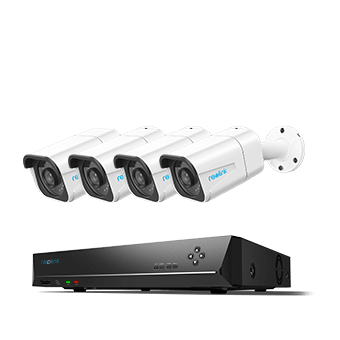
4K 8-Channel PoE Security System
4 pcs 4K Ultra HD Security Cameras; 2TB HDD 8-Channel NVR for 24/7 Recording; Person/Vehicle Detection; Plug & Play; 2 Network Solutions.
By deploying multiple cameras across entrances, hallways, and inventory areas, you can monitor your entire property from a single dashboard. Every second of 4K footage is stored locally and safely on the hardware NVR, giving you ultimate data privacy and absolute freedom from recurring monthly cloud subscription fees.
Testing notes from BGR point out that using a single Ethernet cable to transmit both high-speed digital video data and electrical power up to 330 feet makes it a "breeze" for DIY beginners.
Setup and Placement Tips for Home Indoor Security Cameras
Getting the most out of your indoor camera setups requires more than just plugging them in. Proper positioning, height adjustments, and network planning make the difference between capturing a useless blur and securing definitive, actionable footage.
1. Optimize Camera Height and Downward Angles
Mounting indoor cameras too high or flat against a wall results in capturing the tops of heads rather than identifiable facial features during an incident.
-
Place your indoor cameras roughly 7 to 8 feet off the ground. This height keeps the hardware out of arm's reach from intruders or curious toddlers while providing a comprehensive overview of the room.
-
Always tilt the camera lens slightly downward. A common mistake documented in forum testing notes is positioning cameras perfectly level, which wastes half the frame on the ceiling and fails to capture faces close to the entry point.
-
If you use smart on-device AI algorithms (like person or pet detection), a slight downward angle ensures the software can accurately calculate shapes and body proportions, reducing false alerts.
2. Avoid Glass Reflections and Backlighting Traps
Placing a camera directly facing a window will blind the sensor with solar glare during the day and render it useless at night due to infrared reflection.
-
If an indoor camera points directly toward a bright window, the automatic exposure system will adjust to the sunlight, turning anything inside the room into a dark, unidentifiable silhouette.
-
At night, traditional infrared (IR) LED lights bounce off glass windows like a mirror. This creates a glaring white ring of light in your video feed that blinds the camera to the outside world.
-
Position your camera at an angle to the window rather than dead-on, or utilize Privacy Zone settings to block out problematic glare spots.
3. Establish Strategic Placement Zones
You do not need a camera in every single room; instead, focus on high-traffic choke points where an uninvited visitor is physically forced to walk.
4. Run a Pre-Installation Bandwidth Check
A camera mounted far from your router may suffer from weak signals. Run a WiFi test to avoid video lag, buffering, or missed event clips.
Based on aggregated community feedback from platforms like Reddit, users often discover that a camera works perfectly on their kitchen counter during setup but fails completely when moved to its permanent spot in a basement or garage. Thick drywall, brick fireplaces, and metallic appliances degrade wireless signals rapidly.
Before drilling any brackets or mounting hardware, hold your camera in the exact physical spot you want it, log into the smartphone app, and check the live feed. Stream a 2K or 4K test video to verify that your Wi-Fi signal strength can handle the data load without stuttering.
If you notice signal drop-offs, choose a dual-band Wi-Fi camera that can jump to the longer-range 2.4 GHz frequency, or deploy a localized PoE NVR system that replaces Wi-Fi completely by running a single physical cable for power and data.
FAQs
Are you allowed to have a camera inside your house?
Yes, you are legally legally permitted to install security cameras inside your own home to protect your property and monitor your family. However, you must respect the reasonable expectation of privacy for guests, roommates, and domestic workers.
Can I use an indoor camera outdoors?
No, indoor cameras are not weatherproofed and should never be used outdoors, as exposure to moisture, dust, and temperature extremes will quickly destroy the hardware.
Can indoor cameras be integrated with smart home systems?
Yes, most modern smart indoor cameras seamlessly integrate with major smart home ecosystems like Amazon Alexa and Google Home.
Which security camera is best for indoors?
The best indoor security camera depends entirely on your specific household needs, balancing power limitations, privacy requirements, and budget.
For renters, a wire-free, battery-powered camera like the Reolink Argus 4 Pro is ideal. It sits anywhere on a shelf without drilling and captures 4K resolution.
For continuous recording, a plug-in Pan & Tilt camera like the Reolink E1 Pro is best for families wanting 24/7 video logs.
Conclusion
Indoor security cameras have become an integral part of home security systems for homeowners. These devices offer an ideal solution for users who protect their children and elderly parents. When choosing the right one, consider your budget and its functionalities, such as resolution, recording options, color night vision capabilities, and subscription.
What do you think about indoor monitoring? Are cameras an excellent choice to safeguard your indoor spaces? Leave your opinions in the comment section below and share this article with your friends! Let's discuss it together!
Search
Subscribe for the Latest Updates
Security insights & offers right into your inbox