
Security Camera Blind Spots: How to Find and Avoid Them
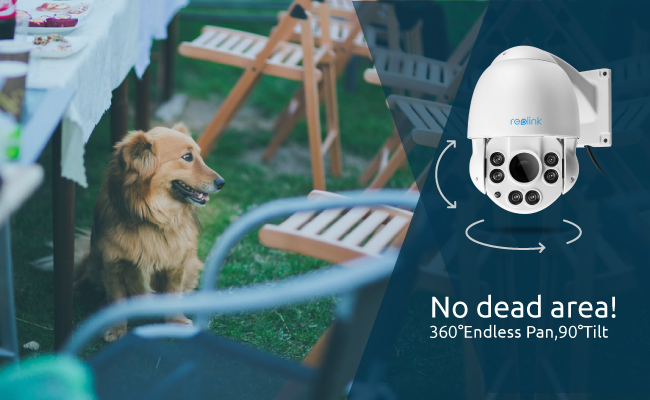
Security cameras can have blind spots even when installed correctly. These uncovered areas are usually caused by limited field of view, poor placement, obstacles, or gaps between cameras. The good news is that most blind spots can be identified and reduced through better placement, overlapping coverage, and the right camera type.
Key Takeaways:
- Every fixed security camera has a limited field of view.
- Blind spots often occur below the camera, behind obstacles, around corners, or between non-overlapping cameras.
- You can identify blind spots by checking the camera’s FOV and performing a walk test.
- Overlapping coverage from a second camera is one of the most reliable ways to eliminate dead zones.
- Wide-angle, panoramic, PTZ, or multi-lens cameras can reduce the number of blind spots, but no camera is automatically blind-spot-free in every installation.
How to Find Blind Spots in a Security Camera?
A security camera blind spot is any area that falls outside the camera’s usable field of view or is blocked by an object, angle, lighting condition, or installation limitation. A blind spot can occur beside, behind, below, or beyond the camera’s viewing range.
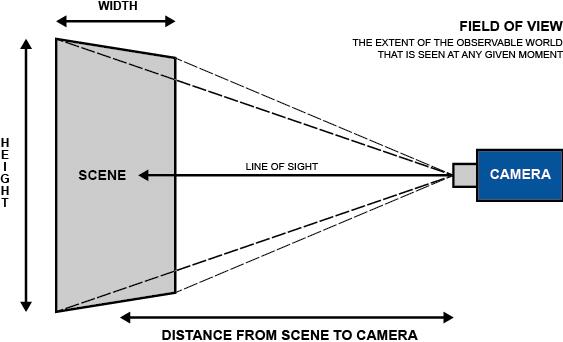
To get your camera’s blind spots, you should, first of all, find out your camera’s field of view (FOV). FOV is the viewing angle a camera can see.
Due to different lens your camera use, you will get different viewing angle. You may get 4 mm fixed lens, 6 mm or 8 mm fixed lens, or varifocal lens camera. A shorter focal length generally provides a wider field of view, while a longer focal length provides a narrower but more detailed view. Then the areas beyond the 80-degree field of view are blind spots, which your camera fails to cover.
The best way to find your blind spots is to put your camera into action with trial runs. Have one of your friends, family members, or trusted neighbors pose as a visitor and/or intruder. Tell this person to approach your property from various angles:
- Your front door
- Other entrances (back porch, garage door, etc.)
- Have them go to each window of your house
While they do this, monitor your camera’s feed. These days, security systems allow you to do that from the comfort of your mobile device. While we encourage you to do this, we also suggest you take a look at all of the avenues from which you can monitor your feed. What’s visible on your TV monitor, for example, might not be visible on your iPhone.
Where Are Security Camera Blind Spots Usually Located?
The most common blind spots are directly below fixed cameras, around corners, behind obstacles, and between cameras with non-overlapping fields of view.
- Directly below a high-mounted fixed camera
- Behind walls, pillars, fences, or vehicles
- Around sharp corners
- Outside the horizontal or vertical FOV
- Behind large trees or landscaping
- Near doors or windows outside the camera angle
- Between two cameras whose views do not overlap
How to Avoid Blind Spots on Security Cameras?
One of the first steps you can take to avoid blind spots for your security cameras is to take photos of the areas you want to cover, from the exact locations where you anticipate installing your security cameras. This will help you to determine:
- What lens you need for maximum coverage
- How far away to place the camera
- How wide the viewing area is
Experts in the field then use these images, as well as the building plan, to identify the ideal camera locations, as well as the best type of equipment. You can also use security camera lens calculator to determine what lens size you really need.
In an ideal situation, you’ll have the ability to install a multi-camera setup. A security camera system enables you to use each camera to overlap with one another’s viewing area, thus all but any blind spot.
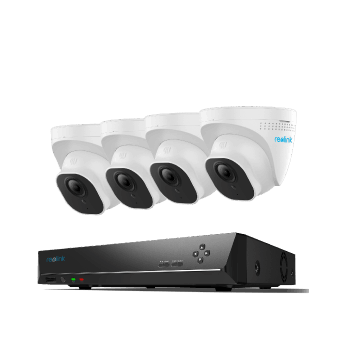
4K 8-Channel PoE Security System
4 pcs 4K Ultral HD Security Cameras; 2TB HDD 8-Channel NVR for 24/7 Recording; Plug & Play; 2 Network Solutions.
Tip 1: Firstly Focus on Location When It Comes to Eliminating Blind Spots
The integrity of your equipment plays a huge role in eliminating blind spots. However, one of the most important steps you can take to protect your property is to preplan and strategize the location of your cameras.
By working with a professional on deciding where to place home security cameras, you can greatly reduce the likelihood of both blind spots and damage caused by vandals or Mother Nature. In the end, you’ll have greater peace of mind that your security cameras are doing their job of protecting your property and family.
Tip 2: Consider Changing to a Wide-Angle Security Camera
While the placement of the security camera plays an important role in minimizing the blind spots, you can also try to avoid them by choosing a wide angle security camera, which is better to be able to cover all areas.
1. A Panoramic Fisheye Security Camera
A 360-degree panoramic fisheye security camera is a perfect choice. A 360° fisheye camera can greatly reduce horizontal blind spots by capturing the surrounding area from a single mounting point. Recently Walmart and many other stores and supermarkets have taken this kind of panoramic camera to prevent shoplifting.
2. A PTZ Surveillance Camera
Panoramic security cameras are excellent to view every blind spot. But they are expensive on Amazon, Best Buy, eBay and other retail stores. If you have a tight budget, you can consider a PTZ (Pan/Tilt/Zoom) security camera, a one-of-the-kind panoramic fisheye camera alternative.
A PTZ camera can reduce blind spots by changing its viewing direction and tracking moving subjects. However, it cannot monitor every direction simultaneously, so critical areas may still benefit from fixed overlapping cameras. In this way, the camera will not only focus on one direction, leaving other areas uncovered. To view the live video feed and control the camera’s direction, you can download Reolink app on your mobile devices. You can monitor wherever you want even if you are away, with PTZ control on your hand.
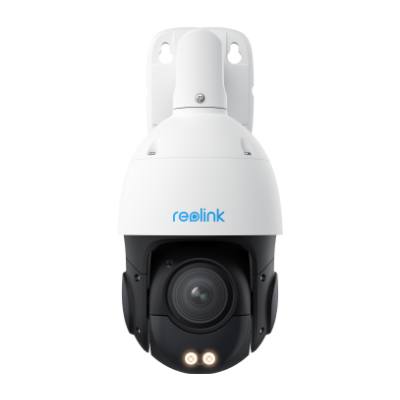
Smart 4K PTZ PoE Security Camera with 16X Optical Zoom
16X Optical Zoom, 360° Coverage in 4K UHD, Auto Tracking, Color Night Vision.
Tip 3: Consider the External Factors at Play to Minimize Blind Spots of Your Camera
As mentioned earlier, you should take into account the impact the moving sun (and darkness) has on your security cameras’ blind spots. This helps to avoid security camera blind spots both day and night.
But there are far more external factors to consider. For example, the swaying of a branch from a wind gust is enough to cause a blind spot. In the summer time, a tree full of leaves might block out the morning sun, but in the winter, that bare tree (and closer-to-the-horizon sun) can pose an entirely new challenge.
Make it a point to monitor these external factors at least each season, if not on a monthly basis.
Tip 4: Eliminate Blind Spots by Making Your Camera Free from Vandalism
The hand of Mother Nature isn’t the only reason why your cameras might endure unexpected blind spots. If your camera is easily accessible by intruders, then that intruder can either damage the camera or obstruct its field of vision.
If your cameras are susceptible to vandals, you might want to invest in vandal-proof cameras, or rethink the location of your installations.
What Causes Security Camera Blind Spots?
Limited Field of View (FOV)
A standard fixed-lens camera typically captures a field of view between 80° and 110°. Any zone outside of this angle remains completely unmonitored, creating large blind spots on wide driveways or yards. Switching to a 180° dual-lens camera or a 360° pan-and-tilt model eliminates these side coverage gaps.
Poor Camera Placement
Mounting a camera in a corner, behind a support pillar, or too close to an adjacent wall restricts its effective line of sight. Improper placement forces the camera to waste much of its lens frame on structural walls instead of open space. Placing cameras at key entry choke points with overlapping fields of view prevents perimeter gaps.
Physical Obstructions
Fences, tall vehicles, archways, and outdoor furniture frequently block lower-level camera views. These solid barriers create visual dead zones where individuals can move completely undetected. Position cameras high enough to look over static objects, or mount multiple units to cover both sides of a structure.
Camera Height and Angle
Installing a camera too high creates a steep downward angle that captures the tops of heads or vehicle roofs while missing details. Conversely, mounting a camera too low makes it easy for intruders to tamper with, cover, or vandalize. Aim for an ideal mounting height of 8 to 10 feet angled slightly downward.
Changing Environment
Seasonal changes like overgrown tree branches, foliage, or sudden snow buildup can gradually creep into a camera’s line of sight over time. A clear view in winter might become fully obstructed by leaves in summer. Regularly trimming back surrounding vegetation keeps lens clearance consistent year-round.
Lighting and Glare
Direct sunlight shining into the camera lens during sunrise or sunset washes out the image, rendering footage temporarily unusable. At night, harsh reflections from glass windows or nearby floodlights cause blinding glare. Angle the lens away from direct light sources and choose cameras with high dynamic range (HDR) or ambient night vision sensors to preserve image detail.
Do You Need a Second Camera to Eliminate Blind Spots?
A second camera is often the most reliable way to eliminate a blind spot that a single fixed camera cannot cover. Position the second camera so its field of view overlaps slightly with the first camera, especially around entrances, corners, driveways, and other high-priority areas.
For wide areas, a panoramic or multi-lens camera may reduce the need for multiple devices, but two strategically placed cameras can provide better redundancy and more viewing angles.
Best Reolink Cameras to Avoid Blind Spots
Different camera designs reduce blind spots in different ways. Wide-angle models cover more horizontal space, tracking cameras follow movement across larger areas, and multi-camera systems provide overlapping coverage around an entire property.
Duo 3 PoE: Best for 180° Wide Coverage
The Reolink Duo 3 PoE is a strong choice for wide areas such as driveways, front yards, storefronts, and parking spaces. Its dual-lens design combines two views into a 180° panoramic image, helping reduce the side blind spots that are common with narrower fixed cameras.
It is especially useful when you want to cover a broad area from a single mounting point without installing multiple cameras.

Groundbreaking 16MP Dual-Lens PoE Camera
16MP UHD, Dual-Lens, Motion Track, 180° Wide Viewing Angle, Power over Ethernet, Color Night Vision.
TrackFlex Floodlight WiFi: Best for Dynamic Tracking
The Reolink TrackFlex Floodlight WiFi is better suited to yards, driveways, and other active areas where people, vehicles, or animals may move across different directions. Its pan-and-tilt design and automatic tracking allow the camera to follow moving subjects instead of remaining fixed on one view.
This can reduce temporary blind spots caused by movement outside a fixed camera angle, although critical areas may still benefit from additional fixed coverage.
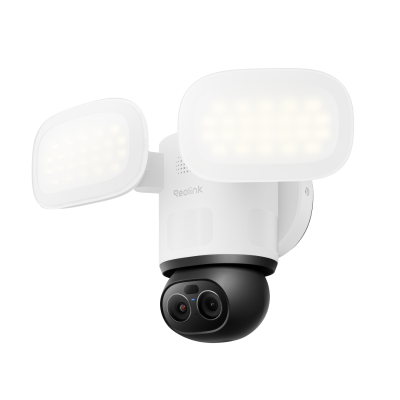
Smart 4K 360° Coverage Wi-Fi Floodlight Security Camera
Local AI Video Search, 4K 8MP Ultra HD, 360° Coverage View, 6X Hybrid Zoom, Dual-Color Floodlight.
RLK16-1200D8-A: Best for Multi-Camera Coverage
For larger homes, businesses, and properties with multiple entrances, the Reolink RLK16-1200D8-A provides broader perimeter coverage through a multi-camera setup. Multiple cameras can be positioned around entrances, corners, driveways, side yards, and other high-priority areas.
By slightly overlapping each camera’s field of view, you can reduce gaps between cameras and create more consistent coverage across the property.
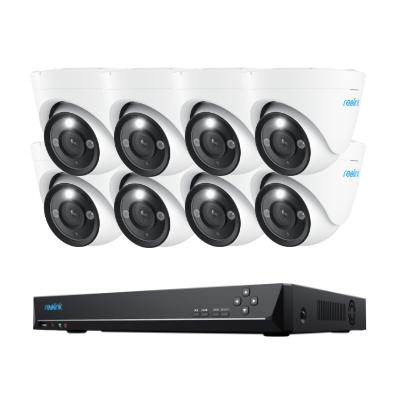
12MP PoE Security System with Color Night Vision
12MP Ultra HD, Person/Vehicle Detection, Power over Ethernet, 16-Channel NVR.
FAQs
Where is a camera’s blind spot?
A camera’s blind spot is any area outside its usable field of view or blocked by an object. Common blind spots appear directly below high-mounted cameras, around corners, behind walls, fences, trees, or parked vehicles, and between cameras whose views do not overlap.
Do all security cameras have blind spots?
Most security cameras have some coverage limitations. Fixed cameras are limited by their horizontal and vertical field of view, while PTZ and 360° cameras can cover much larger areas but may still be affected by mounting position, physical obstructions, or areas outside their vertical viewing range.
How do I know if my CCTV has a blind spot?
Check the camera’s live view and perform a walk test around the monitored area. Pay particular attention to corners, entrances, the space directly below the camera, and areas behind obstacles. If a person can move through part of the property without appearing clearly in the footage, that area is a blind spot.
Can a 360° camera have blind spots?
Yes. A 360° camera can greatly reduce horizontal blind spots, but it may still have uncovered areas because of its mounting position, vertical field of view, nearby walls, ceilings, furniture, or other obstructions. A 360° view does not guarantee complete coverage in every installation.
Conclusion
One big challenge a security camera has is the blind spots, regardless of the quality or cost of it. Therefore we round up the best idea for how you can avoid blind spots in your security camera. We hope this guide helps you find and avoid CCTV blind spots.
Search
Subscribe for the Latest Updates
Security insights & offers right into your inbox