
Wired vs Wireless Security Camera System: Which is Truly Right For You

Choosing between a wired vs wireless security camera system comes down to one practical question: can you run Ethernet cable through your property? If yes, a PoE (Power over Ethernet) NVR kit delivers 24/7 continuous recording, zero monthly fees, and no dependence on your home router. If not, a WiFi NVR kit or hub-based battery system gets you running without drilling a single wall.
Most buyers searching this comparison find articles comparing individual cameras. What you actually need to decide is system architecture: which recording infrastructure fits your property, which storage model suits your budget, and which installation method is realistic for your situation. Three distinct system types exist under the "wired vs wireless" umbrella: PoE NVR kits, WiFi NVR kits, and hub-based battery camera systems. Each has a different installation footprint, recording method, and cost model.
One important clarification before the comparison: "wireless" describes the data connection, not the power source. Most WiFi cameras still require a wall outlet. Only hub-based battery cameras skip all cables entirely.
- What 'Wired' and 'Wireless' Mean for a Full Camera System
- Wired vs. Wireless Security Camera Systems: Head-to-Head Comparison
- When are Wired Security Camera Systems a Better Choice?
- When are Wireless Security Camera Systems a Better Choice?
- The WiFi Bandwidth Limit Most Buyers Don't Know About
- Best Reolink Wired Security Camera Systems
- Best Reolink Wireless Security Camera Systems
- FAQs
- Conclusion
What 'Wired' and 'Wireless' Mean for a Full Camera System
A wired security camera system connects each camera to a central NVR over one Ethernet cable that carries both power and data. A wireless system however, transmits video over WiFi to a local NVR, cloud server, or hub, and usually still requires a power outlet at each camera location.
Three architectures fall under these two labels.
PoE NVR systems

These systems run one Cat5e or Cat6 cable per camera from the mounting point back to the NVR. IEEE 802.3at (PoE+) supplies up to 30W of power over that same cable; the base 802.3af standard caps at 15.4W. No separate power adapter is needed at the camera. The NVR records continuously to a local HDD.
WiFi NVR systems

WiFi NVR systems connect cameras to the home or business router over WiFi 6 (802.11ax) and send footage to a local NVR hard drive. No Ethernet cable run per camera, but each camera still needs a nearby wall outlet for power.
Hub-based battery systems

Hub-based battery systems (like the Reolink Home Hub) use fully battery-powered or solar-powered cameras that communicate with a compact hub storing footage locally. No wall outlet needed at any camera location. The trade-off is motion-triggered recording rather than continuous 24/7 coverage.
One distinction many buyers overlook is that a "wireless" WiFi NVR kit is not completely wire-free. While video is transmitted wirelessly, each camera still requires a power connection. Only battery-powered camera systems can operate without any cables at the camera location.
Considering standalone wired or wireless cameras instead? Reolink's wired vs. wireless security cameras guide provides a side-by-side comparison guide with useful detail that covers single-camera differences in full.
Wired vs. Wireless Security Camera Systems: Head-to-Head Comparison
PoE wired systems cost less to operate over time and record more reliably whereas wireless systems cost less to install and work in locations where cable runs aren't feasible.
The table below covers the key decision factors across all three system types:
The most underappreciated advantage shared by both NVR-based system types is local storage. A 2TB HDD in an NVR kit stores weeks of 4K footage without cloud fees, and recording continues even when your internet goes down. Cloud-dependent cameras often stop recording or lose remote access entirely during an outage.
The scalability row is also worth examining closely. A PoE NVR system scales predictably by adding cameras up to the channel count, with a PoE switch if you need to expand further. A WiFi system's ceiling depends on router bandwidth, home network congestion, and total connected device count, all of which interact in ways that are hard to predict before installation.
Keen to learn more about PoE and WiFi? You can browse Reolink's security camera systems collection to see PoE and WiFi NVR kits side by side.
When are Wired Security Camera Systems a Better Choice?
A PoE wired system is the stronger choice for homeowners who own their property, plan to have four or more cameras, and want 24/7 recording without any recurring subscription costs.
Each camera receives both power and data without the need for batteries or separate power adapters. The result is a cleaner installation, lower maintenance, and dependable 24/7 operation. A single Cat6 run supports camera distances up to 100 meters from the NVR, making it practical for multi-floor homes and large commercial properties with cameras spread across distributed structures.
Recording continuity follows from that uninterrupted power. A 2TB HDD in an 8-channel NVR stores weeks of 4K footage from four cameras simultaneously. Person Detection and Vehicle Detection alerts are logged around the clock, not just when motion crosses a threshold. There are no coverage gaps from a camera that will miss an upload window.
The cost case is also compelling at scale. Eight cameras on a typical cloud-dependent plan run $300 to $500 per year in subscription fees. Compared to subscription-based security systems, a locally stored PoE NVR solution can recoup its installation costs within one to two years, while delivering compounding savings for years to come.
Pro Tip: For IP camera interoperability across brands on the same NVR, ONVIF standards define the compatibility protocol worth knowing before you mix hardware.
When are Wireless Security Camera Systems a Better Choice?
Wireless camera systems are the right fit when running Ethernet cable isn't practical. These are particularly suitable for rentals, leased commercial spaces, retrofits in finished walls, or properties with detached outbuildings far from the main building.
Two wireless architectures exist here, and the distinction matters more than most buyers think. We recommend you understand the differences before making your final decision to buy.
A WiFi NVR kit needs only a wall outlet near each camera, not a cable run back to the NVR. Cameras connect to the router over dual-band WiFi 6 and stream footage continuously to a local NVR hard drive. Setup time drops from a half-day to a few hours. This is the right pick for homeowners in finished homes who want local NVR recording without routing Ethernet through walls, floors, and ceilings.
A hub-based battery system does not require an outlet or cables at the camera location. Battery or solar-powered cameras record motion-triggered clips to a local hub. This is the system for renters, leaseholders, or anyone adding coverage to a detached shed, barn, or storage unit with no electrical infrastructure.
Pro Tip: For buyers with larger properties, some Reolink NVRs such as the RLN16-410 support both PoE and WiFi cameras on the same recorder. You can cover the main building with hardwired PoE cameras and add battery-powered cameras for a detached outbuilding without running two separate systems.
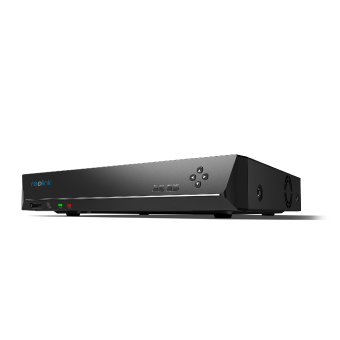 Reolink RLN16-410
16-Channel PoE Security NVR
3TB Built-in HDD; Work with All Reolink 5MP/4MP Cameras for 24/7 Video Recording, Monitoring, and Management; Plug and Play.
The WiFi Bandwidth Limit Most Buyers Don't Know About
Do you know that most home routers start dropping frames when more than six to eight cameras stream 4K video simultaneously over a shared 2.4GHz WiFi connection?
The math is straightforward. A single 4K H.265 security camera streams at roughly 4 to 8 Mbps under normal conditions. Eight cameras running simultaneously demand 32 to 64 Mbps of sustained throughput and that budget is shared with every other device on the same 2.4GHz channel. In most homes, 2.4 GHz Wi‑Fi usually tops out around 50–100 Mbps. Add smartphones, a smart TV, a laptop, and a streaming device, and the cameras are competing for the same bandwidth as the rest of the household.
WiFi 6 (802.11ax) addresses this through OFDMA Orthogonal Frequency-Division Multiple Access. Instead of devices waiting their turn on a shared channel, OFDMA divides the channel into sub-channels and serves multiple streams in parallel, reducing contention even as camera count increases. Dual-band routers help further by offloading cameras to the less-congested 5GHz band.
PoE wired cameras sidestep the problem entirely. Each camera has its own dedicated Ethernet lane to the NVR, completely independent of the home router.
Pro Tip: For systems with six or more wireless cameras, either use a WiFi 6 router with OFDMA support, or choose PoE. Before buying a WiFi 6 NVR kit, check whether your home's layout can support the signal first.
Best Reolink Wired Security Camera Systems
Wired NVR kits are the right choice for permanent installs where continuous local recording and zero recurring fees are the priority. The two picks below cover two distinct buyer types.
Reolink RLK8-811B4-A: Best Wired Home Security Camera System for Homeowners

The RLK8-811B4-A is a four-camera, 8-channel PoE kit that covers a typical 3 to 4 bedroom home with continuous 4K recording at no monthly cost.
This kit suits homeowners who own their property, plan four or more cameras, and want hardware they own outright with no subscription. Users running it for 24/7 continuous recording report that the 2TB HDD handles extended storage comfortably, with the option to upgrade to an external drive for two or more months of footage. The system integrates with Home Assistant for smart home setups, and the Reolink app handles remote access reliably.
Trade-off to know: Routing four Ethernet cables through walls takes a half-day and requires drilling. This isn't the right kit for renters or anyone who needs to relocate cameras.
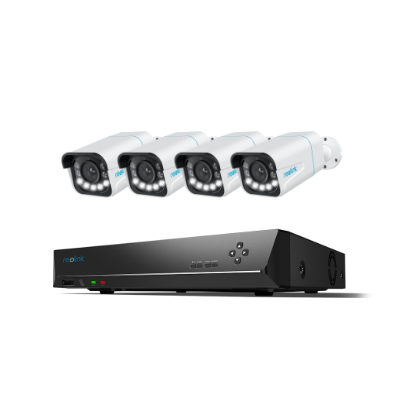
4K 8-Channel PoE Security System
4 pcs 4K Ultral HD Security Cameras; 2TB HDD 8-Channel NVR for 24/7 Recording; Person/Vehicle Detection; Plug & Play; 2 Network Solutions.
Reolink RLK16-1200D8-A: Best Wired Security Camera System for Business

The RLK16-1200D8-A is an 8-camera, 16-channel NVR kit with 12MP resolution and local storage expandable to 12TB, designed for commercial deployments that need room to grow.
This system suits retail stores, small offices, warehouses, and property managers who need 8 to 16 camera points with no ongoing cloud fees. The 12MP resolution captures license plate numbers and facial features from a distance. PoE wiring keeps cable management clean with one cable per camera back to the NVR.
Trade-off to know: Dome cameras require ceiling or soffit mounting. Not the right fit for setups where cameras need to be repositioned regularly.
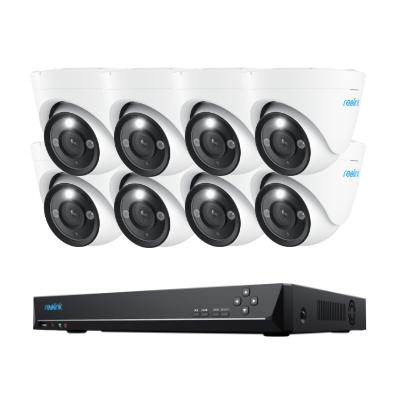
12MP PoE Security System with Color Night Vision
12MP Ultra HD, Person/Vehicle Detection, Power over Ethernet, 16-Channel NVR.
Best Reolink Wireless Security Camera Systems
The two picks below cover distinct wireless architectures: a WiFi 6 NVR kit for homeowners who want local recording without cable runs, and a hub-based battery system for true zero-wire flexibility. Which one fits your situation depends on whether you have power outlets near each camera location.
Reolink RLK12-800WB4: Best Wireless Home Security Camera System for Homeowners

The RLK12-800WB4 is a WiFi 6 NVR kit that delivers continuous local recording without running a single Ethernet cable to any camera.
This kit suits homeowners in finished homes where routing Ethernet through walls and ceilings would be disruptive. The WiFi 6 connection handles multi-camera streaming with significantly less congestion than WiFi 5 (provided that your router supports WiFi 6), and the 16-channel NVR gives room to expand the system over time.
Trade-off to know: Each camera still needs a nearby wall outlet. This is not a battery-powered system. For zero cables of any kind at the camera location, see the Home Hub kit below.
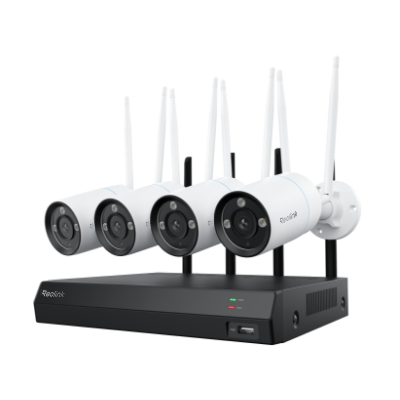
4K Security Kit with Next-Gen WiFi 6
4 pcs 4K Ultra HD Security Cameras; Dual-Band WiFi 6; 2TB HDD 12-Channel NVR for 24/7 Recording; Peron/Vehicle/Animal Detection; IP67 Weatherproof.
Reolink Home Hub with Argus PT Ultra: Best Battery Security Camera System for Flexible Setups

The Reolink Home Hub with Argus PT Ultra is a hub-based battery system that sets up in under 10 minutes and stores up to one year of footage locally without a cloud subscription.
This system suits renters, leaseholders, and anyone adding cameras to detached outbuildings. This could be areas like sheds, separate garages, barns, and storage units where no wall outlet or Ethernet infrastructure exists. Setup completes in under 10 minutes, and Person and Vehicle Detection accuracy is reliable with low false-trigger rates.
Trade-off to know: Battery-powered cameras record motion-triggered clips, not 24/7 continuous footage. High-activity zones drain batteries faster so a solar panel is strongly recommended for cameras with consistent sunlight exposure.
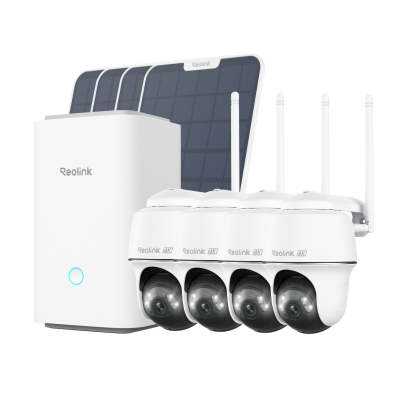
Wireless Security System With 4K PT Standalone Battery/Solar Wi-Fi Cameras
4K Color Footage Day & Night, 1 Year of Local Storage, Exclusive Anti-Theft Algorithms, 360° All-Around Coverage, Expandable System Up to 8 Reolink Cams.
FAQs
Can a wireless security camera system record 24/7?
Yes, with the right system type. A WiFi NVR system like the Reolink RLK12-800WB4 records 24/7 because cameras run on wall power and stream continuously to a local NVR HDD. Recording continues even during an internet outage: remote app access pauses, but footage is not lost. Hub-based battery systems are different: they record motion-triggered clips to preserve battery life, not continuous footage around the clock.
How many wireless cameras can I add before it affects my home Wi-Fi?
On a standard 2.4GHz Wi-Fi router, stream quality typically degrades past six to eight cameras streaming simultaneously. Each 4K H.265 camera uses roughly 4 to 8 Mbps; eight cameras demand 32 to 64 Mbps of sustained bandwidth, shared with every other connected device on the network.
Is a wired or wireless system better for a small business?
For owned or long-term leased premises with six or more cameras: a PoE wired NVR system wins on reliability and five-year cost. Eight cameras on a typical cloud plan run $300 to $500 per year in subscription fees; a locally-storing PoE NVR eliminates that cost after the initial hardware purchase. For short-term or restricted leases where drilling is prohibited: a wireless system avoids leaving installed infrastructure behind. A hybrid approach suits such as having a PoE at a permanent location and battery hub cameras at temporary or seasonal sites is an ideal setup for multi-site SMBs.
Do wired security camera systems work without internet?
Yes. A PoE NVR system records continuously to a local HDD regardless of internet status. Remote viewing via the Reolink app pauses during an outage, but no footage is lost and local recording runs uninterrupted. WiFi NVR systems work the same way: local NVR recording continues without internet. Hub-based battery systems also record locally during an outage, but cloud push notifications and remote viewing require an active connection.
Is it better to have wired or wireless security cameras?
It depends on whether you can run cable. Wired PoE cameras are the stronger choice for permanent installs. A single Ethernet cable delivers power and video, enables 24/7 recording independent of your router, and eliminates Wi‑Fi bandwidth limits. Wireless cameras are the better fit when cable runs aren't practical. Think rentals, finished walls, or detached structures with no electrical access. For homeowners planning four or more cameras on a property they own, wired wins on long-term reliability and cost. For renters or anyone who needs flexibility without drilling, wireless wins on installation speed.
How do wireless security cameras work?
A wireless security camera captures video, compresses it using H.265 encoding, and transmits it over Wi-Fi to a receiver. Power comes from a wall outlet in WiFi NVR systems, or from a rechargeable battery in hub-based systems. The NVR or hub stores footage locally. In the case of Reolink, the Reolink app connects to it over your home network for live viewing and playback from anywhere. During an internet outage, local NVR recording continues uninterrupted. Only remote app access pauses until the connection is restored.
Conclusion
We hope you are clearer on which type of security camera system is best for you.
If you own your property and plan four or more cameras with no monthly fees, a PoE wired NVR kit is the right system. The Reolink RLK8-811B4-A covers a full home while the RLK16-1200D8-A is built for businesses that need room to scale to 16 cameras.
If you can't run cable but still want local NVR recording, a WiFi NVR kit like the RLK12-800WB4 installs without routing Ethernet through a single wall. If you're a renter, leaseholder, or adding coverage to a detached outbuilding, the Reolink Home Hub with Argus PT Ultra is operational in under 10 minutes with no outlet required.
Browse all system options at Reolink's security camera systems collection. If you still have any questions, do feel free to comment below if you have any questions and we'll do our best to help you out further!
Search
Subscribe for the Latest Updates
Security insights & offers right into your inbox