
How to Solar Power an Outdoor Security Camera | DIY Guide 2026
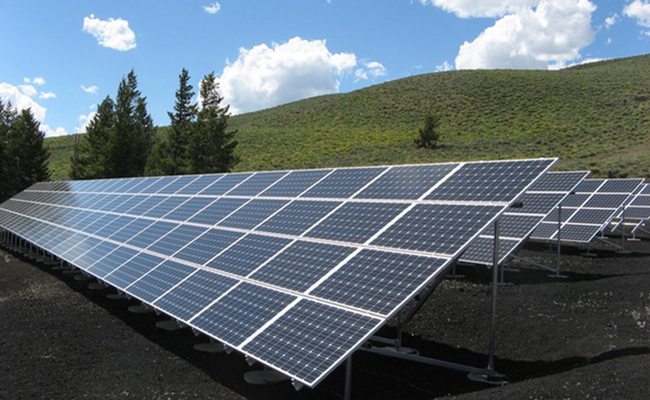
How can you turn a wireless outdoor camera into a solar-powered security camera that works wirelessly? How to DIY solar-powered security cameras? Or to use a solar panel to power security camera, what factors need to be considered?
Key Takeaways
-
The easiest way to solar power a wireless security camera is to pair a rechargeable battery camera with a compatible solar panel
-
Most consumer battery cameras do not require a separate inverter or external charge controller when using their supported solar panel.
-
Solar charging performance depends on panel wattage, sunlight, shade, temperature, camera activity, and battery capacity.
-
Continuously powered cameras may require a larger DIY setup with a solar panel, battery, charge controller, and voltage regulation.
-
For locations without WiFi, a battery-powered 4G LTE camera with solar charging is usually the simpler off-grid option.
- Can You Power an Outdoor Security Camera with a Solar Panel?
- How Does a Solar Panel Power a Security Camera?
- Two Ways to Solar Power an Outdoor Security Camera
- What Do You Need for a DIY Solar-Powered Security Camera?
- How Much Solar Power Does a Security Camera Need?
- How to Solar Power a Wireless Outdoor Security Camera
- Factors to Consider When Building a Solar Security Camera
- Security Camera Solar Panel Sizes Compared
- Ready-Made Solar Camera vs DIY Solar Power Kit
- Best Reolink Cameras for Solar-Powered Outdoor Monitoring
- Which Solar-Powered Security Camera Is Best for Your Setup?
- FAQs
- Conclusion
Can You Power an Outdoor Security Camera with a Solar Panel?
Yes. A compatible solar panel can charge many battery-powered outdoor security cameras, allowing them to operate without a nearby power outlet. The solar panel typically replenishes the camera's rechargeable battery rather than powering the camera directly at all times.
Cameras that require continuous wired power may need a larger DIY solar system with a battery and power-management components.
How Does a Solar Panel Power a Security Camera?
A solar panel converts sunlight into electrical energy and uses it to recharge the camera's battery. During daylight hours, the panel replenishes energy used by the camera; at night or during low-light periods, the camera runs from stored battery power.
The panel's actual charging performance depends on its wattage, sunlight exposure, installation angle, temperature, camera activity, and battery capacity.
Two Ways to Solar Power an Outdoor Security Camera
Battery Camera + Compatible Solar Panel
The simplest setup uses a rechargeable battery security camera with a compatible solar panel. The panel charges the camera's internal battery directly, so no separate charge controller, inverter, or external battery is normally required.
DIY Solar Power System
A custom solar system may be required if the camera is designed for continuous wired power rather than direct solar charging. Depending on the camera and system, this setup may require a solar panel, charge controller, battery, voltage regulator or converter, weatherproof enclosure, and compatible cabling.
What Do You Need for a DIY Solar-Powered Security Camera?
To build a DIY solar-powered security camera setup, you need the following components:
-
Solar Panel: Captures sunlight and converts it into direct current (DC) electricity. A standard 10W to 30W panel is usually sufficient for a single camera setup.
-
Rechargeable Battery: Stores energy generated during the day to keep the camera running overnight and during cloudy weather. Typically, a 12V Deep Cycle AGM or LiFePO4 battery (around 10Ah to 20Ah) is recommended.
-
Charge Controller: Regulates the voltage and current coming from the solar panel to safely charge the battery and prevent overcharging or deep discharging. A basic PWM or MPPT controller works best.
-
Voltage Regulator / Step-Down Converter: Adjusts the battery's output voltage (usually 12V) down to match your camera’s specific input requirement (most Wi-Fi or IP cameras require 5V via Micro-USB/USB-C or 12V DC).
-
Security Camera: An energy-efficient Wi-Fi or 4G cellular security camera with local storage (e.g., microSD card slot) to minimize power consumption.
-
Cables & Weatherproof Enclosure: Outdoor-rated wiring, connectors, and an IP65/IP66-rated junction box to protect the battery, charge controller, and wiring connections from rain, dust, and temperature extremes.
How Much Solar Power Does a Security Camera Need?
The required solar panel size depends on the camera's daily energy consumption, battery capacity, recording behavior, and available sunlight. A motion-triggered battery camera generally requires much less solar input than a camera recording continuously.
Daily energy needed (Wh) = Camera power (W) × Hours of operation
Required solar output ≈ Daily energy use ÷ Effective sunlight hours
How to Solar Power a Wireless Outdoor Security Camera
Method 1: Connect a Compatible Solar Panel to a Battery Camera
- Fully charge the camera.
- Set up WiFi or cellular connectivity.
- Choose a location with unobstructed sunlight.
- Position the panel toward the optimal sun direction.
- Mount the camera and panel.
- Connect the panel securely.
- Verify the charging indicator and battery status.
Method 2: Build a DIY Solar Power Kit
- Calculate camera consumption.
- Select panel wattage.
- Size battery storage.
- Match voltage.
- Add charge controller.
- Add DC regulator/inverter only if required.
- Weatherproof all electrical connections.
- Test before permanent installation.
Factors to Consider When Building a Solar Security Camera
A DIY solar-powered security camera can work well for locations without convenient access to power, but the system needs to be sized and installed correctly. The most important factors are camera compatibility, energy consumption, solar panel output, battery capacity, sunlight exposure, weather conditions, installation, and network connectivity.
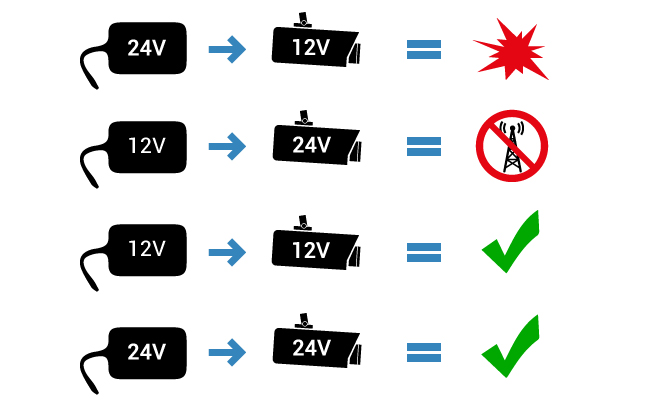
Factor 1. Voltage and Compatibility
The solar panel, battery, charging components, and camera must be electrically compatible. Check the camera’s required input voltage, connector type, and charging specifications before connecting any solar equipment.
Battery-powered cameras designed for solar charging usually work with a compatible low-voltage panel and do not require a separate inverter or external charge controller. By contrast, continuously powered cameras may require a larger DIY setup with a battery, charge controller, voltage regulator, or inverter.
Do not assume that any solar panel can safely power any security camera.
Factor 2. Camera Power Consumption
The camera’s energy use determines how much solar power the system needs. Motion-triggered battery cameras generally consume less energy than cameras that record continuously or frequently use features such as IR night vision, spotlights, pan-and-tilt movement, live viewing, or auto tracking.
Estimate how often the camera will record, stream, or move before choosing the solar panel and battery.
Factor 3. Solar Panel Wattage
The solar panel needs to generate enough energy to replace what the camera consumes each day. Higher-wattage panels can replenish the battery faster, but the right size depends on the camera’s power demand, local sunlight conditions, and how often the camera is used.
A low-activity battery camera may only need a small compatible panel, while a high-traffic or continuously powered setup may require a larger solar array.
Factor 4. Battery Capacity
The battery stores energy for nighttime operation, cloudy weather, and periods with limited sunlight. A larger battery provides a longer backup period, but it also takes more solar energy to recharge.
For off-grid installations, choose enough battery capacity to support the camera through expected periods of poor weather without frequent manual charging.
Factor 5. Sun Exposure and Panel Placement
Solar panel placement has a major effect on charging performance. Install the panel where it receives unobstructed sunlight for as much of the day as possible.
In the Northern Hemisphere, panels generally perform best when oriented toward the south; in the Southern Hemisphere, they should generally face north. Avoid shade from roofs, trees, walls, or other structures, and adjust the tilt angle when possible to improve solar exposure.
Factor 6. Weather and Temperature
Outdoor solar systems are exposed to rain, snow, dust, wind, heat, and cold. Use outdoor-rated cameras, panels, cables, and enclosures that are suitable for the installation environment.
Keep the solar panel surface clean because dust, leaves, snow, and debris can reduce charging efficiency. Battery charging can also slow down or stop outside the supported temperature range, so always check the camera and battery specifications for cold- or hot-weather limits.
Factor 7. Installation and Cable Routing
Mount the camera where it provides the required field of view, then position the solar panel where sunlight is strongest. The panel does not need to be installed directly beside the camera as long as the cable length and mounting setup remain compatible.
Secure cables and connectors against rain, movement, and accidental damage. For DIY systems with separate batteries or charge controllers, use a weather-resistant enclosure for exposed electrical components.
Factor 8. Network Connectivity
Power and connectivity are separate considerations. A solar panel can keep a camera charged, but the camera still needs a network connection for remote access.
Use a WiFi camera where a reliable wireless network is available. For farms, construction sites, cabins, gates, or other locations outside WiFi range, a 4G LTE security camera is usually the more practical option.
Factor 9. System Cost and Maintenance
The cost of solar powering a camera depends on the type of setup. A battery camera paired with a compatible solar panel is usually simpler and requires fewer components than a custom off-grid system for a continuously powered camera.
A full DIY system may require a larger solar panel, external battery, charge controller, enclosure, cabling, and power-conversion equipment. Cellular cameras may also require an ongoing mobile data plan.
Consider both the upfront cost and long-term maintenance, including panel cleaning, battery replacement, weatherproofing checks, and data service if applicable.
Security Camera Solar Panel Sizes Compared
Ready-Made Solar Camera vs DIY Solar Power Kit
A ready-made solar security camera is usually the better choice for homeowners who want a simple, low-maintenance setup. A DIY solar power kit offers more flexibility, but it requires more planning, components, and technical knowledge.
Choose a Ready-Made Solar Camera If:
A ready-made system is a better fit if you want a battery camera that can connect directly to a compatible solar panel. It is easier to install, has fewer components to maintain, and works well for most residential and light commercial outdoor monitoring.
Choose a DIY Solar Power Kit If:
A DIY solar kit is more suitable when you need to power a camera that was not originally designed for direct solar charging, or when you are building a larger off-grid surveillance system. It gives you more control over panel size, battery capacity, and power management, but requires careful compatibility and energy calculations.
For most users, a battery-powered camera paired with a compatible solar panel is the simpler and more reliable option. A DIY system makes more sense for specialized installations with higher or continuous power requirements.
Best Reolink Cameras for Solar-Powered Outdoor Monitoring
Different solar-powered security cameras work better for different environments. For wide WiFi coverage, long-duration battery monitoring, or remote locations without WiFi, these Reolink models offer distinct advantages.
Reolink Argus PT Ultra: Best for Flexible 360° WiFi Monitoring
Best for: Backyards, large properties, gardens, and other outdoor areas that need flexible viewing angles.
Key features: The Argus PT Ultra captures 4K 8MP video and combines 355° pan with 140° tilt for near-360° coverage from a single installation point. It also supports person, vehicle, and animal detection, preset monitoring positions, and both color and infrared night vision.
Solar setup: Its 21.6Wh rechargeable battery supports solar charging through USB-C, helping reduce the need for manual recharging. The camera also connects over both 2.4GHz and 5GHz WiFi for flexible wireless installation.
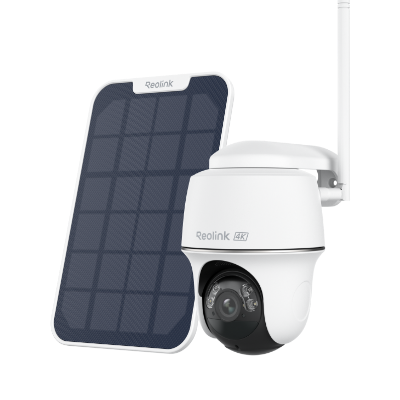
4k 100% Wire-Free PT Camera
4K 8MP Ultra HD; 5GHz/2.4GHz WiFi; Rechargeable Battery & Solar Powered; 355° Pan & 140° Tilt; IP65 Certified Weatherproof; Clear Night Vision; 2-Way Audio; 122° Wide Viewing Angle.
Reolink Altas PT Ultra: Best for Long-Duration Monitoring and Tracking
Best for: Larger properties, driveways, yards, and locations where longer recording times and flexible coverage are important.
Key features: The Altas PT Ultra delivers 4K UHD video, 355° pan and 90° tilt, person/vehicle/animal detection, and automatic tracking. Its 20,000mAh battery also supports up to 10 seconds of pre-recording and continuous recording modes, giving users more event context than standard motion-only battery cameras.
Solar setup: The camera supports the 6W Reolink Solar Panel 2. Solar charging can extend operating time and support more demanding recording modes, although the amount of sunlight required varies with recording frequency, settings, weather, and camera usage.
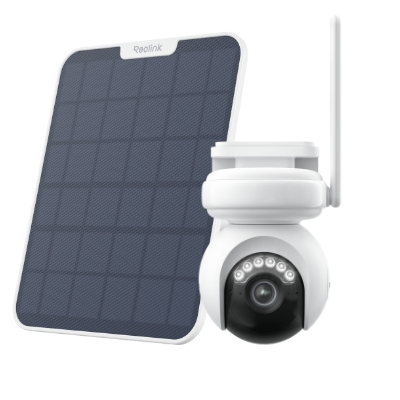
4K Battery-Powered PTZ Camera with Continuous Recording
👍 4K UHD video with continuous recording
👍 ColorX night vision in low light
👍 Pan, tilt, and automatic person tracking
👍 Local storage without monthly fees
Reolink Go PT Ultra: Best for Remote Areas Without WiFi
Best for: Farms, construction sites, remote gates, cabins, vacation properties, and other off-grid locations.
Key features: The Go PT Ultra uses 4G LTE instead of WiFi, making it suitable for locations without a traditional internet connection. It records in 4K, offers 355° pan and 140° tilt, person/vehicle/animal detection, color and infrared night vision, and local microSD storage up to 128GB.
Solar setup: Its 21.6Wh rechargeable battery can be paired with the Reolink Solar Panel 2 for ongoing solar charging. This reduces the need for manual recharging in remote installations, although charging performance depends on sunlight exposure, camera activity, cellular signal, and weather conditions.
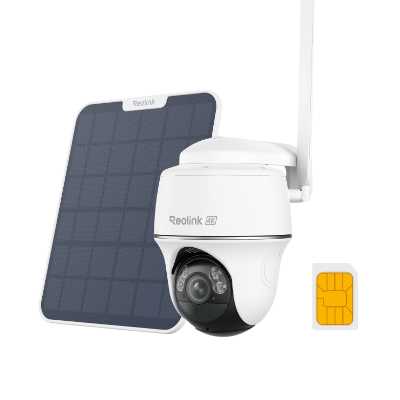
4K 8MP Wire-Free 4G LTE PT Battery Camera
4K 8MP; Smart Detection; 355° Pan & 140° Tilt; Battery/Solar Powered; Color Night Vision; Smart Real-Time Alert.
Which Solar-Powered Security Camera Is Best for Your Setup?
For Wide Driveways and Large Front Yards
Problem: A fixed camera with a narrower field of view may require multiple units to cover a wide driveway or front yard.
Solution: A panoramic dual-lens or PTZ camera can capture more horizontal space from a single mounting point.
Recommendation: Choose the Reolink Argus PT Ultra. Its PTZ functionality create a horizontal view in 4K, making it particularly useful for wide driveways, double garages, yards, and other broad areas where minimizing blind spots is important.
For Longer Recording and Multi-Angle Tracking
Problem: Traditional battery cameras primarily rely on short motion-triggered recordings, which may provide limited context around an event.
Solution: A larger battery combined with pre-recording, continuous recording options, and motorized tracking provides more complete coverage.
Recommendation: Choose the Reolink Altas PT Ultra. Its 20,000mAh battery supports up to 10 seconds of pre-recording, while 355° pan, 90° tilt, and auto tracking allow the camera to follow people, vehicles, and animals across a larger area.
For Farms, Construction Sites, and Remote Properties Without WiFi
Problem: Remote locations may have neither fixed power nor a nearby WiFi network.
Solution: A battery-powered 4G LTE camera paired with a solar panel can provide remote monitoring without relying on WiFi or permanent electrical wiring.
Recommendation: Choose the Reolink Go PT Ultra. It connects through 4G LTE, records in 4K, and supports solar charging, making it a practical option for farms, construction sites, remote gates, cabins, and vacation properties.
FAQs
Where do wireless cameras get power?
Wireless cameras get power either from a built-in rechargeable battery or through a wired power adapter connected to an outlet. Some models can also be powered by a solar panel.
Do wireless cameras have to be plugged in?
No, wireless cameras don’t always need to be plugged in. Many models run on rechargeable batteries or can be paired with a solar panel. However, some wireless cameras do require a power adapter, even though they transmit video wirelessly.
Do solar security cameras have to be in full sun?
No, solar security cameras don’t have to be in full sun all day, but they do need several hours of direct sunlight to stay charged. Light shade or cloudy days are usually fine, but heavy shade can reduce charging efficiency and affect battery performance.
Conclusion
The solar power as a power source alternative is getting a lot of attention these days, and rightfully so. Its ability to provide electricity to surveillance cameras at the place where running cable would be overly expensive or excessively complicated makes solar power a favorable solution
Search
Subscribe for the Latest Updates
Security insights & offers right into your inbox