
Reolink vs Lorex: Is One Better Than The Other?
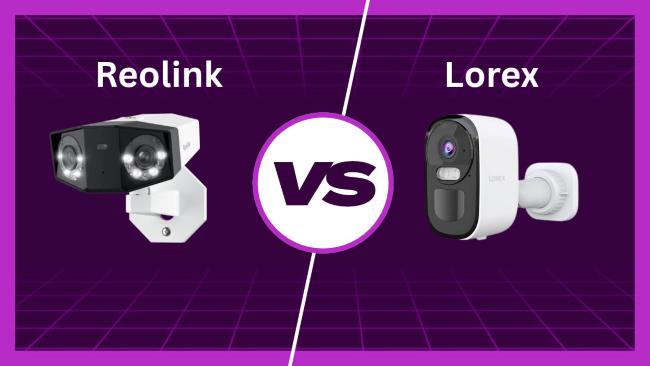
Reolink and Lorex both sell security cameras that record locally without a monthly fee, so the better choice depends on what you need your cameras to do, not on which brand wins overall. This comparison covers connectivity, resolution, AI detection, apps, cloud plans and returns, then matches each brand to the situations where it fits best.
We make Reolink cameras, so every claim about either brand here comes from the brand's own pages or a named review, to ensure the article stays completely impartial.
Reolink vs Lorex at a Glance
*PoE (Power over Ethernet) means one network cable carries both power and video.
*An NVR is a small box that records video from wired cameras.
Where Reolink and Lorex Are Similar
Both brands sell DIY security cameras that do not need a monthly fee for their core job.
Subscription-optional core
Reolink cameras record locally to a microSD card or a Reolink NVR, depending on the model, with no subscription. The Go PT Ultra, Argus 4 Pro and Duo 3 PoE all take a microSD card.
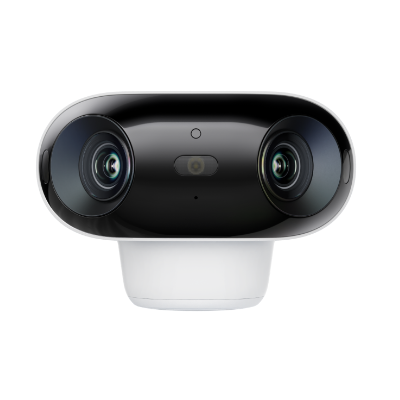
4k 180° Wire-free Color Night Vision Camera
4K UHD 180° Blindspot-free View; Color Vision Day and Night; 30% More Battery Life; Dual-band Wi-Fi 6; Smart detection.
Lorex's Fusion NVR systems list "No Monthly Fees" and "No subscriptions required." Its Connect Wi-Fi camera, the OC101, also carries a "No Monthly Fees" banner. That camera records to a microSD card that is not in the box, and its cloud option is listed as "coming soon."
DIY installation
Both brands make cameras you can install yourself. Lorex publishes step-by-step installation guides, and Reolink product pages include quick start guides too. SafeHome.org's comparison says neither brand offers professional monitoring, meaning a paid call center that watches your alerts. Both brands can record 24/7 locally, but you review the alerts yourself.
Smart home voice control
Select models from both brands work with Amazon Alexa and Google Assistant. Lorex lists its compatible recorders and cameras. Reolink's Alexa compatibility table shows which models work, and the Argus 4 Pro lists both assistants on its page. Support depends on the model, so be sure to check yours first.
Where Reolink and Lorex Differ
In the Reolink vs Lorex comparison, the biggest gaps are connectivity, resolution, AI detection and the apps. Audio, weatherproofing and warranty also differ by model and policy.
Installation and connectivity options
Reolink's lineup spans wired PoE cameras (with/without an NVR), standalone NVRs and Wi-Fi cameras. It also offer battery, solar cameras, and 4G LTE cameras. One example of a 4G LTE camera from Reolink is the Reolink Go PT Ultra. It needs a nano SIM and a cellular data plan, and it does not connect to Wi-Fi at all. It runs on a rechargeable battery with an optional solar panel.
Pro Tip: For more info about 4G cellular cameras, check out our cellular camera guide to learn how they work.
Lorex's wired line is its Fusion series, built around an NVR. Fusion recorders can also pair with Wi-Fi devices, and the number depends on the recorder. Fusion bundles and camera models vary, so check the current listing for what is in the box. Lorex's Connect line covers standalone Wi-Fi and battery cameras such as the OC101. Lorex does not offer cellular cameras.
Video resolution and night vision
MP stands for megapixels, or millions of tiny dots in each video frame. More dots can show finer detail, though the lens and lighting matter too. The highest resolution security camera in the Reolink lineup is a 16MP model while for Lorex, it's a 12MP model.
Let's look at both company's PoE lineup again. One of Reolink's 16MP security cameras in this line is the Duo 3 PoE. It's a wired dual-lens camera built for a wide 180° coverage. For Lorex, its 4K Fusion systems mainly use 4K (8MP) cameras. Its 4K+ cameras, however specs 12MP. One of the models is the E910AB.
Both brands offer infrared night vision on many models, and some models add color night vision. The Duo 3 PoE and Lorex's E910AB both list 30 m (98 ft) of infrared range, so they are level on paper. Range varies by model, so check the spec sheet.
AI detection features
Both brands provide smart detection technology.
Reolink's Go PT Ultra, Argus 4 Pro and Duo 3 PoE each list person, vehicle and animal detection. But, none of the three lists package detection or facial recognition. Package detection is on select video doorbells. Reolink cameras do not offer facial recognition as it acknowledges privacy and data security concerns around capturing and analyzing biometric facial data.
On Lorex's Fusion recorders, face detection is available but it cannot run at the same time as the other smart plans, such as person and vehicle detection. Which features you get depends on the recorder and camera model. Lorex also lists package detection, described as missing or left-behind items, on select cameras and recorders.
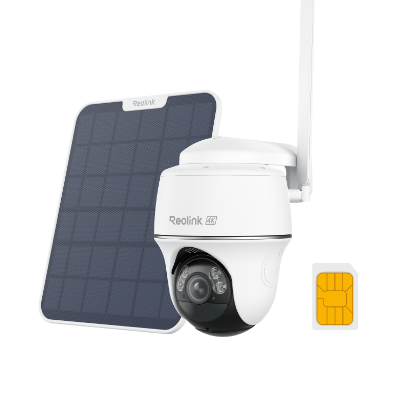
4K 8MP Wire-Free 4G LTE PT Battery Camera
4K 8MP; Smart Detection; 355° Pan & 140° Tilt; Battery/Solar Powered; Color Night Vision; Smart Real-Time Alert.
Mobile app experience
Both Reolink and Lorex security cameras cam be controlled and viewed through a mobile app.
Reolink offers the Reolink App and the Reolink Client for phones and computers, while Lorex uses the Lorex Connect app for its newer Wi-Fi cameras and theLorex Classic app for Fusion recorders.
Reviewers disagree on the apps. SafeHome.org (updated July 2026) rates Lorex's app higher and calls Reolink's app interface clunkier. However, Security.org's Reolink Go review (updated December 2025) states that the app worked well on iOS and Android.
If you want to plug cameras into other software, ONVIF and RTSP matter more than the app. ONVIF is a shared standard that lets cameras and recorders from different brands work together. Both Reolink and Lorex do provide security cameras that are ONVIF and RTSP friendly.
Audio and weatherproofing
Two-way audio and IP ratings vary by model on both sides. An IP rating shows how well a camera resists dust and water.
The Reolink Argus 4 Pro is rated IP66 and the Reolink Duo 3 PoE is rated IP67. Both have a built-in microphone and speaker. The Go PT Ultra is rated IP64 and also has two-way audio.
Lorex's Fusion system listings show IP67 bullet cameras with two-way talk through a built-in microphone and speaker. Lorex's OC101 battery camera is rated IP66. Its page lists "2-way talk with quick pre-set replies" so 2-way communication via the camera is also possible.
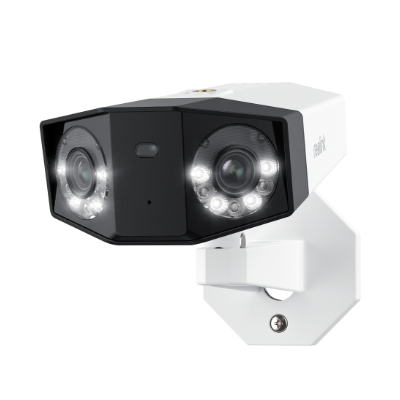
Groundbreaking 16MP Dual-Lens PoE Camera
16MP UHD, Dual-Lens, Motion Track, 180° Wide Viewing Angle, Power over Ethernet, Color Night Vision.
Returns and warranty
Reolink's return policy gives you 30 days from delivery to request a refund on products bought from our online store. You pay return shipping for personal reasons, and we pay it for dead-on-arrival and quality issues. The standard warranty is 2 years, plus 6 months if you register. Its Professional Series cameras have 3 years.
Lorex's refund policy offers a 30-day money-back guarantee on products bought directly from Lorex. You pay return shipping on most returns, though Lorex pays on legal defect or misdescription claims. Some categories have shorter windows. Lorex says it charges no restocking fee on returns within 30 days. Its standard warranty is one year, and it sells extended plans.
These terms apply to purchases in the US. Return windows and warranty lengths can differ in other countries, so check the policy page for your region before you buy.
Subscription Plans and Storage Compared
Neither brand requires a subscription for a camera to record locally, but both offer optional cloud plans for off-site backup and longer video history.
On Reolink's side, local recording, live view and phone alerts stay free. So do person, vehicle and pet detection. The optional Reolink Cloud works with select 4G cameras and battery doorbells, not Wi-Fi or PoE cameras. So, do check the supported device list before you subscribe. Single-Device LTE plans cover one camera with 30 or 60 days of video history. But, the Standard LTE plan covers up to 5 cameras with 30 days. As for the Business LTE plan, it covers 20 or 30 cameras with 60 days. Cloud storage across all plans have unlimited storage and the 4G cameras need a separate data plan when you use a Reolink SIM card.
Lorex's Connect Cloud+ has two tiers. The Single Camera plan covers one camera, and the Multi-Camera plan covers up to 10 cameras in one location. Both keep up to 60 days of key events and store smart motion event clips. Cloud+ currently works with Lorex Connect Wi-Fi products only, and the page says recorder support is coming soon.
Note: Plan lists change often. For current pricing of both company's cloud plans, check out the Reolink's cloud plan page and Lorex's Cloud+ page.
Which Brand Fits Your Situation
The right brand depends on what you need the cameras to do, not on which brand is better overall. This comparison helps you match a brand to your situation
- If you have no Wi-Fi or Ethernet nearby: Go for Reolink cameras such as the Go PT Ultra as it uses 4G LTE. Lorex doesn't manufacture 4G cellular cameras as of now.
- If you need the highest resolution: Reolink produces 16MP cameras such as the Duo 3 PoE. Lorex's 4K+ cameras such as the E910AB are 12MP.
- If you need a wider night vision range Both Reolink and Lorex are worthy considerations. The Duo 3 PoE and the Lorex E910AB both list 30 m (98 ft) of infrared range.
- If face detection is a need: Go for Lorex cameras as its Fusion recorders offer it on supported cameras, and Reolink cameras do not offer facial recognition.
- If you need package detection Both Reolink and Lorex offer them. Reolink has it on select video doorbells, and Lorex lists it on select cameras and recorders.
- If you need an easy-to-use app: App interface could be subjective as shown in the example above. Find a chance to sample the app interface in retail stores that carry both brands to find out which is better for you.
- If you need an ONVIF/RTSP camera: Both brands have cameras that are ONVIF and RTSP friendly.
- If you need to engage in 2-way communication: Both Reolink and Lorex cameras have such capabilities. Check out the model that provides them and then compare the rest of the specs that are also important to you to narrow down your decision.
- If you need to feel more assured with a longer warranty: Reolink cameras provide a longer time frame, at 2 years (3 years for Professional Series) against Lorex's 1 year. The return window is a close call, since both give 30 days.
Conclusion
Reolink and Lorex are both solid choices, and the better one is the one that fits your space and your habits. If your camera has to work far from Wi-Fi or Ethernet, or you want the highest resolution on paper, Reolink has the edge. If face detection matters to you, Lorex offers it while Reolink does not. Night vision, package detection, ONVIF support and two-way audio come out about even, and neither brand charges a subscription to record locally.
The real value here is not in crowning a winner. It is in knowing what you need your cameras to do and choosing the brand that does it. Check the spec sheet of the exact model you like, and keep in mind that in the US both brands give you 30 days to return a product bought directly from them, so you can test the fit at home before you commit.
FAQs
Is Reolink or Lorex better?
Neither brand is better on every point, so the answer depends on what matters most to you. Connectivity needs, resolution and app preference decide it for most buyers. The decision guide above matches each point to a brand.
Is Reolink or Lorex more affordable?
Both brands sell everything from single cameras to multi-camera systems, so cost depends on the model and kit you pick. We do not list prices here because they change often. Check Reolink's store and Lorex's product pages for current pricing. Price alone rarely decides it, so compare what each tier includes.
Do Reolink and Lorex cameras need a subscription?
No. Neither brand requires a subscription for a camera's core function. Both record locally, and cloud plans add extras such as off-site backup and longer video history. One caveat applies to Lorex's Connect Wi-Fi line. The OC101 lists no monthly fees, but it needs a microSD card that is not in the box, and its cloud option is listed as coming soon. Our 4G cameras need a data plan.
Does Reolink or Lorex offer facial recognition?
Lorex lists face detection on its Fusion recorders, while our cameras do not currently offer facial recognition. We checked the Go PT Ultra, Argus 4 Pro and Duo 3 PoE, and none lists it. On Lorex's Fusion recorders, face detection runs on its own and cannot be combined with person and vehicle detection. Check the exact Lorex model page for what the feature does.
Which brand has the better return policy, Reolink or Lorex?
The return policies are close. Both give you 30 days on products bought directly from the brand, and you pay return shipping on a change-of-mind return. The clearest difference is warranty. Our standard warranty is 2 years and Lorex's is 1 year, with paid extensions. Read each policy before you buy.
How to Choose Between Reolink and Lorex
Reolink vs Lorex comes down to your situation. If you have no Wi-Fi or Ethernet nearby or want the highest resolution, Reolink fits. If you want face detection or an app that reviewers rate highly, Lorex fits. Neither brand requires a subscription to record locally. If your needs split, rank the points that matter most and use the decision guide above. When you are ready to match a camera to your space, see our full lineup.
Search
Subscribe for the Latest Updates
Security insights & offers right into your inbox