
Reolink Floodlight Series Guide: Features, Models & Buying Tips
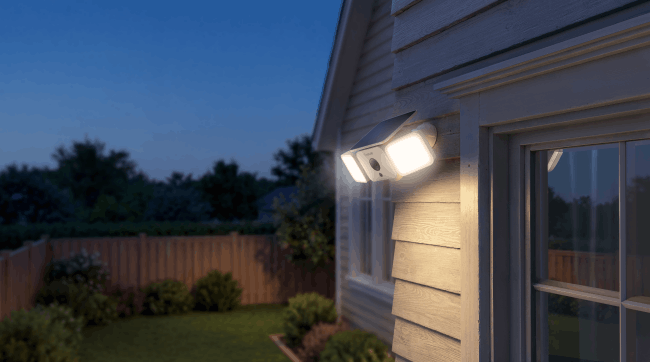
Reolink floodlight cameras offer good security options for homes and businesses. These devices combine bright lights with clear video to keep areas safe day and night. People often choose a Reolink floodlight camera for its reliable work and easy setup.
Introduction to Reolink Floodlight Series
Homeowners and business operators look for security solutions that provide both lighting and monitoring in one unit. Reolink addresses this need with its floodlight series, which includes models for different power sources and connection types.
Reolink builds its floodlight series around key ideas like bright illumination and sharp video capture. The lineup covers wired and solar options to fit various installation spots. Users get features such as motion detection and night vision across all models.
Reolink Floodlight Series Review
Users want detailed insights into how these cameras perform in real situations before they buy. This review section looks at each model step by step, covering video quality, lighting power, and other important aspects. Experts and customers have tested these units in different settings to show their strengths.
Reolink Solar Floodlight Cam Review
The Reolink Solar Floodlight Cam stands out for its wireless design. It uses a solar panel to charge the battery, so you do not need to run wires for power. This model fits well in remote areas or spots without easy access to outlets.
The camera records in 2K resolution, which means you see sharp details even from far away. It has a 150° ultra-wide view, covering a large area without blind spots.
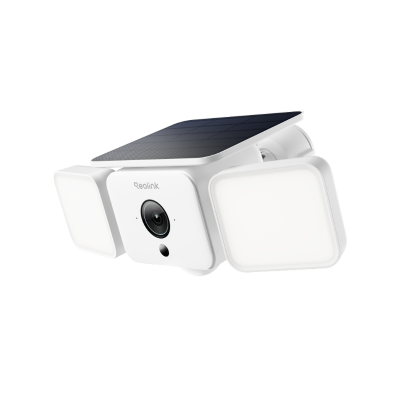
Smart 2K Solar Floodlight Security Camera
150° Ultra-Wide View, 2K 4MP HD Resolution, AI-Based Adaptive Floodlight, Endless Power with Reolink SolarEase™.
Reolink TrackFlex Floodlight WiFi Review
The Reolink TrackFlex Floodlight WiFi brings auto-tracking to the series. It follows moving objects with its pan-tilt-zoom lens. The camera uses two lenses, one wide-angle for overview and one with 6x hybrid zoom for close-ups.
This setup records in 4K, giving clear views of faces or license plates. The unit connects to dual-band WiFi 6 for stable streaming without lags.

Smart 4K 360° Coverage Wi-Fi Floodlight Security Camera
Local AI Video Search, 4K 8MP Ultra HD, 360° Coverage View, 6X Hybrid Zoom, Dual-Color Floodlight.
Reolink Elite Floodlight WiFi Review
The Reolink Elite Floodlight WiFi focuses on wide coverage. It uses dual lenses to create a 180-degree panoramic view without distortion. The camera captures 4K 8MP video, so images stay sharp even in low light. It supports WiFi 6 on both 2.4GHz and 5GHz bands for fast connections.
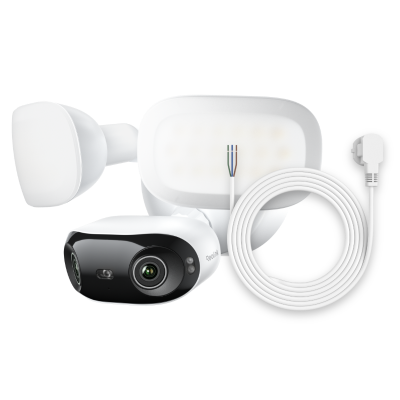
4K 180° Ultra-Wide Wired Floodlight Security Camera
3000-Lumen Dimmable Lighting, Adjustable Color Temperature, Local AI Video Search, Local Storage, Dual-Band Wi-Fi 6.
Reolink Duo Floodlight Review
The Reolink Duo Floodlight comes in WiFi and PoE versions. Both use dual lenses for a 180-degree view in 4K resolution. The PoE option runs on Ethernet for power and data, while WiFi uses a dual-band connection. This flexibility lets you choose based on your setup.
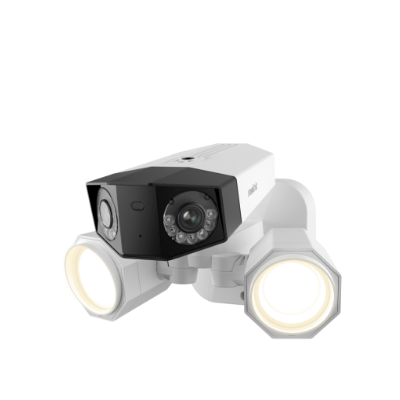
4K PoE Floodlight Camera
Dual Lens, Power over Ethernet, 180° Wide-Angle Panorama, 1800 Lumen Floodlights
Reolink Floodlight Series Comparison
Buyers often compare models to find the right fit for their space and budget. This section puts the cameras side by side in a table. It shows key specs like resolution, lighting, and power types to make decisions easier.
Pros and Cons of Reolink Floodlight Series
Every security camera has strong points and areas for improvement. This section lists the main advantages and disadvantages based on user feedback and tests. It covers the series as a whole to give a balanced view.
Pros
-
Clear 4K video helps identify details from a distance.
-
Bright floodlights improve night vision and deter intruders.
-
Smart AI reduces false alerts by focusing on people, vehicles, and animals.
-
Local storage options avoid monthly costs.
-
Weatherproof designs handle rain, snow, and dust.
-
Easy app control for settings and live views.
-
Two-way audio allows communication from anywhere.
Cons
-
Wired models need an electrical setup, which may require a pro.
-
Some units lack cloud storage without extra plans.
-
High-lumen lights can reflect on windows at night.
-
App features take time to learn for new users.
How to Choose the Best Reolink Floodlight Cameras?
Selecting a camera involves thinking about your property and needs. This section outlines key factors to consider. It uses a list to break down the process.
-
Check the area size and pick a model with enough view angle to cover it.
-
Decide on a power type solar/battery for no wires or wired for constant operation.
-
Look at connection options like WiFi or PoE based on your network.
-
Consider light needs and choose higher lumens for dark spots.
-
Review storage local microSD or NVR for no fees.
-
Think about smart features like AI detection for fewer alerts.
-
Factor in the budget and compare prices with features.
-
Read user reviews for real performance in similar setups.
FAQs
What is the best floodlight camera on the market?
The Reolink Elite Floodlight WiFi ranks high for its 4K panoramic view and 3000 lumens. It offers strong features without fees. Other top picks include the Reolink TrackFlex for tracking and the Duo Floodlight for broad coverage.
Is there a monthly fee for Reolink floodlight series?
No, Reolink does not charge monthly fees for basic use. You store videos locally on a microSD or NVR. Cloud storage has optional plans and is only available in some countries, but the cameras work fully without them.
How to connect Reolink floodlight camera?
Download the Reolink app on your phone. Scan the QR code with the camera. Follow the steps to connect to WiFi or Ethernet. Wire power as needed. Test the live view to confirm.
Conclusion
Reolink floodlight cameras provide reliable security with bright lights and clear video. Models like the Solar Floodlight Cam, TrackFlex Floodlight WiFi, Elite Floodlight WiFi, and Duo Floodlight cover different needs. They offer smart detection and no required fees. Buyers get value from these options. What do you think about this guide? Share your opinions in the comments.
Search
Subscribe for the Latest Updates
Security insights & offers right into your inbox