
Reolink Duo 2 WiFi Review: Is This Dual-Lens 4K Security Camera Worth It in 2026?
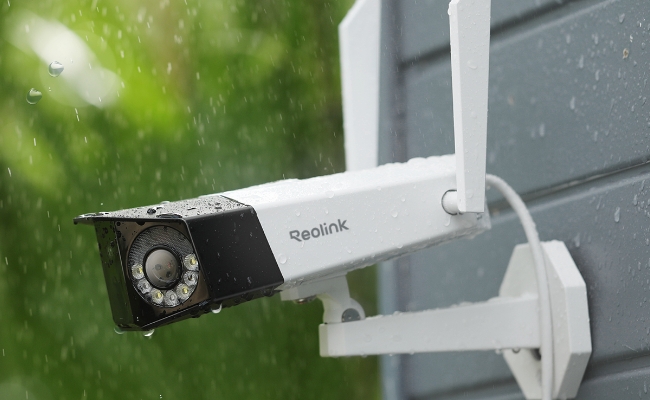
Reolink Duo 2 Wi-Fi has got the attention of users and enthusiasts because of its ability to cover a wider area through its dual lenses. It is an incredible security camera for outdoor and indoor security and surveillance.
In this article, we will give you a complete Reolink Duo 2 Wi-Fi review. We will take you through its important features and pros & cons. We will also share the installation steps and compare them with Duo 3 Wi-Fi.
- Reolink Duo 2 WiFi Review: Pros & Cons Summary
- Reolink Duo 2 WiFi Overview & Specifications
- Key Features of Reolink Duo 2 WiFi: Real-World Performance Review
- Real-World Feedback on Reolink Duo 2 WiFi
- Reolink Duo 2 WiFi Installation & Setup Guide
- Reolink Duo 2 WiFi vs Duo 3 WiFi: Which One Should You Choose?
- Who Should Buy the Reolink Duo 2 WiFi?
- Buyer Decision Table: Is Duo 2 WiFi Right for You?
- FAQs
- Conclusion
Reolink Duo 2 WiFi Review: Pros & Cons Summary
The Reolink Duo 2 WiFi provides seamless 180° panoramic outdoor coverage by stitching two lenses into a single 4K video stream. It is ideal for property owners who want wide-area coverage without blind spots or subscription fees, provided it is deployed as a standalone Wi-Fi setup rather than integrated into a central NVR system.
Pros
-
Seamless 180° Panoramic Field of View: Combines dual lenses to cover ultra-wide outdoor perimeters without blind spots, image overlaps, or the need to install multiple single-lens cameras.
-
4K UHD Image Clarity Day & Night: Delivers high-resolution video for precise detail identification across broad spaces like driveways and front yards.
-
On-Device Smart AI Detection: Recognizes people, vehicles, and pets locally to deliver accurate, real-time push alerts without requiring a paid cloud subscription.
-
Robust Weatherproof Housing (IP67): Outperforms standard IP66-rated cameras, ensuring reliable operation through extreme rain, heavy snow, and dust.
-
Strong Dual-Band Connection: Features upgraded antennas offering an operating range of up to 164 feet, reducing Wi-Fi signal dropouts over longer distances.
-
Smart Home & Ecosystem Ready: Integrates smoothly with Google Assistant for hands-free live viewing on smart displays.
Cons
-
Fixed Wide-Angle Placement Required: Because it lacks motorized Pan-Tilt-Zoom (PTZ) hardware, precise initial mounting height and angle adjustments are essential to maximize its 180° field of view.
-
Higher Bandwidth Usage: The dual-lens 4K stream requires stable network throughput; users with congested Wi-Fi networks should ensure the camera is placed within a strong 5GHz router zone.
Best For:
Homeowners or small business owners who need seamless, ultra-wide coverage over large open areas (such as long driveways, backyards, or parking lots) using a single, subscription-free Wi-Fi camera.
Reolink Duo 2 WiFi Overview & Specifications
The Reolink Duo 2 WiFi is a dual-lens, plug-in Wi-Fi 6 camera that uses an internal stitching algorithm to deliver a seamless 180° panoramic 4K video feed. Designed for indoor and outdoor monitoring, it eliminates blind spots across wide perimeters while offering subscription-free smart AI detection and flexible local storage options.
Key Features of Reolink Duo 2 WiFi: Real-World Performance Review
1. Dual-Lens 180° Panoramic Coverage ("Two Cameras in One")
By combining dual sensors into a single stitched stream, the camera replaces two traditional fixed-lens cameras to provide a continuous 180° view without overlapping video or dead zones.
The Duo 2 WiFi houses two physical camera modules side-by-side. Internal image-processing algorithms merge the left and right feeds into a single ultra-wide panoramic video in real time.
Traditional cameras typically offer a 90° to 110° field of view, leaving perimeter blind spots. This Duo 2 camera covers an entire fence line or long driveway in one view, drastically reducing equipment and installation costs.
Tip: Avoid mounting the camera too low or close to nearby vertical obstructions (like a downspout), as physical barriers close to the lens can interfere with the image stitching alignment.
2. 4K Ultra HD Resolution Details
The camera records in 4K UHD clarity, ensuring critical details—such as vehicle license plates—remain sharp even when zooming in.
Generating a 4K panoramic image requires high pixel density (4608 x 1728). This allows you to digitally zoom into specific areas of a wide 180° scene during live view or recorded playback without immediately losing video clarity.
Excellent for property entrances, parking areas, and open yards where identifying small details across long distances is necessary.
3. Dual-Band Wi-Fi 6 Connection Stability
Wi-Fi 6 technology provides faster data transmission speeds and improved anti-interference capabilities, keeping high-resolution video streams running smoothly.
Wi-Fi 6 reduces network latency when multiple smart home devices are connected to the same wireless network simultaneously.
4. Smart AI Person, Vehicle & Pet Detection
On-device AI processing analyzes shapes locally to categorize motion, preventing false smartphone push notifications.
-
Push Notifications: Instead of triggering alerts for blowing branches or passing shadows, the system distinguishes between humans, cars, and pets.
-
No Monthly Fees: Unlike many smart camera competitors that lock advanced AI filters behind paywalls, Reolink processes person, vehicle, and pet detection directly on the camera hardware at no additional cost.
5. Flexible Dual Night Vision Modes
Choose between stealthy black-and-white infrared night vision or spotlight-assisted full-color night vision depending on your security needs.
-
Infrared (IR) Night Vision: Uses built-in infrared LEDs to record clear black-and-white footage in complete darkness without drawing attention to the camera.
-
Color Night Vision: Activates integrated LED spotlights upon motion detection to illuminate intruders and capture full-color video in dark environments.
-
Deterrence Effect: The sudden activation of bright spotlights serves as a physical deterrent to ward off trespassers before they reach your entryways.
Real-World Feedback on Reolink Duo 2 WiFi
The Reolink Duo 2 WiFi’s biggest advantage in real-world use is its ability to replace multiple cameras with a single wide-angle view. Independent reviewers particularly praised its dual-lens design, panoramic coverage, and image quality.
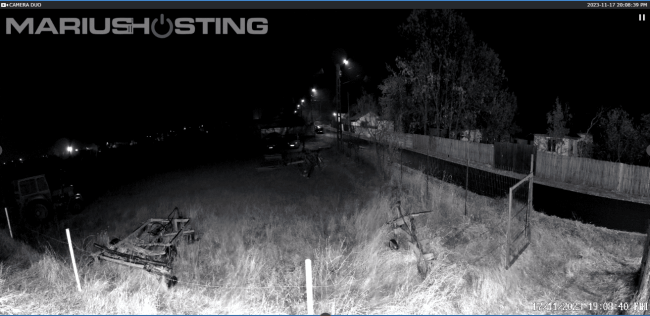
Marius Bogdan Lixandru from MariusHosting tested the Duo 2 WiFi and highlighted its ultra-wide-angle performance. He praised the camera’s ability to combine two lens views into a seamless 180° panoramic image, noting that the dual-lens design delivers a true wide-area monitoring experience without noticeable gaps between the two views. This makes it especially useful for locations such as driveways, yards, and large outdoor spaces where a traditional single-lens camera may leave blind spots.
Similarly, NASCompares gave the Duo 2 WiFi a strong 9/10 rating, highlighting its standout dual-lens 180° field of view and 4K resolution. The reviewer considered the camera a unique option in the home and small business security market because it combines wide coverage, high-resolution video, and flexible installation options in a single device.
However, real-world use also shows that placement matters. Because the Duo 2 WiFi is designed for wide-area coverage rather than optical zoom, users should install it at an angle and height that match their monitoring goals. For example, it works best when covering an entire driveway or backyard, while users who need detailed identification of distant objects may benefit from pairing it with a zoom-capable camera.
Overall, independent reviews suggest that the Reolink Duo 2 WiFi is best suited for homeowners who want maximum coverage from fewer cameras, especially in wide outdoor areas where reducing blind spots is the priority.
Reolink Duo 2 WiFi Installation & Setup Guide
Setting up the Reolink Duo 2 WiFi takes under 15 minutes: insert a microSD card, connect to your router via Ethernet for initial initialization, scan the QR code in the Reolink app, and mount the camera at an optimal height.
Follow this 5-step guide for a seamless hardware and app installation:
Step 1: Insert Local Storage (MicroSD Card)
Before mounting the camera outdoors, insert your local storage card:
-
Use a Phillips screwdriver to unscrew the protective cover on the bottom of the camera.
-
Insert a microSD card (up to 256GB) into the slot until it clicks.
-
Reattach the protective cover tightly to maintain the camera's IP67 weatherproof seal.
Step 2: Connect Power & Initial Network Pairing
For initial app configuration, set up the camera near your router before final outdoor mounting:
-
Connect the included 12V DC power adapter to turn on the camera.
-
Connect the camera directly to your Wi-Fi router using the provided Ethernet cable. This initial wired handshake ensures instant app recognition.
Step 3: Add Camera to the Reolink App
-
Download and open the Reolink App on your iOS or Android smartphone.
-
Tap the "+" icon in the upper right corner and scan the QR code located on the camera housing.
-
Follow the on-screen prompts to create a secure device password and name your camera.
-
Select your home Wi-Fi network (2.4GHz or 5GHz) and enter the Wi-Fi password to enable wireless operation.
Step 4: Mount in an Optimal Location
To maximize the dual-lens 180° panoramic view, mounting placement is critical:
-
Choose the Spot: Position the camera 8 to 10 feet above the ground for the best balance of facial recognition and broad perimeter coverage.
-
Drill & Secure: Use the included mounting template to drill pilot holes, insert wall anchors, and secure the mounting bracket with screws.
-
Attach Camera: Fasten the camera onto the bracket and tighten the adjustment knob.
Step 5: Adjust the Lens Angle & Stitching View
-
Open the live stream in the Reolink app.
-
Adjust the camera angle so the horizon line is centered horizontally across the screen.
-
Ensure no close vertical obstructions (such as wall edges or drain pipes) block either side lens, which allows the internal algorithm to seamlessly stitch the 180° image without distortion.
Reolink Duo 2 WiFi vs Duo 3 WiFi: Which One Should You Choose?
The Reolink Duo 2 WiFi and Duo 3 WiFi share the same dual-lens design and 180° panoramic coverage, but they target different users. Duo 2 WiFi is a more affordable 4K option for everyday outdoor monitoring, while Duo 3 WiFi is designed for users who need higher resolution and more detailed footage across larger areas.
Choose Reolink Duo 2 WiFi If:
-
You need a cost-effective camera for driveways, entrances, or backyards.
-
4K video quality is enough for your daily security needs.
-
You want wide-area coverage without installing multiple cameras.
-
You prefer local storage options with no mandatory subscription.
Choose Reolink Duo 3 WiFi If:
-
You want sharper details for larger properties.
-
You need better image clarity for identifying faces, vehicles, or distant objects.
-
You want more storage capacity with support for up to 512GB microSD cards.
-
You prefer the latest Duo series technology.
The Reolink Duo 2 WiFi remains a solid choice for homeowners who want affordable 180° panoramic coverage. If you are monitoring a larger property or need more detailed footage, the Duo 3 WiFi is the better upgrade thanks to its 16MP resolution and improved image quality. For a detailed breakdown, see our Reolink Duo 2 WiFi vs Duo 3 WiFi comparison.
Who Should Buy the Reolink Duo 2 WiFi?
The Reolink Duo 2 WiFi is engineered for property owners who need wide-area, subscription-free outdoor coverage without installing multiple single-lens cameras. It excels in standalone installations where ultra-wide 180° panoramic coverage and smart local recording are top priorities.
-
Large Outdoor Perimeter Owners: Homeowners or small business owners securing expansive front yards, wide driveways, long fences, or commercial storefronts who want to eliminate blind spots with a single camera.
-
Privacy & Subscription-Conscious Users: Buyers who want smart AI notifications (person, vehicle, and pet detection) and continuous local video recording (via microSD card, NVR, or FTP) without paying recurring monthly fees.
-
Low-Maintenance Wi-Fi Installers: Anyone looking for high-speed Wi-Fi 6 connectivity with reliable dual-band range and the stability of continuous AC plug-in power.
Buyer Decision Table: Is Duo 2 WiFi Right for You?
Use this decision table to determine whether the Reolink Duo 2 WiFi fits your installation setup, or if a different Reolink camera type better meets your monitoring goals.
FAQs
Is Reolink Duo 2 WiFi worth buying?
Yes. Reolink Duo 2 WiFi is a good choice for wide-area monitoring with its dual-lens 180° panoramic view, 4K video, AI detection, and local storage options. It is ideal for driveways, yards, and entrances.
Does Reolink Duo 2 WiFi require a subscription?
No. Reolink Duo 2 WiFi does not require a subscription. You can store recordings locally with a microSD card, NVR, or FTP server.
Can Reolink Duo 2 WiFi record without WiFi?
Yes. It can record without WiFi when using a microSD card or NVR. WiFi/internet is only needed for remote viewing, alerts, and app access.
Where should I install Reolink Duo 2 WiFi?
Install it in areas that need wide coverage, such as driveways, backyards, front yards, and storefronts. It works best where one camera can replace multiple fixed-angle cameras.
Does Duo 2 WiFi work with an NVR?
Yes. Duo 2 WiFi works with Reolink NVRs for centralized recording and management. However, some panoramic viewing features may vary when connected to an NVR.
Conclusion
Reolink Duo 2 WiFi is a robust security camera that covers a wider area. Its dual lenses set it apart from other security cameras. It records videos with exceptional clarity and offers incredible performance during the day and night. It can detect the motion of objects and send real-time alerts. It is suitable to work in all weather conditions.
Search
Subscribe for the Latest Updates
Security insights & offers right into your inbox