
PoE Security Cameras & Systems with Audio - Buyers' Guide
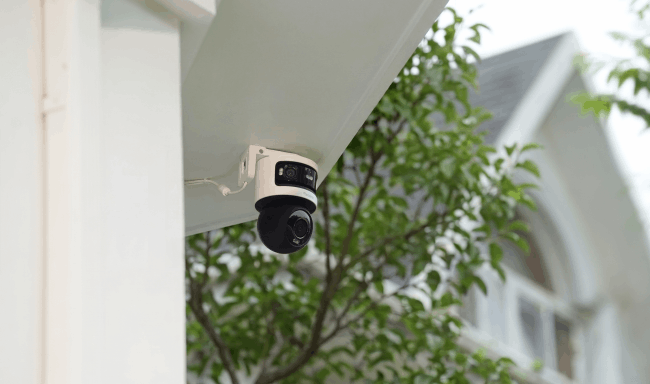
PoE security cameras with audio transmit video, audio, data, and power through an Ethernet connection, simplifying installation compared with systems that require separate power and audio cables. Depending on the model, a PoE camera may support audio recording through a built-in microphone or two-way audio through both a microphone and speaker. This guide explains how PoE camera audio works, what to look for, and how to choose the right camera or system.
Key Takeaways:
- PoE security cameras can transmit power, video, and audio through a single Ethernet connection, but audio requires a camera with a built-in microphone, external audio input, or microphone-and-speaker setup for two-way communication.
- For continuous monitoring, check audio type and controls, camera placement, video quality, weather resistance, and whether a compatible NVR can store audio together with video.
- Audio recording is subject to privacy and consent laws. In the U.S., federal law generally requires at least one-party consent, while some states impose stricter requirements, particularly for private conversations.
How Does Audio Work on a PoE Security Camera?
Audio on a PoE security camera travels as digital data over the same Ethernet connection used for video and network communication. PoE also supplies electrical power through that cable, allowing a compatible camera to handle power, video, and audio through a single Ethernet connection.
The process starts with the camera's microphone. It captures sound waves around the camera and converts them into an electrical signal. The camera then digitizes and encodes the audio, commonly using an audio codec such as AAC, before sending the compressed audio stream together with the video stream across the IP network.
At the receiving end, an NVR, computer, or mobile app decodes the stream so users can hear live audio or play it back with recorded video. If the camera is connected to a compatible NVR, the audio track can also be saved alongside the corresponding video footage.
PoE itself does not give a camera audio capability. The camera must have the necessary audio hardware, such as a built-in microphone or an audio input for an external microphone.
Built-In Microphone
A built-in microphone captures sound directly around the camera. The camera processes the audio internally and sends it over the Ethernet network with the video stream, without requiring a separate audio cable.
External Microphone
Some PoE cameras have an audio input for an external microphone. The external microphone captures the sound, while the camera handles audio encoding and network transmission. This setup is useful when the microphone needs to be placed closer to the area where sound is being captured.
Two-Way Audio
Two-way audio requires both a microphone and a speaker. The microphone sends captured audio from the camera to the user, while voice from the user's app or client travels back across the network to the camera and is played through its speaker. This creates two-way communication over the camera's network connection.
How to Choose the Best PoE Security Camera with Audio
When choosing a PoE security camera with audio, look beyond whether the camera simply has a microphone. Audio type, camera placement, video quality, outdoor protection, recording controls, and storage all affect how useful the camera will be in everyday surveillance.
Audio Recording or Two-Way Audio
First, check what type of audio the PoE camera supports. A built-in microphone allows the camera to capture sound and record it together with video, while two-way audio requires both a microphone and speaker.
If you only need to hear and review what happened during an event, audio recording may be enough. For front doors, entrances, offices, and other locations where you may need to communicate with someone remotely, a PoE security camera with two-way audio is more useful.
PoE Security Camera IP Rating
For an outdoor PoE security camera with audio, check its IP rating. An IP66 or IP67 rating provides protection against dust and water, making the camera more suitable for exposed locations such as driveways, entrances, yards, and building exteriors.
If the camera uses an external microphone or speaker, those components also need suitable weather protection when installed outdoors.
Camera and Microphone Placement
Placement of PoE security cameras affects both video coverage and audio quality. A camera installed too far from the area being monitored may capture the scene clearly but struggle to pick up conversations or other useful sounds.
Background noise also matters. Traffic, wind, air-conditioning equipment, and other nearby noise sources can make recorded audio harder to understand. Test both the camera view and microphone performance at the intended installation point before completing the installation.
Video Resolution
Audio provides additional context, but clear video is still essential for identifying what happened. Higher-resolution PoE cameras can retain more visual detail when reviewing people, vehicles, packages, and other events.
For larger areas such as driveways, car parks, entrances, and yards, 4K or higher resolution can be particularly useful when you need to zoom into recorded footage while listening to the corresponding audio.
Audio Controls
A microphone does not only capture voices. It may also record traffic, wind, machinery, thunder, and other background sounds, so having control over audio recording can be useful.
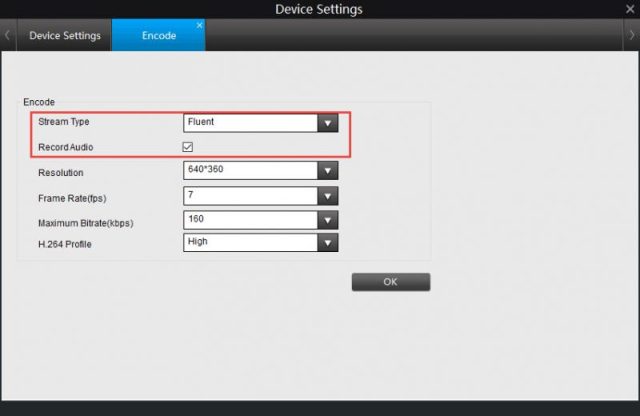
Look for a PoE camera that allows you to enable or disable audio through its app or desktop client. For example, Reolink App and Client provide controls for supported cameras' audio functions.
NVR and Storage Compatibility
If you plan to record continuously, check whether the camera's audio can be stored together with video on a compatible NVR. This allows the corresponding audio and video to be reviewed together during playback.
Also check the available storage options. Depending on the camera and system, recordings may be stored on a microSD card or compatible NVR, giving you different options for standalone and multi-camera installations.
Best PoE Security Camera & System with Audio
Best Vandal-Proof PoE Security Camera with Audio – Reolink RLC-1240A
The Reolink RLC-1240A is a strong choice for entrances, shops, offices, and other locations where both audio and physical protection matter. Its built-in microphone and speaker support two-way audio, allowing users to listen and communicate through the camera remotely.
It records in 12MP resolution and provides a wide 145° diagonal field of view. The camera also features IK10 vandal resistance, IP67 weatherproofing, person, vehicle, and animal detection, and both infrared and color night vision. It supports 24/7 recording and local microSD storage up to 512GB.
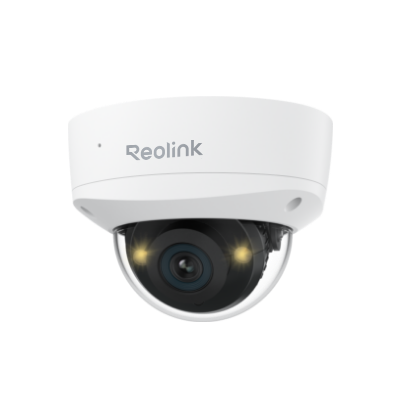
12MP IK10 Vandal Proof Wide FOV Security Camera
12MP UHD with 145° FOV, Color Night Vision, IK10 Vandal-Proof, Two-Way Audio.
Best Wide-Angle PoE Security Camera with Audio – Reolink Duo 3 PoE
For driveways, yards, warehouses, and other large areas, the Reolink Duo 3 PoE combines dual lenses with an ultra-wide panoramic view. Its built-in microphone and speaker provide two-way audio, so users can hear what is happening and communicate remotely.
Its wide coverage makes it particularly useful where a conventional single-lens camera may leave more blind spots, while PoE provides a stable connection for video and audio transmission.

Groundbreaking 16MP Dual-Lens PoE Camera
16MP UHD, Dual-Lens, Motion Track, 180° Wide Viewing Angle, Power over Ethernet, Color Night Vision.
Best PTZ PoE Security Camera with Two-Way Audio – Reolink TrackMix PoE
The Reolink TrackMix PoE is a good choice for driveways, yards, and other areas where people or vehicles frequently move across the camera's view. Its dual-lens design provides a wide-angle view and a close-up view at the same time, while auto tracking follows detected people, vehicles, and animals.
It records in 4K 8MP and supports 6X hybrid zoom, 355° pan and 90° tilt. A built-in microphone and speaker provide two-way audio, allowing users to hear what is happening and communicate through the camera remotely.
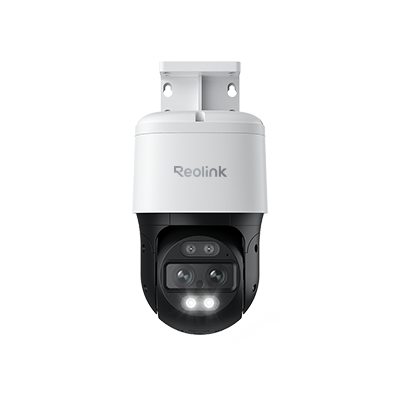
4K Dual-Lens PTZ Camera with Dual Tracking
4K 8MP Ultra HD, Wide & Telephoto Lenses, Pan & Tilt, Auto-Tracking, Person/Vehicle Detection, Power over Ethernet, Two-Way Audio.
Best PoE Security Camera System with Audio – Reolink RLK16-1200D8-A
For larger properties that need multi-camera coverage, the Reolink RLK16-1200D8-A includes eight 12MP PoE cameras and a 16-port PoE NVR. Each camera supports two-way audio, person, vehicle, and pet detection, as well as infrared and color night vision.
The NVR comes with a built-in 4TB HDD and supports up to 16TB of total storage. It can manage up to 24 Reolink IP cameras in total, with up to 16 wired cameras, making the system suitable for larger homes, offices, retail stores, and other properties that may need to expand beyond the eight included cameras.
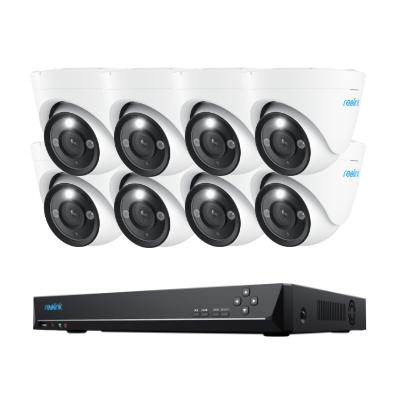
12MP PoE Security System with Color Night Vision
12MP Ultra HD, Person/Vehicle Detection, Power over Ethernet, 16-Channel NVR.
Decision Table
Legality of PoE Security Cameras/Systems with Audio Recording
In the U.S., recording audio with a PoE security camera can be subject to federal and state wiretapping or eavesdropping laws. The rules for audio are different from simply recording video, particularly when the camera captures private conversations.
Federal and State Consent Laws
Under federal law, recording a conversation generally requires the consent of at least one party to that conversation. However, states can impose stricter requirements. According to the Reporters Committee for Freedom of the Press (RCFP), about 11 states primarily require all parties to consent to the recording of a conversation, while several other states apply different consent rules depending on whether the communication takes place in person or over the phone.
If your outdoor PoE camera records a conversation between visitors, neighbors, delivery workers, or other people while you are not part of that conversation, the one-party consent rule does not automatically give you permission to record it. RCFP notes that it is generally unlawful to record a conversation when you are not a party, have no consent, and could not naturally overhear it.
For example, California requires all parties to consent before a confidential conversation is recorded. Florida law also generally permits interception of an oral communication when all parties have given prior consent. Camera owners should therefore check the specific recording law in their state rather than relying only on the federal one-party consent rule.
Reasonable Expectation of Privacy
Whether people have a reasonable expectation of privacy can also affect whether an audio recording is legally protected. Courts may consider where the conversation occurred, what was being discussed, and whether other people could naturally hear it.
A conversation taking place openly near a public-facing entrance may be treated differently from one occurring inside a bedroom, bathroom, private office, or another location where people reasonably expect privacy.
For this reason, avoid positioning a PoE camera and its microphone so that it intentionally captures private conversations inside neighboring properties or other private spaces.
Best Practices for Audio Recording
If you use a PoE security camera with a microphone, clearly inform visitors, employees, or customers when audio recording is taking place. Visible surveillance notices can help make people aware that both video and audio may be recorded, although signage does not automatically satisfy every state's consent requirements.
For outdoor cameras, also check whether the microphone regularly captures conversations beyond the area you intend to monitor. If audio is unnecessary or creates privacy concerns, disable audio recording while continuing to use video surveillance.
Businesses should pay particular attention to cameras used in workplaces, retail stores, offices, and other areas where employees or customers may be recorded. State laws and workplace privacy requirements may impose additional obligations.
Note: Because recording laws vary significantly by state and situation, review both federal and local requirements before enabling continuous audio recording on a PoE camera or NVR system.
FAQs
Can I use two-way audio through an NVR?
It depends on the camera and NVR. For Reolink systems, two-way audio requires a compatible camera and NVR, and the camera must be supported by that NVR. Two-way communication can also be accessed through the Reolink App or Client on supported setups.
Can I turn off audio recording on a PoE camera?
Yes. On cameras that provide audio controls, audio recording can be disabled while video recording remains active.
Do PoE cameras have two-way audio?
Some do. Two-way audio requires both a microphone and speaker, allowing you to hear sound from the camera and talk back through an app or client. Cameras with only a built-in microphone can record sound but cannot provide two-way communication.
Counclusion
The best PoE security camera with audio depends on the area being monitored and how you plan to use the sound it captures. A wide-angle camera may work better for large open areas, while PTZ models suit moving targets and multi-camera NVR systems provide broader coverage for larger properties.
Whichever setup you choose, consider audio quality and controls alongside image quality, detection, storage, and recording modes. Also check local consent and privacy requirements before recording conversations, especially in workplaces or areas accessible to the public.
Search
Subscribe for the Latest Updates
Security insights & offers right into your inbox