
Megapixels vs. Resolution: How Much Do You Really Need?

Megapixels and resolution are the two most confusing terms when you're shopping for a camera, TV, or computer. They're also the two most important for image quality.
Megapixels count the total number of pixels a sensor captures. Resolution describes the specific width-by-height grid those pixels form. Here's what that difference actually means when you're choosing a camera.
Let's start with the basics.
- Megapixels vs. Resolution: Brief Overview
- Megapixels to Resolution: How They Work Together?
- Megapixel vs. Resolution: What's the Difference?
- What Factors Affect Megapixels and Resolution?
- How Many Megapixels and What Resolution Do You Need?
- How to Choose Right Resolution and Megapixel Count for Security Cameras?
- High Resolution and Megapixel Security Camera Recommendation
- FAQs
- Conclusion
Megapixels vs. Resolution: Brief Overview
When shopping for security cameras, dash cams, smartphones, or TVs, you will constantly see the terms Megapixels and Resolution. While they are closely related, they describe two different aspects of an image sensor or screen.
What Are Megapixels?
The word "megapixel" literally means one million pixels. A pixel is the smallest individual dot of color that makes up a digital image.
Instead of writing out massive numbers to describe a camera's sensor size, the tech industry uses megapixels as a convenient shorthand.
- 1 MP = 1,000,000 pixels
- 8 MP = 8,000,000 pixels
Megapixel numbers are almost always rounded for simplicity. For example, a standard Full HD video frame actually contains 2,073,600 individual pixels, but manufacturers simply round this down to 2MP.
What Is Resolution?
While megapixels tell you how many total pixels there are, resolution tells you exactly how the pixels sit in that grid. It is always written as a width-by-height grid formula. That means the number of pixels in each horizontal row, multiplied by the number of pixels in each vertical column.
For example, a standard Full HD resolution is 1920 x 1080. This means the image is 1,920 pixels wide and 1,080 pixels tall.
Megapixels to Resolution: How They Work Together?
There is a direct mathematical relationship between the two. If you multiply a resolution's width by its height, you get the exact total pixel count, which you can then convert into megapixels.
Width x Height = Total Pixels→Megapixels
Let's look at a real-world example using 2K / Quad HD (1440p), which is the popular "sweet spot" resolution for modern cams.
-
Find the Width and Height (Resolution): A standard 2K video frame is 2560 pixels wide and 1440 pixels tall.
-
Multiply Width × Height (Total Pixels): 2560 × 1440 = 3,686,400 total pixels**
-
Convert to Megapixels (Divide by 1,000,000): Divide your total pixel count by 1,000,000 to find the megapixel (MP) value. For example, 3,686,400 ÷ 1,000,000 = 3.6864 MP.
Here is how the most common resolution and megapixel standard formats break down:
Resolution and megapixels are directly proportional: the higher the resolution, the higher the megapixel count.
A higher number of pixels packed into a camera or dash cam sensor captures finer details, cleaner lines, and crisper visuals. That makes it much easier to crop into a video clip to read a distant license plate or street sign.
Megapixel vs. Resolution: What's the Difference?
While both terms describe the detail a camera or screen can handle, they look at that data from entirely different angles. Here are the four fundamental differences:
1. Total Count vs. Structural Grid
- Megapixels tell you the raw volume of data. It is a single number representing the total sum of all pixels on a sensor or screen (e.g., "8.3 Million Pixels").
- Resolution tells you exactly how those pixels are organized. It specifies the physical grid layout of the image by breaking it down into horizontal rows and vertical columns (e.g., 3840 x 2160).
2. Finding the Aspect Ratio (Shape)
-
Resolution allows you to instantly calculate the shape or aspect ratio of a video or display. For instance, knowing a resolution is 1920x1080 tells you mathematically that it is a standard 16:9 widescreen layout.
-
Megapixels cannot tell you the shape of an image. A 12-megapixel image could be a long panorama, a square Instagram photo, or a standard widescreen video. The total number alone gives zero clues about its physical dimensions.
3. One-Way Mathematical Conversion
-
You can always find Megapixels from a Resolution. If you are given the grid 2560x1440, you can multiply those numbers together to find that it equals roughly 3.7 Megapixels.
-
You cannot find Resolution from Megapixels. If someone tells you a camera captures "8 Megapixels," you cannot guess the exact resolution. A camera could arrange those 8 million pixels as 3840 x 2160 (4K UHD), 4096 x 2160 (DCI 4K), or countless other combinations.
4. Overall Size vs. Precise Dimensions
-
Megapixels act as a shorthand rating for the overall resolution potential and data size of a camera sensor.
-
Resolution provides the specific "blueprint" of the image. It gives you the precise spatial dimensions and pixel density a video needs to fit a specific screen without stretching or cropping.
Comparison Table
What Factors Affect Megapixels and Resolution?
1. Physical Sensor Size (The Most Critical Factor)
A megapixel is not a fixed physical size. It is just a unit of measurement. The size of the image sensor holding those pixels dictates how well they work.
-
Pixel Crowding: If you pack 8 million pixels (4K) onto a tiny sensor, each individual pixel has to be microscopic. Tiny pixels can't capture much light, leading to grainy, noisy footage.
-
Large Sensors: If you put those same 8 million pixels onto a physically larger sensor, each pixel is larger. Larger pixels absorb more light, resulting in much cleaner resolution, especially in low-light conditions.
2. Lens Quality and Glass Clarity
The highest-resolution sensor in the world can be deemed useless if the light passing through to it is distorted.
-
Optical Sharpness: Premium dash cams use multi-layer glass lenses to cleanly focus light onto the sensor. Cheap plastic lenses cause refraction and blurriness, effectively wasting the high megapixel count of the sensor.
-
Windshield Glare and Cleanliness: Environmental factors like a dirty windshield, dust on the lens, or intense sunlight glare can completely ruin an image's perceived resolution. In the case of security cameras, important details such as license plate numbers could be hard to capture.
3. Video Compression and Bitrate
When a camera records video, it has to compress the file so it can fit onto a microSD card. This compression heavily affects the final resolution.
-
High Compression (Low Bitrate): To save space, a camera might aggressively compress a 4K video. This causes "artifacting"—blocky, pixelated patches in the video, especially when driving past complex objects like trees or brick walls.
-
Low Compression (High Bitrate): Preserves the true, crisp layout of the high-resolution grid, but results in much larger file sizes.
4. High Dynamic Range (HDR) and Exposure
Lighting conditions constantly change while driving. Going from bright sunlight into a dark tunnel can affect how you perceive resolution.
-
Overexposure: Without HDR, bright light (like sun reflecting off a license plate or oncoming headlights at night) can "blow out" the pixels, turning the area into a solid white blur.
-
HDR Stabilization: HDR takes multiple exposures at once to balance the dark and bright areas of a scene. This ensures the pixels retain their color and contrast data, keeping the resolution sharp and readable.
5. Motion Blur and Frame Rate (FPS)
When a car is moving at 60 mph, motion blur can destroy high-resolution details.
-
Shutter Speed: If the camera’s internal shutter speed is too slow, moving objects will stretch across multiple pixels, creating a blur.
-
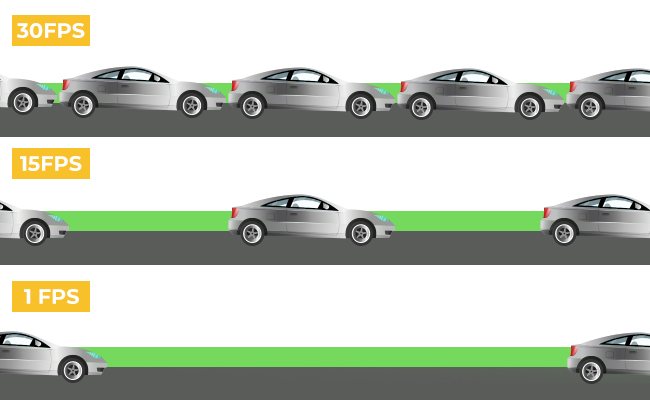
Frame Rate (FPS): A resolution recorded at 60 frames per second (FPS) looks much sharper during fast motion than one recorded at 30 FPS. That's because it captures twice as many individual image frames to freeze the action.
How Many Megapixels and What Resolution Do You Need?
For TVs/Displays
Your target resolution depends on the physical size of the screen and how close you sit to it. This matters whether you're buying a television or a computer monitor.
-
The Baseline Standard: 4K Ultra HD (3840 X 2160 / ~8.3 MP) is the ideal sweet spot for almost all home displays today. Because modern TVs are typically 55 inches or larger, 4K provides enough pixel density to keep the image sharp and lifelike up close.
-
Small Screens/Budgets: Full HD (1920 x 1080/ ~2 MP) is perfectly acceptable for smaller kitchen TVs (under 32 inches) or basic office monitors. The smaller surface area on these screens keeps the lower pixel count from looking blurry.
-
The Premium Horizon: 8K Ultra HD (7680 x 4320 / ~33 MP) displays exist but are largely unnecessary for the average living room. The human eye cannot distinguish between 4K and 8K unless you are sitting inches away from a massive 85-inch-plus screen. Moreover, there is also very little native 8K content available to watch.
For Gaming Consoles
For gaming, resolution is a balancing act between image crispness and smooth performance (frame rate).
-
Current-Gen Flagships (PS5, Xbox Series X): These consoles are built to target 4K (3840 x 2160) output. If you want to experience games with sharp textures and cinematic realism on a large TV, you need a 4K display.
-
Performance vs. Resolution: Many modern games offer a "Performance Mode" that dynamically drops the internal game resolution to 1440p (2K) or 1080p. That keeps the frame rate a smooth 60 to 120 frames per second.
-
Handheld & Budget Gaming (Nintendo Switch, Xbox Series S): These devices target 1080p when plugged into a TV, and handheld screens typically drop to 720p (1280 x 720, about 0.9 MP). Because a mobile gaming screen is so small, 720p or 1080p looks remarkably sharp while preserving battery life.
For Digital Cameras
On DSLRs and mirrorless cameras, megapixels decide how large you can print a photo and how deeply you can crop in without losing quality.
-
Casual & Everyday Photography: 24 Megapixels is the industry sweet spot. It provides more than enough detail to print sharp 16 x 20-inch posters. You can also crop significantly into a photo while keeping absolute clarity for online sharing.
-
Sports & Action: 20 MP to 24 MP is often preferred by action photographers. Lower megapixel counts mean smaller file sizes. That lets the camera fire off rapid bursts of photos, 20 or more frames per second, without clogging its internal memory buffer.
-
Studio, Landscape, & Commercial: Professionals who shoot massive billboard advertisements or fine-art landscapes use 45 MP to 60+ MP cameras. These sensors capture every single blade of grass or fabric texture, but require massive storage drives and powerful computers to handle the files.
For Security Cameras
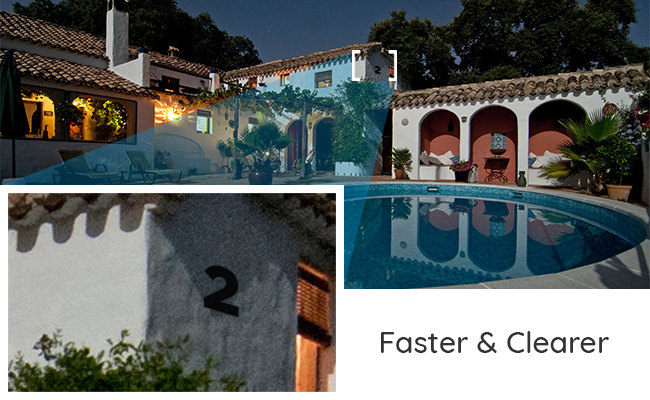
In security setups, megapixels and resolution dictate your "identification zone." That's how far away a camera can be while still letting you zoom in to read a license plate or identify a face cleanly
-
The Minimum Standard: 2 MP / 1080p (1920 x 1080) is acceptable for tight spaces, like a small indoor hallway or an entryway door frame. This works well where subjects pass directly in front of the lens.
-
The Practical Choice: 4 MP / 2K (2560 x 1440) is the recommended baseline for outdoor home security (driveways, backyards). It offers nearly double the detail of 1080p, allowing you to clearly see facial features up to 20–30 feet away.
-
Maximum Protection: 8 MP / 4K (3840 x 2160) is the best choice for wide areas like storefronts, large parking lots, or long driveways. The high megapixel count gives you the digital freedom to crop deeply into a video archive and that enables you catch a license plate down the street after an incident.
How to Choose Right Resolution and Megapixel Count for Security Cameras?
To get the absolute best value for your money, you must match your camera specifications to your specific goals. High megapixel counts sound impressive on paper, but they are only worth the investment if your infrastructure and use case actually demand them.
Consider these four essential factors to choose exactly what you need:
1. Intended Use and Viewing Medium
Your primary goal and where you'll view the final images or videos are what set your baseline needs. Higher megapixels mean more detail, but you don't always need it.
-
Mobile Screens & Social Media: If you are mostly sharing clips on social media or viewing footage on a smartphone, a 1080p (2 MP) or 2K (4 MP) camera is more than enough. Because smartphone screens are physically small, they pack pixels tightly together. It's nearly impossible for the human eye to tell standard HD from ultra-high 4K resolution.
-
Large Displays & Deep Zooming: An 8.3 MP (4K) setup is worth it for large displays and deep zooming as it covers viewing footage on a large 4K monitor, printing physical posters, or cropping deep into a frame. All of those benefit from catching fine details, like a distant license plate or a face in a crowd.
2. Physical Storage Capacity
More pixels equal larger file sizes. Before jumping straight to the highest resolution available, evaluate your storage limits:
-
A 4K video file eats up storage space up to 4 times faster than a standard 1080p file.
-
If you choose a high-megapixel camera, you will need to budget for much larger, high-end microSD cards or hard drives. You must also ensure the storage device has a fast enough write speed to handle the heavy stream of data without crashing.
3. Data Transfer and Processing Power
Handling high-resolution files requires modern digital infrastructure:
-
Transfer Speeds: Moving large 4K or 2K video files from a camera to your phone or computer wirelessly requires high-speed 5GHz Wi-Fi or a physical card reader. Trying to sync heavy files over older 2.4GHz bands will be painfully slow.
-
Editing & Playback: High-megapixel files require more processing power to view and edit. Older smartphones or laptops may lag, stutter, or freeze when trying to play back raw 4K footage.
4. Low-Light and Night Performance Requirements
Counterintuitively, a higher megapixel count can sometimes hurt image quality in the dark if the sensor chip isn't large enough.
-
If you pack too many pixels onto a tiny camera sensor, each individual pixel has to be microscopic. Tiny pixels struggle to absorb light, leading to grainy, noisy night footage.
-
If night visibility matters to you for overnight security or night-time driving, look for a moderate pixel count like 2K. You can also make sure your 4K camera uses a larger, premium sensor built for low-light environments.
5. Budget
Last but not least is the budget. You don't always need a high-resolution camera, and we've already explained that in detail.
Buying a high-resolution or high-megapixel camera can be a wasteful investment if you're not using it for what it's actually made for.
Depending on the usage, select a suitable camera in your budget. Go for the right brand that is reputable for offering what's advertised and the right camera sensor.
High Resolution and Megapixel Security Camera Recommendation
To monitor a large area effectively, a 16MP camera is an excellent choice. Reolink's 16MP lineup includes the flagship Duo 3 PoE. This camera features a dual-lens system for a 180-degree field of view and intelligent image stitching to minimize blind spots.

Groundbreaking 16MP Dual-Lens PoE Camera
16MP UHD, Dual-Lens, Motion Track, 180° Wide Viewing Angle, Power over Ethernet, Color Night Vision.
Unlike the Duo 3 PoE, which uses Power over Ethernet for both power and Internet connection, the new Reolink Duo 3 WiFi operates over dual-band WiFi 6 and also boasts 16MP resolution. Thus, you can select megapixels and resolutions depending on your use.
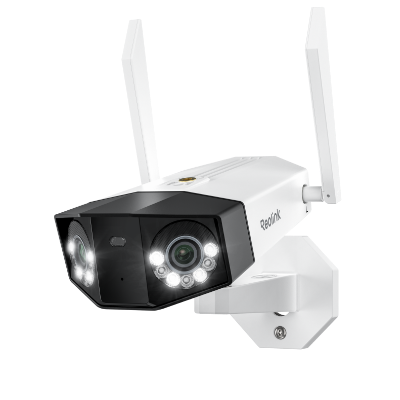
Groundbreaking 16MP Dual-Lens WiFi Camera
16MP UHD, Dual-Lens, Motion Track, 180° Wide Viewing Angle, Plug-In WiFi, Color Night Vision.
FAQs
What is MP for camera?
MP means megapixels, and it represents the total number of pixels in an image. It is one of the key determining factors of a camera's quality and its ability to take sharp images and/or videos.
How many pixels are in a megapixel?
One megapixel equals 1,000,000 (1 million) pixels. A camera labeled 1MP captures images built from 1 million individual pixels while a 16MP camera scales that up to 16 million.
How many megapixels is 4K resolution?
4K resolution equals about 8.3 megapixels, or 8,294,400 pixels in total. Some brands round this down to 8MP. The math comes from 4K's 3840 x 2160 pixel grid with 3840 pixels across and 2160 pixels down, multiplied together.
Does higher MP mean better quality?
Higher MP generally means more pixels in the image, which translates to more details and sharpness, leading to better overall image quality. But, they are not the sole determining factor. Other factors like lens quality and sensors matter too as they also play a role in defining image quality.
How do I convert resolution to megapixels?
To convert resolution to megapixel, you can multiply the width and height in the resolution to get the total pixel count. Then divide that number by 1,000,000 to convert it into megapixels.
Conclusion
So there you have it. Resolution tells you the exact pixel grid. Megapixels just count how many pixels that grid has. The number that matters isn't the biggest one on the box. It's the one that matches what you'll actually do with the footage.
A security camera watching a driveway needs enough resolution to identify a face or a plate at a distance. A phone screen doesn't need anywhere near as much. Match the camera to the job, and the megapixel number stops being a mystery.
- Camera Resolution Guide: Everything You Need to Know
- Security Camera Resolution: A Major Factor Contributes to Crisp Images
- 16 Megapixel Camera: Capture Brilliance
- Highest Resolution Camera: A Complete Overview
- How Many Pixels In 4K Resolution: 4K Clarity Unveiled
- What is a Megapixel? Pixel Power Explained
Search
Subscribe for the Latest Updates
Security insights & offers right into your inbox