
Field of View vs. Resolution: Check Both Before You Buy
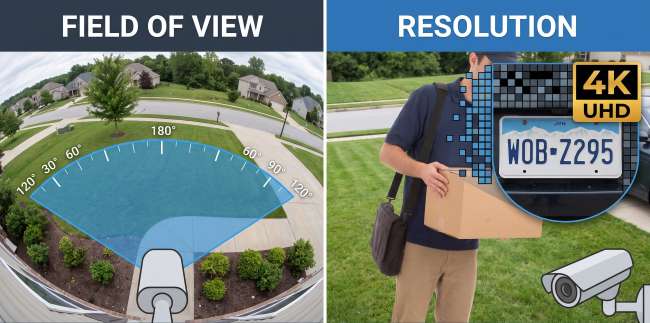
Field of view and resolution are two of the most important camera specifications, but they're also two of the most misunderstood. Product listings often highlight a wide viewing angle alongside a high resolution, leading many buyers to believe they're directly related. They're not.
Field of view describes how much of the surrounding area a camera can see, while resolution determines the level of detail captured within that view. A higher number isn't always better unless it aligns with your specific requirements.
In this guide, we'll explore what field of view and resolution are, how they differ, and how to use both specifications to make a more informed camera purchase decision.
What Is Field of View?
Field of view (FOV) is the amount of a scene that can be seen through a camera, lens, or other optical device at a single moment. It is typically measured in degrees and describes the width of the area visible from a fixed position. Field of view affects how much you can see, but it does not determine image sharpness or resolution.
In security cameras, FOV determines how much of a yard, driveway, porch, or room fits within the frame. A wider field of view captures a larger area, while a narrower field of view focuses on a smaller section of the scene. Most home security cameras offer a field of view between 90° and 180°, depending on the lens and camera design.
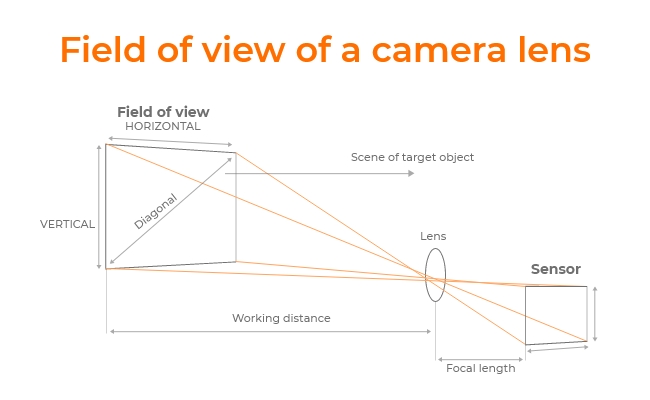
Most spec sheets quote the horizontal angle. Some also list vertical or diagonal. A wide home-security view usually sits around 120° to 180°. A tighter view, the kind you want on a front door, is closer to 40° to 90°. Most cameras sold for houses land somewhere between 90° and 180°.
Your own eyes are a useful comparison, and a slightly unfair one. Binocular human vision spans roughly 200° horizontally. You also glance around as you walk. A fixed camera cannot do that. It stares at one slice of the property until you move it or pick a pan-and-tilt model. When you plan coverage, plan for a locked frame.
The angle itself comes from the lens and the sensor, not from how many pixels the camera has. A short lens, often 2.8mm or 4mm on home cameras, takes in more of the scene. A longer lens, say 8mm or 12mm, tightens the view and makes distant objects look larger. Fixed lenses ship at one of those lengths. A varifocal lens, commonly 2.8mm to 12mm, lets you set the angle during install and then lock it.
The passenger-side mirror on a car is the same idea in a form everyone has used. That mirror is convex. It curves outward and folds a wider slice of the road onto a flat surface, which is why a convex mirror provides the widest field of view among common mirror types. Wide-angle security lenses work on that same optical trick.
Mount one 180° camera at a corner and it can watch two walls that would otherwise need two separate fixed cameras.
Note: For a fuller optics walkthrough, see our guide on What's the meaning of FOV.
What Is Resolution
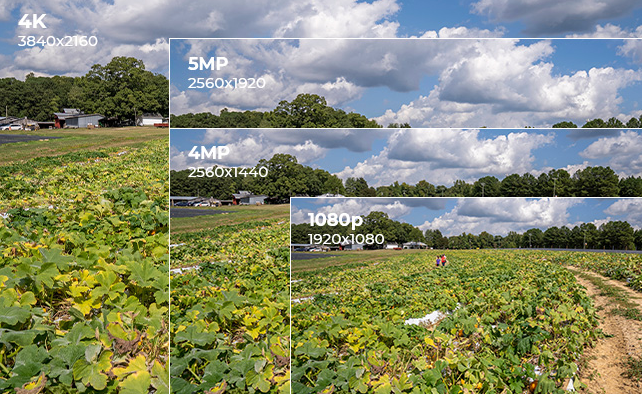
Resolution is how many pixels are packed into the image. More pixels means more chance of reading a face or a package label. It does not tell you how much of the property is in the shot.
The number is just width times height. Brands write it two ways:
- A "p" label follows the vertical count: 720p, 1080p, 2160p.
- A "K" label approximates the horizontal count
That's how you get figures such as 2K or 4K.
Megapixels are the same math divided by a million.
- 1920×1080 is Full HD, or FHD, at about 2MP
- 2560×1440 is QHD, often sold as 2K, at about 3.7MP
- Consumer 4K, also called UHD, is 3840×2160, about 8.3MP.
That 4K label can still describe two very different cameras. One 3840×2160 unit might be aimed at a narrow stoop. Another 3840×2160 unit might be watching a two-car driveway. Same pixel count. Different amount of yard. How wide the shot is belongs to field of view. Resolution only says how many pixels fill the shot the lens already chose.
One naming wrinkle is worth a second look. On TVs and security cameras, "4K" almost always means the consumer UHD standard of 3840×2160. Cinema-grade DCI 4K is 4096×2160. Shoppers rarely notice the gap, which is why two "4K" sheets do not always print the same digits. The Consumer Technology Association's own UHD definition is the consumer-side reference. Reolink's What Is 4K Resolution? guide goes further on the same split.
In everyday shopping language, this is all you mostly need to know:
- HD is 720p,
- Full HD is 1080p
- QHD or 2K is 1440p
- and UHD or 4K is 2160p.
Note that these names describe sharpness. They do not describe coverage.
Resolution Tiers and What They Mean for Field of View
Here's every resolution tier from 480p to 4K in one place, with the pixel math already done. If you only remember one thing from a spec sheet, make it the pixel dimensions, since the nicknames bounce around from brand to brand.
"2K" is the sloppiest label in the table. In cinema, it once meant a frame about 2048 pixels wide. On cameras and monitors now, people use it for 1440p, which is 2560×1440. 480p and 720p are fading on new outdoor models. They still show up on cheap indoor cameras and older DVR kits.
Some panoramic cameras advertise 4K while recording an ultrawide frame such as 5120×1440. That is still about 8 million pixels. It is not the 3840×2160 rectangle on a TV box so read the actual dimensions. A resolution chart still only tells you clarity. It will not tell you how many degrees of yard the lens can see.
Pro Tip: If you are choosing between the two tiers that dominate new cameras, it's good to learn more about 2K and 4K resolution. Check out our 2K vs 4K Security Camera and 4K vs 1440p vs 1080p vs 720p guide to learn more.
How Field of View Actually Gets Calculated
The formula of FOV is = 2 × arctan(sensor size / (2 × focal length).
In simple terms, a shorter focal length gives you a wider view, while a longer focal length narrows the field of view. For most camera comparisons, you do not need to calculate this yourself because nearly all modern camera specification sheets already list the horizontal and vertical field of view in degrees.
That said, the focal length formula is still useful in two situations:
- When a specification sheet provides focal length instead of field-of-view measurements
- or when you are selecting a replacement lens for a varifocal camera.
Common fixed focal lengths for home security cameras are 2.8 mm and 4 mm for wide-area coverage, while 8 mm and 12 mm lenses are typically used when greater viewing distance is needed. Varifocal cameras list a focal length range rather than a single value, which is why their specifications often include both millimeter measurements and field-of-view angles.
Sensor size is the other half of the story. Two cameras can share a 4mm lens and still see different amounts of the yard if one sensor is larger. That is why a field of view calculator asks for both figures.
Pro Tip: For lens-by-lens examples, check out Reolink's Security Camera Lens Selection Guide. Reolink Support's Introduction to Field of View is also a great article that covers sensor size in more depth.
Does a Higher Resolution Mean a Wider Field of View?
No. A higher resolution does not give you a wider field of view. The two specs come from different hardware, and a manufacturer can pair them however it wants.
Pixels come from the sensor and the video format. The viewing angle comes from the lens and the sensor's physical size. Raising one does not force the other up.
The myth persists because expensive cameras often raise both at once. Some guides then talk as if more megapixels mean more yard, or as if a wide lens must look soft. Neither is true by itself.
The Reolink Argus 4 Pro is a useful counter-example. It pairs a 180° horizontal field of view with an 8MP image at 5120×1440, using a fixed f=4mm dual-lens setup. Wide coverage and a high pixel count in one body. Those two numbers can move together. They are still two numbers.

4k 180° Wire-free Color Night Vision Camera
4K UHD 180° Blindspot-free View; Color Vision Day and Night; 30% More Battery Life; Dual-band Wi-Fi 6; Smart detection.
What does change on a wide camera is how thinly the pixels are spread. Keep the resolution fixed and stretch the view from 90° to 180°, and each square foot of the scene gets fewer pixels. A plate at the curb can look softer on the wide 4K camera than on a narrow 4K camera aimed at the same spot.
Think of two 4K cameras on a 40-foot driveway. The 90° model spends most of its 8.3 million pixels on the pavement and the car. The 180° model spends that same pile of pixels on the drive plus the hedge beside it. Both are 4K. The curb is easier to read on the narrower camera unless the wide one adds more pixels or a second lens.
A wide field of view buys coverage. It costs some detail per object unless resolution climbs with it. Which mix you want depends on the job, and on how far away the thing you care about actually stands.
Matching Field of View and Resolution to What You Actually Need to See
Pick the field of view for the area you need to cover, then pick enough resolution that the far end of that area still looks like a person and not a smudge.
A driveway or backyard is a coverage job. You want 120° to 180° so one mount can see the whole approach. On a 40 to 60 foot drive, 4K / 8MP at 150° to 180° is a realistic floor if you still want a usable look at someone at the far end. The Argus 4 Pro's 180° by 8MP (5120×1440) frame is built for that kind of suburban stretch.
A front door is the opposite. The subject is close. An 80° to 100° view keeps the stoop large in the frame. On a 10 to 15 foot porch, 1080p or 2K is often enough. Faces and labels are near the lens, so you are not asking a modest pixel count to cover half the yard.
A long side yard or fence line is a reach job. You need pixels on a gate 50 to 80 feet away more than you need a huge angle. The Reolink TrackMix PoE handles that with 4K / 8MP (3840×2160), one wide lens, one telephoto lens, plus 355° of pan and 90° of tilt so it can follow motion. The lens itself sees about 104° down to 38° horizontally. The 355° figure is how far the body can turn, not how wide a single frame is.
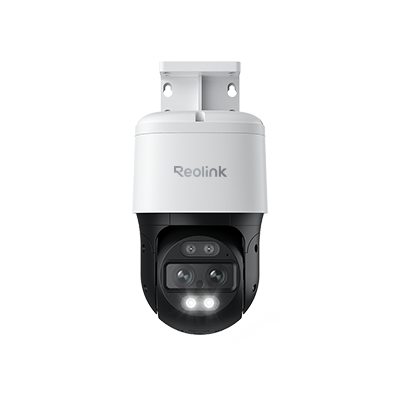
4K Dual-Lens PTZ Camera with Dual Tracking
4K 8MP Ultra HD, Wide & Telephoto Lenses, Pan & Tilt, Auto-Tracking, Person/Vehicle Detection, Power over Ethernet, Two-Way Audio.
Dual-lens cameras dodge the usual trade-off by stitching two sharper frames instead of stretching one wide lens. The Reolink Duo 3 PoE builds a 180° view at 16MP (7680×2160). The extra pixels are what keep a face at the edge of that panorama from falling apart.

Groundbreaking 16MP Dual-Lens PoE Camera
16MP UHD, Dual-Lens, Motion Track, 180° Wide Viewing Angle, Power over Ethernet, Color Night Vision.
Both a wider view and a higher resolution make bigger files. A 16MP 180° stream eats more card space than a 1080p porch camera, even when both use H.265. H.265 typically needs 30 to 40 percent less bitrate than H.264 for comparable quality, with the exact gap running higher or lower depending on the footage.
Those compression gains help, but they do not eliminate the storage demands of high-resolution video. Higher pixel counts still require more data to be encoded, especially when a camera is capturing a very wide scene.
Reolink's own bandwidth guidance puts most single-lens cameras at up to roughly 8 Mbps on their clearest quality setting. A 16MP dual-lens stream runs higher, since it is combining two sensors, so check the specific model's bitrate setting or Reolink's storage calculator before you max out both specs.
One thing you can try is to stand at the mount point and pick the farthest spot that still needs to stay identifiable. That distance should drive resolution more than the degree number does. Industry pixel-density guidelines for facial identification generally call for somewhere around 250 pixels per meter, or roughly 75 pixels per foot, at the subject's distance, though different standards draw that line in different places. That density is much easier to hit with 4K at 40 to 60 feet than with 1080p at the same range.
Note: We have wide angle camera options compared in the Best Wide Angle Security Camera for Complete Protection guide. If you already know you want 4K, start in the 4K security camera lineup.
FAQs
What resolution is 4K?
4K on consumer cameras and TVs almost always means 3840×2160 pixels, about 8.3 megapixels. That is the UHD standard. Cinema-grade DCI 4K is 4096×2160, about 8.8 megapixels. If a spec sheet only says "4K," it means 3840×2160 unless it says otherwise.
What resolution is 2K?
On cameras and monitors, 2K usually means 2560×1440, also called 1440p or QHD, at about 3.7 megapixels. Cinema 2K is closer to 2048 pixels across. Consumer use drifted toward 1440p, which is why the same nickname shows up on security cameras and gaming monitors.
Does a wider field of view lower image quality?
Not directly. The camera's resolution stays the same. The pixels are just spread over more ground, so a face at the edge of a 150° to 180° view can look softer than it would on a narrower camera with the same pixel count. If you want a wide view and a readable face, pair the wide angle with 4K / 8MP or higher.
How do I calculate field of view for a security camera?
Start with the spec sheet. Almost every current camera already lists horizontal and vertical field of view in degrees. If you still need the math, use FOV = 2 × arctan(sensor size / (2 × focal length)). That is mainly useful when you are choosing a lens, or comparing a varifocal camera that prints focal length but not degrees. Reolink Support's Introduction to Field of View is the technical walkthrough.
Conclusion
None of this requires memorizing a formula. It just means checking two lines on the spec sheet instead of one, since a wide angle and a sharp picture are separate promises a camera can keep or break independently.
Need the whole approach covered? Sort by field of view first. Need to identify someone at the far end of a drive? Sort by resolution first. Need both? Look for a wide published angle sitting next to a high pixel count, or a dual-lens camera that stitches two sharper frames into one view.
Compare those two specs on current 4K models in the Reolink 4K security camera lineup, or start with wide-angle options in Best Wide Angle Security Camera for Complete Protection.
Search
Subscribe for the Latest Updates
Security insights & offers right into your inbox