
Best Doorbell Camera without Subscription: 2026 Guide
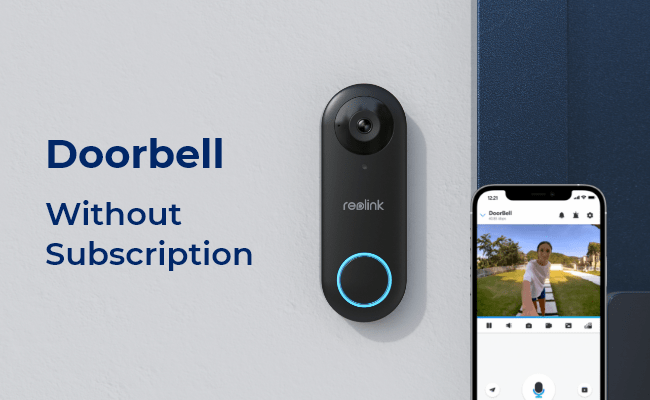
Doorbell cameras are becoming increasingly popular for home security as they provide an extra layer of protection against intruders. With a doorbell camera, you can keep an eye on movement around your porch.
Worry about expensive subscription fees or complicated installation processes? This article is for you. We’ll go through the best doorbell camera without subscription, including its common features and benefits. Read on to make informed decisions when choosing one for your home.
- What is the Doorbell Camera without Subscription?
- Types of No Subscription Doorbells
- How to Choose the Best Doorbell Camera without Subscription?
- How to Install and Set up No Subscription Doorbell?
- Cost Comparison about Doorbell Camera No Subscription
- Subscription vs. No-Subscription Video Doorbell: Comparison Between Them?
- FAQs
- Conclusion
What is the Doorbell Camera without Subscription?
A real no-subscription video doorbell offers all the essential functions without ongoing fees. Rather than uploading footage to the cloud, it stores recordings locally—on an SD card, built-in memory, or a connected nvr and home hub.
Since there are no monthly costs, every core feature is included with the initial purchase. Unlike subscription-based options that charge extra for smart detection features like packages or persons, these doorbells give you full functionality right out of the box.
Types of No Subscription Doorbells
If you want to purchase the best video doorbell without subscription, you can check the following list.
WiFi Video Doorbell without Subscription
WiFi no subscription video doorbells connect directly to your home's wireless network, allowing you to view live footage, receive instant motion alerts, and communicate with visitors from anywhere through a mobile app. Unlike cloud-dependent systems, many modern WiFi doorbells support local storage via microSD cards, home hubs, or NVRs, eliminating the need for monthly subscription fees. This combination of convenience, smart features, and long-term cost savings makes WiFi doorbells one of the most popular choices for homeowners.
The Reolink Video Doorbell WiFi is a standout subscription-free option, featuring 5MP Super HD resolution, smart human detection, two-way audio, and support for local storage up to 256GB. With no mandatory cloud plan, users can enjoy reliable front-door security while avoiding recurring monthly costs.
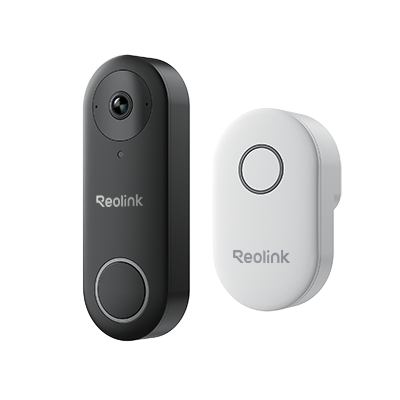
Smart 5MP Video Doorbell with Chime
5MP Super HD Day & Night, Person Detection, 2.4/5 GHz Dual-Band WiFi, 180° Diagonal Viewing Angle, Two-Way Audio, Rich Notification.
Wireless Doorbell Camera without Subscription
Wireless doorbell cameras offer maximum installation flexibility because they don't require existing doorbell wiring. Most battery-powered models connect through WiFi and support local storage, allowing homeowners to save recordings directly to a microSD card or compatible hub rather than paying monthly cloud fees. This makes them an excellent choice for renters, apartments, and users who want an easy-to-install security solution with no recurring costs.
The Reolink Battery Video Doorbell features a 2K 4MP head-to-toe view, AI-powered detection, dual-band WiFi, and local storage support, delivering advanced security without subscription fees.
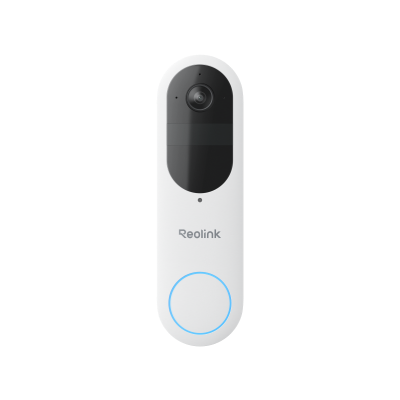
Smart 2K Dual-Band Wi-Fi Battery Doorbell
2K 4MP Head-to-Toe View; Person/Vehicle/Package Detection; Works with Reolink Home Hub & Wi-Fi NVR; 5/2.4GHz Dual-Band Wi-Fi.
Wired Doorbell Camera without Subscription
Wired video doorbells are powered through existing doorbell wiring or a direct power connection, making them a reliable choice for homeowners who want continuous operation without worrying about battery life. Because they receive constant power, many wired models support 24/7 recording and extensive local storage options, allowing users to store footage on microSD cards, NVRs, or home hubs instead of paying for cloud subscriptions. They are ideal for homeowners seeking long-term reliability, continuous monitoring, and lower ownership costs.
The Reolink Video Doorbell WiFi combines 5MP Super HD video, smart human detection, two-way audio, and local storage up to 256GB, making it a strong subscription-free option for everyday home security.
Smart 5MP Video Doorbell with Chime
5MP Super HD, Person Detection, Power over Ethernet, 180° Diagonal Viewing Angle, Two-Way Audio, High-Quality Night Vision.
How to Choose the Best Doorbell Camera without Subscription?
The best wired and wireless doorbell camera no subscription usually has some advanced features and can bring a lot of benefits. Here are some of them.
Local Storage Capability
Some doorbell cameras without subscription commonly have an SD card that stores footage locally, allowing you to access and view the video on the camera or another device.
Some doorbell camera brands, for example, Reolink, also allow their users to add the doorbell cameras to their NVRs for local video storage and better surveillance experience.
Smart Detection
Even without a subscription, advanced doorbell cameras can detect motion from people, pets, or packages within their field of view and instantly alert users when specific activity is detected.
Night Vision
No-subscription doorbell cameras frequently offer night vision capabilities, allowing them to capture clear footage even in low-light or nighttime conditions. Reliable models use infrared technology to record detailed black-and-white video after dark, helping homeowners monitor visitors, package deliveries, and potential security events around the clock.
High-Quality Video
Most wireless doorbell cameras come with 2K, 4K, or higher resolution video streaming capabilities, ensuring they can capture clear pictures and videos of subjects even from a distance.

Ability to work with other cameras
You can consider its ability to work with other cameras. Linking multiple cameras together provides increased coverage and protection for your home and property.
An NVR or a home hub can be incorporated into the mix to give users the option to record footage locally without needing cloud storage or subscription services.
Remote Access
The cameras can be conveniently controlled from other devices. For instance, you could view motion alerts and see who is at the door from your phone or PC.
Compatibility with Third-Party Platforms
Compatibility with third-party platforms means that the doorbell camera can be connected to other devices or services to enhance its functionality.
Third-party platforms include Home Assistant, Apple HomeKit, and Amazon Alexa. These platforms, for example, allow users to control their doorbell camera with voice commands.
Doorbell cameras without subscriptions typically have the same capabilities as those with subscriptions. However, in some cases, each type may offer features not present in the other – it depends on the camera brand.
How to Install and Set up No Subscription Doorbell?
Installing and setting up a no-subscription doorbell camera is usually straightforward, especially for modern WiFi and battery-powered models. While the exact process may vary by manufacturer, the basic steps remain similar.
Step 1. Choose the Installation Location
Select a location near your front door that provides a clear view of visitors and package deliveries. Make sure the camera is mounted at an appropriate height and within range of your WiFi network if you're using a wireless model.
Step 2. Install the Doorbell Camera
For battery-powered models, simply mount the bracket and attach the device. Wired and PoE doorbells may require connecting existing doorbell wiring or an Ethernet cable for power and network access.
Step 3. Connect the Camera to the App
Download the manufacturer's mobile app and follow the setup wizard. Most doorbell cameras can be paired by scanning a QR code or following the in-app instructions.
Step 4. Configure WiFi and Security Settings
Connect the camera to your WiFi network, create a secure password, and adjust settings such as motion detection sensitivity, notification preferences, and activity zones.
Step 5. Set Up Local Storage
Insert a compatible microSD card or connect the camera to a local storage device such as a Home Hub or NVR. This allows recordings to be stored locally without requiring a cloud subscription.
Step 6. Test the Camera
Verify that live view, motion alerts, two-way audio, and recording functions are working properly. You should also test the night vision performance and viewing angle to ensure optimal coverage.
Step 7. Fine-Tune Notifications
Customize motion detection and notification settings to reduce false alerts while ensuring important events are captured and recorded.
Once configured, your no-subscription doorbell camera can provide reliable front-door monitoring, local video storage, and smart alerts without ongoing monthly fees.
Cost Comparison about Doorbell Camera No Subscription
Actual subscription cost of a doorbell camera depends on the provider. Prices typically range between $3 and $10 monthly, while some brands offer premium packages that can set you back up to $25 monthly. Let’s briefly examine the subscription fees of several popular video doorbells.
On the other hand, no subscription doorbell cameras generally cost between $50-$300 and offer basically the same features as those with a subscription. Once you buy them, you get all the features free and for life, saving you a high cost over time.
This is not to say subscription-based doorbell cams aren’t worth it. They usually have extra perks that users may find worthwhile. For example, some Ring Protect payment plans offer extended warranties for devices and automatically contact emergency responders when the cameras detect suspicious activity.
Subscription vs. No-Subscription Video Doorbell: Comparison Between Them?
Cost Comparison
No Subscription doorbell camera typically involve a higher upfront cost but no recurring fees. For instance, a $200 doorbell with no subscription costs $200 over five years. While the initial cost of subscription model may be lower, subscription fees can add up over time. For example, a $100 doorbell with a $5 monthly subscription totals $400 over five years
Privacy & Data Control
No-subscription video doorbells often offer local storage options, such as microSD cards, giving users more control over their data and reducing reliance on cloud services. In contrast, subscription-based models store footage on cloud servers, which can raise privacy concerns for some users.
Features & Functionality
Video doorbells without subscription generally provide essential features such as live streaming, two-way audio, and motion detection, while some advanced models, like the Reolink, offer 2K video, package recognition, and smart home integration. Subscription doorbells build on these capabilities by adding cloud video storage, enhanced motion detection, and deeper integration with security systems.
Comparison Chart
FAQs
Which doorbell camera is best without a subscription?
The best doorbell camera without a subscription is the Reolink Video Doorbell series. Whether you choose the WiFi, Battery, or PoE version, each offers high-resolution video (up to 5MP or 2K 4MP), smart detection for people, vehicles, and packages, and free local storage of up to 256GB via microSD card
Is it worth having a Ring doorbell without subscription?
Without a subscription, videos are not saved. You can't review past alerts. You also can't record live footage if you need evidence of an event.
Do all doorbell cameras require a subscription?
The presence of a monthly fee depends on the specific brand and model you choose. For example, some Ring doorbell cameras require a subscription service called Ring Protect Plans while other doorbells don't require subscriptions at all, such as Reolink video doorbells.
Is there a video doorbell without a monthly fee?
Yes. Many video doorbells are available without monthly fees. These models typically support local storage through a microSD card, NVR, or other on-premises storage solutions, allowing you to save recordings without paying for a cloud subscription.
Conclusion
As more brands begin to move to subscription-based services for their wireless doorbell cameras, it can be challenging for buyers to find one-time payment cameras. Using doorbell cameras without a subscription is an economical way of ensuring home security as you don’t have to pay any fees over time, unlike the subscription-based counterparts.
Luckily, you can still find the best doorbell camera without subscription in the market today, and we’ve discussed some quality options above. Have you ever used one of these devices? Share your thoughts in the comments, and don’t forget to share this with your friends and family who might be looking for an affordable home security solution!
Search
Subscribe for the Latest Updates
Security insights & offers right into your inbox