
Cheapest Security Camera in 2026: Secure on a Budget
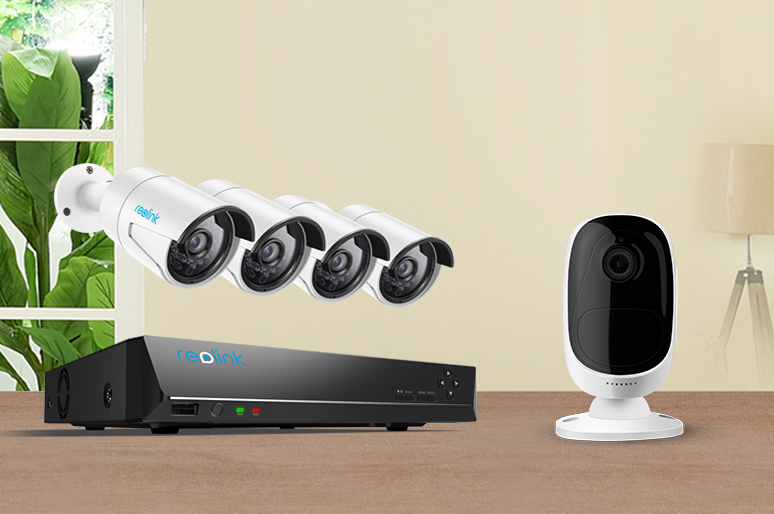
Securing your home is crucial, but not everyone can afford a high-end security system. Luckily, in the realm of advanced smart home tech, there are cheap security cameras that balance affordability with reliability. Offering real-time monitoring, these cameras provide peace of mind without breaking the bank. In this article, we explore these cost-effective security options to help you safeguard your home economically.
Cheap Security Cameras Don’t Mean Poor Quality
A low price doesn't automatically mean you're getting a bad security camera. In fact, many budget models are built for everyday home use rather than packed with features most people never use.
If your goal is simply to keep an eye on the front door, driveway, or backyard, an affordable camera can often do the job just as well as a premium one. Most entry-level models now record in 1080p, offer clear night vision, send motion alerts to your phone, and let you check live footage from anywhere.
The biggest differences usually come with extra features instead of basic performance. More expensive cameras may include 4K video, local AI processing, longer cloud storage, or wider smart home compatibility. Those features are useful, but they're not essential for everyone.
For whatever reasons that you want to buy cheap indoor and outdoor security cameras, remember you can always find the best cheap security camera.
How We Choose the Cheapest Security Cameras?
Eliminate the Monthly Subscription Trap
The cheapest security camera is one that costs little upfront and doesn't require ongoing monthly fees. Many budget brands sell inexpensive hardware but lock important features—such as person detection, cloud storage, or even smart alerts—behind paid subscriptions.
Our Rule: Prioritize cameras that offer:
- On-device AI for free person and vehicle detection
- A built-in microSD card slot for free local video storage
- Optional rather than mandatory cloud storage
Prioritize Essential Video Quality
Higher resolution isn't always better. While 4K cameras provide exceptional detail, they are more expensive, consume more bandwidth, and require larger storage capacity.
Our Rule: We recommend 2K (4MP) or 1080p (2MP) cameras, which provide an excellent balance between image quality and affordability. These resolutions are typically sufficient to identify faces or license plates within approximately 15–20 feet while keeping storage and network requirements low.
Focus on Essential Security Features
Affordable cameras should still provide the features necessary for effective home monitoring.
We look for:
- Accurate motion detection
- Reliable night vision
- Two-way audio for communication
- Instant mobile notifications
- User-friendly mobile apps
These core functions provide everyday security without paying for unnecessary premium features.
Compare Storage Options
Storage can significantly affect the total cost of ownership.
- Local storage using a microSD card eliminates recurring subscription fees and gives users direct control over recorded footage.
- Cloud storage provides convenient remote access and backup but often requires monthly payments.
Our preference is cameras that support free local storage, while offering cloud storage only as an optional upgrade.
Evaluate Overall Build Quality
Low prices shouldn't come at the expense of durability. We assess several aspects of each camera's construction, including:
- Housing materials: Durable materials help protect internal components from impacts, heat, and long-term wear.
- Mounting bracket strength: A sturdy mounting system keeps the camera securely in place and makes installation safer and more reliable.
- Weather resistance: Outdoor cameras should have at least an IP65 rating to withstand rain, dust, and changing weather conditions.
- Overall construction quality: We evaluate the camera's overall fit and finish to ensure it can withstand everyday use and provide reliable long-term performance.
A well-built security camera should continue to operate reliably for years, especially when installed outdoors.
Reolink cameras are going on sale now during its Prime Sale! Be sure not to miss out on the greatest deals!
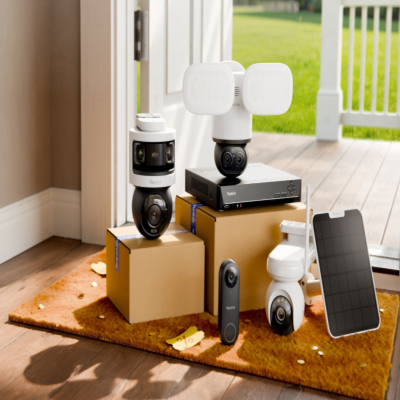
🎉 Exclusive Limited-Time Security Deals
- Save Up to 50% on Bundles & Multi-Packs
- Official Prime Day Sale is about to begin!
Best Cheap Security Cameras: Top 3 Picks
We've done the legwork to highlight some of the top affordable security cameras (all under $100) and the best budget-friendly security camera systems. Save yourself the hassle of scouring through numerous websites by checking out our curated list for reference.
Cheap wireless security cameras for outdoor use - Argus Eco
Whether you want to buy the best cheap outdoor security camera with no subscription or the best budget wireless security camera, Reolink's Argus Eco will strike you as a must-buy at a price below $70.
It comes with a rechargeable battery and the optional Reolink solar panel is designed to provide non-stop power for the camera. So you don’t need to run the messy cables or recharge batteries frequently. With IP65 Certified Weatherproof, this camera can brave rain, snow, and varying temperatures without compromising performance.
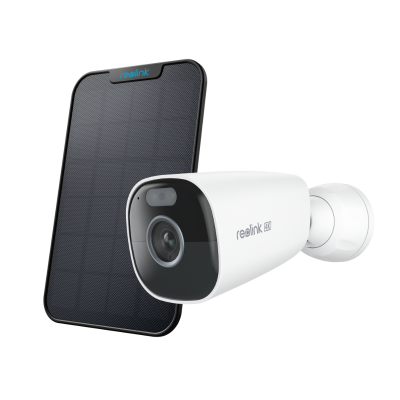
100% Wire-Free Bullet Camera
Rechargeable Battery & Solar Powered; IP65 Certified Weatherproof; 1080 Full HD; Smart Motion Detection; 2-Way Audio; 100° Wide Viewing Angle.
Cheap WiFi security cameras for indoor use - E1 Zoom
Among the best cheap indoor security cameras, Reolink E1 Zoom stands out relying on its superior quality and decent price (under $80).
In virtue of the 8MP high resolution, you can expect to get sharp and clear images with vivid details. With the 3X optical zoom and PTZ function, this cheap indoor security camera allows you to zoom in for more visible details or zoom out to cover the whole room.

PTZ Wireless Smart Home Camera
Smart, Powerful and Affordable All-Round Home Protection. 355° Pan and 50° Tilt; 4K Ultra HD, 3X Optical Zoom, Two-Way Audio, 2.4/5 GHz WiFi, with Google Assistant Integration.
Cheap portable security camera - Argus Magicam
If you live in an apartment, need a temporary security setup, or simply want a security camera that is easy to move around, the Reolink Argus MagiCam is a game-changer for under $50.
This camera only only weighs 108g and is sized to fit in the palm of your hand. It's a wire-free 2MP camera that also features a unique magnetic base. You can snap it onto any metal surface or use the included sticky magnetic pad to create a metallic stick-on mount. This means there is no need for tools or drilling to set this camera up.
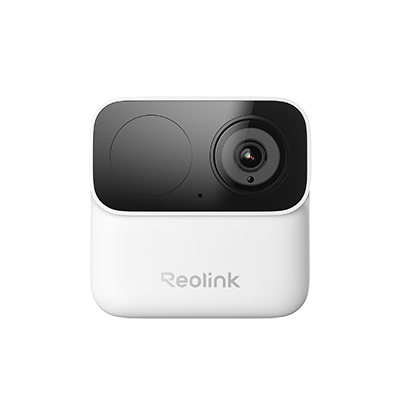
2MP Wireless Power-Efficient Camera
Magnetic Mounting for Easy Installation, Max. 9-Month Battery Life, Dual-Band 2.4/5GHz Wi-Fi, No Monthly Fees.
Cheap security camera system for large area- RLK8-800B4
If you want to buy a cheap 8-camera security system, The Reolink RLK8-800B4 is more than good enough to keep tabs on your home and business keenly for 24 hours nonstop, even the place has no access to the network.
With 8 PoE 4K security cameras and one PoE 8 channel-NVR, this best budget security camera system can support up to 8 cameras recording simultaneously.
And you don’t have to be concerned about the storage space – the pre-installed 2TB HDD and an external HDD are fairly enough for you to save the videos. When the storage space is full, the old files will be automatically overwritten.
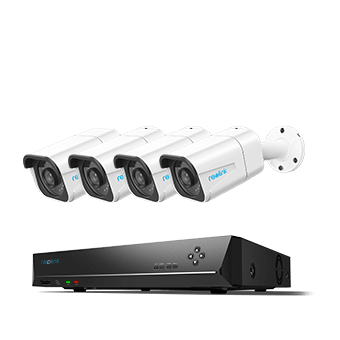
4K 8-Channel PoE Security System
4 pcs 4K Ultra HD Security Cameras; 2TB HDD 8-Channel NVR for 24/7 Recording; Person/Vehicle Detection; Plug & Play; 2 Network Solutions.
Watch Out! Some Cheap Security Cameras Might Have Hidden Fees!
To obtain a real and best cheap or inexpensive security camera, you need to factor in all the fees you need to pay, including these following hidden fees that you may ignore:
- Do cheap home security cameras have all the essential accessories, like cables, batteries, screws, etc? Or the battery-powered cheap wireless security cameras support rechargeable batteries so that you can save bucks on replacing batteries? (Read the security camera accessory buying guide.)
- Are you buying a cheap do it yourself home security camera that is easy to install? Or you need to hire professional installers?
- Are you required to pay monthly subscription fees for the cheap security camera systems you buy for your apartment or business?
- If you intend to buy the best cheap home security cameras online, such as Amazon and eBay, do you need to bear the shipping fees and customs duties?
- In case you purchase inexpensive security camera from abroad, will you pay foreign transaction fees charged by your credit card issuing bank?
Pro Tip: The price tag of cheap surveillance cameras may not be the final cost you need to pay. Check out our latest smart buyer's checklist to learn more about fair security camera prices.
Tips for Cost-Effective Installation of Cheap Security Camera
Opting for a DIY approach is the most cost-effective choice when installing cheap cameras, allowing you to save money on professional installation services. Let's see the details.
Cost-effective Installation tip
Choose a simple system: Opt for a security camera system that is designed for easy DIY installation. Many budget-friendly options are specifically tailored for user-friendly setup.
Utilize existing infrastructure: If possible, leverage existing Wi-Fi networks and power sources to avoid additional costs.
Utilize mobile apps: Take advantage of mobile apps provided by the camera's manufacturer for easy setup and monitoring. These apps often include guided installation processes.
DIY cable management: If you opt for wired cameras, plan your cable routes carefully to minimize the amount of cable needed.
How to install cheap security camera?
Installing DIY security cameras can be a straightforward process, and the method depends on the type of camera you choose.
For wire-free battery-powered security cameras, start by selecting an optimal location within wireless range. Insert batteries, sync with a base station if applicable, and mount the camera, adjusting the angle for the best coverage. Connect it to your Wi-Fi network through the mobile app, and after testing, make any necessary adjustments.
Traditional WiFi security cameras require a reliable Wi-Fi signal and a clear view of the monitored area. Power the camera using the provided adapter, mount it securely, and connect it to your Wi-Fi network through the mobile app. Configure settings such as motion detection and alerts, and after testing, fine-tune the placement or settings as needed.
For PoE security cameras, choose a location with both a clear view and access to an Ethernet connection. Connect the camera to a PoE Injector or a PoE-enabled network switch using an Ethernet cable. Mount the camera securely, configure network settings, and connect it to an NVR if applicable. Test the camera to ensure it's functioning correctly and make any necessary adjustments to placement or settings. Following these step
Note: You may read about our DIY installation tip or process guide to find out more detailed installation tips.
FAQs
1. Can cheap security cameras connect to your phone?
Yes, virtually all modern budget security cameras connect directly to smartphones via dedicated iOS and Android apps. These companion applications serve as the primary control center, allowing you to stream live footage, receive instant motion alerts, and adjust settings remotely.
2. Can I find a security camera under $50 that still provides adequate security?
Absolutely. You can find budget-friendly security cameras under $50 that still offer decent features. Many brands today often have affordable options with good reviews. While you might not get all the advanced features of higher-priced models, many budget cameras still provide essential functions like motion detection, night vision, and mobile app integration.
3. Do budget security cameras compromise on features??
Not necessarily. It depends on what you consider a compromise. Budget security cameras omit premium hardware upgrades, but they do not sacrifice core protection. While budget-friendly models usually skip specialized capabilities like automatic physical tracking or ultra-high resolutions, they are engineered to deliver reliable everyday monitoring, clear local storage options, and smartphone connectivity.
4. How much is the cheapest security camera?
The cheapest security cameras typically cost between $20 and $40, while models with better image quality, on-device AI detection, and weatherproof designs generally range from $40 to $80.
Although it may be tempting to buy the lowest-priced camera, the cheapest option isn't always the best value. Some budget models require monthly subscriptions for essential features like person detection or cloud storage, which can increase the total cost over time.
Conclusion
The quest for the cheapest security camera doesn't mean compromising on basic safety features. While these budget-friendly cameras may not boast all the bells and whistles of their higher-priced counterparts, they deliver fundamental security functionalities. Motion detection, night vision, and mobile app integration are standard features that ensure you can keep an eye on your property without breaking the bank.
If you like this article and find it helpful, share it with your friends. Do you have something to say about cheapest security camera? Make sure you leave a comment below!
Search
Subscribe for the Latest Updates
Security insights & offers right into your inbox