
Synology Surveillance Station Compatible Cameras: Best Options & Setup

ynology Surveillance Station provides a centralized way to manage compatible IP cameras, record footage to a Synology NAS, and monitor multiple locations from one interface. If you are choosing Synology Surveillance Station compatible cameras, the key is to check protocol support, camera licensing, recording needs, and whether the model is designed for continuous network access.
This guide explains which cameras are compatible, how to add Reolink cameras to Synology, what limitations to expect, and which models are better suited to different surveillance scenarios.
Key Takeaways:
- Many Reolink PoE and plug-in WiFi cameras can integrate with Synology Surveillance Station through ONVIF, Reolink protocol, or RTSP.
- PoE cameras are especially suitable for 24/7 NAS recording because they provide continuous power and stable network connectivity.
- Battery-powered cameras are generally not ideal for Synology Surveillance Station because they are designed to enter standby mode between events.
- Check Synology camera compatibility and license requirements before building a multi-camera system.
- For the best experience, choose the connection method and camera type based on your needs for continuous recording, wide-area monitoring, or flexible WiFi installation.
- What Cameras Work with Synology Surveillance Station?
- Why Use Synology Surveillance Station for Home Security Cameras?
- Best Synology Surveillance Station Compatible Cameras
- How to Set up Reolink Cameras to Synology Surveillance Station?
- Which Cameras Are Not Suitable for Synology Surveillance Station?
- Synology Camera Licensing: Essential Rules
- FAQs
- Conclusion
What Cameras Work with Synology Surveillance Station?
Officially Supported Cameras
Synology Surveillance Station works with a wide range of IP cameras listed in Synology’s official compatibility database. These cameras are tested and verified to ensure stable performance and full feature support within the Surveillance Station platform.
The compatibility list includes models from major security camera brands such as Synology's own line, Reolink and others. Cameras in this category typically offer seamless integration, including live view, recording, motion detection, and event notifications without additional configuration.
ONVIF-Compatible Cameras
In addition to officially certified models, Synology Surveillance Station also supports cameras that follow the ONVIF standard.
ONVIF-compatible cameras allow broader integration across different manufacturers, making it easier to build a flexible surveillance system. Even if a camera is not listed in Synology’s official compatibility list, it can often still be added through ONVIF protocols.
However, feature availability may vary depending on the camera model, and some advanced functions may not be fully supported compared to officially verified devices.
Which Reolink Cameras Work with Synology?
Most Reolink IP cameras—including PoE and plug-in Wi-Fi models—work seamlessly with Synology Surveillance Station via direct official support or standard ONVIF/RTSP protocols. Battery-powered cameras are generally not supported due to power-saving restrictions.
Reolink Cameras Compatible with Synology
-
PoE IP Cameras: Models such as the RLC-810A, RLC-823S2, and other wired PoE cameras fully integrate with Synology, supporting 24/7 continuous recording, high-resolution live streaming, and smart motion alerts.
-
Plug-In Wi-Fi Cameras: Mains-powered Wi-Fi models (such as the E1 Zoom or plug-in outdoor Wi-Fi series) connect reliably through ONVIF or RTSP protocols for live viewing and local NVR recording.
-
Reolink NVRs & Home Hubs: Reolink channel setups and standalone recorders can pass camera feeds directly through to Synology Surveillance Station for centralized management.
Reolink Cameras NOT Supported by Synology
- Battery & Solar Cameras: Battery-powered models (like the Argus series or Go cellular cameras) do not support ONVIF/RTSP protocols or continuous streaming to prevent rapid battery drain, making them incompatible with Synology Surveillance Station
Why Use Synology Surveillance Station for Home Security Cameras?
Synology Surveillance Station transforms a local Synology NAS into a centralized, subscription-free video management system (VMS) that gives you full ownership of your security data, 24/7 continuous recording, and high compatibility across top camera brands.
-
Zero Subscription Fees & Full Privacy: By storing all video footage locally on your NAS hard drives, you avoid monthly cloud storage costs while keeping private security feeds off third-party servers.
-
Massive & Flexible Storage Capacity: Unlike standalone microSD cards that overwrite quickly, a NAS allows multi-terabyte storage configurations to archive months of high-resolution 4K video footage across multiple camera channels.
-
Unmatched Camera Compatibility: Synology natively supports thousands of IP cameras—including major brands like Reolink—alongside standard ONVIF and RTSP protocols, giving you complete freedom to mix and match hardware.
-
Centralized Management & Advanced VMS Features: Monitor all your indoor, outdoor, and PoE cameras through a single desktop or mobile interface (DS cam) featuring multi-channel live views, smart timeline playback, motion detection, and customizable alert rules.
-
Redundancy & Off-Site Backup: Protect your critical recordings against hardware failure or camera theft by using RAID storage setups or automatically backing up event clips off-site to a secondary NAS or remote cloud server.
Best Synology Surveillance Station Compatible Cameras
Integrating Reolink IP cameras with Synology Surveillance Station provides a powerful, subscription-free security system backed by massive local NAS storage and continuous 24/7 recording.
Reolink RLC-810A — Best for 24/7 PoE Recording
The Reolink RLC-810A is one of the best PoE cameras for Synology Surveillance Station. Featuring 4K Ultra HD resolution and smart person and vehicle detection, it delivers sharp video quality and reliable security monitoring.
The PoE design ensures a stable network connection and continuous recording, making it ideal for users who prioritize dependable 24/7 surveillance. With support for ONVIF and Synology Surveillance Station, the RLC-810A can be easily added to a NAS-based security system for efficient video storage and management.
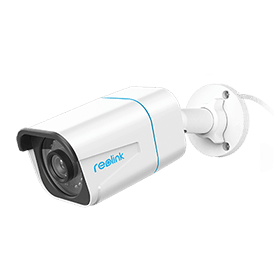
4K PoE IP Camera with Person/Vehicle Detection
Smart Person/Vehicle Alerts; 4K UHD Day; Night; 100ft Night Vision; Time Lapse; IP66 Certified Weatherproof; Audio Recording.
Reolink Elite Floodlight WiFi — Best for Outdoor WiFi Monitoring
The Reolink Elite Floodlight WiFi is an excellent choice for homeowners who want both surveillance and active deterrence. Combining high-resolution video with powerful floodlights, it provides clear footage around the clock while helping to discourage intruders.
Its Wi-Fi connectivity makes installation straightforward, and its support for ONVIF allows seamless integration with Synology Surveillance Station. Once connected to a Synology NAS, users can enjoy centralized recording, remote monitoring, and flexible storage management without relying on cloud subscriptions.
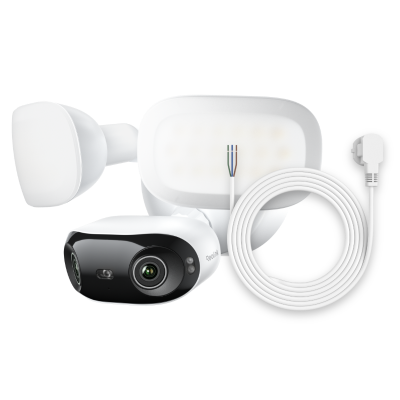
4K 180° Ultra-Wide Wired Floodlight Security Camera
3000-Lumen Dimmable Lighting, Adjustable Color Temperature, Local AI Video Search, Local Storage, Dual-Band Wi-Fi 6.
Reolink Duo 3 PoE — Best for Wide-Area Monitoring
Reolink Duo 3 PoE is well suited to expansive areas such as large front lawns, open parking spaces, farms, and corner properties where multiple fixed cameras might otherwise be needed. Its 180° panoramic field of view helps cover a much wider scene from a single installation point.
For Synology Surveillance Station, Duo 3 PoE can connect over a single PoE cable and integrate through ONVIF or RTSP for centralized live view and recording on a Synology NAS. Its dual-lens design combines the two views into one panoramic image, making wide-area monitoring easier to manage.
The camera also offers 16MP ultra-high resolution, smart person, vehicle, and animal detection, PoE power and data transmission, and a weather-resistant outdoor design for long-term surveillance.

Groundbreaking 16MP Dual-Lens PoE Camera
16MP UHD, Dual-Lens, Motion Track, 180° Wide Viewing Angle, Power over Ethernet, Color Night Vision.
How to Set up Reolink Cameras to Synology Surveillance Station?
Prerequisites
Before getting started, log in to your device using the Reolink App or Reolink Client to enable the required ports.
Reolink App: Go to Device Settings → Network → Advanced to open the necessary ports for your device.
Reolink Client: Go to Device Settings → Network → Advanced → Server Settings to enable the required ports. After making changes, make sure to click Save to apply your configurations.
1. How to Add the camera via ONVIF Protocol?
-
Log in to Synology Surveillance Station, go to IP Camera, and click Add. Choose to add a camera from the LAN using the ONVIF protocol.
-
Select your camera from the device list and click Next.
-
Click Authenticate, then enter your camera’s username and password. Make sure the ONVIF port (default: 8000) matches your camera settings. Click Authenticate again to continue.
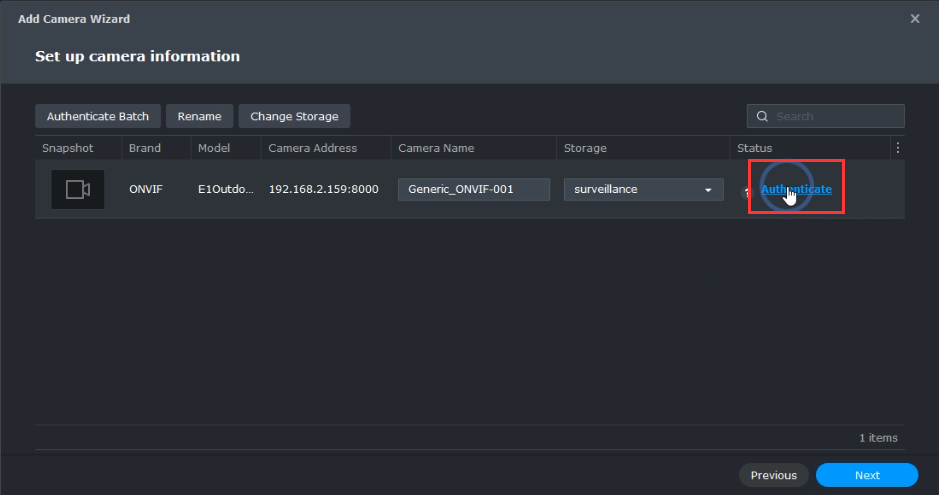
-
Once the camera status shows a green icon, click Next.
-
Select Quick Setup, click Next, and then click Done to complete the setup.
2. How to Add the camera via Reolink protocol?
-
In Synology Surveillance Station, click Add Manually. Enter a camera name, select Reolink as the brand, choose your camera model, and enter the camera's IP address. Ensure the HTTP port matches your camera settings (default: 80), then click Add.
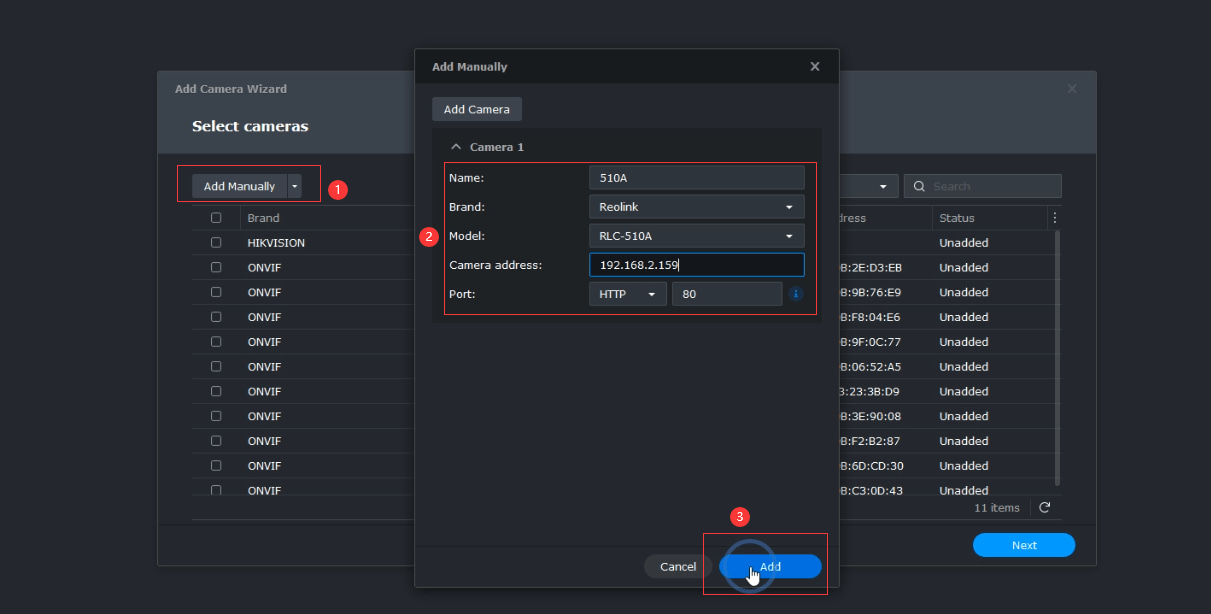
-
Select the camera you just added and click Next.
-
Click Authenticate, enter your camera's username and password, and then click Authenticate again.
-
When the camera status displays a green icon, click Next.
-
Select Quick Setup, click Next, and then click Done to finish the setup.
3. How to Add the camera via RTSP URL?
-
In Synology Surveillance Station, click Add Manually. Enter a camera name, select User Define as the brand, and enter the RTSP URL in the following format: rtsp://username:password@camera_ip_address:554/Preview_01_main. Then click Add.
-
Select the camera you just added and click Next.
-
Once the camera status shows a green icon, click Next.
-
Select Quick Setup, click Next, and then click Done to complete the setup.
You have now successfully added your Reolink camera to Synology Surveillance Station. To view the live stream, go to Live View in Surveillance Station.
Here is a video that shows how to add your cctv cameras to the Synology Surveillance Station.
Which Cameras Are Not Suitable for Synology Surveillance Station?
Battery-powered security cameras and unverified third-party models lacking full ONVIF/RTSP support are poorly suited for Synology Surveillance Station because they cannot maintain the continuous network connections or protocol standards required for NAS recording.
Battery-Powered Cameras
Battery models (such as the Reolink Argus series or cellular cameras) enter sleep mode to preserve energy, disabling the constant RTSP/ONVIF network streams that Synology relies on.
Better Alternative: For 24/7 continuous NAS recording, choose a wired PoE camera like the Reolink RLC-810A instead of a battery-operated device.
Unsupported or Limited Third-Party Models
Unverified cameras connected via generic ONVIF may offer basic live video while losing advanced capabilities like PTZ motion controls, two-way audio, or multi-streaming. Synology's "ONVIF Streaming Only" profile strips away smart analytics and event triggers compared to fully certified profile integrations.
Synology Camera Licensing: Essential Rules
Standard Synology NAS models include 2 free perpetual camera licenses, while NVR/DVA units include 4 to 8 default licenses.
Additional perpetual licenses can be purchased in 1-, 4-, or 8-camera packs to expand your channel capacity.
Standard single-lens and fixed stitched multi-lens cameras (like panoramic 180° models) typically consume only 1 license. However, multi-lens cameras that assign separate IP addresses or independent streams per channel require 1 license per active video stream.
FAQs
1. How many cameras can you add to a Synology Surveillance Station?
If you need to add more cameras, Synology provides Surveillance Device License Packs in bundles of 1, 4, or 8 licenses. Each pack comes with a license key that allows you to activate the same number of additional surveillance devices.
2. Are Reolink cameras compatible with Synology Surveillance Station?
Yes, many Reolink PoE and WiFi cameras are compatible with Synology Surveillance Station through ONVIF, Reolink protocol, or RTSP. However, battery-powered Reolink cameras are not supported because Surveillance Station requires a continuous connection for monitoring and recording, which would quickly drain the camera's battery. For the best experience, use wired or plug-in Reolink cameras with your Synology NAS.
3. Does Synology support ONVIF cameras?
Yes. Synology Surveillance Station supports many ONVIF-compatible IP cameras, which makes it easier to integrate devices from different brands. However, feature support can vary by model, so functions such as PTZ control, audio, motion events, or multiple streams may not always work the same way as officially listed cameras.
4. Can Synology record Reolink cameras 24/7?
Yes. Compatible Reolink PoE and plug-in WiFi cameras can record continuously to Synology Surveillance Station when they support the required streaming protocols and remain connected to the network. For reliable 24/7 recording, PoE models are usually the better choice because they provide stable power and network connectivity.
5. Do battery cameras work with Synology?
Generally, no. Battery-powered cameras are designed to save power by entering standby mode between events, while Synology Surveillance Station expects a more persistent connection for live view and continuous recording. For Synology-based surveillance, wired PoE or plug-in WiFi cameras are typically more suitable.
Conclusion
Setting up your security camera system with Synology Surveillance Station is a seamless process, especially when utilizing compatible cameras like Reolink. By following the outlined steps for adding cameras via ONVIF, Reolink protocol, or RTSP URL, you can easily integrate various surveillance options into your home.
Search
Subscribe for the Latest Updates
Security insights & offers right into your inbox