
A Complete Guide on Best Reolink Solar Security Cameras
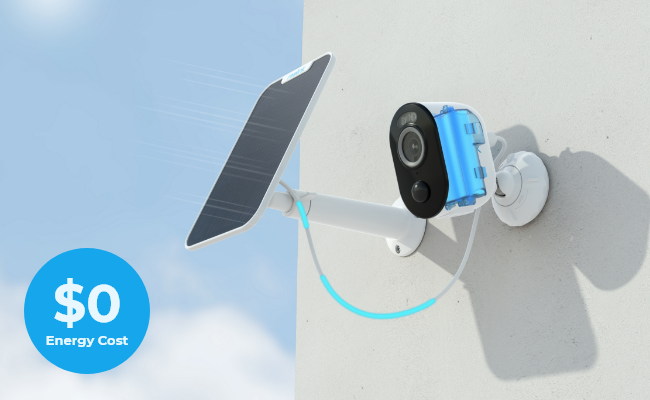
Everyone's situation is unique. The best solar security camera depends on how much ground you're covering, and whether Wi-Fi actually reaches the mounting spot. A single wall-mounted unit works fine for a front door or a backyard gate. But, a five-acre property with no signal near the far fence will require either a cellular camera or a small networked system instead.
What's interesting for solar-powered security cameras is solar power removes one variable from that decision: the electrical line. A panel keeps the camera's battery topped up, which matters most for garages, driveways, or any spot where running a cable would mean trenching or an electrician's call. The picks below are narrowed from Reolink's current solar lineup, organized by which situation each one actually solves, not by a generic ranking.
- How Solar Security Cameras Actually Work
- Standalone Solar Security Camera or Solar Security Camera System: Which Do You Need?
- The Real Advantages of Solar Security Camera
- What to Look For in a Solar Security Camera
- Best Solar Security Camera for Your Situation?
- Common Mistakes Buyers Make When Purchasing a Solar-Powered Security Camera
- Which Solar Camera Setup Is Right for You?
- FAQs
- Conclusion
How Solar Security Cameras Actually Work

A small solar panel is usually the core of the entire setup. It converts sunlight into a trickle charge that tops up the camera's rechargeable battery all day, so the camera never needs a wall outlet or a buried cable run.
Most solar security cameras ship as a bundle, which typically includes a camera plus a solar panel and a rechargeable battery. Some cameras sell the panel separately, so check the listing before assuming it's included.
On a cloudy or rainy day, the panel's output will drop. But, it rarely stops completely since visible light still passes through cloud cover. The battery is what actually keeps the camera running overnight and through low-light stretches while the panel's job is to keep that battery from running out.
Pro Tip: Point the panel toward true south (true north if you're in the southern hemisphere) and keep it clear of shade from trees or overhangs to get the most solar energy.
Standalone Solar Security Camera or Solar Security Camera System: Which Do You Need?
A standalone solar camera is a single self-contained unit with its own battery, solar panel, and microSD slot for local recording. There is no hub and no need for additional setup. You can just mount and pair it with an app (if available), and it work on its own too. This is usually enough to cover one blind spot such as a single gate or shed door. If there are multiple outdoor blind spots to cover, there will be a need for multiple solar security cameras or in some cases, a camera system.
A camera system pairs several cameras with a central Hub, which not only lets you view every camera from one app but centralizes storage too. It's the better choice once you're covering more than two or three spots, since managing standalone units one at a time gets tedious fast, and a hub-based system gives you one built-in storage pool instead of juggling several microSD cards.
In Reolink, neither option requires a monthly subscription for local storage. That applies whether you buy a single standalone camera or a full Home Hub system.
The Real Advantages of Solar Security Camera
Skipping a wired power source opens up placement options a plug-in camera can't match. Vacation homes, sheds, construction sites, vineyards, farms, barns, boats, and RVs all become viable mounting spots once the camera isn't tethered to an outlet.
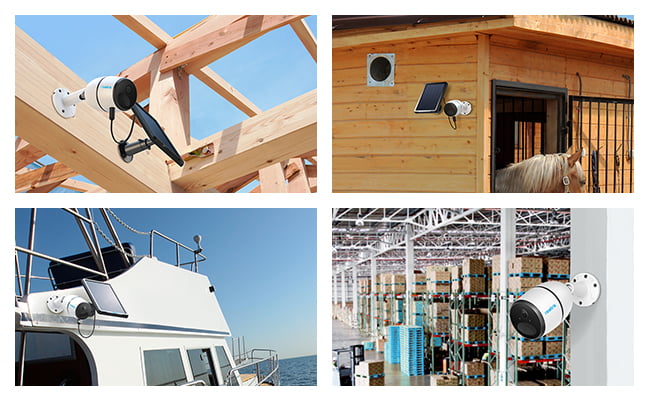
Installation is simpler as well. There are no cables to conceal and no conduit to install, making the camera easy to relocate. When a construction project is completed and site requirements change, the camera can be quickly moved by unmounting and remounting it elsewhere.
A charged battery also keeps working through a power outage, so the camera isn't dependent on the grid staying up. And because most solar cameras run on Wi-Fi or 4G rather than a wired network connection, you're not limited to areas with existing cabling or nearby outlets.
Scaling up is straightforward as well. Adding a second or third camera to a property doesn't require new wiring. All it takes is just another mounting spot with sun exposure, and with an app, they can be grouped together so you can check every feed from one screen.
What to Look For in a Solar Security Camera

Solar panel efficiency and charge time
A higher-output panel charges the battery faster, especially on shorter winter days. Reolink's own panels run 3W for the original Solar Panel and 6W for Solar Panel 2. Placement toward true south (true north below the equator) and clear of shade matters as much as the panel's wattage on the spec sheet.
Battery capacity
The battery keeps the camera running when the solar panel isn't producing enough power, such as at night or on cloudy days. Different solar cameras use different battery and panel sizes, so there isn't a simple rule that applies to every model. Some cameras have larger batteries because they use more power or are designed to last longer without sunlight.
If you're comparing models, it's best to check the manufacturer's specifications rather than relying on a general battery-to-panel ratio. As a starting point, look for a battery with at least 5,000mAh if you plan to use features that consume more power, such as two-way audio, continuous motion detection, or frequent recording. This can help ensure the camera stays powered between solar charging cycles.
Local storage vs. cloud
A microSD card lets the camera save recordings directly on a continuously recording camera. For most homes, a 64GB card can store several weeks to a few months of motion-triggered footage, depending on how often the camera records. If you choose a higher-resolution camera or want to keep recordings for longer before they are overwritten, consider a 128GB or 256GB card. Cloud storage is another option. It typically requires an ongoing subscription, but it lets you access and back up recordings from anywhere without removing the memory card.
Connectivity: Wi-Fi vs. 4G
Most solar cameras run on 2.4GHz or 5GHz Wi-Fi, which covers most homes and yards without issue. For a property where Wi-Fi doesn't reach, such as a detached barn or a remote fence line, a 4G-connected camera solves a problem a Wi-Fi model simply can't. It just needs a SIM card and a data plan from a supported carrier.
Weatherproofing
Every outdoor camera on this list carries an IP rating, written as IPXX. The first digit covers protection against solid objects like dust, the second covers protection against water.
- IP65: handles ordinary rain
- IP66: holds up to direct, driving rain and is the safer choice for a fully exposed mount with no overhang.
- IP67: adds protection against temporary submersion, useful for mounts low enough to sit in standing water during flooding or heavy runoff.
Cost
Upfront cost for solar-powered security cameras is higher than a plug-in camera, largely because you're paying for the panel and a larger battery. Before checking out, confirm there's no hidden installation fee or mandatory subscription, and that the current lineup you're comparing actually matches the features you need. Pricing on individual models can vary with promotions, so check the live listing rather than relying on a quoted number.
Best Solar Security Camera for Your Situation?
Best Wireless Solar Security Camera: Reolink Argus 4 Pro

Best for: Wide, static coverage without a blind spot
A single unit here covers an entire driveway or backyard without a second camera and without a spotlight lighting up the scene at night. Per Reolink's own lab testing, ColorX saves roughly 2W/h compared with an equivalent IR camera at night, about 12 extra days of standby time. That's a real efficiency gain, though actual results vary with usage and temperature.

One verified buyer picked this camera after dealing with repeated yard theft, and reported that it has worked well as a deterrent since installation. They noted spending weeks comparing options before settling on the Reolink, and came away satisfied with the choice.

4k 180° Wire-free Color Night Vision Camera
4K UHD 180° Blindspot-free View; Color Vision Day and Night; 30% More Battery Life; Dual-band Wi-Fi 6; Smart detection.
Best 4G Solar Security Camera: Reolink Go PT Ultra

Best for: No Wi-Fi where you need to mount it
This is the pick for any spot where the router simply doesn't reach. The battery can hold a charge for up to two months on cloudy stretches once paired with its solar panel. You'll need an ongoing data plan, so factor that into the cost comparison against a Wi-Fi model.

That's exactly the scenario another verified buyer described, having bought two units to cover a horses' field and a stable. They found it simple to use in a spot with no Wi-Fi, and valued being able to check in on things remotely whenever needed.
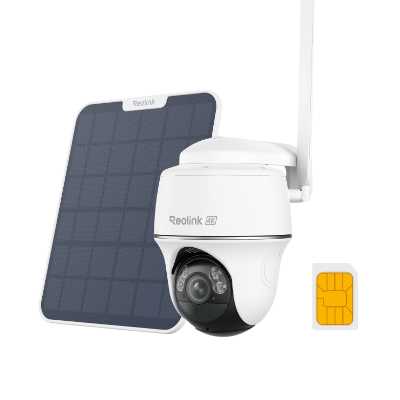
4K 8MP Wire-Free 4G LTE PT Battery Camera
4K 8MP; Smart Detection; 355° Pan & 140° Tilt; Battery/Solar Powered; Color Night Vision; Smart Real-Time Alert.
Best Solar-Powered Security Camera Without Subscription: Reolink Altas PT Ultra

Best for: Longest battery life, with pre-recording
It's the only camera in this lineup with adjustable pre-recording (2 to 10 seconds before a motion event), so you get to see what happened just before the camera started rolling. It's also the only pick here that goes beyond motion-triggered recording. When it's getting roughly 5 hours of direct sunlight a day through its solar panel, it can run scheduled or continuous recording instead of motion-only, which changes the SD-card math if you plan to use it that way.

The Altas PT Ultra was actually one of PCMag's Editor's Choice during 2025, citing its solid performance provided by its panning capabilities, solar charging, recording performance, and sharp resolution.
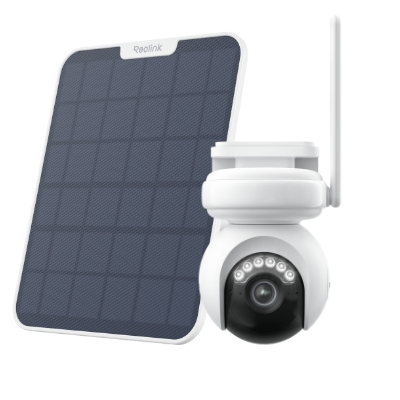
4K Battery-Powered PTZ Camera with Continuous Recording
👍 4K UHD video with continuous recording
👍 ColorX night vision in low light
👍 Pan, tilt, and automatic person tracking
👍 Local storage without monthly fees
Best Solar Security Camera for Home: Reolink Argus Eco Ultra

Best for: Simple, single-spot, budget-conscious buyers
This is a standalone unit in the fullest sense as there's no hub and no base station. Just the camera, battery, and an optional solar panel. It's the most affordable entry point in this lineup and a reasonable starting camera if you're covering one spot and don't yet know whether you'll want to expand to a full system later.
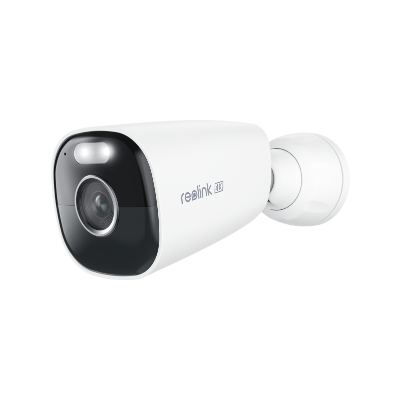
4K Standalone Battery/Solar-Powered Camera
4K 8MP; Smart Detection; 5/2.4GHz Dual-Band WiFi; Battery/Solar Powered; Color Night Vision; Easy & Flexible Installation.
Best Solar Security Camera System: Reolink Home Hub

Best for: Turning several solar cameras into one managed system
The Home Hub itself isn't a solar camera, and it isn't solar-powered. It's a small, sleek-looking wired box that plugs into your router and pools storage and management for whichever solar cameras you're already running (up to eight of them). It works with any of the Wi-Fi picks in this lineup (Argus 4 Pro, Altas PT Ultra, Argus PT Ultra, Argus Eco Ultra) except for the Go PT Ultra, since Home Hub doesn't support 4G cameras, and it'll keep recording to its own card independently either way.
If you'd rather start from scratch than add a hub to cameras you already own, Reolink also sells the hub pre-bundled with solar cameras included, genuinely solar-powered kits in a single purchase, such as Home Hub with Argus Eco Ultra or Home Hub with Altas PT Ultra.
Note: All six picks record locally with no monthly fee. The differences between them are coverage angle, connectivity, battery life, and whether you're buying one camera or building toward a system, not subscription cost.
Common Mistakes Buyers Make When Purchasing a Solar-Powered Security Camera
Assuming full sun year-round
A technically sunny climate doesn't guarantee a good charge if the mounting spot sits in tree shade for part of the day, and every panel's output drops as the sun's angle gets lower in winter. Walk the property at midday before finalizing a mounting spot, not just at the time of day you happen to be doing the install.
Undersized battery relative to panel output
There's no single fixed ratio to check against. Battery-to-panel pairings across even one brand's lineup can run from roughly 3:1 to 12:1 depending on the model. What matters is checking the specific camera's spec sheet before buying, not assuming a rule of thumb holds across every model.
Skipping the IP rating check
A camera under a covered porch overhang has different weatherproofing needs than one fully exposed to driving rain. IP65 covers the former while IP66 is the safer bet for the latter.
Not testing Wi-Fi signal at the actual mounting point
A camera that tests fine near the router can drop frames or lag once mounted at the far end of a yard. Check signal strength at the exact spot before buying a Wi-Fi model. However, this doesn't apply if you're going with a 4G camera instead.
Which Solar Camera Setup Is Right for You?
Six picks is a lot to hold in your head at once, so here's the same information from the sections above condensed into one table.
Pro Tip: A spec sheet's battery-life number is measured under ideal conditions. Cold weather reduces the effective runtime a battery delivers between charges, so a camera rated for months per charge may hold less in a hard winter. It's also worth checking how configurable a camera's app is before buying, since motion zones and notification sensitivity end up mattering as much as raw hardware specs once the camera is actually mounted and sending alerts.
FAQs
How much sunlight does outdoor solar security camera need?
It depends on the camera and panel wattage. Reolink's Altas needs just 1 hour of direct sunlight daily with its 6W Solar Panel 2 for continuous pre-recording, while the pan-tilt Altas PT Ultra needs about 5 hours to minimize missed recordings. Check the specific model's spec sheet rather than assuming one number applies to all.
Do solar security cameras require a monthly subscription?
No, most solar security cameras like Reolink models do not require a monthly subscription. Core features including live feeds, motion alerts, and local video recording to a microSD card or local hub are completely free of recurring fees. Monthly fees are typically optional and only apply if you opt for cloud storage backups or require a cellular data plan for 4G LTE models operating without Wi-Fi.
Are solar-powered security cameras worth it?
Yes, if running power to the mounting spot is impractical, such as for garages, barns, gates, or vacation properties. They cost more upfront and depend on sunlight, so a shaded or north-facing spot with an outlet nearby is better served by a plug-in camera.
How long do solar-powered security cameras last on a single charge?
Most models in this lineup run for one to six months on a full charge without any sunlight at all, though the exact figure depends on how often motion detection, two-way audio, and other power-hungry features trigger. Cold weather typically shortens this window.
Do solar cameras need much maintenance?
Very little. Wipe the panel every six months or so to clear dust or pollen buildup, which is the main thing that reduces charging efficiency over time.
How do I protect the solar panel itself from theft?
Mount it somewhere hard to reach, such as a rooftop or high eave, and note the serial number in case you ever need to prove ownership. A motion-triggered siren also acts as a deterrent before a thief gets close enough to reach the panel.
Conclusion
None of the six cameras above is the best solar security camera in some universal sense, and that's really the point of this whole guide. The right one is whichever matches how much ground you're actually covering and whether a signal reaches that spot at all. Get those two things right, and solar quietly does what it's supposed to. It takes the power cable out of the conversation entirely, so the only thing left to decide is where you want eyes on your property.
Go ahead to check out the current lineup and pricing at the Reolink solar security camera collection. Feel free to drop a comment below if you have any questions. Our team will be there to help answer them.
Search
Subscribe for the Latest Updates
Security insights & offers right into your inbox