
Wireless Webcam: The Ultimate Guide
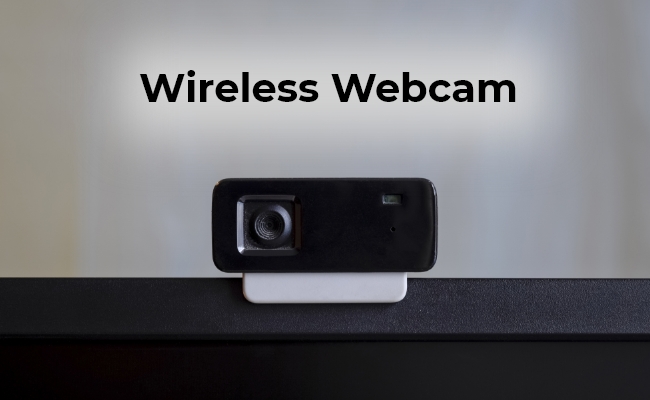
Have you ever struggled with messy cables while trying to video chat or record something on your computer or laptop? Wireless webcams are the solution you've been waiting for. These little cameras let you capture video and audio without any wires getting in the way.
But with so many options out there, how do you pick the right wireless webcam for your needs? From how they work to their benefits and top recommendations, we've got you covered. So keep reading to learn all about going wire-free with webcams.
What is a Wireless Webcam?
A wireless webcam is a video camera that can capture and transmit live video footage wirelessly, without the need for physical cables or wires.
These innovative devices use various wireless technologies, such as Wi-Fi, Bluetooth, or proprietary wireless protocols, to establish a connection with a computer, smartphone, or other compatible devices.
Unlike traditional wired webcams, wireless webcams offer a clutter-free and portable solution, allowing users to position the camera wherever they need without being constrained by cable lengths or tangled wires.
Types of Wireless Webcams
Wireless Bluetooth Webcams
Wireless Bluetooth webcams offer a convenient, cable-free solution for video calls, streaming, and recording by pairing directly with compatible computers, laptops, or smartphones through device settings or software.
Key Characteristics
- Cable-Free Setup: Eliminates desktop clutter and allows flexible positioning.
- Energy Efficient: Low power consumption extends internal battery life.
- Short-Range Use: Best suited for personal desktops or small-scale setups.
- Broad Compatibility: Works seamlessly with most modern PCs, tablets, and smartphones.
2.4GHz USB Dongle Webcams
2.4GHz USB dongle webcams provide a seamless, ultra-low latency wireless experience by connecting directly to your computer via a dedicated USB receiver—delivering effortless plug-and-play functionality without requiring Wi-Fi or Bluetooth pairing.
Key Characteristics
-
Plug-and-Play Simplicity: Connects instantly out of the box without complex network setup or device pairing.
-
Ultra-Low Latency: Offers a highly stable, lag-free video feed ideal for real-time communication.
-
Cable-Free Setup: Eliminates wire clutter to keep your workspace clean and organized.
-
Dedicated Receiver Connection: Works reliably even in environments without active Wi-Fi networks.
Wi-Fi / IP Webcams
Wi-Fi / IP webcams offer maximum placement flexibility and long-range operation by connecting directly to your local 2.4GHz or 5GHz network, allowing standalone models to stream directly to online platforms without relying on a tethered computer.
Key Characteristics
- Extended Range: Operates anywhere within your Wi-Fi coverage area, freeing the camera from desktop proximity.
- Standalone Streaming: Many models encode and broadcast directly to platforms like YouTube or Twitch without a host PC.
- Multi-Camera Scalability: Easily integrates into multi-angle setups for live event coverage and large spaces.
- Flexible Mounting: Battery-powered options enable seamless remote and outdoor deployment.
AI Auto-Tracking PTZ Webcams
AI auto-tracking PTZ webcams utilize intelligent motion algorithms combined with motorized pan, tilt, and zoom gimbals to keep you perfectly framed in real time as you move around the room.
Key Characteristics
- Dynamic Subject Tracking: Automatically follows facial and body movements to keep the presenter centered without manual adjustment.
- Motorized PTZ Controls: Smooth, silent motorized movement delivers fluid, broadcast-style framing.
- Hands-Free Operation: Ideal for active presenters who need to move naturally during live streams, lectures, or demonstrations.
- Smart Framing & Zoom: Intelligently adjusts focal distance and framing to suit single presenters or dynamic group interactions.
Wireless Security camera
Wireless security cameras deliver hassle-free home protection through battery, solar, or Wi-Fi-powered designs, offering high-definition video monitoring and real-time app access without requiring complex wiring.
Key Characteristics
- Truly Wire-Free Installation: Battery and solar-powered models eliminate power cords and Ethernet cables for quick, versatile mounting indoors or outdoors.
- High-Definition Video & Night Vision: Features crisp 2K/4K resolutions paired with infrared or full-color spotlight night vision for clear monitoring around the clock.
- Smart Motion & Person Detection: On-device AI accurately distinguishes humans, vehicles, and pets to reduce false alarms and send relevant app alerts.
- Versatile Local & Cloud Storage: Supports local Micro SD cards for subscription-free recording as well as cloud backup options for safe remote access.
Applications of Wireless Webcams
Wireless webcams have found widespread applications across various domains, catering to diverse user needs. Their versatility and portability have made them invaluable tools for individuals, professionals, and organizations alike.
For PC
Wireless webcams are an excellent choice for desktop computers, offering a clutter-free and flexible setup. Users can position the wireless webcam for PC at the desired angle and location without the constraints of cable lengths or the need for cable management.
For Laptop
Wireless webcam for laptops provides the ultimate portability, allowing users to video conference or stream from anywhere without being tethered to their laptops by cables.
Whether you're working remotely from a coffee shop, attending a virtual meeting while traveling, or simply enjoying the flexibility of working from different locations, a wireless webcam for your laptop ensures that you can seamlessly participate in video calls or live streams without the hassle of tangled wires.
For Conference Room
In conference rooms and meeting spaces, wireless webcam for conference room enables seamless video conferencing and collaboration, eliminating the need for complex wiring setups.
These webcams can be easily positioned to capture the desired view of the room, ensuring that all participants are visible and audible during virtual meetings or presentations.
For Zoom Meetings
With the rise of remote work and virtual meetings, wireless camera for Zoom meetings have become essential tools for professionals to stay connected and engage in productive online discussions.
These webcams offer a high-quality video and audio experience, allowing participants to clearly see and hear each other, regardless of their physical location.
How to Choose the Best Wireless Web Camera
When selecting the best wireless webcam, several factors should be considered to ensure optimal performance and user experience. Here are some essential features to consider:
Resolution
The resolution of a wireless webcam determines the quality of the captured video. Higher resolutions, such as 1080p (Full HD) or 4K, provide sharper and more detailed images, making them ideal for professional use or high-quality video streaming.
Focus
A webcam with autofocus capabilities can automatically adjust the focus, ensuring that the subject remains sharp and clear, even when moving or changing positions. This feature is particularly useful for video conferencing, live streaming, or recording scenarios where subjects may move around or change their distance from the camera.
Microphone
A wireless webcam with microphones is ideal for video conferencing, online meetings, or recording purposes. These webcams capture both video and audio, eliminating the need for a separate microphone setup.
Connectivity Options
When choosing a wireless webcam, consider the wireless connectivity options offered, such as Wi-Fi, Bluetooth, or proprietary wireless protocols. Each option has its advantages and limitations in terms of range, bandwidth, and compatibility with different devices.
Compatibility
Check the compatibility of the wireless webcam with your operating system, software applications, and devices to ensure seamless integration and reliable performance. Many webcam manufacturers provide compatibility lists or system requirements to help users determine if their devices are compatible with the webcam.
Benefits of Using Webcams with Wireless Connection
Embracing wireless webcams brings numerous advantages, offering users a more convenient, flexible, and efficient video experience. Here are some of the key benefits of using webcams with a wireless connection:
- Flexibility and portability: Wireless webcams allow for easy repositioning and mobility, enabling users to capture video from various angles and locations without being restricted by cables.
- Easy setup and installation: With no wires involved, setting up a wireless webcam is a breeze, making it a convenient choice for both personal and professional setups.
- Remote monitoring capabilities: Wireless webcams offer remote monitoring capabilities, allowing users to keep an eye on their homes, offices, or any other location from a distance.
- Clutter-free environment: By eliminating the need for physical cables, wireless webcams contribute to a clean and organized workspace, enhancing productivity and aesthetics.
- Wireless webcam for streaming: In the era of live streaming, wireless webcams have become essential tools for content creators, gamers, and professionals to broadcast high-quality video content wirelessly.
- Cost-effective: While wireless webcams may initially cost slightly more than their wired counterparts, they can be more cost-effective in the long run.
Best Wireless Camera for Computer Recommendation
If you're in the market for a top-notch wireless camera for your computer, the Reolink Altas PT Ultra is an excellent choice. This 4K PT Wi-Fi solar/battery camera with auto tracking capabilities is designed to capture video and transmit it wirelessly to a computer via the Reolink Client.
With its 4K 8MP Ultra HD resolution, the Altas PT Ultra delivers stunning video quality, ensuring that every detail is captured with precision.
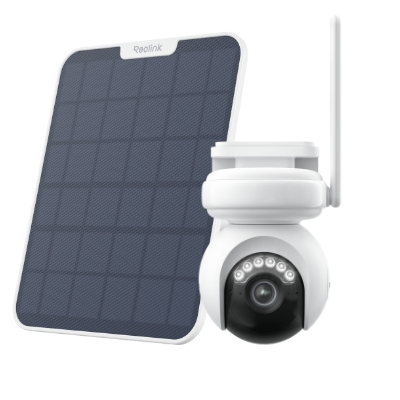
4K Battery-Powered PTZ Camera with Continuous Recording
👍 4K UHD video with continuous recording
👍 ColorX night vision in low light
👍 Pan, tilt, and automatic person tracking
👍 Local storage without monthly fees
Reolink Argus PT is another good choice. It stands out as a versatile wireless security camera with 5MP 2K+ Super HD video quality, pan-and-tilt functionality, and color night vision. It includes a rechargeable battery that can be solar-powered and supports both 5GHz and 2.4GHz Wi-Fi bands for reliable connectivity. Its straightforward installation makes it perfect for remote locations or places lacking power sources.
Moreover, it seamlessly integrates with Alexa, allowing for voice control and enhancing its usability in smart home setups.
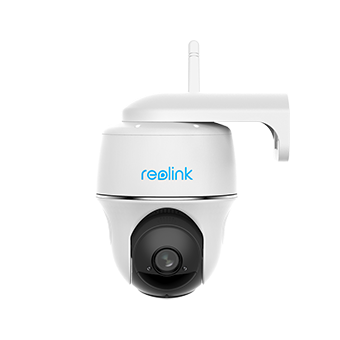
100% Wire-Free PT Camera
2K+ 5MP Super HD; 5GHz/2.4GHz WiFi; Rechargeable Battery & Solar Powered; 355° Pan & 140° Tilt; IP65 Certified Weatherproof; Color Night Vision; 2-Way Audio; 122° Wide Viewing Angle.
FAQs
Can webcams be wireless?
Yes, webcams can be wireless, using technologies such as Wi-Fi, Bluetooth, or proprietary wireless protocols to transmit video and audio data without the need for physical cables.
Can I connect a webcam with Bluetooth?
Yes, you can connect a webcam with Bluetooth technology. Many modern webcams support Bluetooth connectivity, allowing you to wirelessly pair and transmit video and audio data to compatible devices, such as computers, laptops, or smartphones.
How do Wi-Fi webcams work?
Wi-Fi webcams work by establishing a wireless connection with a Wi-Fi network or a compatible device through a built-in Wi-Fi module. Once connected, the webcam can transmit video and audio data over the wireless network, enabling remote viewing or video conferencing without the need for physical cables.
Can you connect a webcam wirelessly?
Yes, webcams can connect wirelessly using 4 primary methods:
- 2.4GHz USB Dongle: Plug-and-play connection via a dedicated USB receiver plugged into your PC.
- Wi-Fi / IP: Connects directly over your local network for long-range placement or direct streaming.
- Bluetooth: Pairs directly with compatible PCs, laptops, or tablets without extra hardware.
- Smartphone Apps: Turns your phone into a wireless webcam over Wi-Fi using apps like Camo, DroidCam, or Apple Continuity Camera.
Conclusion
In the ever-evolving digital landscape, wireless webcams have emerged as a game-changer, offering unparalleled flexibility, portability, and convenience.
Whether you're a professional seeking seamless video conferencing solutions, a content creator exploring new streaming possibilities, or simply someone who values a clutter-free and modern setup, wireless webcams are the ultimate choice. We invite you to share your thoughts and experiences with wireless webcams in the comments below.
Search
Subscribe for the Latest Updates
Security insights & offers right into your inbox