
Reolink Home Hub vs Home Hub Pro: What's the Difference?
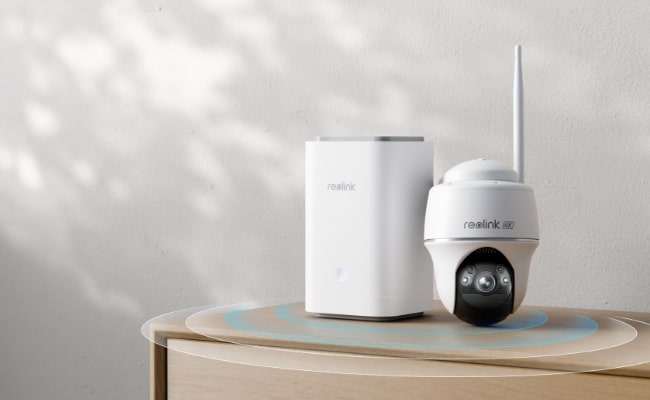
Reolink Home Hub and Home Hub Pro are devices that make connecting and controlling security cameras extremely simple and flexible. Not only do they provide a unified platform, but they also offer storage space with many incredible features.
Let’s see what both devices do and compare them in terms of features and different aspects. We will explain the key differences to help you select the right device.
Reolink Home Hub vs Home Hub Pro: Review of Them
Reolink Home Hub is a multi-device management and wireless security center with encrypted local storage. It’s suitable for small setups or homes to connect and control multiple devices on one platform. It supports Wi-Fi 6 to ensure a smooth live video feed and fast performance. It also records when the device is offline, and there is no monthly fee.

Wireless Security Center with Encrypted Local Storage and Multi-Device Management
64GB microSD Card Included; Exclusive Anti-Theft Algorithms; Expandable System Up to 8 Reolink Cams; No Monthly Fees
It offers 16MP resolution, which offers incredible details and clarity. It comes with a 64GB microSD card, but you can install up to two 512GB cards for more storage. The storage is encrypted, which means no one can get your data even if the device or card is stolen. It also works and creates a sound when an event is triggered in the IP camera or other smart devices.
Reolink Home Hub Pro is the advanced version of the Home Hub. It offers 2TB built-in storage and supports, which you can expand up to 16TB. Which means it is perfect for more devices to cover a large area. You can connect up to 24 security cameras and store their recordings in an encrypted storage with advanced anti-theft algorithms. It supports 16MP live streaming, local recording, and Wi-Fi 6 without any monthly fee.
Reolink Home Hub vs Home Hub Pro: Key Differences
There are three key differences between Home Hub and Home Hub Pro.
Storage
Home Hub comes with a 64GB microSD card. However, it supports two 512GB microSD cards, so you can increase the space up to 1GB. In contrast, Home Hub Pro has a 2TB HDD, which can be expanded up to 16TB. It also has a card slot where you can install a microSD card up to 512GB.
Supported Cams
Home Hub supports up to 8 security cameras. It is suitable for standard homes and apartments. On the other hand, Home Hub Pro supports up to 24 security cameras (only 12 can be wired cams). It is an ideal option for large homes and spaces.
Connectivity and Ports
The Home Hub Pro has more connectivity options and ports. Firstly, it has an HDMI port, so you can connect it directly to a monitor or TV. It also has a USB port, which you can use to back up and save footage in an external drive. Lastly, it has two LAN ports for IP cameras (Home Hub has only one port).
Reolink Home Hub Series Kits Recommendation
Home Hub with Altas PT Ultra
It comes with one Home Hub device and two Altas PT Ultra security cameras. The cameras record videos in 4K resolution along with ColorX night vision. With pan and tilt motion, they cover 360⁰ with auto tracking. The Home Hub works as a local storage and stores recordings without any fees. It offers encryption and weekly insights and works as an alarm center.
Home Hub Pro with E1 Outdoor Pro
It includes one Home Hub Pro and four E1 Outdoor Pro security cameras. The cameras offer 4K color footage with 3X optical zoom. You can clearly see objects and zoom into them for a close-up view. They offer 360⁰ surveillance for optimal security. The Home Hub Pro can connect up to 24 cameras, and it has a 2TB HDD to store videos. It offers anti-theft encryption algorithms, HD live view, and playback.
How to Set up Security Cameras with Home Hub
- First, you need to set up the security cameras. Power on the camera and install the Reolink app. Open the app and tap on the “+” button. Scan the QR code of the camera and complete the initialization process.
- Power the Hom Hub and connect it to the router using a network cable. On the app, tap the “+” button and scan the QR code. Complete the initialization process.
- On the app, go to the Home Hub settings. Tap the “+” button to add security cameras. You will see a list of devices. Tap Connect to connect them directly to the Home Hub. Now, you are ready to use the cameras via Home Hub.
Reolink Home Hub Pro vs Reolink NVR
The primary difference between Reolink Home Hub Pro and NVR is the connectivity. The Home Hub Pro connects and manages devices over Wi-Fi. In contrast, Reolink NVRs connect via PoE. All devices are connected via a separate physical cable.
Secondly, they differ in functions. The Home Hub Pro offers additional functions like HD playback, security summary, and built-in audio & alarm. On the other hand, the NVR only supports an HDMI connection to show the live feed on the monitor.
In terms of storage, the Home Hub Pro can store videos in both microSD cards and HDDs. However, the NVR uses pre-installed HDDs and also supports external HDD storage.
Last but not least is compatibility. The Home Hub Pro supports all Reolink battery Wi-Fi cameras, Plug-in Wi-Fi cameras, and PoE cameras. Battery cameras require a firmware upgrade for connection. In contrast, NVR supports all Reolink PoE cameras and most plug-in Wi-Fi cameras. You can also connect third-party cameras to the NVR.
FAQs
1. What is the range of the Reolink Home Hub?
Reolink Home Hub offers a coverage of up to 1,000 square meters. Any cameras within the range can be connected.
2. Does Reolink Home Hub Pro require a subscription?
No, Reolink Home Hub Pro does not require a subscription. You can use it without any monthly fee and enjoy the local storage, real-time alerts, remote access, and all features.
Conclusion
Reolink Home Hub and Home Hub Pro are excellent for smart homes. They allow you to control multiple cameras with ease and store their videos with advanced encryption. Users can check the weekly summary and use the device as an alarm center. It makes surveillance, video management, and remote access hassle-free, and all of that without any recurring charges.
Search
Subscribe for the Latest Updates
Security insights & offers right into your inbox