
How to Tell if a Smoke Detector is a Hidden Camera?
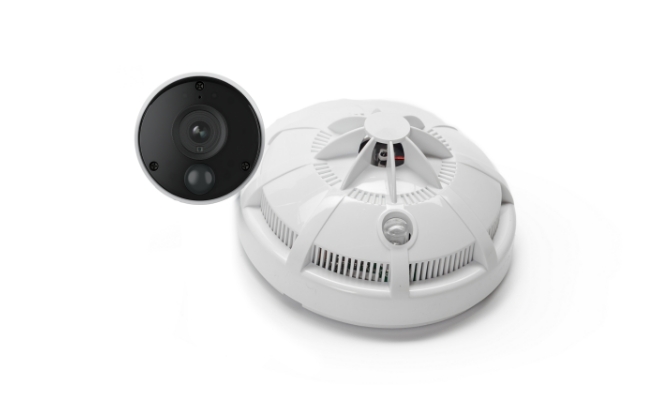
Privacy concerns have increased as hidden surveillance devices become more common in hotels, rentals, and public spaces. This has led many people to ask: Can smoke detectors have hidden cameras?
In most cases, regular smoke detectors do not contain cameras. However, some devices can be modified or disguised as smoke detectors for surveillance purposes. Knowing how to tell if a smoke detector has a camera can help you identify suspicious signs and protect your privacy.
In this guide, we will explain how to check whether a smoke detector could be a hidden camera, including physical inspection methods, light and lens checks, RF detection, and other techniques to help locate hidden cameras.
- Do Smoke Detectors Have Cameras?
- How to Tell if a Smoke Detector is a Hidden Camera? 5 Clear Signs
- How to Detect a Hidden Camera in a Smoke Detector?
- Smoke Detector vs Hidden Camera: Key Differences
- What to Do If You Find a Hidden Cameras in Smoke Detectors?
- Protect Your Space with a Reliable Security Camera
- FAQs
- Conclusion
Do Smoke Detectors Have Cameras?
No, normal smoke detectors do not have cameras. A standard smoke detector is designed to detect smoke and fire risks, not record video or monitor people.
However, some devices can be modified or manufactured to look like smoke detectors while containing hidden cameras. These disguised devices may be used for surveillance because smoke detectors are usually installed on ceilings and can provide a wide view of a room.
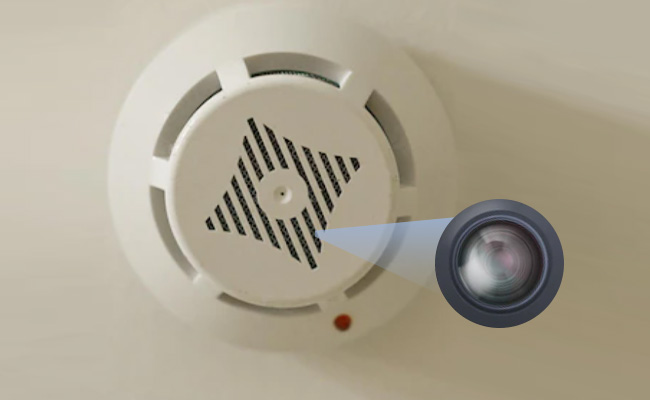
If you are concerned about a smoke detector camera in a hotel, rental property, or unfamiliar location, look for unusual signs such as a visible lens, unexpected openings, unfamiliar wiring, strange LED behavior, or wireless signals that are not typical for a smoke detector.
In short, while regular smoke detectors do not have cameras, a device disguised as a smoke detector can potentially contain a hidden camera. Understanding the differences can help you identify suspicious devices and protect your privacy.
How to Tell if a Smoke Detector is a Hidden Camera? 5 Clear Signs
Standard smoke detectors are designed solely for fire safety, whereas hidden camera smoke detectors house optical lenses and video wiring inside an altered detector casing.
You can distinguish a genuine smoke detector from a hidden surveillance device by examining its light indicators, wiring, and ceiling placement.
-
Abnormal LED Light Patterns: Under normal operating conditions, a standard smoke detector flashes a red status light consistently every 50 to 60 seconds. A camera unit often displays rapid blinks, irregular patterns, or steady green/blue Wi-Fi indicator lights.
-
Missing LED Indicator or Unsealed Casing: Standard commercial smoke detectors feature a completely sealed enclosure with a visible sensor window and vertical LED light. Many hidden camera units lack an indicator light entirely or feature unusual side vents designed to clear the camera's field of view.
-
Irregular Wiring Connections: Hardwired smoke detectors typically connect to standard household AC power using a 3-wire or 4-wire safety harness. In contrast, hardwired hidden camera detectors usually feature a dedicated power cable combined with an RCA, BNC, or coaxial video-output cable.
-
Unusual Room Placement: Fire safety codes dictate installing smoke detectors in the center of a ceiling to optimize smoke detection. If a unit is mounted near a wall corner, angled directly toward a bed or desk, or placed in a room's blind spot, it may be positioned intentionally to capture video coverage.
-
Misplaced Side Indicator Lights: On standard fire alarms, the flashing status LED is positioned vertically on the bottom face of the unit. If an indicator light is located along the side rim of the casing or blinks in an unfamiliar color pattern, inspect the housing closely for a hidden pinhole lens.
How to Detect a Hidden Camera in a Smoke Detector?
Hidden cameras disguised as smoke detectors can be difficult to identify because they are designed to blend into normal household devices.
However, a combination of physical inspection and digital detection methods can help you find suspicious devices and determine whether a smoke detector may contain a hidden camera.
1. Physical Inspection of the Smoke Detector
The first step is to carefully examine the smoke detector and look for features that are unusual for a normal fire alarm.
Check for a Camera Lens or Unusual Openings
Most smoke detectors have openings designed for smoke to enter the sensor chamber. A hidden camera, however, requires a clear view of the room. Look for:
- Small dark holes that do not match the smoke detector design
- A tiny glass or plastic lens behind an opening
- Unusual gaps or modifications on the housing
- A camera-like position facing areas where people spend time
A small lens reflection or a suspicious opening does not always confirm a hidden camera, but it may require further inspection.
Inspect the LED Lights and Device Behavior
Smoke detectors usually have indicator lights that show power status or alarm conditions. Check whether the device has:
- Unusual LED colors or blinking patterns
- Lights that remain active when they should not
- Additional lights that are not mentioned in the product manual
For example, a green light on a smoke detector is usually related to power or operating status and does not automatically indicate a camera. However, unexpected lights combined with other suspicious signs may require further checking.
Examine the Installation and Physical Condition
A normal smoke detector is typically installed according to safety guidelines and positioned to detect smoke effectively. Pay attention to:
- Devices installed at unusual angles
- Smoke detectors placed in locations that do not make sense for fire detection
- Recently installed or modified units
- Loose covers, extra components, or unusual attachments
Use a Flashlight to Look for Lens Reflections
A flashlight can help identify hidden camera lenses because glass lenses often reflect light.
To perform a flashlight check:
- Turn off the room lights if possible.
- Shine a flashlight around the smoke detector from different angles.
- Look for small, bright reflections that appear different from normal plastic surfaces.
This method works best in darker environments, although it cannot detect every type of hidden camera.
2. Digital and Network Checks
Some hidden cameras rely on wireless connections to transmit video. Digital inspection methods can help identify devices that may be connected to a network or emitting signals.
Use an RF Detector
An RF (radio frequency) detector can identify wireless signals from devices such as Wi-Fi or Bluetooth cameras.
To check a smoke detector:
- Turn on the RF detector.
- Move it slowly around the smoke detector.
- Look for unusual signal activity.
A detected signal does not always mean there is a hidden camera, because many electronic devices also emit radio signals. However, unexpected wireless activity near a smoke detector may deserve further investigation.
Scan Your Wi-Fi Network for Unknown Devices
If you suspect a smoke detector camera in a hotel, rental property, or home network, check connected devices on the Wi-Fi router.
Look for:
- Unknown cameras or video devices
- Unfamiliar device names
- New devices connected without permission
- Devices using large amounts of network traffic
Network scanning tools can help identify unknown devices, but they may not detect cameras that are offline, use a separate network, or store recordings locally.
Check for Infrared Camera Signals
Many hidden cameras use infrared (IR) lights for night vision. Some smartphone cameras can help detect infrared light.
Try this method:
- Turn off the room lights.
- Open your phone camera.
- Point it toward the smoke detector.
- Look for unusual blinking or glowing spots.
Note that not all smartphone cameras detect infrared equally, and some security cameras may use different night-vision technologies.
Use Hidden Camera Detection Apps
Some smartphone apps claim to detect hidden cameras by identifying infrared signals or scanning nearby network devices. These apps can be useful as an additional check, but they should not be treated as a guaranteed detection method.
For better results, combine app-based detection with physical inspection and network checks.
Smoke Detector vs Hidden Camera: Key Differences
While hidden cameras designed to look like smoke detectors mimic the outer shell of fire safety equipment, their internal architecture, primary function, and operational behavior are fundamentally different.
The comparison below highlights the primary distinctions between a genuine smoke detector and a hidden camera device:
What to Do If You Find a Hidden Cameras in Smoke Detectors?
If you confirm the presence of an unauthorized hidden camera in a private space:
-
Do Not Touch or Destroy the Device: Leave the unit intact to preserve physical evidence and fingerprints for law enforcement.
-
Document the Evidence: Take photos and video of the smoke detector, the hidden lens, and its exact viewing angle.
-
Contact Authorities: File a report with local police or notify building management/rental platform support immediately.
Protect Your Space with a Reliable Security Camera
Finding a hidden camera disguised as a smoke detector is concerning, but protecting your privacy is only one part of maintaining a secure space. Installing a trusted, dedicated security camera system gives you complete visibility and full control over your home or property's surveillance data.
Unlike hidden devices, purpose-built security cameras offer transparent monitoring, reliable performance, and essential features like high-definition video recording, AI-powered motion alerts, and real-time remote viewing.
Advanced Home Security: Reolink Altas PT Ultra
If you need a comprehensive, high-performance security solution, the Reolink Altas PT Ultra delivers industry-leading features for full-property coverage:
-
Continuous 4K Ultra HD Recording: Captures crystal-clear detail around the clock, making it easy to identify key details.
-
360-Degree Coverage: Eliminates blind spots by allowing you to rotate the camera remotely to monitor expansive outdoor or indoor areas.
-
Wi-Fi 6 Connectivity: Ensures fast, stable wireless streaming with reduced latency, even when handling high-bitrate 4K video feeds.
-
Local Storage (No Monthly Fees): Keeps your footage private and secure on-site without requiring mandatory cloud subscription plans.
-
Smart Motion Detection & Night Vision: Delivers precise alerts for people, vehicles, and pets while providing vivid footage in low-light conditions.
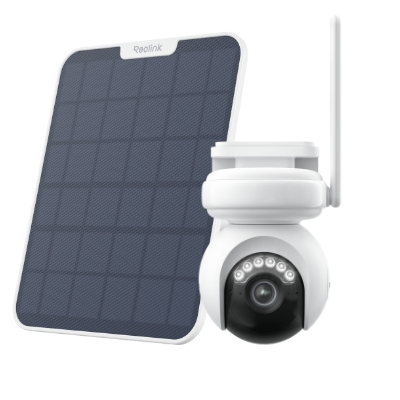
4K Battery-Powered PTZ Camera with Continuous Recording
👍 4K UHD video with continuous recording
👍 ColorX night vision in low light
👍 Pan, tilt, and automatic person tracking
👍 Local storage without monthly fees
FAQs
Do smoke detectors blink red or is it a camera?
During regular use, a smoke detector has the feature to signal in red once every 5 seconds. If there is a different pattern in blinking it could mean a camera.
Can a cell phone detect a hidden camera?
Yes, some smartphone apps can help you detect a hidden camera in smoke detectors and other things. They work by testing radio frequencies and infrared signals.
Conclusion
Protection of your privacy means that you must detect hidden cameras inside smoke detectors. You can use RF detectors and smartphone apps like Peek to identify surveillance devices, and if you find anything, report that to the authorities. In our tech-driven world, it is unsafe to not have some privacy when we are outside and live or work in a place eventually do not feel safe or free.
Search
Subscribe for the Latest Updates
Security insights & offers right into your inbox