
Doorbell Cameras with Local Storage: A Comprehensive Guide
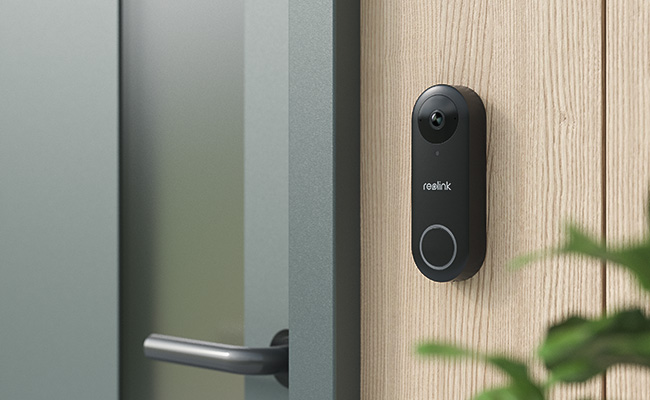
Some users prefer to have a doorbell camera with local storage to prevent the recurring cost of cloud storage. Not only does it save money, but it also offers you complete control over the data.
In this article, we will discuss what a doorbell camera with local storage is and why you should go for it. We explain some local storage options for doorbell cameras and share a few doorbell recommendations for optimal security.
What Is a Doorbell Camera with Local Storage?
A video doorbell that offers an option to store video recordings in local storage is called a local storage doorbell camera. It does not need a cloud storage subscription, so you can save money. You just need to buy the doorbell camera and connect a local storage device to it.
Common Local Storage Options
There are three main local storage options for doorbell cameras.
- SD Cards: Video doorbell cameras have a built-in microSD card slot. You can insert your card into it, and it will start storing your videos. It is the simplest way of storing doorbell camera videos in local storage, usually supporting up to 256GB.
- Hard Drive Storage (via NVR): If you want to save continuous recordings or use multiple cameras, NVR is a better option. You need an NVR to connect a hard drive, which can offer 2TB to 16TB of storage. It is ideal for long-term use and future scalability.
- Network Attached Storage (NAS): Suitable for complete security systems, NAS offers advanced features like encryption and high performance. It is easily scalable but requires compatibility with your doorbell camera and is generally more expensive than other options.
What Are Key Benefits of Local Storage Doorbell Cameras?
- Money-saving: The obvious benefit of a local storage doorbell camera is money-saving. You don't need to pay a recurring fee.
- Complete control and privacy: When storing data on local storage, you have complete control over it. You can save as many videos as you want and delete recordings whenever needed. You can implement security measures to protect data and you are also sure about your privacy.
- Works without internet: The recordings are directly stored in the local storage. It does not need internet. Even if your Wi-Fi is not working, the videos will be there. You can see them later.
- Scalable storage: You can scale the size of the storage according to your needs. If there are multiple cameras, you can use HDDs.
Where to Use Doorbell Camera with Local Storage?
- Homes and Apartments – Monitor entrances while avoiding monthly fees
- Rental Properties – Manage access without relying on shared cloud accounts
- Offices and Small Businesses – Secure entry points with full control over footage
- Areas with Unstable Internet – Ensure recording continues even without Wi-Fi
- Privacy-Sensitive Locations – Keep data stored locally for better security and control
Why Choose Local Storage Over Cloud Storage for Video Doorbells?
Both storage options have their own pros and cons, and it depends on your preferences which one to choose.
If you don't want to pay a recurring fee and have complete control over your data, you should go with local storage. You can either install a microSD card or store videos on NVR or server. It does not need the internet to store videos and offers more privacy. However, it stores data on a physical storage device, which can malfunction or fail.
If you can't bear the loss of videos due to the failure of physical storage, you should go with cloud storage. It instantly stores videos in the cloud, and even if the doorbell is tampered with or stolen, you still have videos at instant access. You can view videos from any location. For these special features, you need to pay a monthly fee, and there are concerns related to privacy. A stable internet connection is mandatory for cloud storage.
Best Doorbell Camera with Local Storage
Reolink Battery Doorbell
If you’re looking for a wireless video doorbell with local storage, consider the new Reolink battery doorbell. This wire-free model features a 7000mAh rechargeable battery, providing long-lasting power. Enjoy a full head-to-toe view for comprehensive front-door surveillance. It supports local storage via a MicroSD card of up to 256GB and can also connect to the Reolink Home Hub for encrypted storage with up to two 512GB MicroSD cards, offering central management and expanded storage capacity.
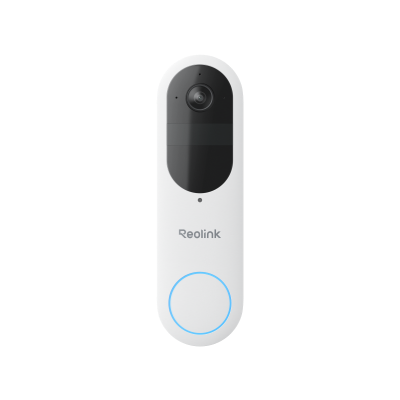
Smart 2K Dual-Band Wi-Fi Battery Doorbell
2K 4MP Head-to-Toe View; Person/Vehicle/Package Detection; Works with Reolink Home Hub & Wi-Fi NVR; 5/2.4GHz Dual-Band Wi-Fi.
Reolink Video Doorbell PoE
This is a PoE doorbell that offers you reliable performance 24/7. You need to connect an Ethernet cable to the doorbell for the internet, but it is totally worth it. It offers three local storage options: microSD card, FTP server, and Reolink NVR. You can choose any of them you find feasible and the best in your case.
It captures videos in 2K+ resolution and offers exceptional details and clarity. At night, it uses IR LEDs to capture clear footage. It can detect motion automatically and send real-time alerts to your devices. You can listen to the chime and talk to the person on the video via the app.
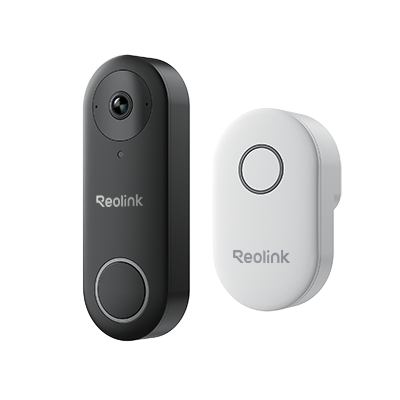
Smart 5MP Video Doorbell with Chime
5MP Super HD, Person Detection, Power over Ethernet, 180° Diagonal Viewing Angle, Two-Way Audio, High-Quality Night Vision.
Reolink Video Doorbell Wi-Fi
It's a video doorbell that works on Wi-Fi, which means you will not need an Ethernet cable. It works within the Wi-Fi range, and you can store your videos on a microSD card, FTP server, or Reolink NVR. It uses a dual Wi-Fi band to ensure a stable and speedy connection.
You can directly talk to the person through the built-in microphone and speaker. It captures clear videos in 2K+ resolution and offers black-and-white videos at night. It detects the motion of the objects and sends accurate alerts.
Smart 5MP Video Doorbell with Chime
5MP Super HD Day & Night, Person Detection, 2.4/5 GHz Dual-Band WiFi, 180° Diagonal Viewing Angle, Two-Way Audio, Rich Notification.
FAQs
Which video doorbell has free local storage?
Reolink video doorbells offer free local storage with microSD cards and are compatible with Reolink NVR and Home Hub.
Can a Ring doorbell have local storage?
Yes, you can store the videos of your Ring doorbell locally on a microSD card by using Ring Alarm Pro, which is a separate security system. But it only works with selected doorbells.
What is the best Ring alternative with local storage?
Check out Reolink cameras and doorbells—most models support local storage via microSD cards and can also connect to a Reolink NVR or Home Hub for continuous recording.
Conclusion
A doorbell camera with local storage allows you to store data on physical storage, such as an SD card, server, or NVR. Users don't need to pay a recurring fee to store their videos. For many users, it is a preferred option as they also have control over their data. We have shared the benefits and pros & cons of both types of storage, and you can easily select the one that you find feasible. If you are looking for a doorbell camera with local storage, you can consider the options we have shared.
Search
Subscribe for the Latest Updates
Security insights & offers right into your inbox