
4 Top Cottage Security Cameras: Find The Right One
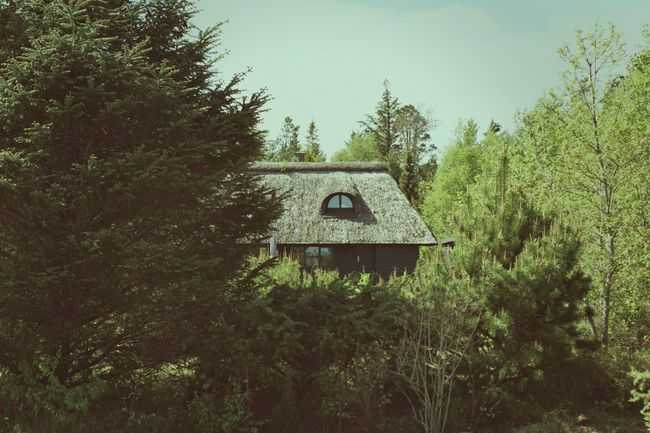
A cottage can sit empty for weeks or months, so a camera that works on your home's front door often falls short here. Cottage security cameras need to cover the approach to your property, send alerts you will actually act on, and run on the power and internet you really have.
This guide covers where to place cameras, how to match one to your WiFi and power setup, what to do when an alert arrives hours from the property, and which Reolink models fit which cottage.
- When Is a Cottage Actually at Risk?
- What do Cottage Security Cameras Actually Cover?
- Before You Buy Anything: Does Your Cottage Have WiFi and Power?
- What to Do When You Get a Security Camera Alert Three Hours Away From the Cottage?
- Cottage Security Camera Checklist Before You Close Up for the Season
- Does a Cottage Camera Actually Protect Your Insurance Coverage?
- Which Reolink Camera Fits Which Cottage?
- FAQs
- Conclusion
When Is a Cottage Actually at Risk?
Cottages are most at risk when nobody is around. Alberta RCMP data showed October was the peak month for break-ins at seasonal residences in 2017 and 2018, and police noted that many winter break-ins aren’t reported until owners reopen the cabin in spring. More recently, Alberta RCMP counted 348 break-ins at seasonal properties and cottages so far in 2024, up 8% from the previous year. In one Ontario case, OPP said a Lake Huron cottage was vandalized sometime between July 22 and Sept. 13 and was only discovered when a friend stopped by.
That doesn’t mean every vacant cottage will be burglarized. It means your security strategy should consider the possibility of long stretches with no human activity on or near the property. Solutions that suffice for your primary residence might not cut it when there’s no one to hear a broken window or see an open shed gate or a car driving down your driveway.
What do Cottage Security Cameras Actually Cover?
A cottage is often a compound of buildings, not just one structure. Here are some options to consider when selecting the right placement.
- The main cottage entrance and any nearby windows
- A detached shed/bunkie
- Dock or boathouse
- Driveway/Gate or road approach
If you absolutely can only afford to install one camera, put it near your driveway/gate or approach your property. Every delivery driver, contractor, salesman, and even a would-be burglar must pass this spot to reach your cottage.
Don’t forget outbuildings. Sheds, bunkies, and boathouses can seem like an afterthought because they are often set back from your main cottage. This also means neighbours and passersby are less likely to notice them.
Before You Buy Anything: Does Your Cottage Have WiFi and Power?
Your WiFi and power situation determines far more than any specs list. Here’s what you should consider based on Wi-Fi coverage and availability of power when buying security cameras for your cottage.
- Strong WiFi and power: Often the easiest choice for a cottage near town or off a 4-season road is a regular WiFi camera.
- Weak or seasonal WiFi/powers: Often better than jamming square peg in round WiFi hole and hoping for the best is a cellular camera with solar assist.
- No WiFi/no power: Generally speaking, a 4G LTE camera with battery and solar becomes the no-brainer default for a hard-off grid cabin.
Note: For additional information on these options, please review our posts on security cameras that don’t need electricity. as well as off-grid security cameras. See the home security camera buying guide for overall weather ratings and purchase considerations.
What to Do When You Get a Security Camera Alert Three Hours Away From the Cottage?
Security cameras only help if you have an actionable plan for the alert they generate. Any trees, waterways, or sources of wildlife near your driveway can potentially send endless motion alerts.
This is when functions such as Motion Zones as well as Person, Animal and Vehicle Detection comes in. They can reduce alerts triggered by moving branches, scampering animals and anything else happening outside of your zone of interest.
If you receive an alert while you are hours away from the cottage, take these steps in order to confirm what's happening before you escalate:
- Review the live view or the recorded clip footage.
- Reach out to a trusted neighbor or local property-watch contact if physical verification is required.
- Contact your county sheriff’s office or local police department non-emergency number if you believe the activity is suspicious.
Important Note: Remember to only use 911 if there is an emergency actively occurring. Built-in sirens or spotlights can scare away an intruder while you formulate a response, but they are no substitute for one.
Cottage Security Camera Checklist Before You Close Up for the Season
Plumbing, food, and windows are already on your closing list. The security camera needs its own line, because it only protects the cottage if it keeps running while you're away.
So, check these things before you lock up:
- Power: Charge the battery fully, or make sure the solar panel is clear of debris, aimed at the sun, and connected. Check the camera's rated operating temperature against your winter lows. If the cottage's main power goes off for winter, your router goes with it, and a WiFi camera loses its connection.
- Signal: Check signal strength in the app from the camera's final mounting spot. For a cellular camera, confirm the data plan stays active through spring.
- View: Re-aim the camera to cover the approach, and update motion zones for falling leaves, snow, water, and neighboring trees.
- Alerts and access: Confirm app notifications are on, and give your property-watch contact instructions for viewing the feed or receiving alerts.
- Test: Walk past the camera to confirm it records and sends a notification to your phone. Do this last, after every other change.
Does a Cottage Camera Actually Protect Your Insurance Coverage?
Many insurers offer a discount for a home security system, but that isn't the question that matters most for a cottage. The bigger one is whether your policy has a vacancy clause. According to the Insurance Information Institute, these clauses typically apply after 30 to 60 consecutive days without anyone living in the home, and many standard policies limit or exclude theft and vandalism coverage once a home is deemed vacant.
The specifics depend on the insurer and policy. Some insurers offer vacancy endorsements or vacant home policies for properties that sit empty, and these typically cost more than standard coverage.
A security camera can help mitigate risk but won’t supersede the rules of your policy. Ask your insurance provider how it defines “vacant” and “unoccupied” for your cottage, whether you need a vacancy endorsement, and how any monitoring can or does affect your coverage. For the discount question, see our guide on whether security cameras can lower your home insurance premiums.
Which Reolink Camera Fits Which Cottage?
You should pick the right Reolink cottage security camera based on the property setup and area. This is why you shouldn’t focus too much on the list of features. Let’s take a look at few of the options available to you.
Argus 4 Pro: Best for One Area With Reliable WiFi
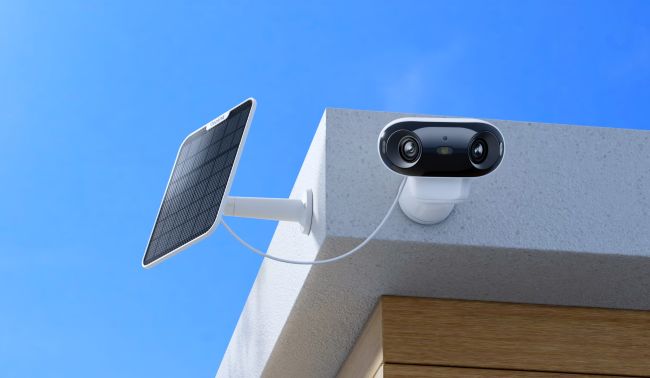
The Argus 4 Pro suits a cottage with WiFi and one spot that matters most, usually the driveway or front entrance.
Its two lenses are stitched into a single 180° view, so one camera can cover the door and the path leading to it.It runs on a rechargeable battery, so you don't need an outlet at the mounting spot, and it works with a solar panel.
Did You Know: The Argus 4 Pro has won a 2024 European Product Design Award in the security systems category. It also earned a Special Mention in TIME's Best Inventions of 2024.
RLK8-800B4: Best for Several Areas With Reliable Power
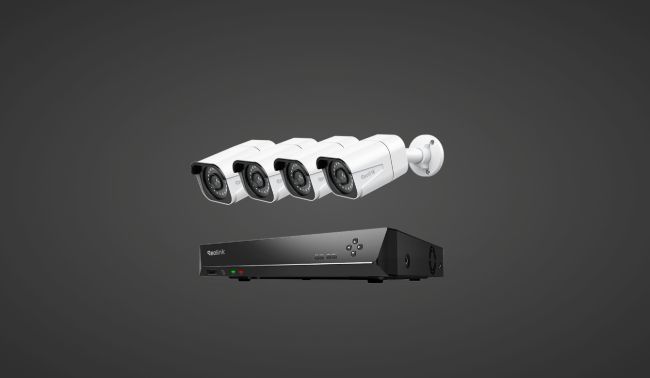
If you want the cottage, a shed, and the road approach covered at the same time, a wired kit is the sturdier route.
The RLK8-800B4 pairs an eight-port PoE NVR with four 8MP bullet cameras. Each camera gets power and video over a single Ethernet cable, so there are no batteries to recharge.
As a PoE NVR kit, you'll need cable runs from the NVR to every camera, and the NVR needs steady power, so this kit fits cottages where the electricity stays on while you're away. It's also ideal to keep the NVR in a part of the building that stays within its operating temperature range of -10°C to 45°C (14°F to 113°F).
Go PT Plus: Best for Weak or Seasonal WiFi
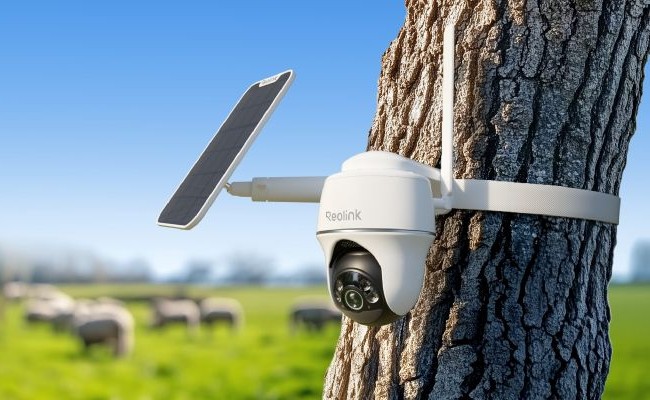
The Go PT Plus connects over 4G LTE instead of WiFi, so it keeps working when the cottage router is switched off or when the signal doesn't reach the shed. Its 355° pan and 140° tilt lets one camera cover the driveway and the cottage entrance by moving between saved preset positions.
It runs on a rechargeable battery and works with a Reolink solar panel. As a 4G camera, it uses a Nano SIM and needs an active data plan. Some Reolink packages include a SIM, so check what comes in the box.
Go PT Ultra: Best for Off-Grid Cottages With No WiFi or Power
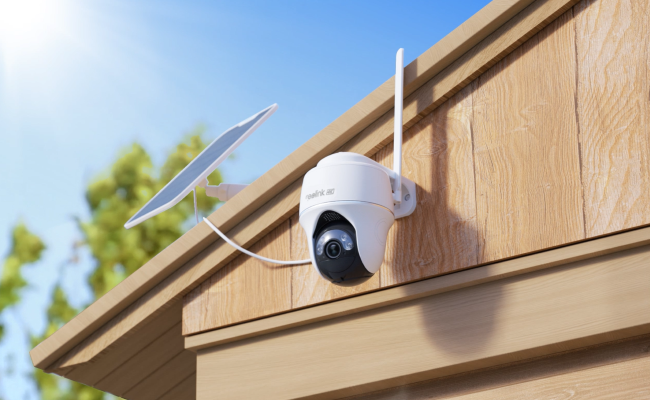
The Go PT Ultra keeps the cellular, pan-tilt design of the Go PT Plus and steps up to 4K (8MP) video, which gives you more detail when you zoom into a clip of the driveway. It pairs with the 6W Reolink Solar Panel 2, which makes it the pick for a hard off-grid cabin with no WiFi and no power.
Like the Go PT Plus, it connects over 4G LTE through a Nano SIM, so it also needs an active data plan and a cell signal on the property. Reolink's SIM guide lists a Nano SIM as included with the Go PT Ultra, but check your package and country.
The Reolink Go PT Ultra's 355° pan, 140° tilt in action:
FAQs
Do cottage security cameras need WiFi?
Not necessarily. A cellular camera equipped with a battery and solar support can run off-grid without WiFi or grid power. Instead, it connects to the cellular network with a SIM card and uses mobile-data. You’ll still need to plan on data service and good sunlight for a solar panel location.
What is the best security camera for a cottage?
There isn’t one best camera, because the right pick depends on your WiFi and power. If your cottage has reliable WiFi and one area to cover, the Argus 4 Pro is a good fit. For several areas with steady power, the RLK8-800B4 wired kit covers more ground. If the WiFi is weak or seasonal, the Go PT Plus connects over 4G LTE instead. For a cottage with no WiFi and no power, the Go PT Ultra pairs 4K video with a solar panel.
How can I monitor my cottage when I’m away?
Use a camera with a mobile app and push alerts. A WiFi camera needs internet at the cottage, while a 4G camera uses a mobile data plan. Set up motion zones and Person and Vehicle Detection (plus Animal Detection on cameras that offer it) to cut false alerts, and give a trusted neighbor or property-watch contact access to the feed or alerts. When an alert comes in, review the clip first, ask your contact to check in person, and use the police non-emergency line if something looks suspicious.
Can a security camera work in a cottage during winter?
Yes, if it is rated for your winter temperatures and still has power and a connection. The four options in this guide are rated down to -10°C (14°F), so check your coldest nights against that. If you shut off the cottage’s main power for winter, a WiFi camera loses its connection when the router goes down, while a 4G camera on battery and solar doesn’t depend on the router. Keep the solar panel clear of snow so it can keep charging.
Do cottage security cameras require a monthly fee?
Not for recording. The Argus 4 Pro, Go PT Plus, and Go PT Ultra save video to a microSD card, and the RLK8-800B4 saves it to its hard drive, so local storage has no subscription. A 4G camera does need an active mobile data plan, which you can get from Reolink's data service where available or from a carrier. Reolink Cloud is also available in selected countries.
Conclusion
There’s no one-size-fits-all cottage security camera system out there. It’s about understanding how to cover your approach to the structure of the cottage you own, picking a camera that works with your WiFi and power availability and knowing EXACTLY what you’ll do when you see an alert.
Search
Subscribe for the Latest Updates
Security insights & offers right into your inbox