
Reolink Argus 4 Pro Review: Behind the Lens
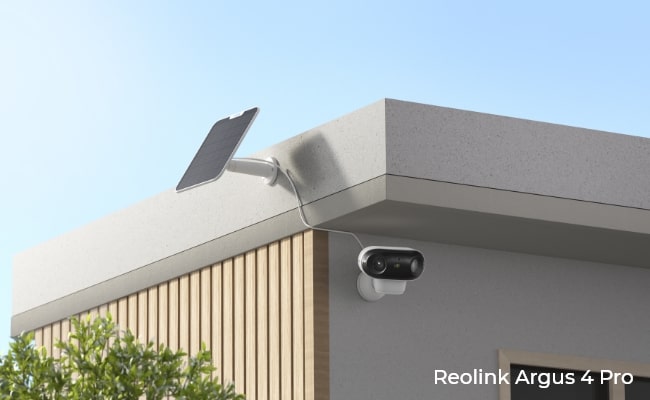
The Reolink Argus 4 Pro launched in June 2024 as the most significant redesign in the Argus line, introducing a new dual-lens form factor, a 180° field of view, and Reolink's ColorX night vision technology that produces full-color footage without visible spotlights.
This security camera is built for a specific use case - wide outdoor coverage, wire-free installation, and spotlight-free night vision without a monthly subscription. If that combination matches what you need, it is one of the most capable battery cameras in its class. If it does not, this review's Best Use section and Buyer Decision Table will point you toward a better fit.
- What Is the Reolink Argus 4 Pro?
- How to Set Up the Reolink Argus 4 Pro?
- Reolink Argus 4 Pro Feature Breakdown
- Solar Panel Compatibility: Can the Argus 4 Pro Run Without Recharging?
- Who Should Buy the Reolink Argus 4 Pro?
- Argus 4 Pro Real User Experiences
- Argus 4 Pro Alternatives
- Argus 4 Pro vs. Argus 3 Pro: Is the Upgrade Worth It?
- Is the Reolink Argus 4 Pro Worth the Price?
- Buyer Decision Table
- FAQs
- Conclusion
What Is the Reolink Argus 4 Pro?

The Reolink Argus 4 Pro is a wire-free outdoor battery camera that uses two 4mm lens modules and an in-camera stitching processor to produce a continuous 5120x1440 panoramic image across a 180° horizontal field. It runs on a 5000mAh rechargeable battery with optional solar charging via the Reolink Solar Panel 2. All AI detection features and local storage are included with no subscription required.
Key Specifications
Pros
- 4K (5120x1440) resolution across a 180° dual-lens field, with two views stitched into one seamless image
- ColorX night vision: full-color footage in low light without visible spotlights (F/1.0 aperture and 1/1.8" CMOS sensor)
- AI person, vehicle, and animal detection at no extra cost, with no subscription required
- 5000mAh battery with fast charge: 10 minutes of charging = 24 hours of operation
- IP66 weatherproof, rated for rain, dust, and direct water spray from any direction
- Local storage up to 512GB microSD; also supports Reolink Home Hub for multi-camera cross-tracking
Cons
- No infrared fallback mode, which means the camera not be suitable for situations like wildlife monitoring or light sensitive environments.
- Designed for motion-triggered recording only. For locations requiring 24/7 coverage, a wired PoE camera like the Reolink RLC-810A is a better fit.
- Battery performance varies in cold temperatures. Users in climates with extended sub-zero winters should plan for more frequent recharging, or pair with the Reolink Solar Panel 2 in locations with reliable winter sun.
How to Set Up the Reolink Argus 4 Pro?
Setup takes under 10 minutes using the Reolink app. The camera pairs via Bluetooth rather than QR code scanning, which makes the initial connection faster and more reliable than older Argus models. Once paired, you connect the camera to your Wi-Fi network (2.4GHz or 5GHz), choose your recording and notification preferences, and mount the camera using the included hardware.
The mounting arm supports vertical and horizontal tilt adjustment, so you can dial in the field of view after installation without removing the bracket. Two-person installation is easier on high mounts above 3 metres, but one person can handle standard door-height placements.
Reolink Argus 4 Pro Feature Breakdown
180° Blindspot-Free View: What It Covers in Practice

The Argus 4 Pro's 180° horizontal field of view is wide enough to cover the entire front of a standard detached house, or a two-car driveway, from a single mounting point above the front door. That is a coverage area that would typically require two separate single-lens cameras.
The view is produced by dual-image stitching: two 4mm lens modules capture adjacent frames and merge them in-camera into one continuous 5120x1440 image. Because the stitching is handled on-device, the full resolution is maintained across the entire width rather than being split across two streams. When placed above my front door facing the street, the camera captured the full road width from left to right without any gap in coverage.
Reolink refers to this as "Blindspot-Free View" because the 180° horizontal angle combined with a 50° vertical angle leaves no meaningful blind spots in a typical outdoor frontage installation. In practice, the PIR sensor's 170° horizontal detection angle closely matches the camera's optical field, so motion detected at the edges of frame is also detected reliably by the sensor.
Does 4K Actually Make a Difference for Outdoor Security?

At 5120x1440 pixels stretched across a 180° panoramic frame, the Argus 4 Pro provides enough detail to identify a face or read a licence plate at standard driveway distances. This is the practical test that matters for a security camera.
The 15fps frame rate is optimised for still-frame review rather than smooth motion playback. For a battery camera built around PIR-triggered recording efficiency, that is the right trade-off. Smooth 30fps footage requires significantly more processing and storage; the 15fps approach preserves battery life without losing the detail needed to identify a person or vehicle from footage.
In bright daylight, color accuracy and sharpness are strong across the full 180° width. At the edges of the stitched frame, there is a small amount of geometric distortion typical of ultra-wide lenses, but subject identification remains reliable within the central 160° of the frame.
ColorX Night Vision: How It Works Without Spotlights

The Argus 4 Pro produces full-color footage in low-light conditions without activating visible spotlights. In typical suburban outdoor lighting, a driveway or front entrance lit by ambient streetlight or porch illumination appears in natural color rather than the black-and-white infrared image standard on most battery cameras.
ColorX is built around two hardware decisions: an F/1.0 aperture lens and a 1/1.8" CMOS sensor. The 1/1.8" sensor is larger than the 1/2.7" sensor used in the Argus 3 Pro. A bigger sensor captures more light per pixel, and the F/1.0 aperture is wider than any standard security camera lens. Together, these two components capture roughly four times more light than conventional camera hardware, producing color footage in conditions where other cameras would switch to black-and-white IR mode.
The five built-in spotlights activate automatically in complete darkness, providing color footage in zero-ambient-light conditions.
Battery Life and Charging: Real Numbers, Not Lab Estimates
The Argus 4 Pro's 5000mAh battery delivers up to 30% more standby time than a comparable IR camera. According to Reolink's lab testing, ColorX saves 2W/h per hour versus IR night vision, adding up to 12 extra standby days under equivalent conditions. (Reolink's figures are based on lab comparison with a 4K IR camera under night conditions.) In active use with normal residential detection frequency, expect several weeks between charges under typical conditions.
Battery life varies by temperature, detection volume, and how often live streaming is accessed. Cold temperatures reduce battery performance noticeably; users in climates with extended winters should factor in more frequent recharging during cold months.
One practical standout: 10 minutes of USB-C charging powers the camera for 24 hours, so recharging sessions are short even when done manually. This fast-charge capability is not mentioned on most review sites but is a meaningful practical advantage for anyone who needs to bring the camera inside periodically.
A question that comes up regularly in the r/reolinkcam community: can the Argus 4 Pro run continuously from USB-C wall power? The answer is yes for power delivery. But the camera is built around PIR-triggered recording and still captures footage only on motion events, even when plugged into constant power. It does not support continuous 24/7 recording in any configuration.
Wi-Fi 6 Connectivity: Setup Speed and Streaming Stability
The Argus 4 Pro connects to both 2.4GHz and 5GHz networks using Wi-Fi 6 (802.11ax). Wi-Fi 6 provides faster initial connection during Bluetooth pairing setup and more stable throughput when accessing live video or downloading recorded footage from the camera.
In practical terms, 5GHz access reduces buffering when streaming 4K live footage compared to the 2.4GHz-only performance of older Argus models. If your router supports Wi-Fi 6, the Argus 4 Pro can use its full capabilities. If your router only supports Wi-Fi 5 (802.11n), the camera falls back gracefully and still functions on 2.4GHz.
The camera also supports WPA3 security, the current standard for network encryption.
Smart Motion Detection: How Accurate Are the Alerts?

The Argus 4 Pro uses AI person, vehicle, and animal detection to filter motion events before sending notifications, with no subscription required. In testing across a standard residential front door placement, false alert rates from wind-blown foliage and passing vehicles outside the detection zone were low.
Detection zones can be configured in the Reolink app. You can define custom polygonal zones within the 180° frame, set sensitivity per zone, and configure notification schedules to stop alerts during times you do not want to be notified. The PIR sensor's 170° horizontal detection angle closely matches the camera's field of view, which means the sensor-triggered recording and the camera's optical range are well-aligned.
For users who want to pause all detection without changing settings: you can manually turn off the PIR sensor entirely to stop all detections, configure non-detection zones to exclude specific areas from triggering, or set a time schedule to limit when the camera records and sends notifications.
The camera supports cross-camera tracking via Reolink Home Hub, which enables a subject detected by the Argus 4 Pro to trigger recording on adjacent cameras. This is a useful capability for properties with multiple camera installations.
No Subscription Needed: What You Get for Free
All AI smart detection (person, vehicle, animal), local microSD storage up to 512GB, two-way audio, live view, and Reolink app access are included without any subscription. There is no cloud storage plan required for the camera to function at full capability.
Reolink does offer optional cloud storage plans, but they are not required. For users who want an off-device backup without a recurring monthly fee, the Reolink Home Hub provides local network storage for multiple cameras simultaneously.
At $394.99 USD, the Argus 4 Pro's subscription-free model represents a meaningful total cost of ownership advantage over cameras requiring a cloud plan. A $10/month cloud subscription adds $240 over two years, which closes the price gap between the Argus 4 Pro and less expensive alternatives significantly.
Solar Panel Compatibility: Can the Argus 4 Pro Run Without Recharging?

The Argus 4 Pro is compatible with solar panels, specifically the Reolink Solar Panel 2 (6W). It connects via USB-C. The original Reolink Solar Panel uses a different connector and is not compatible with this camera. Verify the model before purchasing.
With the Reolink Solar Panel 2, the Argus 4 Pro can sustain or exceed daily charge consumption for cameras in locations receiving consistent direct sunlight. In south-facing outdoor locations with 3 to 4 hours of direct daily sun, most users find the solar panel keeps the battery topped up without manual intervention. In overcast climates or heavily shaded mounting points, solar input may not fully offset battery drain at moderate detection frequencies, and periodic USB-C recharging remains necessary.
When running the Argus 4 Pro, it is best to treat the solar panel as a significant charge extender in variable-sun climates, and as a near-complete replacement for manual charging in consistently sunny placements. For installations where direct sun access is limited or unreliable, a wired PoE camera removes the power variable entirely.
Pro Tip: Position the Reolink Solar Panel 2 at a slight upward angle above the camera for maximum sun exposure. The panel cable is long enough to allow flexible positioning relative to the camera body.
Who Should Buy the Reolink Argus 4 Pro?
The Argus 4 Pro is the right choice for the following situations.
Best for:
- Front-of-home coverage from a single camera. One Argus 4 Pro mounted above a front door covers a standard two-car driveway and the adjacent footpath without a second camera.
- Wire-free outdoor installation in locations with direct sun access. Paired with the Reolink Solar Panel 2, the camera requires no cable routing and no manual recharging cycle in suitable locations.
- Night monitoring where spotlight presence is a concern. ColorX night vision produces full-color footage without the visible white light that announces a camera's presence or wakes sleeping household members.
- Buyers who want AI-powered smart detection and local storage without a monthly subscription.
Argus 4 Pro Real User Experiences

Reddit user mistertkbe deployed the Argus 4 Pro with a Reolink Hub and Solar Panel 2 at their property in Spain, integrated with Home Assistant. Despite only 3 hours of sunlight on a cloudy day, the Solar Panel 2 charged the camera from 20% to 80%, faster than they anticipated. The user also described the Image quality as "fantastic, both during the day and at night," with ColorX delivering full-color footage at night using a nearby ambient LED light source as the only illumination.
In the user's setup, it also shows how much value solar-powered cameras gain when they integrate directly with Home Assistant. By avoiding cloud dependencies and subscriptions, they offer a more flexible and self-sufficient alternative to traditional wired or cloud-locked security cameras.

Paul Moons of Digital Reviews Network mounted the Argus 4 Pro on his garage in Australia, facing a street with "very little lighting." One camera covered the full driveway and street approach. The Solar Panel 2 kept the camera operational for several weeks without manual recharging under mild detection settings. ColorX produced clear full-color footage in the dimly lit street, and AI detection correctly identified passing cars and a garbage truck. A windy night triggered some false positives from trees, resolved by lowering the sensitivity setting in the app.
Argus 4 Pro Alternatives
No security camera is suitable to perform in every scenario. Here are a few situations that are worthy to consider alternatives to the Argus 4 Pro:
- You need 24/7 continuous recording: The Argus 4 Pro records on motion only, including when powered via USB-C. A wired PoE camera like the Reolink RLC-810A is the right choice for continuous recording.
- Your mounting location receives limited direct sunlight: Solar charging will underperform in shaded or north-facing locations, and a wired option removes the power constraint entirely.
Argus 4 Pro vs. Argus 3 Pro: Is the Upgrade Worth It?
The Argus 4 Pro is a meaningful generational upgrade, not a minor refresh. The core differences are the lens system, night vision approach, resolution, connectivity, and PIR coverage.
Night vision: The Argus 3 Pro uses color night vision that requires visible spotlights to illuminate the scene, plus an IR black-and-white fallback for complete darkness. The Argus 4 Pro's ColorX produces full-color footage in ambient low light without activating visible spotlights, but has no IR fallback mode. For locations with some ambient light, the 4 Pro's approach is better.
Field of view: The Argus 4 Pro's 180° dual-lens stitched view is over 70° wider than the Argus 3 Pro's 105° single-lens FOV. One Argus 4 Pro can cover what would otherwise require two cameras in wide-area scenarios.
Resolution: 8MP at 5120x1440 versus 5MP at 2880x1620. A meaningful jump for face or plate identification at distance, particularly across a wide panoramic frame.
Where the Argus 3 Pro holds an advantage: The Argus 3 Pro retains IR black-and-white night vision as a fallback for fully unlit environments, which the 4 Pro does not have. It also has a marginally bigger 5200mAh battery.
Verdict: Argus 3 Pro owners who want wider coverage and spotlight-free night vision will find the Argus 4 Pro a clear upgrade. Those satisfied with their current coverage who rely on IR fallback for completely dark locations can continue using the 3 Pro without compromise.
Is the Reolink Argus 4 Pro Worth the Price?
The Reolink Argus 4 Pro retails for an MSRP of $162.99 USD.
What is included: 4K dual-lens camera, AI person/vehicle/animal detection, local storage up to 512GB microSD, Wi-Fi 6 connectivity, Google Home and Amazon Alexa compatibility, IP66 weatherproofing, and a 2-year warranty. No monthly subscription is required for any of these features.
Subscription savings context: Security cameras requiring a cloud subscription at $10/month add $240 over two years. The Argus 4 Pro's local storage eliminates that ongoing cost entirely, narrowing the effective price gap between it and less expensive subscription-required alternatives.
Where the price is justified: The combination of ColorX spotlight-free night vision and a 180° dual-lens panoramic field of view is uncommon in battery-powered cameras. Buyers who need both capabilities together will find the price reflective of what the hardware delivers.
Where buyers may want to reconsider: Buyers who need only wide coverage (without ColorX) or only spotlight-free night vision (in a narrower FOV) have less expensive options in the Reolink lineup. The standard Argus 4 is a capable alternative at a lower price point for buyers who do not need the 180° field of view.
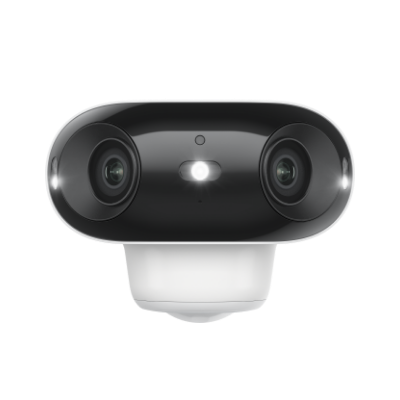
4k 180° Blindspot-free Wi-Fi 6 Camera
4K UHD 180° Blindspot-free View; Dual-band Wi-Fi 6; Smart detection; Easy Installation Anywhere
Verdict: Strong value for the specific use case: wide outdoor coverage, wire-free installation, full-color night vision, and no subscription. If your situation calls for all three of those, the $394.99 USD price is reasonable. If your situation calls for only one or two, there are lower-cost paths to the same outcome.
Buyer Decision Table
FAQs
What solar panel works with the Reolink Argus 4 Pro?
The compatible solar panel is the Reolink Solar Panel 2 (6W), which connects via USB-C. The original Reolink Solar Panel (3W) uses a different connector and is not compatible with the Argus 4 Pro. In locations with consistent direct sunlight, the Solar Panel 2 can sustain the camera's charge without manual recharging. Real-world testing from a user in Spain showed the panel charging the camera from 20% to 80% in just 3 hours of sunlight on a cloudy day.
How long does the Reolink Argus 4 Pro battery last?
Battery life depends on detection volume, temperature, and live stream usage. Under normal residential conditions, several weeks between charges is typical. ColorX night vision saves approximately 2W/h per hour compared to IR night vision cameras, contributing to longer standby time despite the 5000mAh capacity being smaller than some competing battery cameras. The fast-charge capability means 10 minutes of USB-C charging restores 24 hours of operation.
Does the Argus 4 Pro record 24/7, or only on motion?
The Argus 4 Pro records on motion only. It is designed around PIR-triggered recording for battery efficiency. Plugging the camera into USB-C wall power delivers continuous power but does not enable continuous 24/7 recording. For locations that require 24/7 continuous footage, a wired PoE camera is a better fit.
Does the Reolink Argus 4 Pro require a subscription?
No. All AI smart detection, local storage, live view, two-way audio, and Reolink app access are included without any subscription. Reolink offers optional cloud storage plans, but they are not required for the camera to function at full capability. Local microSD storage supports cards up to 512GB.
Is the Reolink Argus 4 Pro easy to set up?
Setup takes under 10 minutes using the Reolink app. The camera pairs via Bluetooth, which is faster and more reliable than the QR code pairing used on older Argus models. After Bluetooth pairing, you connect to Wi-Fi, choose your settings, and mount the camera. The mounting arm supports tilt adjustment after installation, so you can dial in the field of view without reinstalling the bracket. Users who run Home Assistant have confirmed the camera integrates with the platform without requiring a cloud connection.
Conclusion
The Reolink Argus 4 Pro is built for a specific combination of needs: wide outdoor coverage from a single camera, wire-free installation, and full-color night vision without the visual presence of active spotlights. That combination is difficult to find in a battery-powered camera, and the Argus 4 Pro delivers all three.
It is not the right fit for every situation. Locations that need 24/7 continuous recording, completely dark environments where IR fallback is required, or shaded mounting points where solar charging cannot sustain the battery, have better-matched options in the Reolink lineup. The Buyer Decision Table above covers those alternatives directly.
For the use case it is designed for, wide outdoor wire-free coverage with ColorX night vision and no subscription, it is a strong choice at $394.99 USD.
See current pricing and bundle options on the Reolink Argus 4 Pro product page.
Search
Subscribe for the Latest Updates
Security insights & offers right into your inbox