
3 Best Reolink Floodlight Cameras Without Subscription

Buying a security camera used to be simple. You simply purchase, install, and you are good to go. Now, many homeowners discover too late that the camera they bought quietly locks important features behind a monthly subscription. Motion history disappears after a few days. Smart detection becomes limited. Some brands even restrict video storage unless you keep paying.
That frustration is exactly why demand for the best floodlight camera without subscription has grown so quickly. People want outdoor security that works fully out of the box without recurring fees hanging over it every month.
The good news is that there are still cameras offering local storage, AI Detection, bright floodlights, and reliable recording without pushing users into a cloud plan. Better yet, many of them now rival or outperform subscription-based competitors in video quality and smart features.
A good floodlight camera should help you spot motion clearly, deter intruders instantly, and keep footage safely stored even during an internet outage. That’s the standard buyers should expect now, not a premium add-on.
Let us first go through why a floodlight camera without subscription could be more suitable for you and how to properly choose one that works for you.
Why Choose a Floodlight Camera Without Subscription
Recurring Cost
The main reason is recurring costs. Monthly subscription fees cost around $5 to $15 per camera. It might look like a small figure at first but when you keep paying the same amount range for about 3 or 4 years, that money could easily cover for another high-quality outdoor floodlight camera entirely.
According to security.org, cloud storage fees are now one of the biggest recurring expenses tied to home security cameras.
Privacy
Cameras with local storage keep footage on your device instead of constantly uploading recordings to third-party servers. For families concerned about data security, that level of control matters.
More Storage Options
If your router goes offline for some reason (e.g. short circuit) while motion is triggered outside your garage, a cloud-only floodlight camera may miss the recording entirely. But, a local-storage floodlight camera can still save the footage directly to the microSD card or NVR without interruption.
That difference only becomes obvious after something important happens.
How to Choose a Good No Subscription Floodlight Camera
There are many features to look for in a no-subscription floodlight camera, including some tricky ones to take note of.
AI detection without a paywall
A surprising number of cameras advertise “no subscription required” while quietly limiting useful features behind optional cloud plans. Smart AI detection is one of the biggest traps. Some brands technically record locally but reserve person or vehicle detection for paying subscribers.
The best floodlight security camera without subscription should include person, vehicle, and animal detection fully unlocked from day one.
Storage flexibility
At minimum, look for cameras that support 128GB microSD cards. Cameras that also work with NAS systems or NVRs can also give you far more flexibility for continuous 24/7 recording. That setup is especially useful for larger homes or small businesses managing multiple camera feeds.
Floodlight brightness (lumens)
Brightness deserves more attention than most buyers realize. Around 1,800 lumens work well for driveways and front yards. Closer to 3,000 lumens gives stronger coverage across larger outdoor spaces up to roughly 40 feet. It depends on your space dimensions so be sure to take note of it when factoring in the brightness of the floodlights.
Resolution
Resolution plays a bigger role in subscription-free systems specifically. Without cloud enhancement processing, the camera relies more heavily on raw on-device image quality. That is why 4K stands out so much on a good floodlight camera. Faces, license plates, and motion details stay sharper during playback. While 2K is still usable, 4K gives noticeably cleaner evidence footage.
Power source fit
Power source should match your installation environment. Hardwired AC cameras are the most reliable long-term option for permanent outdoor use. A PoE floodlight camera works especially well for homeowners already running Ethernet infrastructure. Wireless floodlight camera models offer easier placement flexibility, especially around garages, sheds, or side entrances where wiring access is difficult.
Weather resistance
Weather resistance is one detail buyers often overlook until heavy rain arrives. IP65 should be considered the baseline. IP67 offers better durability in harsher climates with frequent storms or snow exposure.
3 Best Floodlight Cameras Without Subscription
Reolink Elite Floodlight WiFi - Best for homeowners looking for wired cameras powered by AI
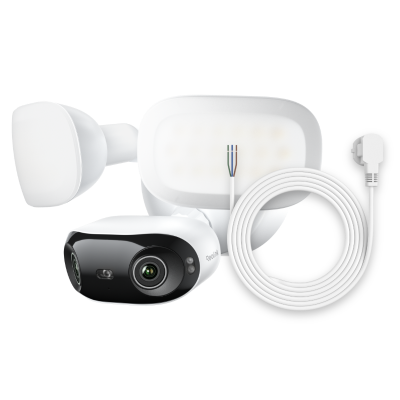
4K 180° Ultra-Wide Wired Floodlight Security Camera
3000-Lumen Dimmable Lighting, Adjustable Color Temperature, Local AI Video Search, Local Storage, Dual-Band Wi-Fi 6.
The first thing you notice about the Reolink Elite Floodlight WiFi is how much ground it covers. Its dual-lens 4K 8MP setup creates a full 180-degree panoramic view, which immediately solves one of the biggest weaknesses of traditional outdoor cameras: blind spots.
For a driveway or wide front yard, that extra coverage changes everything. Instead of installing two separate cameras to cover both sides of the property, the Elite handles it with one stitched panoramic feed.
Lighting performance is equally impressive. The 3,000-lumen floodlights are dimmable and support adjustable color temperature, which gives homeowners more control over nighttime visibility.
Pro Tip: Bright white lighting tends to work well for security-focused setups, while warmer tones feel less harsh near entryways or patios.
Storage support is one of the strongest points here. The camera supports up to 512GB microSD cards along with NVR, NAS, and Home Hub compatibility. That flexibility makes it one of the best subscription-free wired floodlight camera options for users who want long-term local recording.

Connectivity feels future-ready too. Dual-band Wi-Fi 6 improves stability and throughput, especially for 4K streaming.
The real differentiator, though, is Reolink’s Local AI Video Search powered by ReoNeura. Instead of manually scrubbing through hours of footage, users can search for descriptions like “man in a white hoodie” or “red truck” directly on-device without cloud processing.
That kind of feature used to require expensive subscription ecosystems. Here, it runs locally with no monthly fee attached.
For homeowners wanting advanced AI tools without handing footage over to the cloud, this is arguably the strongest overall pick right now.
Reolink Duo Floodlight WiFi - Best for wide coverage
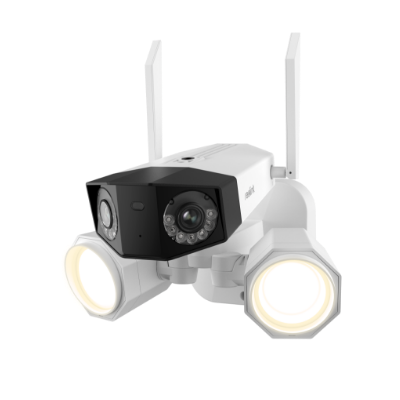
4K WiFi Camera with Floodlights
Dual Lens, 5GHz/2.4GHz WiFi, 180° Wide-Angle Panorama, Person/Vehicle Detection
Some camera setups are less about advanced tracking and more about eliminating dead zones entirely. That is exactly where the Reolink Duo Floodlight WiFi excels.
Its dual-lens 4K design delivers another seamless 180-degree panoramic view, making it ideal for large driveways, storefront entrances, side yards, or warehouse loading areas. Instead of switching between separate camera feeds, users get one continuous wide-angle image.
This matters more than people think. A standard camera pointed too wide often stretches and distorts footage around the edges. The Duo avoids that problem while still covering a huge area.
The 1,800-lumen floodlights strike a good balance for everyday residential use. They are bright enough to deter unwanted visitors without overpowering smaller outdoor spaces.
AI detection is included out of the box with person, vehicle, and animal recognition. No subscription required. That means fewer false alerts from moving trees or passing headlights, which becomes especially valuable near busy streets.
Dual-band Wi-Fi helps maintain stable connectivity, though homeowners with existing Ethernet infrastructure may appreciate the PoE-friendly installation options even more. For properties already wired for networking, that setup delivers stronger long-term stability than relying purely on wireless signals.
Like the Elite, the Duo supports up to 512GB microSD storage along with Home Hub compatibility.
The key difference here is simplicity. The Duo Floodlight WiFi focuses on reliable wide-area monitoring without overcomplicating things. If your goal is broad outdoor visibility with strong local storage support, this is one of the best outdoor floodlight camera choices available.
Reolink TrackFlex Floodlight WiFi - Best for active tracking

Smart 4K 360° Coverage Wi-Fi Floodlight Security Camera
Local AI Video Search, 4K 8MP Ultra HD, 360° Coverage View, 6X Hybrid Zoom, Dual-Color Floodlight.
Fixed cameras work well for monitoring wide areas. But sometimes you want a camera that actively follows movement instead of simply recording it. That is where the Reolink TrackFlex Floodlight WiFi becomes interesting.
Its dual-lens 4K PTZ system combines panoramic awareness with active motion tracking. The camera supports 355-degree pan, 50-degree tilt, and 6x hybrid zoom, allowing it to follow movement across large outdoor spaces instead of locking into a fixed viewing angle.
For properties with long driveways, side gates, or detached garages, that flexibility creates a more responsive security setup.
The floodlights are powerful too. At 3,000 lumens with adjustable color temperature, the lighting system doubles as both a deterrent and a practical outdoor visibility tool.
One feature that deserves attention is the triple PIR sensor system with 270-degree out-of-view detection. Instead of waiting for someone to fully enter frame, the camera detects approaching motion earlier and reacts faster.
ReoNeura AI Video Search is included locally here as well. Searches happen entirely on-device with no subscription attached.
Storage options remain strong across the board as it supports up to 512GB of SD card storage, NVR compatibility and Reolink’s Home Hub device.
For homeowners who want a camera that reacts dynamically instead of simply observing passively, this is the strongest option in the lineup.
The TrackFlex has already started attracting attention outside of Reolink’s own ecosystem. A camera reviewer from YouTube gives a useful real-world breakdown of the camera’s tracking performance and installation experience
Security Tips for No Subscription Floodlight Cameras
Buying the right camera is only part of the equation. A poorly configured system can still leave security gaps even with great hardware.
Network and Account Security
One of the most common mistakes happens during initial setup. People leave the default password unchanged because they plan to “fix it later.” That delay creates unnecessary risk.
Change the password immediately after installation and enable two-factor authentication where available. Firmware updates matter too. Many updates quietly patch vulnerabilities that most users never hear about publicly.
For larger NVR setups, especially for businesses managing multiple properties, placing cameras on a separate VLAN or guest network limits exposure if another device on the network becomes compromised.
Optimize Motion Detection and Reduce False Alerts
Notification fatigue is real. If a camera sends twenty unnecessary alerts every day, people eventually stop paying attention altogether.
The fix usually comes down to proper activity zones and sensitivity tuning.
A camera facing a busy road should exclude sidewalks and vehicle lanes wherever possible.
Detection schedules help too. Morning traffic patterns during school drop-off hours may not need the same alert sensitivity as late-night motion near the driveway.
Note: Reoneura AI detection technology allows users to fine-tune detection sensitivity separately for people, vehicles, and animals. That level of control makes alerts far more useful in real-world conditions. A quieter notification system is often a smarter one.
Backup Strategies for Local Footage
Local storage is reliable, but it is not invincible.
microSD cards wear out over time, especially outdoors where heat and cold cycles stress the hardware continuously. If the footage actually matters, periodic backups should become routine.
For homeowners using NAS systems or NVRs, automated backup workflows are ideal. Smaller setups can still benefit from manually exporting important clips to external USB storage every few weeks.
The goal is simple: avoid discovering storage failure after an incident instead of before one.
Setup and Placement Tips for Floodlight Security Cameras
Even the best outdoor floodlight camera can underperform due to bad placements. Here are some installation tips you can take note to ensure your floodlight security camera works the way you need them to.
Mounting Height and Camera Angle
Mounting the camera too high is one of the most common mistakes. A floodlight camera installed 15 or 20 feet up may cover a large area, but facial detail often becomes less useful because the lens is looking downward too aggressively.
The sweet spot around 9 to 10 feet tends to work best for most homes. At that height, the camera captures faces naturally while still remaining difficult to tamper with.
Angle matters just as much as height. A slight downward tilt around 15 to 20 degrees improves ground coverage without wasting frame space on rooftops or the sky. For front driveways, try positioning the camera slightly off-center rather than directly above the garage door. That angle usually captures better facial detail when someone approaches.
Floodlight positioning deserves separate attention too. Avoid aiming the light arms directly into neighboring windows or back toward reflective surfaces like white garage doors. Excessive glare can reduce nighttime image clarity surprisingly fast.
Networking and Connectivity
A wireless floodlight camera is only as reliable as the signal reaching it.
If the router sits close to the installation point, a 5 GHz connection typically delivers smoother 4k streaming and faster playback responsiveness. That higher bandwidth becomes especially noticeable on dual-lens cameras or PTZ systems handling larger video feeds.
Longer distances tell a different story. Once thick brick walls, concrete, or metal siding enter the equation, 2.4 GHz usually maintains stability better over range.
For camera locations more than 30 to 40 feet away through multiple walls, signal drops become common. This is where homeowners often start seeing delayed notifications or buffering during live view sessions.
In those situations, adding a Wi-Fi extender or switching to a poe floodlight camera setup can create a much more stable long-term solution.
Pro Tip: outdoor cameras near busy smart-home networks sometimes compete with dozens of connected devices simultaneously. Giving the camera its own reserved bandwidth or dedicated Wi-Fi channel can noticeably improve consistency.
Initial Local Storage Configuration
One small setup detail causes more recording issues than people realize: inserting a pre-formatted microSD card and assuming everything will work automatically.
Before mounting the camera outdoors permanently, format the card directly through the camera system first. This reduces compatibility issues and helps the recording system initialize correctly.
Enable loop recording immediately. Without it, the camera eventually stops recording entirely once storage fills up. Many homeowners only discover this weeks later after trying to review footage from an important event.
Recording mode matters too. Continuous recording gives the most complete coverage, especially around high-traffic areas like storefront entrances or shared driveways. Event-only recording conserves storage space but may miss activity occurring just outside the motion trigger window.
For NVR setups, double-check that recording schedules actually match the hours you care about most. A surprising number of users accidentally leave overnight recording disabled during initial setup.
A properly configured storage setup quietly does its job in the background. That is exactly how it should be.
FAQs
Are floodlight security cameras worth it?
Yes, especially for outdoor entry points like driveways, garages, and side gates. A floodlight camera combines motion-triggered lighting with active video recording, which improves visibility while also acting as a visible deterrent. Many homeowners find that a well-placed floodlight camera reduces unwanted nighttime activity quickly.
Is 2K or 4K better for security cameras?
4K delivers noticeably sharper footage, especially when zooming into faces, packages, or license plates. A 2K camera is still usable for general monitoring, but 4K provides cleaner evidence quality and better detail retention during playback. For larger outdoor areas, the extra resolution becomes even more valuable.
Should I leave floodlights on all night?
Motion-activated lighting is usually the better option. Constant lighting increases power usage and may reduce the impact of sudden illumination when motion actually occurs. Properly configured motion-triggered floodlights attract attention immediately while also helping the camera maintain better nighttime image balance.
Do floodlights deter burglars?
They often do. Most intruders prefer darkness and predictable environments. Sudden bright lighting combined with visible camera recording creates uncertainty and increases the risk of being identified. While no security setup guarantees prevention, floodlight cameras add a strong psychological deterrent effect.
Conclusion
The best floodlight camera without subscription is not simply the one with the brightest lights or highest resolution. It is the camera that keeps working fully after installation without turning essential features into recurring monthly expenses.
More buyers are starting to expect security cameras to function completely without ongoing fees, and honestly, that shift feels overdue.
Whether you prioritize advanced AI, wide-angle coverage, or active tracking, the right choice should be the one that gives you those capabilities upfront without asking you to keep paying for them. Feel free to leave down any questions or comments below if you have any questions in mind.
Search
Subscribe for the Latest Updates
Security insights & offers right into your inbox