
Best Wireless Outdoor Security Cameras Without Subscription: 2026 Buyer's Guide
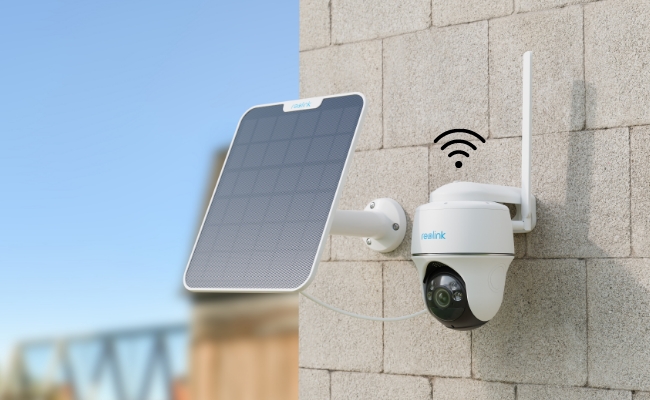
The best wireless outdoor security camera without a subscription is the one that records reliably, stores footage locally, and provides useful alerts without locking essential features behind a monthly fee. While many cameras advertise advanced AI detection, cloud storage, and smart home integrations, the long-term cost often depends less on the camera itself and more on the subscription plan attached to it.
In this guide, we'll break down the different types of wireless outdoor security cameras available in 2026, explain the features that matter most, highlight common mistakes buyers make, and help you find the best subscription-free solution for your specific situation.
- What Is a Wireless Outdoor Security Camera No Subscription?
- Why People Need an Outdoor Wireless Security Camera with No Subscription?
- Real-World Case Study: What Homeowners Regret After Buying a Wireless Outdoor Security Camera?
- 5 Key Features to Look for in the Best Wireless Outdoor Security Camera with No Subscription
- 3 Best Wireless Outdoor Security Cameras with No Subscription
- Which Wireless Outdoor Camera Is Right for Your Situation?
- Pro Tips: What to Do When Your Wireless Outdoor Security Camera Goes Offline?
- FAQs
- Conclusion
What Is a Wireless Outdoor Security Camera No Subscription?
A wireless outdoor security camera without a subscription is a camera that connects to the internet wirelessly and stores recordings locally instead of requiring a paid cloud plan. For many homeowners, the biggest advantage is predictable ownership costs. Once you've purchased the camera and storage device, you can access recorded footage without recurring subscription charges. And there are two types available.
Battery wireless cameras without subscription
Battery-powered WiFi cameras connect to your home's wireless network and run on rechargeable batteries. Because they don't require power cables or Ethernet wiring, they're one of the easiest outdoor security solutions to install.
Batterty 4G cameras without subscription
Battery-powered 4G security cameras use a cellular data connection instead of WiFi. Rather than connecting to a home router, these cameras operate using a SIM card and mobile network, making them suitable for locations without internet access.
Why People Need an Outdoor Wireless Security Camera with No Subscription?
A wireless outdoor security camera without a subscription offers flexibility, lower long-term costs, and greater control over your footage. Instead of paying monthly cloud fees, homeowners can store recordings locally and access them whenever needed.
The most common reasons buyers choose subscription-free security cameras include:
-
No monthly fees: Avoid recurring cloud storage costs that can exceed the camera's purchase price over time.
-
Local video storage: Keep recordings on a microSD card, NVR, or local device without relying on third-party servers.
-
Simple installation: Battery-powered wireless cameras can be installed without running power or Ethernet cables.
-
Better privacy: Footage stays under your control rather than being stored exclusively in the cloud.
-
Protection for remote locations: 4G wireless cameras can secure farms, cabins, construction sites, and other properties without WiFi.
-
Flexible placement: Wireless designs make it easier to monitor driveways, backyards, garages, and entry points.
However, while subscription-free cameras solve many problems, they are not perfect. Real users frequently report challenges with battery life, night vision, false alerts, and WiFi reliability.
To understand what actually matters when choosing a wireless outdoor security camera, let's look at the experiences homeowners have shared after using these systems in the real world.
Real-World Case Study: What Homeowners Regret After Buying a Wireless Outdoor Security Camera?
To understand what actually matters in a wireless outdoor security camera, we reviewed discussions across homeowner and security-focused communities on Reddit. While users had different budgets and property sizes, the same complaints appeared repeatedly regardless of brand.
Case 1: The Camera Was Cheap, but the Subscription Wasn't
One homeowner initially chose a battery-powered wireless camera because of its low upfront cost. The camera worked well for basic monitoring, but after the free trial ended, many essential features—including video history and cloud storage—required a monthly subscription.
Over time, the recurring fees exceeded the cost difference between the camera and a local-storage alternative. Similar frustrations appeared throughout Reddit discussions, where users frequently recommended choosing cameras with microSD card, NVR, or NAS support to avoid ongoing costs.
Key takeaway: When comparing wireless outdoor security cameras, consider the total cost of ownership—not just the purchase price.
Case 2: Clear During the Day, Useless at Night
Another common complaint came from users who discovered that their camera's advertised night vision did not match real-world performance. Several homeowners reported that while parked cars and static objects appeared clear, moving people often became blurred due to slow shutter speeds in low-light conditions.
Users living in poorly lit neighborhoods reported the best results when combining color night vision cameras with ambient lighting or motion-activated floodlights.
Key takeaway: Night vision quality depends on both the camera sensor and available lighting. Always evaluate nighttime performance based on your property's lighting conditions.
Case 3: Too Many Alerts, Yet Important Events Were Missed
A homeowner installed a battery-powered wireless camera overlooking their driveway. Within days, they were receiving dozens of notifications triggered by tree branches, passing shadows, and neighborhood animals.
Ironically, when a delivery arrived, the camera only captured the driver walking away because the PIR sensor needed time to wake the camera from standby mode.
This pattern appeared frequently in community discussions. Users consistently favored cameras with AI-powered person, vehicle, and package detection because they reduced false alerts while improving event capture accuracy.
Key takeaway: Smart detection is often more valuable than higher resolution because it determines whether important events are recorded and noticed.
Case 4: Wi-Fi Coverage Became the Weakest Link
One homeowner mounted a camera at the far end of their backyard, only to discover that the Wi-Fi signal weakened significantly through exterior walls. The result was intermittent connectivity, delayed notifications, and occasional recording gaps.
Community members often recommended testing Wi-Fi strength at the intended installation location before purchasing a camera. For larger properties, users frequently suggested dual-band Wi-Fi, mesh networks, PoE cameras, or local-recording systems that are less dependent on wireless stability.
Key takeaway: Even the best wireless outdoor security camera can underperform if the network connection is unreliable.
Case 5: Winter Reduced Battery Life Dramatically
Battery performance was another recurring issue, particularly among users in colder climates. Homeowners reported charging intervals becoming significantly shorter during winter months, requiring them to remove and recharge cameras more often than expected.
Several users ultimately added solar panels or switched to wired systems to reduce maintenance.
Key takeaway: Battery-life estimates are typically measured under ideal conditions. Cold weather, frequent motion events, and heavy recording activity can substantially reduce runtime.
What We Learned from Community Feedback
Across hundreds of user experiences, the same conclusion showed up: homeowners rarely regret buying higher resolution, but they often regret overlooking storage options, detection accuracy, network reliability, and power requirements.
For most buyers, the best wireless outdoor security camera is not the one with the longest feature list—it is the one that continues to record reliably, send useful alerts, and operate consistently in real-world conditions.
5 Key Features to Look for in the Best Wireless Outdoor Security Camera with No Subscription
The best wireless outdoor security cameras without subscriptions solve five common problems: ongoing cloud fees, false alerts, poor night vision, unreliable connections, and frequent battery charging.
1. Local Storage
Local storage lets you save footage without paying monthly cloud fees. Look for cameras that support:
- microSD cards
- NVR storage
- NAS storage
Local storage gives you full control over your recordings and eliminates recurring subscription costs. For many homeowners, this is the main reason to choose a subscription-free camera.
2. AI Motion Detection
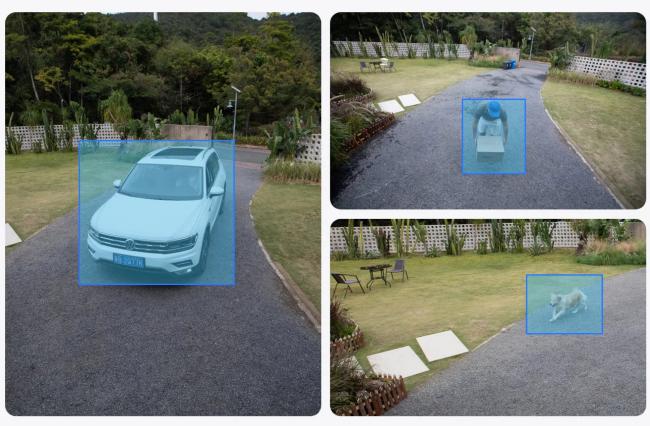
AI detection reduces false alerts and helps you focus on events that actually matter. Look for person/vehicle/animal detection. Some advanced front door models also comes with package detection.
Basic motion sensors can trigger dozens of unnecessary notifications every day. AI-powered detection helps filter out moving trees, shadows, and other non-security events.
3. Night Vision Performance
A security camera is only as useful as its nighttime footage. Look for models with different night vision modes:
- Infrared (IR) night vision
- Color night vision
- Spotlight-assisted night vision
Many cameras produce clear daytime footage but struggle to capture moving people at night. Good night vision should provide identifiable footage rather than blurry silhouettes. For example, a 4K camera with a tiny image sensor will perform worse in pitch darkness than a 4MP low-light camera equipped with a massive sensor, because the larger sensor pixels capture more photons.
4. Reliable Wireless Connectivity
Even the best camera cannot protect your property if it frequently loses connection. Look for:
- Dual-band WiFi support
- Strong wireless range
- Stable app connectivity
Weak signals can cause delayed alerts, buffering, and missed recordings, especially in larger properties or locations far from the router. For instance, note that dual-band Wi-Fi routers running at 2.4 GHz offer better range through exterior walls, while 5 GHz provides faster data transmission for high-resolution streaming.
5. Flexible Power Options
The right power source determines how much maintenance your camera requires. Common options include: rechargeable batteries, solar charging, or swappable battery packs.
Battery-powered cameras offer easy installation, while solar charging can significantly reduce maintenance. The best option depends on your property's layout, sunlight exposure, and accessibility.
Quick Tip: If your area experiences cold winters, prioritize cameras with larger battery capacities combined with solar support. Community feedback consistently shows that the battery performance of some models drops significantly in freezing temperatures.
3 Best Wireless Outdoor Security Cameras with No Subscription
Reolink Argus 4 Pro: Best for Large Front Yards and Driveways
If you need to monitor a wide outdoor area without installing multiple cameras, the Reolink Argus 4 Pro is one of the strongest subscription-free options available.
Its dual-lens design delivers an ultra-wide field of view, greatly reducing blind spots around driveways, front yards, and large entrances. The camera records locally to a microSD card up to 512GB and can also connect to a Reolink Home Hub for centralized storage and management across multiple cameras.
Why it stands out:
- Ultra-wide dual-lens coverage helps eliminate blind spots that often leave driveways and front yards partially unmonitored.
- Battery-powered wireless installation avoids the hassle and expense of running power cables outdoors.
- Local storage without monthly fees addresses one of the biggest homeowner complaints: paying ongoing subscription costs just to access recorded footage.
- Person, vehicle, and animal detection reduces false alerts caused by moving trees or shadows.
- Solar panel compatibility helps solve the frequent charging issues many battery-camera owners experience, especially in high-traffic areas.
Best for: Homeowners who want maximum coverage with fewer cameras.

4k 180° Wire-free Color Night Vision Camera
4K UHD 180° Blindspot-free View; Color Vision Day and Night; 30% More Battery Life; Dual-band Wi-Fi 6; Smart detection.
Reolink Solar Floodlight Cam: Best for Dark Areas Around the Home
Many outdoor security incidents happen at night, making visibility just as important as video quality. The Reolink Solar Floodlight Cam combines a security camera and powerful floodlights in a single device.
The integrated solar panel helps keep the battery charged, while the floodlights illuminate driveways, side yards, garages, and other areas with limited lighting. Local storage options eliminate the need for cloud subscriptions while ensuring footage remains accessible when needed.
Why it stands out:
- Built-in adjustable floodlights for enhanced nighttime visibility, addressing a common complaint that people and vehicles appear blurry or unidentifiable in dark areas
- Solar-powered operation, reducing the need to frequently remove and recharge batteries
- Local recording without subscription fees, avoiding recurring cloud-storage costs and ensuring access to footage without monthly payments
Best for: Homes with poorly lit driveways, backyards, and side entrances.
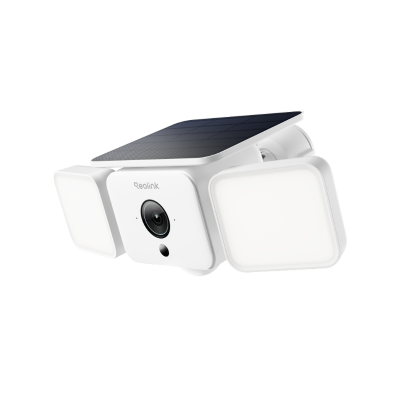
Smart 2K Solar Floodlight Security Camera
150° Ultra-Wide View, 2K 4MP HD Resolution, AI-Based Adaptive Floodlight, Endless Power with Reolink SolarEase™.
Reolink Altas PT Ultra: Best for Color Night Vision and Remote Monitoring
For homeowners who prioritize nighttime image quality, the Reolink Altas PT Ultra offers advanced color night vision combined with pan-and-tilt functionality.
Unlike fixed-position cameras, it can monitor a wider area by rotating horizontally and vertically. When paired with a solar panel, the camera can operate for extended periods with minimal charging, making it suitable for locations that are difficult to access regularly.
Why it stands out:
- Advanced color night vision to address a common complaint that many cameras produce blurry or unusable footage after dark
- Pan-and-tilt coverage for fewer blind spots, reducing the need to install multiple cameras around a property
- Wireless design for locations where running power cables is difficult or impossible
- 20,000 mAh battery with solar charging support to minimize frequent battery recharging, especially for cameras mounted in hard-to-reach areas
- Local storage without recurring fees, helping homeowners avoid ongoing subscription costs and maintain control of their footage
Best for: Large backyards, side yards, and properties that require enhanced nighttime monitoring.
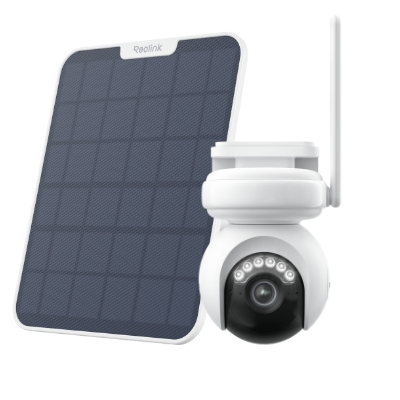
Industry-leading 4K Continuous Recording Battery Camera
4K UHD Continuous Recording; ColorX Night Vision; Pan & Tilt; Automatic Tracking; All Recordings Stored Locally.
Which Wireless Outdoor Camera Is Right for Your Situation?
Still not sure which camera fits your property? Start with the scenario that best matches your needs.
Quick Buying Tip: If you're still undecided, focus on the problem you're trying to solve rather than comparing specifications. Most homeowners benefit more from choosing the right camera for their property layout than from choosing the camera with the highest resolution.
Pro Tips: What to Do When Your Wireless Outdoor Security Camera Goes Offline?
A wireless security camera can still protect your property during a WiFi outage—but only if you've planned for it beforehand.
One of the most common mistakes homeowners make is assuming their camera will continue recording exactly as normal when the internet goes down. In reality, what happens depends on how the camera stores footage.
What Happens During a WiFi Outage?
If your camera relies entirely on cloud storage, recordings may stop when the internet connection is lost. You may also lose access to live viewing, motion notifications, and remote playback until the connection is restored.
However, cameras with local storage can often continue recording even when WiFi is unavailable.
How to Prepare Before an Network Outage?
To avoid losing important footage, consider the following:
- Enable local storage using a microSD card, Home Hub, NVR, or NAS.
- Test offline recording by temporarily disconnecting your router and verifying that the camera still saves footage.
- Keep firmware updated to ensure stable performance and security.
- Check battery levels regularly, since notifications won't warn you about low battery during an internet outage.
- Position cameras strategically to cover key entry points, ensuring critical areas remain monitored even if remote access is unavailable.
For Remote Properties: Consider 4G Cameras
If you're monitoring a cabin, farm, construction site, or other location where internet outages are common, a battery-powered 4G camera may provide a more reliable solution. Because it uses a cellular network instead of WiFi, it can continue sending alerts and providing remote access when local internet service is unavailable. But note that these cameras require a monthly data plan.
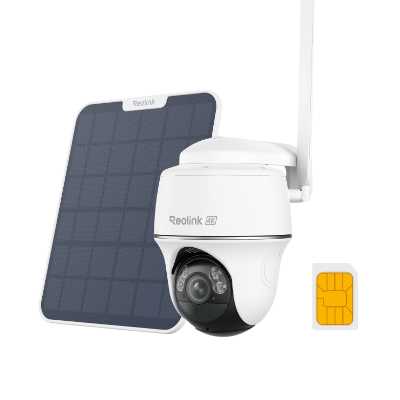
4K 8MP Wire-Free 4G LTE PT Battery Camera
4K 8MP; Smart Detection; 355° Pan & 140° Tilt; Battery/Solar Powered; Color Night Vision; Smart Real-Time Alert.
FAQs
Do all Wi-Fi security cameras require a subscription?
No. Many Wi-Fi security cameras work without a subscription by storing footage locally on a microSD card, NVR, NAS device, or home hub. You can still view live video, receive motion alerts, and access recordings without paying monthly fees.
However, some cameras reserve features such as cloud storage, extended video history, or advanced AI detection for paid plans. Before buying, check whether the camera supports local recording and which features remain available without a subscription.
What is the best wireless security camera for outside?
The best wireless outdoor security camera depends on your needs. For wide-area coverage, choose a camera with a large field of view; for nighttime monitoring, prioritize strong night vision and local storage.
What are the disadvantages of wireless security cameras?
Wireless security cameras can experience WiFi connectivity issues and require battery charging. Some battery-powered models may also miss the first few seconds of motion events and perform less effectively in extremely cold weather.
Conclusion
It is better to have wireless outdoor security cameras to prevent a recurring cost. There are many security cameras available that do not require any subscription, and you can enjoy all their advanced features. We have explained what these cameras are and the features you need to consider while buying them. For your ease, we have shared some of the best cameras that can offer optimal outdoor security without any subscription.
Search
Subscribe for the Latest Updates
Security insights & offers right into your inbox