
Reolink Duo 3 PoE Review: Insider's Look
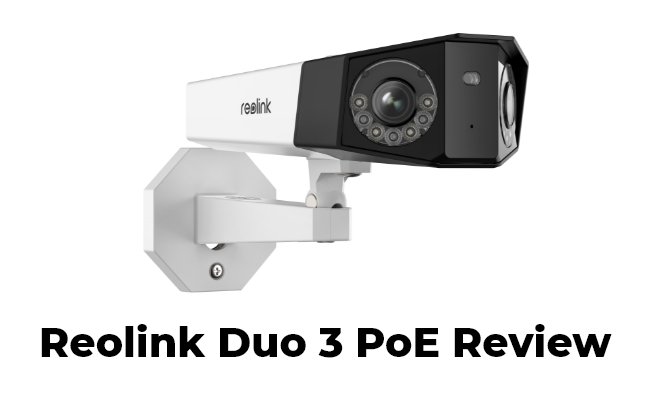
Reolink proudly introduces their latest innovation: a cutting-edge dual-lens camera boasting an impressive 16MP resolution, the Reolink Duo 3 PoE. This revolutionary device combines unparalleled image clarity with the power of dual lenses, setting a new standard in capturing details with precision and finesse. We've got our hands on the product for a sneak peek. This article will review the new Duo 3 PoE, examining its performance in everyday surveillance scenarios.
Reolink Duo 3 PoE Overview
After getting our hands on this camera, we're impressed by its sleek and modern design. The Reolink Duo 3 PoE is made of durable materials and is very strong and well-built. The solid body seems to handle different outdoor conditions without any issues. The seamless integration of two lenses into one camera gives it a modern look. Reolink chooses the white color and makes it blend effortlessly into its surroundings. Overall, the Duo 3 PoE is reliable and robust.
Based on the specs, the Duo 3 PoE delivers 16MP resolution, offering a 180-degree ultra-wide view in a single image. It supports motion-triggered, scheduled, and continuous 24/7 recording. Plus, its two-way audio and built-in sirens elevate its surveillance capabilities.
Celebrate Reolink 17th Anniversary with special deals on the Reolink Duo 3 PoE. Explore limited-time discounts and exclusive offers available during the anniversary event.

🎉 17th Anniversary Spotlight: Breakthrough 16MP Dual-Lens 180° PoE Camera
- 16MP UHD dual-lens with 180° panoramic view
- Color night vision for low-light surveillance
Performance and Functionality
We've reviewed the following aspects to better understand how the camera performs in real everyday security scenarios.
Set Up and Installation
As a 16MP PoE security camera, the initial setup of the Duo 3 PoE is fairly straightforward. Like most PoE cameras, it delivers both power and network connectivity through a single Ethernet cable, which greatly simplifies cable management for home installations.
For our setup, we connected the camera to a Reolink PoE switch and linked the switch to the router’s LAN port. This kind of setup works especially well for users installing cameras around larger properties, detached garages, front gates, or long driveways where WiFi signals may struggle to reach consistently. After powering on the camera, we completed the setup process in the Reolink app within minutes.
There are two installation options: wall mounting or ceiling mounting. We chose a wall-mounted position facing the backyard entrance to maximize the ultra-wide field of view. The included Quick Start Guide makes installation beginner-friendly, even for homeowners setting up their first wired security camera system.
Video Quality
We had high expectations for the 16MP resolution, especially for monitoring wide outdoor spaces where maintaining image detail is often difficult. During testing, the live view in the Reolink app delivered noticeably sharper footage with finer textures and clearer subject outlines.
This extra clarity becomes particularly useful in real scenarios such as:
- identifying faces approaching the front porch,
- checking package deliveries near the driveway,
- or reading details from vehicles parked farther away in the yard.
Although the camera does not include optical zoom, the high native resolution allows digital zooming while still retaining more usable detail than many lower-resolution cameras. Compared with its predecessor, Reolink Duo 2 PoE, the Duo 3 PoE reveals more texture in distant objects and provides a noticeably cleaner image across the entire panoramic frame.
Night Vision Capability
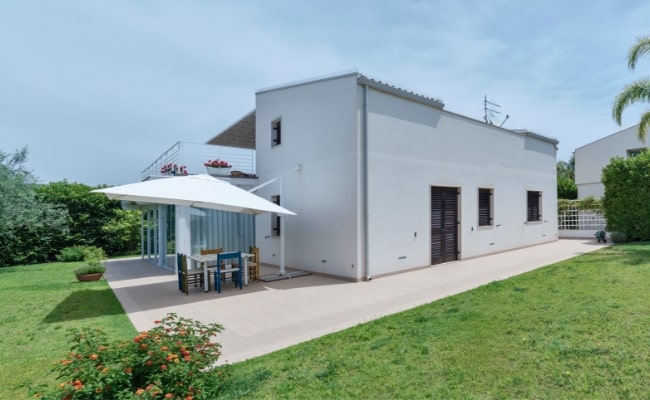
We also tested the camera in low-light and nighttime environments, including a dim backyard and a driveway with minimal street lighting. Thanks to its built-in infrared LEDs and spotlights, the camera can switch between black-and-white infrared night vision and full-color night vision depending on the situation.
In practical use, the color night vision mode is especially helpful for:
- distinguishing clothing colors,
- identifying vehicles entering the driveway,
- or recognizing activity around garages and side entrances at night.
The spotlights also add a subtle deterrence effect. When motion is detected near the property late at night, the illuminated scene makes the area feel more actively monitored while helping capture clearer footage. Overall, the night recordings remained sharp and highly watchable with good detail retention.
Field of View
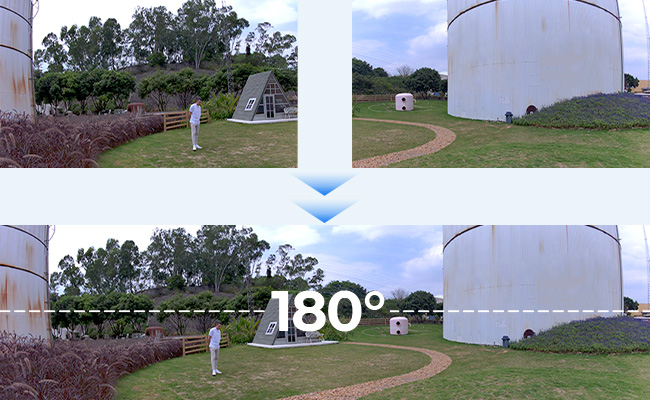
One of the biggest advantages of a dual-lens camera is the ultra-wide viewing angle. The Duo 3 PoE captures a full 180° panoramic image, allowing a single camera to monitor areas that would normally require two separate cameras.
In real-world scenarios, this wide coverage works particularly well for:
- monitoring an entire backyard,
- covering both sides of a driveway,
- overseeing wide front yards,
- or watching large warehouse entrances and parking areas.
During testing, the camera successfully reduced blind spots and eliminated the need to constantly switch between multiple camera feeds. Instead of checking separate left and right views, we could monitor the entire scene in one continuous frame, which feels much more natural when tracking movement across the property.
Compatibility
The Duo 3 PoE integrates smoothly with the Reolink app and desktop Client, making daily monitoring convenient whether you're at home or away. We mainly used smartphones for quick live checks and motion alerts, while the PC client was useful for reviewing recordings on a larger screen.
For users building a more complete home security setup, connecting the camera to a Reolink NVR provides centralized storage and continuous recording management. This is especially useful for households or small businesses running multiple outdoor cameras simultaneously.
The camera also supports smart home integration with Google Home. For example, you can pull up the live feed on a Nest Hub while cooking in the kitchen, checking who is at the front gate, or monitoring driveway activity without needing to open the mobile app manually.
Reolink Duo 3 PoE: Innovations & Advantages
After testing the essential features and functionalities, we think this camera brings more innovations than other Reolink dual-lens models.
16MP Resolution
A 16MP (7680x2160) resolution is considered relatively high and can offer excellent clarity and detail for security cameras. It allows for capturing fine details and provides more explicit images and better identification of subjects or objects within the surveillance area. Users can manually zoom in on the captured footage to discern intricate details like facial features or distant license plates.
Motion Track
Reolink has introduced a new technology called Motion Track in the Duo 3 PoE, which can be easily configured using the Reolink app. In a typical surveillance setup, the camera begins recording upon detecting movement and triggers an alarm when someone enters the monitored area. Yet, observing the complete route of the person's movements currently demands downloading a lengthy video clip, resulting in significant bandwidth and storage usage. The Motion Track technology has emerged as the solution to address this issue.
This advancement combines and overlays a person's movement path over time into a single image. This technology allows the camera to provide comprehensive alarm information while displaying the entire movement track more efficiently and conveniently, eliminating the necessity to store lengthy motion videos.
Accurate Alerts and Detection
Due to the AI-based smart motion detection, this dual-lens camera can detect and classify potential objects such as people, vehicles, and animals, providing reliable and targeted alerts. The embedded AI algorithms significantly reduce false alarms and increase the accuracy of notifications and alarms. Users can configure various alert modes, like activating bright spotlights or triggering sirens.
Dual-Image Stitching Algorithm
Reolink employs image stitching algorithms to merge wide-angle footage into a single scene. The image stitching technology combines multiple video feeds or frames from different lenses to create a cohesive video output because the two Reolink Duo 3 PoE lenses capture footage separately. The technology involves aligning, blending, and synchronizing the various video inputs to create a continuous and immersive viewing experience without noticeable gaps or inconsistencies between the lenses. As a result, users can see 180-degree footage in one scene.
Reolink Duo 3 PoE: Pros and Cons
Pros:
- Sharp 16MP video quality: Captures clear details across large outdoor areas.
- 180° panoramic coverage: Covers wide driveways, yards, and garages with fewer blind spots.
- Low image distortion: Panoramic footage looks more natural than many ultra-wide cameras.
- No subscription required: Supports local storage without mandatory monthly fees.
- Stable PoE connection: One cable handles both power and data reliably.
Cons
- No optical zoom: Distant objects rely on digital zoom only.
- Narrower vertical view: Some users noticed less top-to-bottom coverage.
- Older NVR compatibility limits: Some older NVRs may not support full 16MP recording.
Users's Feedback on Reddit
Reddit discussions around the Duo 3 PoE are generally positive, especially regarding its ultra-wide coverage and image quality.
Common Positive Feedback
Users frequently praised the 180° panoramic view, saying one camera could replace two standard cameras. - Reddit User
Several Reddit users mentioned that the 16MP resolution provides noticeably sharper footage than older Duo models. - Reddit User
The improved image stitching quality received positive feedback compared with the Duo 2 series. - Reddit User
“The panoramic view is awesome and just what I need to cover everything in one view!” - Reddit User
“The stitching has improved allot on the duo 3 and when your not closer than the default distance of 8Meters then it’s pretty much seamless” - Reddit User
“I absolutely love this camera, it does absolutely everything I want and covers exactly the area I want it to.” - Reddit User
Common Criticism
- Multiple users noted the camera still lacks optical zoom, making distant license plates or faces harder to identify.
“Consumer cams are good to ID face close in but not far away unless with optical zoom.” - Reddit User
- Some users felt the Duo 3 sacrifices vertical field of view compared with the Duo 2.
“Duo 3 has a smaller vertical FOV vs Duo2?” - Reddit User
FAQs
How to install Reolink Duo 3 PoE?
Installing the Reolink Duo 3 PoE is simple thanks to its PoE (Power over Ethernet) design. Connect the camera to a PoE switch, PoE injector, or Reolink NVR using a single Ethernet cable, which provides both power and network connectivity. Then mount the camera on a wall or ceiling using the included screws and mounting template.
After powering on the camera, open the Reolink App, scan the QR code on the device, and follow the setup instructions to finish configuration. For the best 180° panoramic coverage, install the camera in open areas like driveways, backyards, garages, or front yards.
What NVR works well with the Duo 3 PoE?
The Reolink NVR pairs seamlessly with the Duo 3 PoE, not just due to their shared brand and enhanced compatibility but also because Reolink NVRs provide round-the-clock video recording and efficient management for multiple IP cameras. With the NVR, you can access expanded storage options for more secure data storage.
Conclusion
The soon-to-be-launched Reolink Duo 3 PoE is set to revolutionize surveillance boundaries. Combining dual-lens technology with a 16MP high resolution offers users expanded options and heightened peace of mind. Are you excited about this camera? Share your thoughts in the comments! Let's discuss it together!
Search
Subscribe for the Latest Updates
Security insights & offers right into your inbox